The Rundown AI homepage

ai image editors

Best AI Image Editors

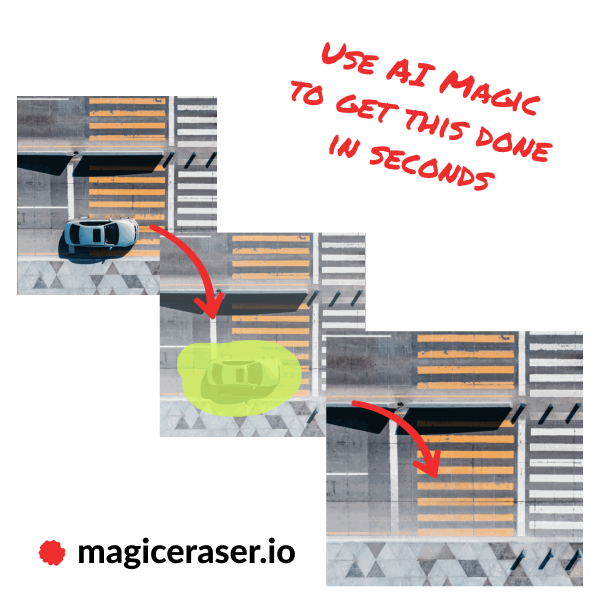
AI image editors can remove an object, extend a frame, relight a scene and make a targeted change through a prompt. This guide compares how precisely each product edits an existing image while preserving the parts the creator wants to keep.

10 active toolsLast reviewed September 1, 2026

Best AI Image Editors: overview

Editing is a preservation problem as much as a generation problem. The selected area should change cleanly, while faces, products, text, lighting and composition outside that area remain stable. Mask quality and local context have a large effect on the final result.

Use the same source files and edit list across candidates. Include removal, replacement, expansion, text, relighting and a revision involving a person or branded product. Inspect edges, shadows, identity, resolution and consistency. Layers, history, batch tools, export formats and commercial terms shape professional use.

Curated tool directory

Compare 10 AI image editors

Filter this shortlist by category or search by name and capability. Open any card for a deeper look at the product, its use cases, and its limitations.

Who this guide is for

When this shortlist is useful

Photographers making targeted corrections

Removal, expansion and relighting can speed up common retouching tasks.

Commerce teams adapting product scenes

Generative backgrounds and local edits can create additional campaign formats from approved assets.

Designers iterating compositions

Canvas expansion and replacement tools can explore layout changes around an existing image.

Selection criteria

What to compare before choosing

01

Edit precision

Masks, selections and prompt interpretation should affect the intended region cleanly.

02

Identity preservation

Faces, products, logos and key visual details need to remain stable through revision.

03

Scene coherence

Lighting, perspective, texture and shadows should connect the generated area with the source.

04

Revision control

History, variations, local correction, layers and resolution support a deliberate editing process.

05

Production output

Batch features, formats, color handling, rights and integrations determine workflow fit.

Editorial standards

How we built this guide

A shared image set covers portraits, products, interiors and graphics. Every editor receives the same removal, replacement, expansion and relighting requests.

We compare mask edges, preservation, artifacts, scene continuity, revision effort and exported resolution. Workflow features are inspected after the image tests.

Image editors are rerun when inpainting, identity, canvas, layer or export features receive major changes. Licensing and plan allowances are checked during the same review.

Frequently asked questions

Best AI Image Editors FAQs

What is generative fill?

Generative fill creates or replaces pixels inside a selected area using the image context and a prompt. It is commonly used for object removal, replacement and canvas expansion.

Can an AI editor change the background of a product photo?

Yes. Strong tools isolate the product and generate a new environment with compatible perspective and lighting. Compare the result with the source item for color, shape and label accuracy.

Which AI image editor is best for faces?

Face preservation varies by model and edit. Use high-resolution sources, small targeted masks and a tool with identity or reference controls, then inspect the result closely.

Do AI image editors reduce resolution?

Some workflows generate at a fixed size or compress exports. Check maximum dimensions, upscale options, file format and color profile before adopting a tool for print or large-format work.

The Rundown University

AI training for the future of work.

Get access to all our AI courses, hundreds of real-world AI use cases, live expert-led workshops, an exclusive network of AI early adopters, and more.

AI Courses

Get unlimited access to all of our current & upcoming industry-specific AI courses for the duration of your subscription.

Daily Guides

To keep up with the rapid pace of AI, our team publishes AI implementation guides daily. Our library contains 300+ practical use cases to automate real-world work.

Workshops

Join weekly, live, interactive sessions with industry leaders who are at the forefront of AI for hands-on implementation guidance and exclusive insights.

Community

Network with an exclusive community of AI-first professionals who are working smarter with AI. Learn how early adopters are using AI in their work and businesses.