E-commerce product images
Create consistent transparent or solid-color product cutouts for stores, marketplaces, catalogs, and ads.
Independent tool overview
Magic Studio Background Remover is a browser and mobile tool that automatically cuts a subject out of a photo, lets you refine the selection, and exports it with a transparent or solid-color background.
Visit the official Magic Studio Background Remover site ↗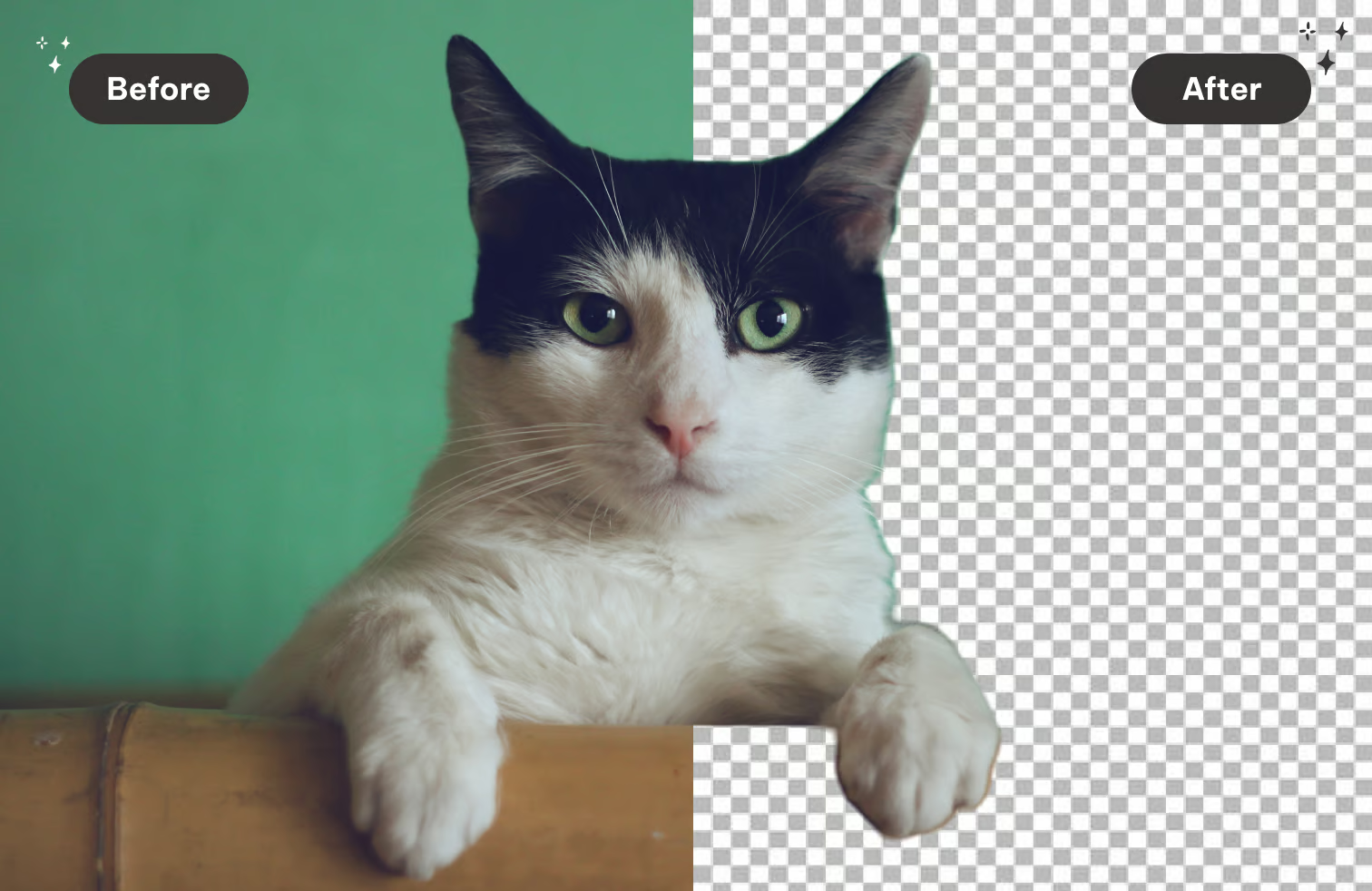
Overview
Magic Studio Background Remover—also described as Background Eraser—is a single-purpose image tool for isolating people, products, pets, vehicles, furniture, and other foreground subjects. Upload a picture and the service creates an automatic AI cutout in seconds, with no design software or initial account setup required for a basic edit.
If the automatic mask misses an edge or includes the wrong object, an AI-assisted selection tool lets you indicate what should remain. You can keep transparency or replace the removed area with white, black, or a custom color, then download the result. Magic Studio also offers mobile apps and paid bulk processing for higher-volume work.
The free experience is best for occasional, low-stakes edits. Magic Studio's pricing page says free downloads have limited resolution and a watermark, while Pro adds high-resolution, watermark-free downloads and bulk editing for supported tools.
Use cases
The strongest fit depends on the job you need the product to complete, not the size of its feature list.
Create consistent transparent or solid-color product cutouts for stores, marketplaces, catalogs, and ads.
Separate a person or object from a snapshot before placing it into a post, thumbnail, or branded layout.
Remove distracting surroundings and standardize listing imagery without manually tracing every edge.
Get a usable cutout quickly through a simple upload, refine, and download workflow.
Capabilities
Identifies the main foreground subject and removes the surrounding background in seconds.
Lets you select points on the subject when the first mask includes or excludes the wrong areas.
Keeps the removed area transparent for use in designs, product pages, and layered compositions.
Adds white, black, or a custom color with a picker and live preview.
Accepts common photo formats including JPG, JPEG, PNG, HEIC, WEBP, and TIFF without a stated upload-resolution cap.
Paid users can process multiple images at once on supported workflows, with Magic Studio advertising batches of up to 50.
Runs in a web browser and is included in Magic Studio's iOS and Android apps.
Process
Step 1
Drag in or select a supported photo; basic background removal can be tried without creating an account.
Step 2
Zoom in around hair, fur, transparent objects, fine product edges, and overlapping subjects.
Step 3
Use AI-assisted subject points or available correction controls to keep missing areas and remove unwanted ones.
Step 4
Keep transparency or apply white, black, or a custom brand color.
Step 5
Export the image, then verify edge quality, resolution, watermark status, color, and marketplace requirements before publishing.
Cost
Basic access is free. Magic Studio currently lists 40 AI generations, limited-resolution watermarked downloads, and one-image-at-a-time editing on Free. Pro adds unlimited AI generations, high-resolution watermark-free downloads, cross-platform access, and bulk editing for selected tools. The public pricing page loads the paid amount dynamically by market and billing choice, so confirm the total shown at checkout rather than relying on an old fixed price.
$0
Basic access across the web and mobile apps for occasional edits.
See current checkout price
Paid Magic Studio access for higher-quality and higher-volume work.
Pricing checked . Check current pricing at the source ↗
Assessment
Compare
The right alternative depends on the specific output, workflow, controls and budget your project requires.
Design
A broader design suite for removing a background and immediately placing the cutout into social, presentation, and marketing layouts.
Explore Canva AI (Magic Studio) →Design
A companion Magic Studio tool for removing unwanted objects, people, or text while keeping the original background.
Explore Magic Eraser →Content Creator
Keeps the scene but blurs it, which is useful when isolation looks unnatural or context should remain visible.
Explore Background Blur →Questions
Yes, basic use is free and the tool says no signup is required to start. The current Free plan has limited-resolution watermarked downloads, 40 AI generations, and one-image-at-a-time editing.
Yes. A transparent export is the standard choice when you want to place the cutout into another design. You can also replace the background with white, black, or a custom color.
Magic Studio lists JPG, JPEG, PNG, HEIC, WEBP, and TIFF among its supported upload formats.
Yes. The tool provides AI-assisted subject selection so you can indicate areas or subjects that should be kept when the automatic mask is wrong.
Bulk editing is available for selected tools on Pro. Magic Studio advertises processing up to 50 images at once, while Free is limited to one image at a time.
Yes. Background Remover is part of the Magic Studio apps for iOS and Android as well as the browser-based service.
Magic Studio says graphical inputs are generally stored temporarily for processing, but its policy also says inputs and outputs may be used to improve models. Users can request deletion; confidential images should be reviewed against the policy before upload.
Bottom line
Magic Studio Background Remover is a convenient choice for quick product and profile cutouts, especially when the automatic mask only needs light correction. Free use is easy to try, but publish-ready high-resolution work and batch workflows push users toward Pro. Teams handling sensitive photography or complex edges should evaluate both the data terms and a sample of their hardest images before committing.
Visit Magic Studio Background Remover website ↗
https://hailuoai.com/video?ref=therundown

Microsoft Designer: Is a canva-like tool that uses ai to generate visuals and social content quickly.
.avif)
DiffusionHub: Unleash the Power of Stable Diffusion Effortlessly

Ideogram: Uses ai to generate artistic text-based images and visuals for marketing, branding, and creative content.

Get access to all our AI courses, hundreds of real-world AI use cases, live expert-led workshops, an exclusive network of AI early adopters, and more.
Get unlimited access to all of our current & upcoming industry-specific AI courses for the duration of your subscription.
To keep up with the rapid pace of AI, our team publishes AI implementation guides daily. Our library contains 300+ practical use cases to automate real-world work.
Join weekly, live, interactive sessions with industry leaders who are at the forefront of AI for hands-on implementation guidance and exclusive insights.
Network with an exclusive community of AI-first professionals who are working smarter with AI. Learn how early adopters are using AI in their work and businesses.