Non-commercial model research
Study instruction-based editing, consistency, inference behavior, evaluation, and mitigation with inspectable local weights.
Independent tool overview
FLUX.1 Kontext [dev] is Black Forest Labs' 12-billion-parameter open-weight model for editing an image with natural-language instructions. It remains useful for local research, customization, and controlled non-commercial workflows, but it is now a previous-generation model: BFL recommends FLUX.2 for new projects because it adds higher resolution, multi-reference editing, and newer quality improvements.
Visit the official Flux 1 Kontext site ↗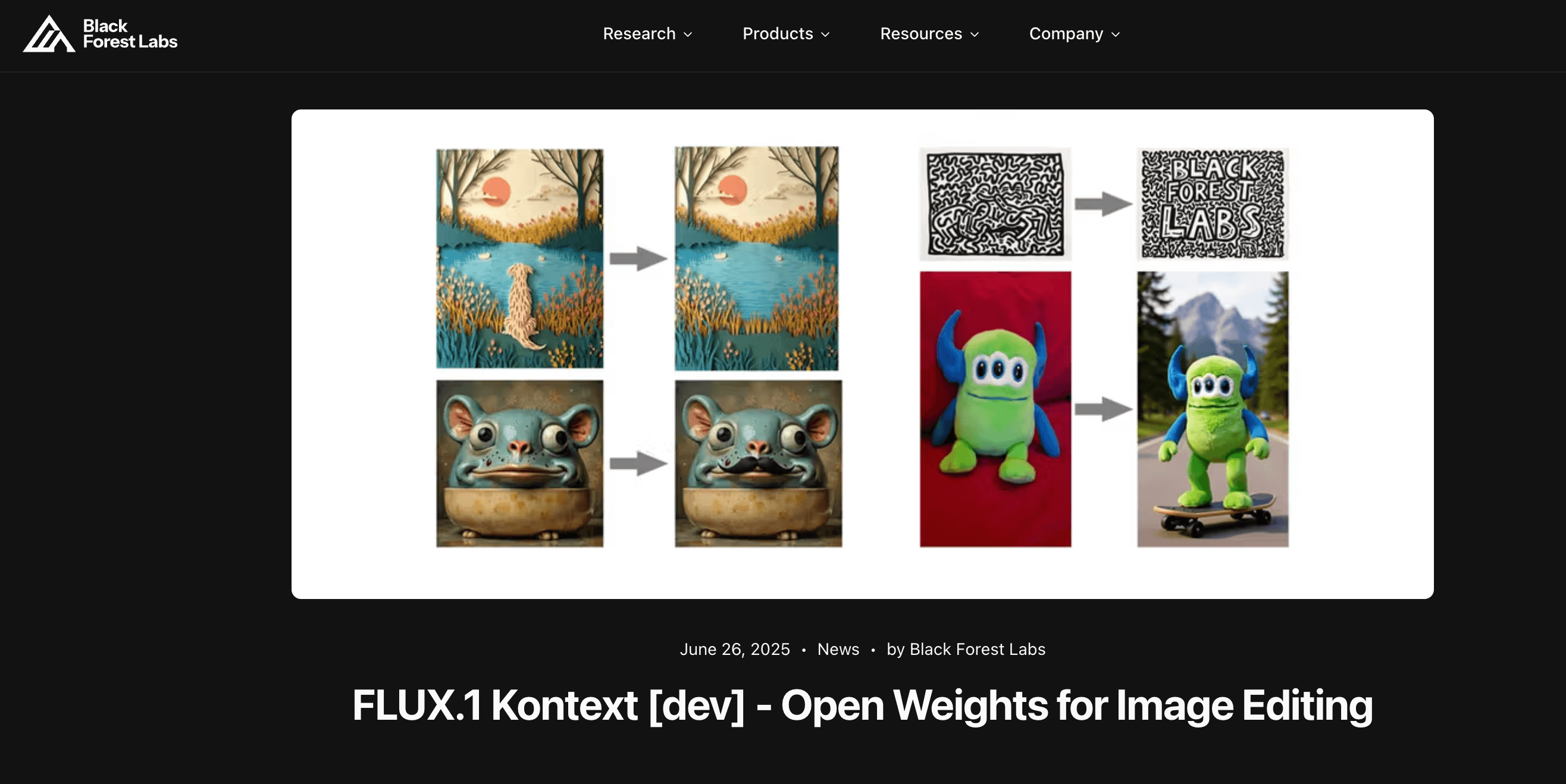
Overview
Kontext [dev] takes an input image and an edit instruction, then attempts to change the requested object, text, style, scene, or character attributes while preserving unrelated details. It can support successive edits, reference-driven character or object continuity, and localized text replacement without a separately trained adapter. The downloadable weights work with the FLUX.1 developer ecosystem, including Hugging Face Diffusers, ComfyUI, and supported TensorRT variants.
Open weights do not mean unrestricted commercial use or a ready-made consumer app. The current FLUX [dev] license permits the model for defined non-commercial and non-production purposes; commercial self-hosting requires a separate license. The operator supplies compute, storage, inference code, security, moderation or manual review, provenance, monitoring, and a usable interface.
Use cases
The strongest fit depends on the job you need the product to complete, not the size of its feature list.
Study instruction-based editing, consistency, inference behavior, evaluation, and mitigation with inspectable local weights.
Build a private proof of concept before deciding whether to license a model or use a managed production API.
Experiment with adapters, fine-tuning, quantization, interfaces, and pipelines within the license and available hardware.
Add natural-language image editing to an existing node-based or Python research workflow.
Measure quality, latency, memory, moderation, security, and operational cost before selecting a production architecture.
Capabilities
Changes an existing image from a direct instruction such as replacing an object, color, background, or scene detail.
Attempts to preserve recognizable character, style, and object attributes without a separate fine-tune.
Supports multiple successive revisions while seeking to limit unwanted drift in the rest of the image.
Can edit visible words in signs, labels, and posters, with quoted source and replacement text recommended in BFL guidance.
Restyles an image while retaining useful subject and composition context from the input.
Makes model files available through a gated Hugging Face repository after acceptance of BFL's license and policy.
Runs through the FluxKontextPipeline in Hugging Face Diffusers for Python-based experimentation.
Works in supported node-based local workflows used for image generation and editing experiments.
BFL released BF16, FP8, and FP4 TensorRT options optimized for compatible NVIDIA Blackwell hardware.
Enables research on derivatives and specialized pipelines, subject to the non-commercial license and its distribution terms.
Process
Step 1
Classify personal, research, evaluation, employment, production, end-user, revenue, derivative, and output uses against the current BFL license; obtain commercial terms when needed.
Step 2
Use an isolated environment, pin and scan dependencies, protect model and input storage, benchmark supported precision and offloading, and restrict network and user access.
Step 3
Use images you own or are authorized to edit, document consent for recognizable people, and exclude sensitive or prohibited content from testing.
Step 4
Record model and runtime versions, checkpoint hash, prompt, seed, input, dimensions, settings, hardware, latency, memory, and expected invariant details.
Step 5
Use a direct instruction, compare the output with the source, preserve the best intermediate, and make small sequential changes instead of an overloaded prompt.
Step 6
Check requested changes, unwanted drift, text, anatomy, rights, likeness, safety, bias, watermarking or provenance, license compliance, and required AI disclosure before any distribution.
Cost
The Kontext [dev] weights are free to access for permitted non-commercial, non-production use, but self-hosting infrastructure and engineering are not free. Commercial use of the weights requires a BFL license. For a managed commercially licensed alternative, BFL still lists Kontext [pro] at $0.04 per image and Kontext [max] at $0.08 per image, although it recommends FLUX.2 for new projects.
Free model access
For uses permitted by the current FLUX non-commercial and non-production license.
License-dependent
For commercial deployment of covered FLUX [dev] weights under BFL's commercial terms.
$0.04/image
A managed previous-generation API for commercial text-to-image and image editing.
$0.08/image
The higher-quality managed Kontext variant for teams retaining a FLUX.1 workflow.
Pricing checked . Check current pricing at the source ↗
Assessment
Compare
The right alternative depends on the specific output, workflow, controls and budget your project requires.
Content Creator
BFL's recommended current family for higher resolution, improved quality, and multi-reference image generation and editing.
Explore FLUX.2 →Design
A newer compact FLUX.2 option for faster local or high-volume workflows, including an Apache-licensed 4B variant.
Explore FLUX.2 [klein] →Design
A managed conversational image-generation and editing experience for users who do not want to operate model weights.
Explore ChatGPT Images 2.0 →Design
An open-weight alternative for teams evaluating a newer image model with strong design and typography ambitions.
Explore Ideogram 4.0 →Questions
It is Black Forest Labs' 12B open-weight model for editing an input image with natural-language instructions and preserving useful subject, object, and style context.
The weights remain available, but BFL now calls FLUX.1 Kontext previous generation and recommends FLUX.2 for new image-generation and editing projects.
Model access is free for uses permitted by the FLUX non-commercial and non-production license. You still pay for hardware, hosting, storage, engineering, security, and operations.
Not under the default non-commercial license for the weights. BFL offers separate self-hosted commercial licensing, and its managed APIs include commercial rights under their current terms. Review the exact intended use before deployment.
BFL's current comparison describes the dev variant as editing mode only. Kontext [pro] and [max] combine text-to-image and editing, while FLUX.2 is recommended for new work.
It is designed to preserve characters and objects across edits, but consistency is not guaranteed. Compare every output with the source and keep references, seeds, settings, and approved intermediates.
Requirements depend on runtime, precision, quantization, offloading, resolution, and speed targets. The main published checkpoint is about 23.8GB, so benchmark the complete pipeline on representative hardware before committing.
The operator must enforce the license and acceptable-use rules, protect inputs, control access, use required filters or human review, document provenance, handle deletion and incidents, and review rights and disclosures before distribution.
Bottom line
FLUX.1 Kontext [dev] remains a valuable open-weight research model for people who specifically need local instruction-based image editing in the mature FLUX.1 ecosystem. It is no longer the default recommendation for a new product: FLUX.2 has a stronger current capability set, while the hosted Kontext API is easier for a commercial legacy workflow. Choose [dev] when weight access and customization justify the licensing and operating burden.
Visit Flux 1 Kontext website ↗
Imagen 4: Google’s SOTA text-to-image model, now available via API & Google AI Studio

Qwen-VLo - Alibaba’s 4o-style model for image generation and editing

Canva AI: Supercharges your graphic design workflow with magic tools for text, image, and layout automation.

Hunyuan 3D-PolyGen - Tencent's 3D AI model designed for professional art-grade outputs for game development and artist modeling.

Get access to all our AI courses, hundreds of real-world AI use cases, live expert-led workshops, an exclusive network of AI early adopters, and more.
Get unlimited access to all of our current & upcoming industry-specific AI courses for the duration of your subscription.
To keep up with the rapid pace of AI, our team publishes AI implementation guides daily. Our library contains 300+ practical use cases to automate real-world work.
Join weekly, live, interactive sessions with industry leaders who are at the forefront of AI for hands-on implementation guidance and exclusive insights.
Network with an exclusive community of AI-first professionals who are working smarter with AI. Learn how early adopters are using AI in their work and businesses.