Marketing teams
Move from a campaign brief to editable social posts, presentations, images, copy, and channel variations in one workspace.
Independent tool overview
Canva AI is Canva's conversational creative assistant for generating and refining designs, images, documents, short video clips, and code-based experiences. Its biggest advantage is that generated work opens inside Canva's editable Visual Suite, but feature access and monthly AI allowances vary substantially by plan.
Visit the official Canva AI site ↗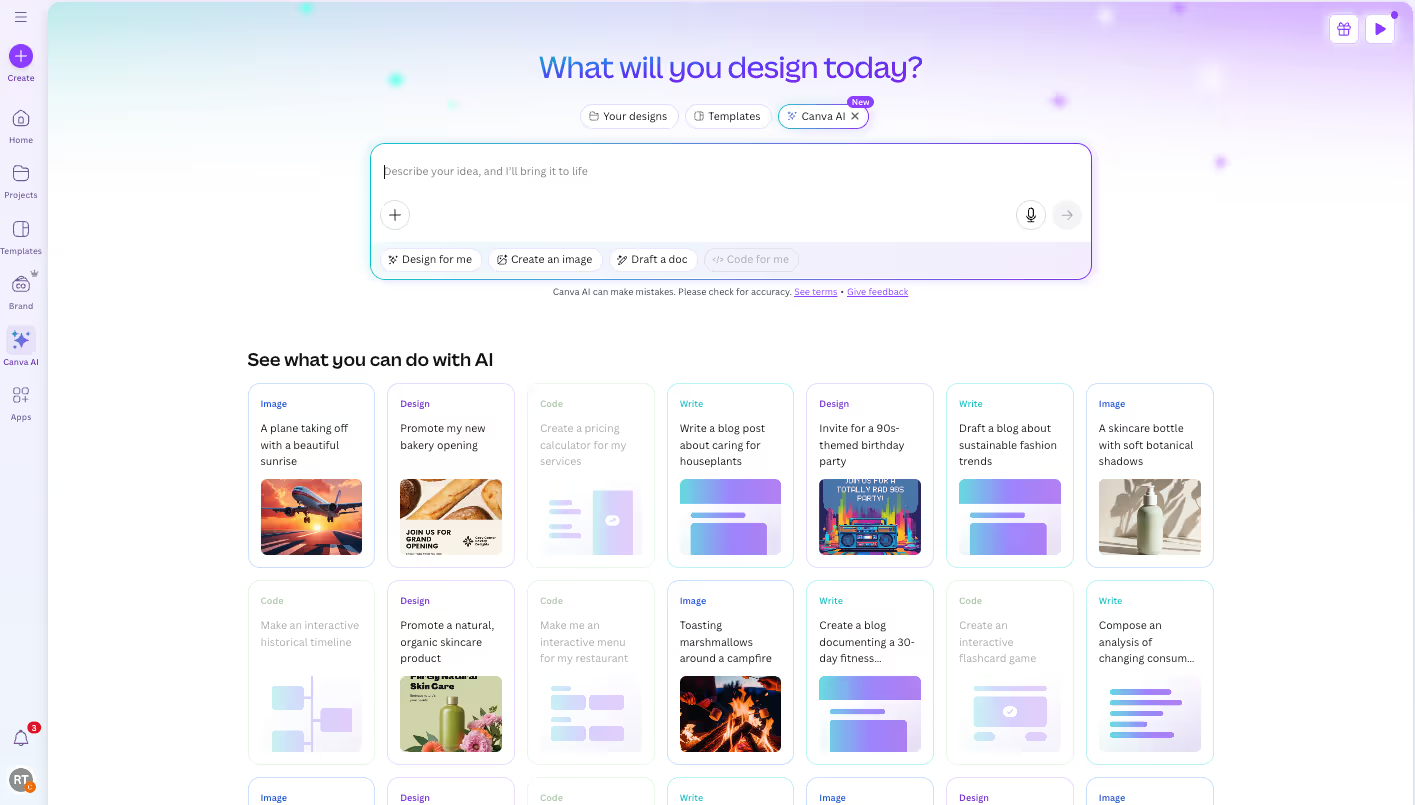
Overview
Canva AI combines prompting with Canva's editor, templates, brand tools, stock library, collaboration, and publishing workflow. Canva AI 2.0 can continue a design conversation, revise individual elements, use uploaded or connected context, remember creative preferences, and move generated work into an editable Canva file.
It is best treated as a first-draft and production-acceleration layer, not an autonomous creative director. Teams still need to verify facts, licensing, accessibility, brand accuracy, layout quality, and whether any uploaded or connected material is appropriate for AI processing.
Use cases
The strongest fit depends on the job you need the product to complete, not the size of its feature list.
Move from a campaign brief to editable social posts, presentations, images, copy, and channel variations in one workspace.
Create polished everyday materials without building a specialist design stack.
Draft thumbnails, carousels, short-form video assets, graphics, and captions, then finish them manually.
Use conversation, templates, and guided editing to produce a credible first version quickly.
Connect brand systems and approval workflows so teams can generate variations while retaining review controls.
Use Canva Sheets and Magic Studio at Scale to turn structured content into repeated campaign assets.
Capabilities
Create and refine work through a continuing chat instead of restarting with every prompt.
Canva AI 2.0 produces layered designs whose text, images, and graphics can be adjusted in the editor.
Generate images, backgrounds, and visual variations, then remove, replace, expand, recolor, or reposition elements.
Magic Write and the AI assistant can brainstorm, draft, rewrite, summarize, and structure copy inside Canva.
Turn a brief into documents, slide concepts, and visual narratives that remain editable.
Generate short video clips and use tools such as Highlights, Enhance Voice, animations, and background removal where the plan supports them.
Generate interactive experiences from prompts and place them inside Canva projects, subject to separate testing before production use.
Canva AI 2.0 can use prior aesthetic, tone, context, and Brand System signals to personalize later work.
Attach device files, Canva designs, connected apps, and supported web sources to ground a request.
Canva AI 2.0 can incorporate current web information, although every consequential fact still needs source verification.
Eligible Canva AI 2.0 accounts can schedule daily, weekly, monthly, or one-time content tasks, with up to ten active tasks.
Apply writing, translation, resizing, background removal, and other supported operations across rows in Canva Sheets.
Process
Step 1
Define audience, goal, format, dimensions, channel, tone, call to action, required facts, and brand constraints.
Step 2
Ask for a design, image, document, video clip, or code experience so Canva can select the right workflow.
Step 3
Add brand assets, source copy, existing Canva files, or permitted connected-app content without exposing sensitive data.
Step 4
Request a small set of meaningfully different concepts instead of dozens of superficial variations.
Step 5
Give specific feedback on hierarchy, imagery, spacing, message, tone, and brand fit.
Step 6
Open the result in the Canva editor and correct layout, typography, crops, contrast, timing, and responsive behavior.
Step 7
Verify every fact, link, right, logo, claim, translation, accessibility requirement, and stakeholder approval.
Step 8
Publish the correct format, preserve an editable master, and compare performance before scaling the winning version.
Cost
Canva combines included AI design tools with a shared monthly allowance for Standard, Premium, and Ultra AI. Prices below are the U.S. annual prices shown during this review; taxes, local pricing, trials, feature rollout, and checkout terms can differ.
US$0
Basic Canva design access with a limited monthly AI allowance.
US$180/year for one person
Premium individual plan with Canva AI 2.0 and a larger AI pool.
US$250/year per person
Individual and small-team plan with collaboration, stronger brand controls, and higher AI usage.
Custom pricing
Organization plan with advanced governance, security, provisioning, and support.
Pricing checked . Check current pricing at the source ↗
Assessment
Compare
The right alternative depends on the specific output, workflow, controls and budget your project requires.
Design
A streamlined AI design option for users already working in Microsoft's ecosystem.
Explore Microsoft Designer →Design
A stronger fit for creators who prioritize generative image, video, and Adobe Creative Cloud workflows.
Explore Adobe Firefly →Consulting
A focused alternative for rapidly generating presentations, documents, and web-style narratives.
Explore Gamma →Questions
Canva AI is a conversational creative assistant inside Canva for generating and refining designs, images, text, documents, short video clips, and code-based experiences.
Canva Free includes limited AI access. Full Canva AI 2.0 access and larger monthly allowances require an eligible paid or nonprofit plan.
Canva describes 1.0 as primarily single-prompt generation. Canva AI 2.0 supports ongoing conversation, design refinement, editable elements, memory, and richer connected context.
The allowance is shared across Standard, Premium, and Ultra tools. Canva currently estimates up to 200 Standard uses on Free, 2,000 on Pro, and 4,000 on Business or Enterprise, but mixed or complex use can reduce the number.
Yes. Canva AI 2.0 emphasizes layered, editable designs that can be refined through chat or changed manually in the Canva editor.
Eligible plans can connect Brand Systems, Brand Kits, and Memory Library context, but teams should still review every output against their actual standards.
Canva says this depends on account type and privacy settings. Personal users can review their AI privacy preferences; Business, Teams, Enterprise, and Education accounts have different controls, and third-party apps have separate policies.
Canva permits legal uses under its terms, but users remain responsible for rights, permissions, claims, and evaluating whether an output is safe and appropriate for the intended commercial use.
It can accelerate production, but final work still needs human creative direction plus factual, legal, brand, accessibility, and quality review.
Bottom line
Canva AI is one of the most complete AI-assisted design workflows for marketers, small businesses, and non-designers because generation leads directly into an editable, collaborative production environment. The main buying decision is less about whether it can produce a draft and more about which plan provides enough AI allowance, brand control, and governance for the team's volume and risk.
Visit Canva AI website ↗
Ideogram: Uses ai to generate artistic text-based images and visuals for marketing, branding, and creative content.

Imagen 4: Google’s SOTA text-to-image model, now available via API & Google AI Studio

Background Eraser: Remove Backgrounds in Seconds!

Flux 1 Kontext [dev] - BFL's Open-weight, SOTA image editing model

Get access to all our AI courses, hundreds of real-world AI use cases, live expert-led workshops, an exclusive network of AI early adopters, and more.
Get unlimited access to all of our current & upcoming industry-specific AI courses for the duration of your subscription.
To keep up with the rapid pace of AI, our team publishes AI implementation guides daily. Our library contains 300+ practical use cases to automate real-world work.
Join weekly, live, interactive sessions with industry leaders who are at the forefront of AI for hands-on implementation guidance and exclusive insights.
Network with an exclusive community of AI-first professionals who are working smarter with AI. Learn how early adopters are using AI in their work and businesses.