Product and listing photos
Remove small props, labels, background clutter, or passing people before publishing ecommerce, vehicle, or property images.
Independent tool overview
A focused browser and mobile photo editor for brushing unwanted objects, people, or text out of an image without learning a full design suite.
Visit the official Magic Eraser site ↗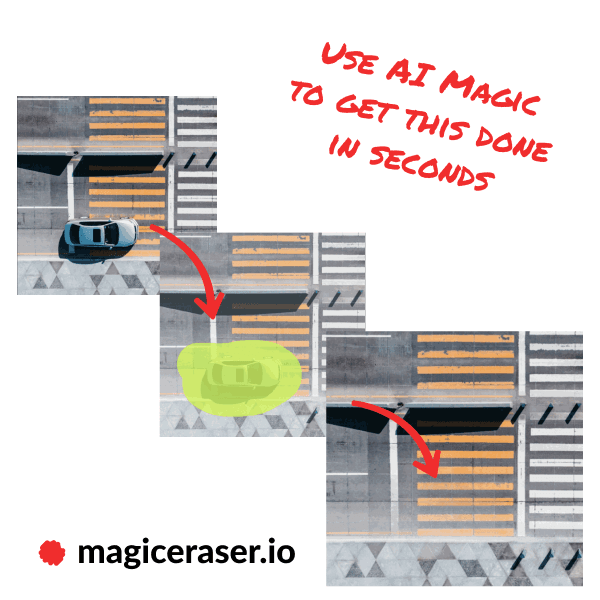
Overview
Magic Eraser is Magic Studio's object-removal tool. You upload a photo, brush over the distraction, let the AI reconstruct the selected area, and download the edited image. The official tool supports JPG, PNG, AVIF, and WEBP at the upload screen and is designed to work without an account for basic edits.
Its strongest use cases are quick cleanup jobs such as removing passersby, signs, cables, clutter, or unwanted text from product, property, social, and personal photos. The brush-size and zoom controls provide more direction than a fully automatic remover, while repeated passes can improve difficult fills.
Magic Eraser is convenient, but it is still generative retouching. Busy backgrounds, reflections, shadows, repeated patterns, and large removals can produce visible artifacts. Keep the original file and closely inspect important commercial, documentary, or identity-sensitive images before publishing them.
Use cases
The strongest fit depends on the job you need the product to complete, not the size of its feature list.
Remove small props, labels, background clutter, or passing people before publishing ecommerce, vehicle, or property images.
Clean up casual photos without opening a layered desktop editor or learning advanced retouching tools.
Use the Pro bulk workflow when many simple object-removal jobs need the same lightweight process.
Capabilities
Paint over the exact object, person, text, or blemish you want the AI to replace.
Adjust the selection for small details and cleaner edges instead of relying on automatic detection alone.
Erase again over an unsatisfactory fill or undo and refine the selected area.
Use the editor on the web or through Magic Studio's iOS and Android apps.
The product advertises editing up to 50 pictures at once for supported bulk workflows.
The paid plan also covers related Magic Studio image tools rather than only Magic Eraser.
Process
Step 1
Start with the highest-quality source you have and keep an untouched copy.
Step 2
Brush over the object and its shadow; zoom in and choose a brush size that avoids nearby subjects.
Step 3
Remove one object or a short section at a time, especially for wires, poles, and complicated edges.
Step 4
Check texture, perspective, shadows, hands, faces, and repeated patterns, then refine any obvious artifact.
Step 5
Confirm resolution, watermark status, and final crop before using the image publicly.
Cost
Basic Magic Studio access is free. Pro adds unlimited AI generations, high-resolution and watermark-free downloads, and bulk editing for supported tools. Magic Studio's public pricing page did not expose a reliable dollar amount in our locale, so confirm the live checkout price before subscribing.
$0
Basic access for occasional edits.
See current checkout
Expanded access for frequent and professional use.
Pricing checked . Check current pricing at the source ↗
Assessment
Compare
The right alternative depends on the specific output, workflow, controls and budget your project requires.
Design
Better when object removal needs to sit inside a broader template, layout, and team-design workflow.
Explore Canva AI (Magic Studio) →Design
Useful for conversational image edits that go beyond deleting a single distraction.
Explore Image Edit and img2img →Design
Choose this when the goal is to isolate the subject by removing the entire background.
Explore Magic Studio Background Remover →Questions
Yes. Magic Studio offers a free tier with basic access, 40 AI generations, limited-resolution watermarked downloads, and one-image-at-a-time editing. Pro removes those output limits and adds bulk support for selected tools.
The Magic Eraser page says basic use is free and does not require signup. Paid features and cross-device use may require an account.
It is designed for unwanted objects, people, text, and small distractions. Results are most convincing when the selected area is modest and the surrounding background gives the model enough visual context.
The free plan limits download resolution. Magic Studio lists high-resolution downloads as a Pro benefit, so verify the exported dimensions against your source before production use.
Check Magic Studio's current terms and make sure you own or have permission to edit the source image. You are also responsible for trademarks, likeness rights, disclosure requirements, and avoiding misleading edits.
Bottom line
Magic Eraser is a strong choice for quick, controlled photo cleanup when a full editor would be overkill. Use small selections and careful review for the best result; move to a layered editor when precision, reversibility, or evidentiary accuracy matters.
Visit Magic Eraser website ↗
Upload, style, and download stunning profile pictures.

Palette effortlessly adds vibrant colors to black and white images.

OpenArt: Unleash your creativity with AI-powered artistic enhancements.

DALL·E 3 helps unleash your creativity with AI-generated visual concepts.

Get access to all our AI courses, hundreds of real-world AI use cases, live expert-led workshops, an exclusive network of AI early adopters, and more.
Get unlimited access to all of our current & upcoming industry-specific AI courses for the duration of your subscription.
To keep up with the rapid pace of AI, our team publishes AI implementation guides daily. Our library contains 300+ practical use cases to automate real-world work.
Join weekly, live, interactive sessions with industry leaders who are at the forefront of AI for hands-on implementation guidance and exclusive insights.
Network with an exclusive community of AI-first professionals who are working smarter with AI. Learn how early adopters are using AI in their work and businesses.