Long-form transcription
Convert interviews, podcasts, webinars, lectures, and recorded meetings into structured text.
Independent tool overview
Scribe v2 is ElevenLabs' high-accuracy batch transcription model for uploaded audio and video. It supports more than 90 languages, speaker diarization, word-level timestamps, audio-event tags, multilingual files, up to 1,000 prompted keyterms, and optional sensitive-entity detection or redaction through the API.
Visit the official Scribe v2 site ↗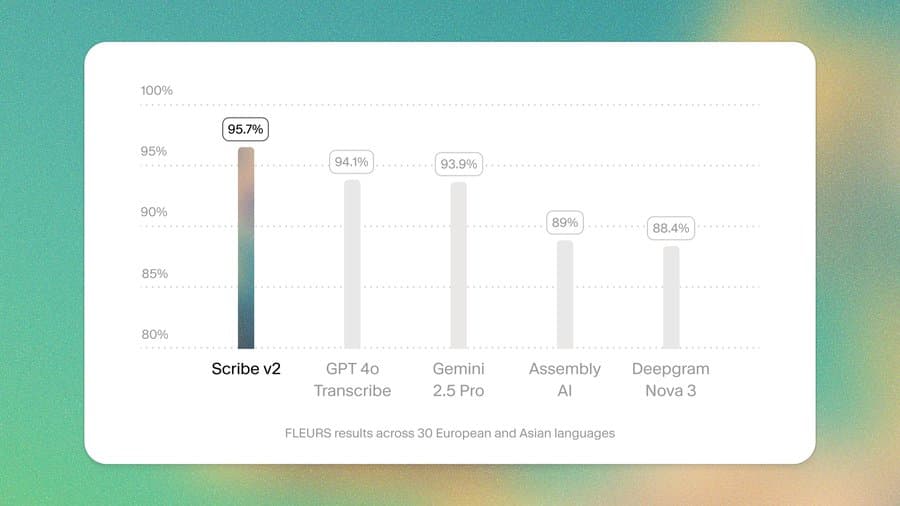
Overview
Scribe v2 is the batch and long-form member of ElevenLabs' speech-to-text family. It is designed for recordings such as interviews, podcasts, research sessions, training media, calls, and subtitle workflows where transcript quality and structure matter more than live response latency.
The model automatically detects languages within the same file, labels speakers, timestamps individual words, and tags non-speech events. The API can accept standard audio and video formats, handle files up to 3GB, and process recordings up to 10 hours in standard mode. A separate multichannel mode supports up to five channels with a one-hour maximum.
Two of its most useful controls are keyterm prompting and entity handling. Teams can supply up to 1,000 relevant words or phrases to improve domain vocabulary. The API can also detect up to 56 categories of personal, health, payment, or other sensitive information and can redact detected entities during transcription.
Scribe v2 should not be confused with Scribe v2 Realtime. The standard model is optimized for batch accuracy and long recordings; Realtime is a separate, higher-priced streaming model for live agents and interactive applications. Teams that need both usually route uploaded files to Scribe v2 and live audio to Realtime.
Use cases
The strongest fit depends on the job you need the product to complete, not the size of its feature list.
Convert interviews, podcasts, webinars, lectures, and recorded meetings into structured text.
Transcribe files that contain multiple supported languages or code-switching without manually splitting each language segment.
Use precise word-level timing and speaker labels to build synchronized caption workflows.
Prompt the model with product names, specialist terms, people, or places that are likely to appear in the recording.
Detect or redact supported entity types before storing or sending the transcript downstream, with human verification.
Submit files through the API and deliver asynchronous results to a webhook for downstream processing.
Capabilities
Supports a broad language set and can automatically detect language changes inside one recording.
Separates and labels up to 32 speakers in supported transcription workflows.
Returns timing for individual words to support captions, search, playback highlighting, and editing.
Identifies non-speech events such as laughter or footsteps alongside spoken content.
Accepts as many as 1,000 words or phrases and uses surrounding audio to determine when a supplied term applies.
Can find supported sensitive-data categories with timestamps or replace detected values using complete, categorized, or enumerated redaction.
Optionally removes filler words, repeated phrases, and stuttering to produce a cleaner reading transcript.
Processes up to five audio channels independently and assigns each channel a speaker ID.
Can send completed asynchronous transcription results to a configured endpoint.
Process
Step 1
Use Scribe v2 for uploaded recordings and long-form accuracy; choose Scribe v2 Realtime when low-latency streaming is essential.
Step 2
Confirm the format, file size, duration, channel layout, audio quality, and that you have consent and rights to process the recording.
Step 3
Select language handling, speaker diarization, timestamps, audio tags, verbatim style, and any keyterms relevant to the recording.
Step 4
Choose entity categories and redaction format where needed, and establish a second review because automated redaction can miss information.
Step 5
Use ElevenLabs' speech-to-text interface for individual work or integrate the API and webhooks for repeatable pipelines.
Step 6
Check names, numbers, speaker changes, timestamps, code-switched segments, technical terms, and every critical redaction against the source audio.
Step 7
Move approved text into subtitle, publishing, search, analytics, archive, or compliance systems with appropriate access controls.
Cost
ElevenLabs sells Scribe v2 through Creative subscriptions with included UI transcription and through usage-based API pricing. Current API pricing is $0.22 per audio hour for Scribe v2, plus $0.05 per hour for keyterm prompting and $0.07 per hour for entity detection. Scribe v2 Realtime is a separate model at $0.39 per audio hour. Prices exclude taxes.
$0 per month
Entry Creative plan with a small Scribe v2 UI allowance.
$6 per month
Creative plan for light recurring transcription.
$22 per month
Creative plan with a larger monthly transcription allowance.
$99 per month
Higher-volume Creative plan.
$0.22 per audio hour
Usage-based batch transcription for applications and automated pipelines.
$0.39 per audio hour
Separate streaming model for live agents and low-latency transcription.
Pricing checked . Check current pricing at the source ↗
Assessment
Compare
The right alternative depends on the specific output, workflow, controls and budget your project requires.
Content Creator
A developer-focused speech-to-text API worth comparing on language coverage, diarization, intelligence features, latency, and price.
Explore AssemblyAI →Project Management
A meeting-oriented product with collaborative notes and a more packaged end-user workflow.
Explore Otter.ai →Content Creator
A transcript-based audio and video editor for creators who want editing tools around the transcription.
Explore Descript →Content Creator
A focused option for podcasters already publishing and managing shows through Transistor.
Explore Transistor AI Transcription →Questions
Scribe v2 is ElevenLabs' batch speech-to-text model for transcribing uploaded audio and video into structured text with language detection, speakers, timestamps, and optional advanced controls.
ElevenLabs documents support for more than 90 languages, including automatic handling of multiple languages within one file.
Scribe v2 is optimized for accurate batch and long-form transcription. Scribe v2 Realtime is a separate streaming model optimized for low-latency agents and live applications.
The current base API rate is $0.22 per audio hour before taxes. Keyterm prompting adds $0.05 per hour and entity detection adds $0.07 per hour.
Yes. Standard diarization supports up to 32 speakers, and a separate multichannel mode can process up to five channels independently.
Yes. The API can return start and end timing for words, which is useful for captions, playback synchronization, and searchable media.
It lets a team provide up to 1,000 expected words or phrases, such as technical terms or names, so Scribe v2 can use the audio context to improve how those terms are transcribed.
The API can detect and redact supported entity types during transcription, but ElevenLabs warns that automated redaction may not identify everything. A human or secondary control should review sensitive transcripts.
It removes filler words, repeated phrases, and stuttering to create a cleaner reading transcript. Leave it off when the exact spoken record matters.
ElevenLabs documents a 3GB maximum file size and a 10-hour maximum duration in standard mode. Multichannel transcription has a one-hour maximum.
Yes. The API accepts multiple common video formats in addition to audio formats and transcribes the audio track.
ElevenLabs says companies requiring HIPAA compliance must contact Sales and sign a Business Associate Agreement before using the service for HIPAA-related deployments.
Bottom line
Scribe v2 is a strong fit for teams that need structured batch transcripts across many languages and want diarization, timestamps, vocabulary guidance, and sensitive-entity controls in one API. Its base usage price is straightforward, but advanced features increase cost and none of the accuracy or redaction features removes the need for review. Choose Realtime instead when live latency is the primary requirement, and compare packaged meeting or editing products if the team does not want to build its own workflow.
Visit Scribe v2 website ↗
LTX-2 - Lightricks' open-source foundation video model for long-form, high-fidelity outputs

GLM-Image - Z AI's new open-source image generation model
Hunyuan Motion 1.0 - Tencent's open-source model for 3D character animations from text prompts

Remotion - Create and edit videos with AI

Get access to all our AI courses, hundreds of real-world AI use cases, live expert-led workshops, an exclusive network of AI early adopters, and more.
Get unlimited access to all of our current & upcoming industry-specific AI courses for the duration of your subscription.
To keep up with the rapid pace of AI, our team publishes AI implementation guides daily. Our library contains 300+ practical use cases to automate real-world work.
Join weekly, live, interactive sessions with industry leaders who are at the forefront of AI for hands-on implementation guidance and exclusive insights.
Network with an exclusive community of AI-first professionals who are working smarter with AI. Learn how early adopters are using AI in their work and businesses.