Platform engineering teams
Standardize agent environments, permissions, models, secrets, and execution across multiple repositories.
Independent tool overview
Oz is Warp's orchestration platform for running, tracking, automating, and steering coding agents locally or across hosted and self-hosted cloud environments.
Visit the official Oz site ↗
Overview
Oz is the agent platform behind Warp's local and cloud coding workflows. It is built for developers and platform teams that want to run agents in parallel, trigger them from engineering systems, and inspect what every run did.
The product supports interactive local work as well as background cloud agents. Cloud runs can react to GitHub, Slack, Linear, schedules, and custom webhooks, while the web app, CLI, API, and SDK provide different ways to launch and manage the same underlying agent workflows.
A configured cloud environment defines the Docker image, repositories, setup commands, secrets, and runtime used for a task. Teams can use Warp-hosted workers, and Enterprise customers can run self-hosted workers inside their own infrastructure.
Oz is most valuable when a team already knows which software tasks are safe and repeatable enough to automate. It supplies orchestration and auditability, but it does not remove the need for repository permissions, spend controls, tests, review gates, and ownership of agent-created changes.
Use cases
The strongest fit depends on the job you need the product to complete, not the size of its feature list.
Standardize agent environments, permissions, models, secrets, and execution across multiple repositories.
Run repeatable work such as dependency updates, code cleanup, issue triage, and PR review in the background.
Dispatch many coding tasks at once while retaining a dashboard, audit trail, and the ability to steer individual runs.
Use the API, SDK, CLI, and webhooks to build custom engineering automations on top of cloud agents.
Capabilities
Use the same Warp agent capabilities interactively on a developer machine or asynchronously in a remote environment.
Launch multiple agents across repositories and tasks rather than waiting for one local session to finish.
Start runs from GitHub, Slack, Linear, custom webhooks, or recurring schedules for unattended workflows.
Browse runs, inspect transcripts and actions, share sessions, and monitor agent activity from a desktop or mobile browser.
Launch and manage agents from a terminal, CI pipeline, backend service, script, or custom application.
Define a Docker image, repositories, setup commands, runtime settings, and secrets once and reuse them across triggers.
Choose from Warp's available models, run reusable Skills, and connect MCP servers for access to systems such as GitHub, Linear, and Sentry.
Enterprise customers can keep agent workloads inside their own VPC or on-premises environment while Oz provides the control plane.
Process
Step 1
Choose a narrow software task with clear inputs, expected outputs, tests, and an owner for exceptions.
Step 2
Select the container image, repositories, setup commands, secrets, permissions, model, and execution host.
Step 3
Run the task manually or connect a GitHub, Slack, Linear, schedule, API, CLI, or webhook trigger.
Step 4
Follow the transcript and actions in Warp or the Oz web app, and pause or redirect the run when necessary.
Step 5
Require automated checks and human review before merging code, changing infrastructure, or acting on production systems.
Cost
Oz is included across Warp plans, but agent runs consume credits based on AI usage and, for Warp-hosted cloud runs, compute. Additional usage is pay as you go. Annual prices below reflect Warp's listed 10% discount.
$0/month
Core terminal and limited cloud-agent access for individual evaluation.
$20/month or $18/month annually
Usage-based individual plan with broader model and cloud-agent access.
$200/month or $180/month annually
Higher-capacity individual plan for frequent agent workloads.
$50/user/month or $45/user/month annually
Team plan for up to 25 seats with administration and security controls.
Custom
Organization plan for advanced governance, deployment, and support.
Pricing checked . Check current pricing at the source ↗
Assessment
Compare
The right alternative depends on the specific output, workflow, controls and budget your project requires.
Coding
Choose Codex for OpenAI's coding agent across local, cloud, and app-based workflows when orchestration infrastructure is not the primary requirement.
Explore Codex →Coding
Choose Replit Agent 4 for a browser-first multi-agent product focused on building and iterating applications.
Explore Replit Agent 4 →Coding
Choose Devin Desktop for Cognition's integrated workspace for supervising Devin and other coding agents.
Explore Devin Desktop →Questions
Oz is Warp's orchestration platform for running, automating, tracking, and steering coding agents locally or in cloud environments.
Yes. Parallel cloud-agent execution is one of Oz's core uses, allowing teams to dispatch many tasks across repositories or workflows at the same time.
Oz supports manual runs plus triggers from GitHub, Slack, Linear, schedules, custom webhooks, the CLI, API, and SDK.
Yes, but managed self-hosted workers are an Enterprise capability. Warp says the execution plane can stay inside the customer's infrastructure while its hosted control plane coordinates the runs.
Oz access begins on Warp's Free plan. Paid plans start with Build at $20 monthly, or $18 monthly on annual billing, and runs consume credits based on model usage and hosted compute.
Warp says its contracted LLM providers operate under zero-data-retention agreements and do not train on customer data. Oz cloud runs still store conversation data needed for run history and the product experience, so teams should configure their privacy and retention controls deliberately.
Bottom line
Warp Oz is a capable orchestration layer for engineering teams ready to move beyond one-off coding-agent sessions into scheduled, event-driven, parallel automation. Its mix of interfaces, auditability, and hosting options is strong, but the operational value depends on disciplined environment setup, permission boundaries, review gates, and usage controls.
Visit Oz website ↗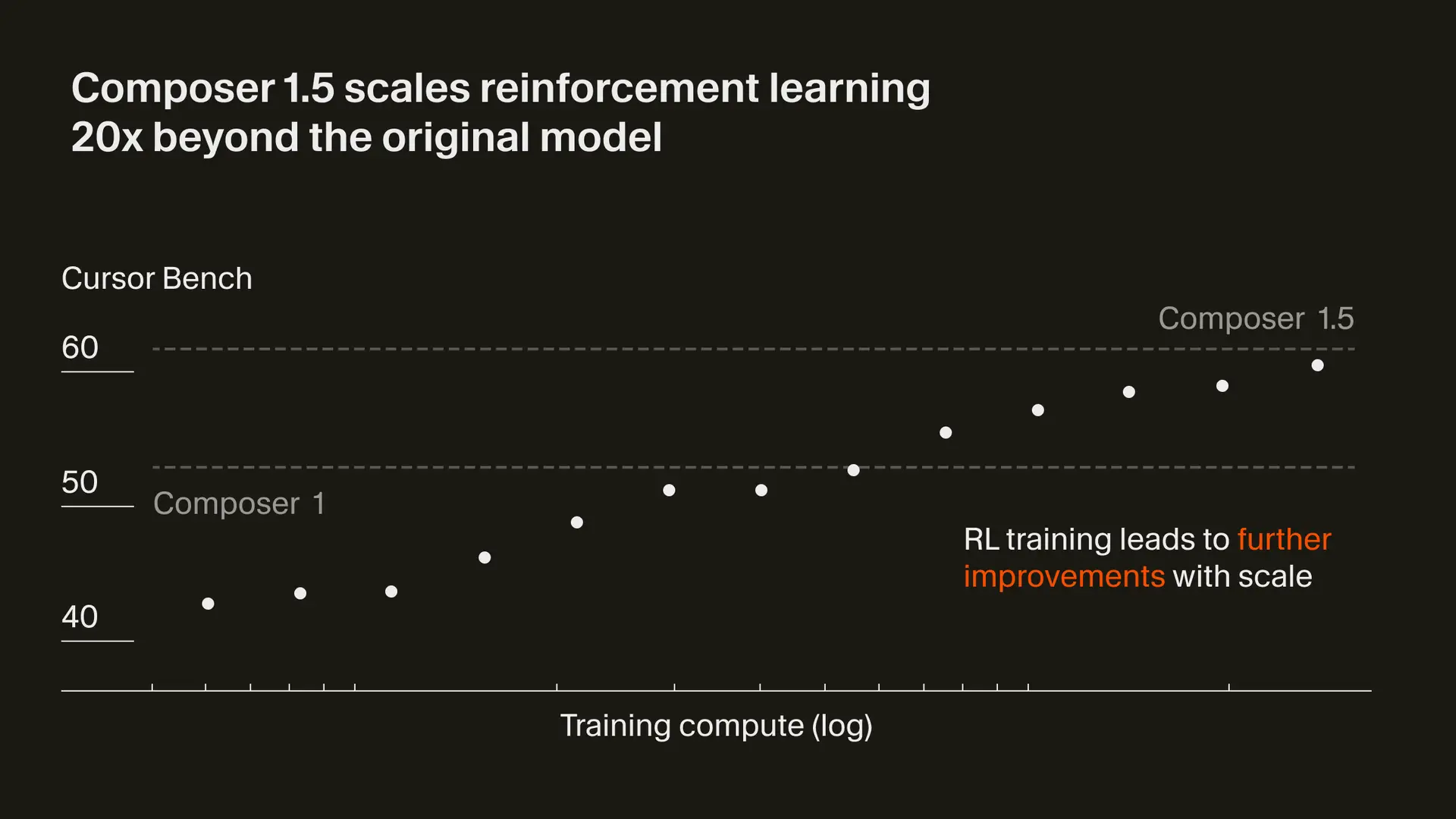
Composer 1.5 - Cursor's updated in-house agentic coding model with increased performance and speed

Orchids 1.0 - AI app builder for any stack with BYO model subscriptions

GPT-5.3-Codex - OpenAI's new SOTA agentic coding model
M2.5 - Minimax's new open-source frontier model with powerful coding capabilities

Get access to all our AI courses, hundreds of real-world AI use cases, live expert-led workshops, an exclusive network of AI early adopters, and more.
Get unlimited access to all of our current & upcoming industry-specific AI courses for the duration of your subscription.
To keep up with the rapid pace of AI, our team publishes AI implementation guides daily. Our library contains 300+ practical use cases to automate real-world work.
Join weekly, live, interactive sessions with industry leaders who are at the forefront of AI for hands-on implementation guidance and exclusive insights.
Network with an exclusive community of AI-first professionals who are working smarter with AI. Learn how early adopters are using AI in their work and businesses.