People testing voice-first writing
Use unlimited free dictation long enough to learn whether speaking actually improves a real daily workflow.
Independent tool overview
Willow Frontier Mini is the free, unlimited dictation model inside Willow Voice, built to convert speech into polished text across Mac, Windows, and iPhone apps.
Visit the official Willow Frontier Mini site ↗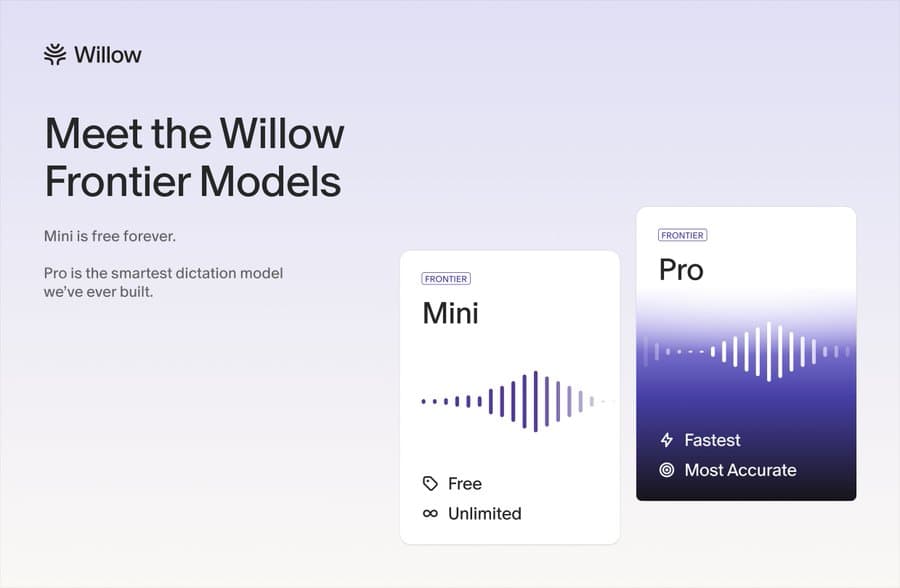
Overview
Frontier Mini is not a separate app. It is the free speech-to-text model in Willow Voice, a system-wide dictation tool that inserts spoken text wherever the cursor is active. It is designed to make everyday messages, prompts, documents, and notes faster without imposing a word cap on the current Basic plan.
Willow created Frontier Mini as the more efficient sibling of Frontier Pro. Both follow the same general architecture, but Mini uses a smaller, faster editing path with less personalization. The paid Pro model spends more processing on formatting, names, glossary terms, accepted corrections, and writing preferences to reduce the amount of cleanup required.
Willow uses cloud models rather than fully on-device transcription. Its default Private Mode says dictated text, transcript context, and audio are not retained on Willow servers, while local history remains on the device. Users should still understand microphone, accessibility, keyboard, and optional context-awareness permissions before using it for sensitive work.
Use cases
The strongest fit depends on the job you need the product to complete, not the size of its feature list.
Use unlimited free dictation long enough to learn whether speaking actually improves a real daily workflow.
Speak longer prompts into ChatGPT, Claude, Gemini, Cursor, and other text fields instead of typing them.
Draft email, Slack, documents, CRM notes, and follow-ups while moving between applications.
Reduce keyboard use for people who find prolonged typing slow, uncomfortable, or difficult.
Try system-wide voice input across Willow's advertised set of more than 100 supported languages.
Capabilities
The current Basic plan includes unlimited Frontier Mini usage with no credit card and no advertised word cap.
On desktop, Willow uses system permissions to insert text into applications such as email, chat, documents, browsers, and AI prompt boxes.
On iOS, Willow runs as a third-party keyboard with microphone and Full Access permissions so users can dictate inside other apps.
The dictation pipeline turns speech into readable punctuation and formatting instead of producing only a literal raw transcript.
Basic users can add terms and receive limited personalization, while Pro adds stronger memory of writing style and accepted corrections.
An optional setting can read small pieces of text around the cursor to improve spelling, formatting, and relevance; it can be disabled.
Recent transcripts and audio needed for retrying a failed transcription are stored on the device rather than synced between devices.
Scribe turns a rough spoken intention into a polished message rather than transcribing word for word. Basic includes 20 uses per week; Pro includes unlimited usage.
A Pro subscription carries across Mac and iOS when the same email and sign-in method are used.
Process
Step 1
Download Willow, create an account, enable microphone access, and allow the desktop input or iOS keyboard permissions needed to insert text.
Step 2
Review data controls before the first sensitive dictation and leave the default private setting on unless there is a clear reason to share anonymized transcript text for improvement.
Step 3
Use the built-in or a reliable wired microphone where possible; low-quality Bluetooth input can clip words and reduce accuracy.
Step 4
Speak naturally in focused segments, pause at logical boundaries, and use the five-minute free-session limit as a cue to review before continuing.
Step 5
Add names, acronyms, product terms, and specialized vocabulary to the dictionary instead of repeatedly fixing the same mistakes.
Step 6
Check names, numbers, punctuation, tone, and accidental microphone capture before sending a message or submitting a form.
Cost
Willow's Basic plan includes unlimited Frontier Mini dictation, limited personalization, and 20 Scribe uses per week at no charge. Pro costs $15 monthly or $12 per month with annual billing and upgrades users to Frontier Pro, unlimited Scribe, stronger personalization, priority processing, and longer sessions. Business is $35 monthly or $28 with annual billing; Enterprise uses custom pricing.
Free
Unlimited dictation with Frontier Mini.
$15/month or $12/month annually
Higher-accuracy Frontier Pro dictation for regular individual use.
$35/month or $28/month annually
Team plan with enforced privacy and administrative controls.
Contact sales
Custom deployment, billing, security, and support for larger organizations.
Pricing checked . Check current pricing at the source ↗
Assessment
Compare
The right alternative depends on the specific output, workflow, controls and budget your project requires.
Content Creator
The closest system-wide AI dictation alternative for users comparing editing quality, platform coverage, and voice-first workflow.
Explore Wispr Flow →Project Management
A better fit when the main need is recording, transcribing, and summarizing meetings or uploaded media rather than typing into any text field.
Explore Notta Showcase →Consumer
A developer-focused speech-to-text API for teams building live transcription directly into their own product.
Explore Scribe v2 Realtime →Questions
Frontier Mini is the free speech-to-text model inside Willow Voice. It is optimized for efficient, fast dictation across applications rather than maximum personalization.
Willow's current pricing page and July 2026 launch state that Basic users receive unlimited Frontier Mini dictation with no word cap. Individual sessions are still limited to five minutes, and some older help content still shows the previous weekly limit.
Mini uses a smaller, faster editing path and includes limited personalization. Frontier Pro spends more processing on formatting, names, glossary terms, writing style, and accepted edits to reduce cleanup.
Yes. Willow currently supports Mac, Windows, and iPhone. Its help center lists Android as coming soon.
No. Willow says it uses cloud-based AI models. Audio and transcript data are sent securely for processing, while its default Private Mode says that audio, dictated text, and contextual data are not retained on Willow servers.
Scribe takes a rough spoken intention and writes a polished, formatted message in the user's style instead of transcribing every word literally. Basic includes 20 uses per week.
Willow supports HIPAA workflows, but users handling protected health information need to enable HIPAA support and sign the Business Associate Agreement. Organizations can use Business or Enterprise controls to enforce the required privacy settings.
Bottom line
Frontier Mini makes Willow unusually easy to evaluate because the free plan is sufficient for a real long-term dictation habit, not just a short trial. It is the right starting point for most users, with Pro justified only when accuracy, vocabulary, personalization, session length, or Scribe usage creates enough editing friction to matter.
Visit Willow Frontier Mini website ↗
Hy-3 - Tencent's new open-source model built for cheap, reliable agent deployment
Grok 4.5 - SpaceXAI and Cursor's strongest Grok model with powerful performance and efficiency at low costs
Higgsfield Explainer - Turn any topic into a faceless explainer video

GPT-Live - OpenAI's new voice model with more natural conversation abilities

Get access to all our AI courses, hundreds of real-world AI use cases, live expert-led workshops, an exclusive network of AI early adopters, and more.
Get unlimited access to all of our current & upcoming industry-specific AI courses for the duration of your subscription.
To keep up with the rapid pace of AI, our team publishes AI implementation guides daily. Our library contains 300+ practical use cases to automate real-world work.
Join weekly, live, interactive sessions with industry leaders who are at the forefront of AI for hands-on implementation guidance and exclusive insights.
Network with an exclusive community of AI-first professionals who are working smarter with AI. Learn how early adopters are using AI in their work and businesses.