Cursor-native repositories
Host new projects where agents, source browsing, pull requests, and Cursor's cloud workflows share one codebase context.
Independent tool overview
Cursor Origin is an active, early-beta code-hosting service built into Cursor for repositories, standard Git operations, pull requests, code search, GitHub mirroring, cloud agents, automations, and CI or deployment apps. It began rolling out on August 17, 2026 to paid Cursor plans. Cursor has not announced a separate Origin fee, repository allowance, or storage price; access currently follows the eligible Cursor subscription.
Visit the official Origin site ↗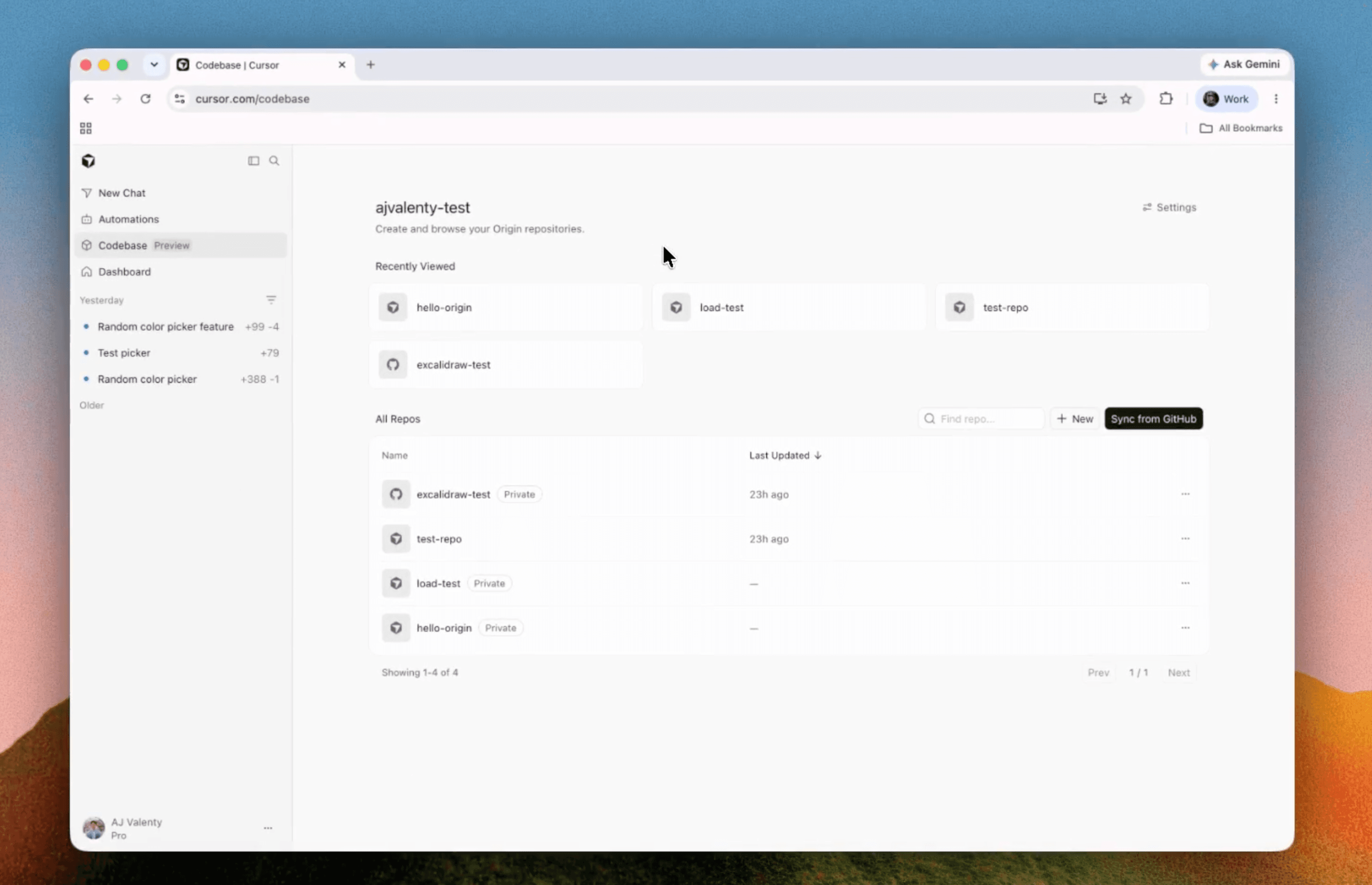
Overview
Origin is Cursor's new git forge: teams can create repositories hosted by Cursor or place real-time GitHub mirrors beside them in the Codebase tab. Native Origin repositories use standard clone, push, pull, branch, and pull-request workflows, while the browser adds source browsing, search, reviews, checks, settings, and direct access to Cursor agents.
The GitHub path is deliberately conservative. GitHub remains the source of truth for repositories that began there, pushes continue to GitHub, and pull-request comments, replies, reviews, and merges synchronize between the two systems. A repository can later be detached, which stops synchronization and turns the Origin copy into a standalone Cursor-hosted repository without altering the GitHub source.
Origin's appeal is proximity: code, pull requests, cloud agents, automations, and Cursor's coding interface live in one workspace. Its biggest drawback is maturity. The product is in early beta, integrations and protections are still expanding, and Cursor has not yet published the operational limits buyers normally expect from an established primary code host.
Use cases
The strongest fit depends on the job you need the product to complete, not the size of its feature list.
Host new projects where agents, source browsing, pull requests, and Cursor's cloud workflows share one codebase context.
Mirror selected GitHub repositories into Cursor while keeping GitHub as the authoritative remote and existing CI system.
Let Cursor agents inspect code, create branches, update pull requests, and propose changes beside the repository they are working on.
Connect Vercel to create pull-request previews and production deployments from an Origin repository.
Test how a forge designed around cloud agents and automations changes repository browsing, review, and merge workflows.
Capabilities
Create a repository from the Codebase tab, CLI, API, or Cursor agent and use standard git clone, push, and pull over HTTPS.
Select repositories to mirror in Cursor, receive updates in real time, and keep GitHub as the source of truth until an explicit detach.
Open, review, comment on, inspect checks and diffs for, merge, close, or reopen pull requests in the browser or Origin CLI.
Browse repositories and search source from cursor.com/codebase without cloning every project locally.
Ask questions about the open codebase, request changes, update a pull request, or push an agent-created branch.
Connect Cursor's background development workflows directly to eligible Origin codebases.
Add preview deployments or CI to native Origin repositories; GitHub mirrors continue to use their GitHub-side CI configuration.
Choose Internal or Private visibility, manage repository and codebase access, and configure the branch rules and merge protections currently available in beta.
Manage repositories, pull requests, rulesets, SSH keys, apps, installations, checks, scopes, webhooks, and rate limits programmatically.
Process
Step 1
Mirror a non-critical repository first so GitHub remains authoritative while the team evaluates browsing, reviews, agents, permissions, and sync behavior.
Step 2
Review who can access the Cursor codebase, choose Private or Internal visibility, and avoid assuming GitHub permissions map perfectly to Origin settings.
Step 3
Test pushes, comments, reactions, assigned reviews, checks, merges, branch updates, and disconnect behavior in both directions.
Step 4
Leave mirrored repositories on their GitHub CI path and verify status checks before moving a new native Origin project to Depot or Buildkite.
Step 5
Use minimum repository permissions, branch rules, required checks, short-lived tokens, signed webhooks, and human review before merge.
Step 6
Keep a second remote or automated backup, document repository export and detach procedures, and do not make the beta the only copy of critical source.
Step 7
Wait for proven reliability, required integrations, protection controls, support terms, usage limits, and security documentation before making Origin the system of record.
Cost
Origin is rolling out on eligible paid Cursor plans without a separately published hosting charge. Cursor has not publicly itemized repository counts, storage, transfer, LFS, or additional Origin usage fees. Agent and model consumption remains subject to the usage pools and on-demand pricing of the underlying Cursor plan.
₹649/month, tax included
Regional entry plan eligible to create Origin repositories and use Cursor's own model pool.
$20/month
Lowest globally listed individual plan included in Origin's paid-plan rollout.
$60/month
Individual plan for heavier daily agent usage.
$200/month
Highest published individual plan for power users running many agents and automations.
$40 or $120 per user/month
Standard and Premium seats for collaborative Cursor and Origin use.
Custom
Contract plan for larger organizations, subject to administrator Origin controls.
Pricing checked . Check current pricing at the source ↗
Assessment
Compare
The right alternative depends on the specific output, workflow, controls and budget your project requires.
Coding
Choose GitHub's ecosystem when established repository hosting and marketplace depth matter, with Spark available for prompt-built applications.
Explore GitHub Spark →Coding
Consider Replit Agent 4 for an integrated cloud development and hosting environment centered on autonomous app creation.
Explore Replit Agent 4 →Coding
Use Claude Code Review when the primary need is multi-agent pull-request analysis rather than moving repository hosting into Cursor.
Explore Claude Code Review →Questions
Origin is Cursor's early-beta git forge for hosting repositories, mirroring GitHub, browsing code, reviewing pull requests, and connecting agents, automations, CI, and deployments.
Cursor has not announced a separate Origin fee. The beta is rolling out to eligible paid Cursor plans, starting at Pro for $20 per month globally and Start for ₹649 per month in India.
No. Cursor says Origin is rolling out to paid plans. The free Hobby plan is not included in the published eligibility list for creating repositories.
It can host new repositories directly, but a repository synced from GitHub remains a mirror. GitHub stays the source of truth and receives pushes until you explicitly detach the Origin copy.
Yes. Agents can answer code questions, make changes, push branches, and update pull requests, subject to repository access, rules, checks, and plan usage.
Yes. Vercel supports deployments and pull-request previews. Depot and Buildkite run CI for native Origin repositories; mirrored repositories keep CI on GitHub.
Yes. Private repositories are limited to explicitly granted members or codebase permissions, while Internal repositories are visible to eligible members of the Cursor team.
A mirror of a non-critical repository is the safer first step. Wait for required protections, integrations, limits, support, reliability evidence, and an independently tested backup and recovery path before making Origin authoritative.
Bottom line
Origin is a strategically coherent addition to Cursor: agents work best when code, branches, pull requests, checks, and context are close together. The GitHub mirror makes evaluation practical, and eligible paid users can test it without a separately announced hosting fee. But this is still a very new beta. Keep GitHub authoritative at first, retain an external backup, and treat published operational limits, security controls, integration coverage, and recovery evidence as prerequisites for a production migration.
Visit Origin website ↗
Muse Code - Meta's terminal-based AI coding agent
Slack's new channels for building software with AI agents as a team

MAI-Cyber-1-Flash - Microsoft's new cybersecurity model for securing codebases
Chat, plan, and run quick tasks in Replit without spending credits

Get access to all our AI courses, hundreds of real-world AI use cases, live expert-led workshops, an exclusive network of AI early adopters, and more.
Get unlimited access to all of our current & upcoming industry-specific AI courses for the duration of your subscription.
To keep up with the rapid pace of AI, our team publishes AI implementation guides daily. Our library contains 300+ practical use cases to automate real-world work.
Join weekly, live, interactive sessions with industry leaders who are at the forefront of AI for hands-on implementation guidance and exclusive insights.
Network with an exclusive community of AI-first professionals who are working smarter with AI. Learn how early adopters are using AI in their work and businesses.