Browser workflow automation
Developers automating repetitive tasks across websites and portals that do not expose sufficient APIs.
Independent tool overview
Lux is OpenAGI's computer-use model and developer toolkit for agents that interpret screenshots and operate human-facing software through clicks, typing, scrolling, and other interface actions.
Visit the official Lux site ↗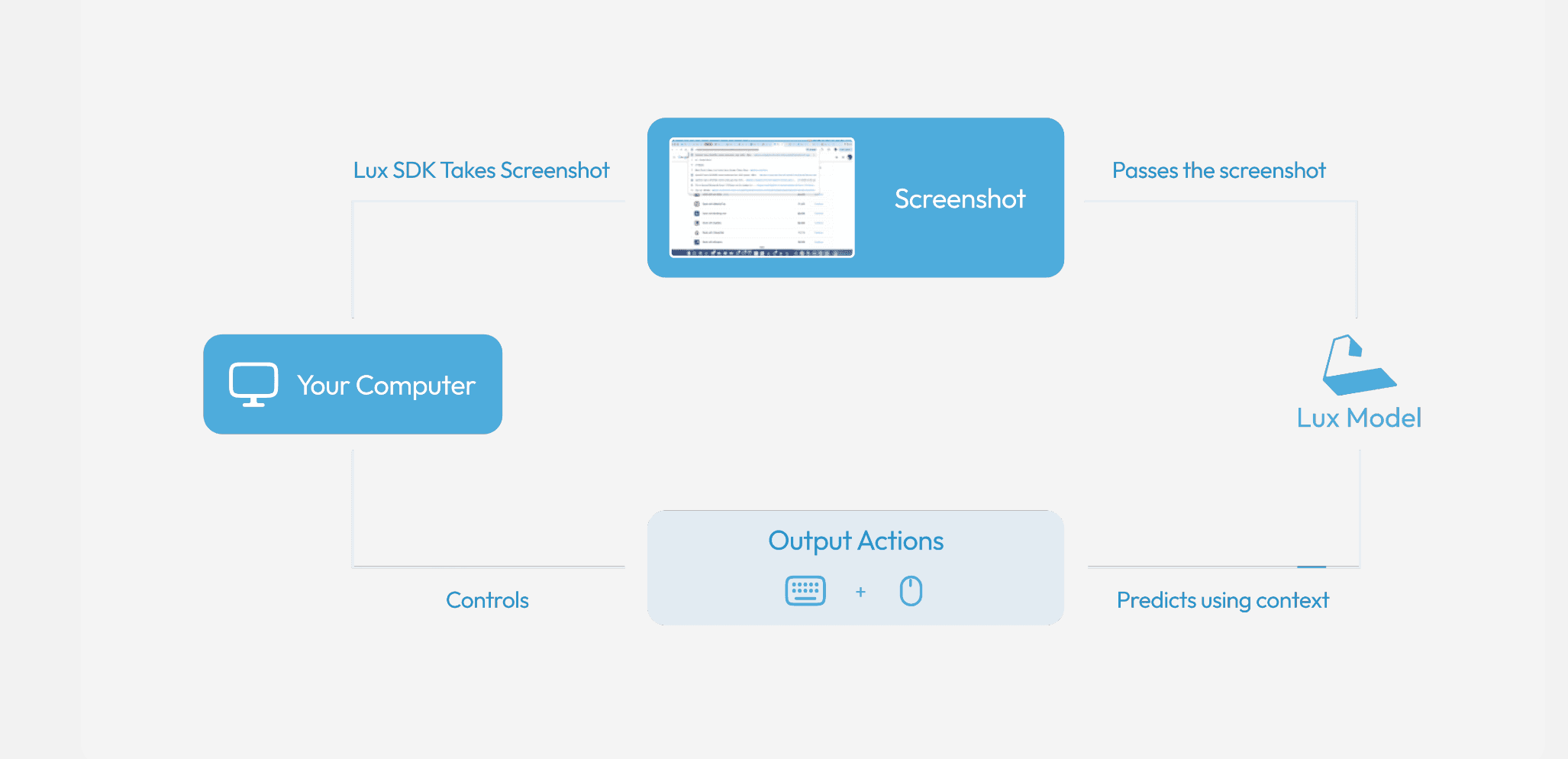
Overview
Lux is designed for workflows that cannot be completed through a clean API alone. It receives a natural-language goal, analyzes the current screen, chooses an interface action, observes the resulting screenshot, and repeats the cycle until the task finishes or reaches a limit.
OpenAGI provides three execution styles: Tasker for tightly specified, repeatable instructions; Actor for fast immediate tasks; and Thinker for vague or long-running goals. The official Python SDK can capture screenshots, execute mouse and keyboard actions, run from a command line, support multiple screens, and expose a real-time server for custom clients.
OpenAGI reports an 83.6 score on Online-Mind2Web and compares Lux favorably with competing computer-use models. Those figures are vendor-reported. Teams should independently test success rate, recovery, latency, cost, and safety on the exact sites and applications they intend to automate.
Use cases
The strongest fit depends on the job you need the product to complete, not the size of its feature list.
Developers automating repetitive tasks across websites and portals that do not expose sufficient APIs.
Teams testing real user flows by navigating interfaces, entering data, and checking expected results.
Organizations moving structured information between dashboards, forms, and internal tools with human approval.
Builders comparing agent modes, screen grounding, action selection, recovery, and long-horizon task performance.
Capabilities
Lux repeatedly analyzes screenshots and emits interface actions, allowing it to operate software through the same visible controls a person uses.
Tasker emphasizes controlled procedures, Actor emphasizes speed, and Thinker handles less-defined goals and longer runs.
The OAGI SDK supports automated task execution, manual step control, model and step limits, command-line runs, and execution-history exports.
Official helpers can capture screens and operate mouse and keyboard inputs through PyAutoGUI, with separate Wayland support using ydotool and Flameshot.
Developers can enumerate displays and direct screenshots and actions to a chosen screen.
An optional FastAPI and Socket.IO server can relay screenshots and action events for browser extensions or other custom interfaces.
Process
Step 1
Start with a reversible, clearly measurable workflow and document the exact completion condition, allowed applications, and prohibited actions.
Step 2
Use Tasker for known procedures, Actor for short responsive jobs, or Thinker for goals that require more planning and steps.
Step 3
Install the SDK, create an API key, grant only necessary screen and accessibility permissions, and isolate the test account and machine where practical.
Step 4
Cap steps and runtime, restrict domains and apps, protect credentials, and require approval before purchases, messages, deletion, or external submission.
Step 5
Record screenshots, chosen actions, completion state, latency, errors, and human interventions so failures can be reproduced.
Step 6
Measure task success, false completion, recovery, cost, and side effects across interface changes and edge cases before production use.
Cost
OpenAGI publishes the Lux Python SDK under the MIT license. A complete public API price table is not currently presented on the product or developer pages. OpenAGI's enterprise comparison shows Lux 1.0 at $0.10 in its benchmark cost graphic, but it does not define that figure as a universal billing unit. Check the developer dashboard for current API rates and request a custom quote for enterprise deployment.
Free and open source
Install and modify the official client and local automation helpers under the MIT license.
Check developer dashboard
Model access requires an API key and is billed under the rates shown for the account.
Custom pricing
Production workflow automation, orchestration, controls, and support are handled through a solutions review.
Pricing checked . Check current pricing at the source ↗
Assessment
Compare
The right alternative depends on the specific output, workflow, controls and budget your project requires.
Agents
Choose Google's Computer Use model when you want a first-party Gemini option for agents that interact with user interfaces.
Explore Gemini Computer Use →Agents
Choose Claude in Chrome when end users want a managed browser assistant rather than a developer SDK.
Explore Claude in Chrome →Agents
Choose Manus when the priority is a hosted general-purpose agent experience with less custom computer-use engineering.
Explore Manus →Questions
Lux is a computer-use model that interprets screenshots and chooses mouse, keyboard, scrolling, and waiting actions to complete tasks in human-facing software.
Tasker follows tightly defined procedures, Actor targets fast immediate actions, and Thinker handles vague or longer-running goals that require more planning.
The official OAGI Python SDK is open source under the MIT license. The Lux model itself is accessed through OpenAGI's hosted API rather than distributed as open weights.
The SDK is free, but OpenAGI does not show a complete public API rate table on the product or developer pages. Check the developer dashboard for current usage pricing and contact OpenAGI for enterprise terms.
Official examples include web data collection, software QA, financial data extraction, data entry, and multi-step workflows across websites and internal applications.
Yes. The official SDK includes screen capture and action handlers for desktop automation, including PyAutoGUI support and a documented path for Wayland environments.
No computer-use agent should receive broad unattended authority by default. Use isolated accounts, least-privilege access, step and spend limits, audit logs, domain restrictions, and human approval for consequential actions.
Bottom line
Lux is a capable developer-oriented option for automating visual software workflows, especially when APIs are unavailable. Its practical SDK and execution modes are attractive, but teams should treat benchmark and cost claims as starting points and demand strong real-task evaluation, transparent account pricing, and tight safety controls before production deployment.
Visit Lux website ↗
Agent 365 - Microsoft's platform for managing, securing, and governing AI agents, with capabilities like agent registry, performance analytics, and more.
Nemotron 3 - Nvidia's new family of open-source AI models in three sizes designed to help developers build multi-agent systems more efficiently
Holo 2 - Lightweight AI models that power cost-efficient computer-use agents

MAI-UI - Alibaba's AI agent that can autonomously control smartphone apps and complete multi-step tasks on mobile devices

Get access to all our AI courses, hundreds of real-world AI use cases, live expert-led workshops, an exclusive network of AI early adopters, and more.
Get unlimited access to all of our current & upcoming industry-specific AI courses for the duration of your subscription.
To keep up with the rapid pace of AI, our team publishes AI implementation guides daily. Our library contains 300+ practical use cases to automate real-world work.
Join weekly, live, interactive sessions with industry leaders who are at the forefront of AI for hands-on implementation guidance and exclusive insights.
Network with an exclusive community of AI-first professionals who are working smarter with AI. Learn how early adopters are using AI in their work and businesses.