Multi-site research
Collect, compare, and organize information from several logged-in pages or browser tabs.
Independent tool overview
Claude in Chrome is Anthropic's browser extension for letting Claude read pages, work across tabs, and take approved actions on websites.
Visit the official Claude in Chrome site ↗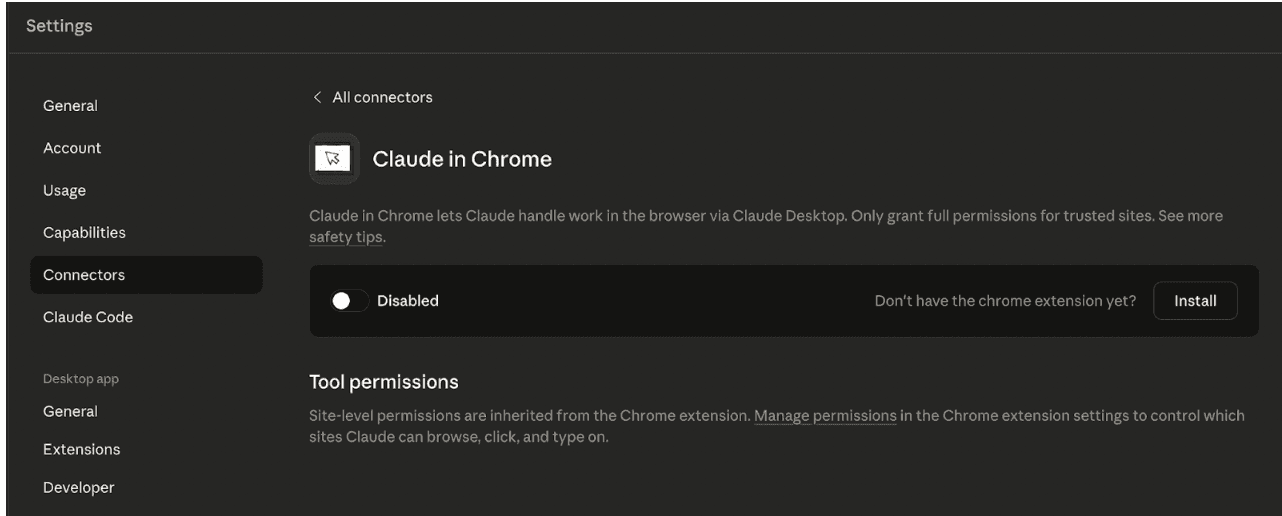
Overview
Claude in Chrome puts an agent in a Chrome side panel that can see the current page, click, type, navigate, fill forms, and coordinate work across grouped tabs. It uses the user's existing browser session, which makes it useful for web apps, dashboards, and internal tools that do not offer an API.
The extension can also act as the browser layer for Claude Cowork and Claude Code. Common uses include gathering information across websites, testing a deployed interface, reading browser console output, updating web tools, and running repeatable browser workflows in the background.
That convenience creates real security risk. Web pages can contain malicious or misleading instructions, Claude can misunderstand a task, and broad permissions increase the impact of a mistake. Start with trusted sites, use narrow permissions, keep irreversible work behind human review, and verify every important result.
Use cases
The strongest fit depends on the job you need the product to complete, not the size of its feature list.
Collect, compare, and organize information from several logged-in pages or browser tabs.
Run saved or scheduled workflows that click, type, navigate, and gather information from web tools.
Pair the extension with Claude Code to inspect a deployed UI, console errors, network requests, and DOM state.
Use Chrome to gather information, then continue in Cowork to create documents, spreadsheets, decks, or reports.
Capabilities
Reads visible website context and can click, type, navigate, upload images, and fill forms within granted permissions.
Lets Claude view and interact with several tabs placed in its designated tab group.
Continues multi-step tasks while the user changes tabs and can notify them when attention or approval is needed.
Saves successful prompts as reusable shortcuts and can run supported recurring browser tasks on a schedule.
Connects build, test, debug, and verification work by exposing browser state and console information to Claude Code.
Offers manual, automatic, and skip-approval modes, plus site-level controls and extra checks for sensitive actions.
Process
Step 1
Add the official Chrome extension, sign in to a paid Claude account, and enable it for the relevant Claude surface.
Step 2
Choose a permission mode and approve only the trusted sites needed for the task; organizations can add allowlists or blocklists.
Step 3
Describe the result, relevant tabs, constraints, and actions Claude may take, then watch the first run closely.
Step 4
Check extracted facts, form fields, drafts, and proposed changes before any consequential action is finalized.
Cost
Claude in Chrome is included with paid Claude subscriptions; it is not available on the Free plan. Usage draws from the selected plan's limits.
$20/month or $200/year
The lowest-cost individual plan that includes Claude in Chrome.
$100/month
For individuals who need about five times Pro session capacity.
$200/month
For heavy daily individual use.
$25/user monthly or $20/user monthly billed annually
For teams of 2 to 150 with central administration.
$20/seat + usage
For larger organizations that need advanced controls and compliance options.
Pricing checked . Check current pricing at the source ↗
Assessment
Compare
The right alternative depends on the specific output, workflow, controls and budget your project requires.
Agents
Choose Comet if you prefer an AI-first browser built around Perplexity rather than a Chrome extension.
Explore Comet →Consumer
Choose Atlas for an OpenAI browser with ChatGPT integrated into the browsing experience.
Explore ChatGPT Atlas →Students
Choose Opera AI for a browser-integrated assistant focused more on everyday browsing and answers.
Explore Opera AI (formerly Aria) →Questions
No. Anthropic says Claude in Chrome is available on Pro, Max, Team, and Enterprise plans, not the Free plan.
It can read pages, click, type, navigate, fill forms, work across grouped tabs, inspect browser debugging information, and run supported background or scheduled workflows.
Anthropic's current setup guide supports desktop Google Chrome and says other Chromium-based browsers and mobile devices are not supported.
No. Anthropic lists purchases and financial transactions among prohibited actions. Other sensitive actions require explicit user approval.
It includes permission controls and safety classifiers, but Anthropic says browser agents still face prompt-injection and hallucination risks. Use trusted sites, narrow access, and human review.
Claude Code can use the extension to test a reachable deployment and inspect console logs, network requests, and DOM state as part of a build-test-debug workflow.
Bottom line
Claude in Chrome is most useful when the work lives inside websites that lack good integrations. Its combination of page actions, multi-tab context, and Cowork or Code handoff is powerful, but it should be deployed with conservative permissions and mandatory review for high-impact tasks.
Visit Claude in Chrome website ↗
Manus: AI agents that can do research, analysis and productivity tasks.

MAI-UI - Alibaba's AI agent that can autonomously control smartphone apps and complete multi-step tasks on mobile devices

Nemotron 3 - Nvidia's new family of open-source AI models in three sizes designed to help developers build multi-agent systems more efficiently
Grok Voice Agent - Build voice agents that speak dozens of languages, call tools, and search realtime data.

Get access to all our AI courses, hundreds of real-world AI use cases, live expert-led workshops, an exclusive network of AI early adopters, and more.
Get unlimited access to all of our current & upcoming industry-specific AI courses for the duration of your subscription.
To keep up with the rapid pace of AI, our team publishes AI implementation guides daily. Our library contains 300+ practical use cases to automate real-world work.
Join weekly, live, interactive sessions with industry leaders who are at the forefront of AI for hands-on implementation guidance and exclusive insights.
Network with an exclusive community of AI-first professionals who are working smarter with AI. Learn how early adopters are using AI in their work and businesses.