Enterprise agent inventory
Find Microsoft, partner, custom and synchronized third-party agents and assign accountable owners or sponsors.
Independent tool overview
Microsoft Agent 365 is an enterprise control plane for inventorying, observing, governing and securing Microsoft and third-party AI agents with Entra, Defender, Purview, Intune and Microsoft 365 controls.
Visit the official Microsoft Agent 365 site ↗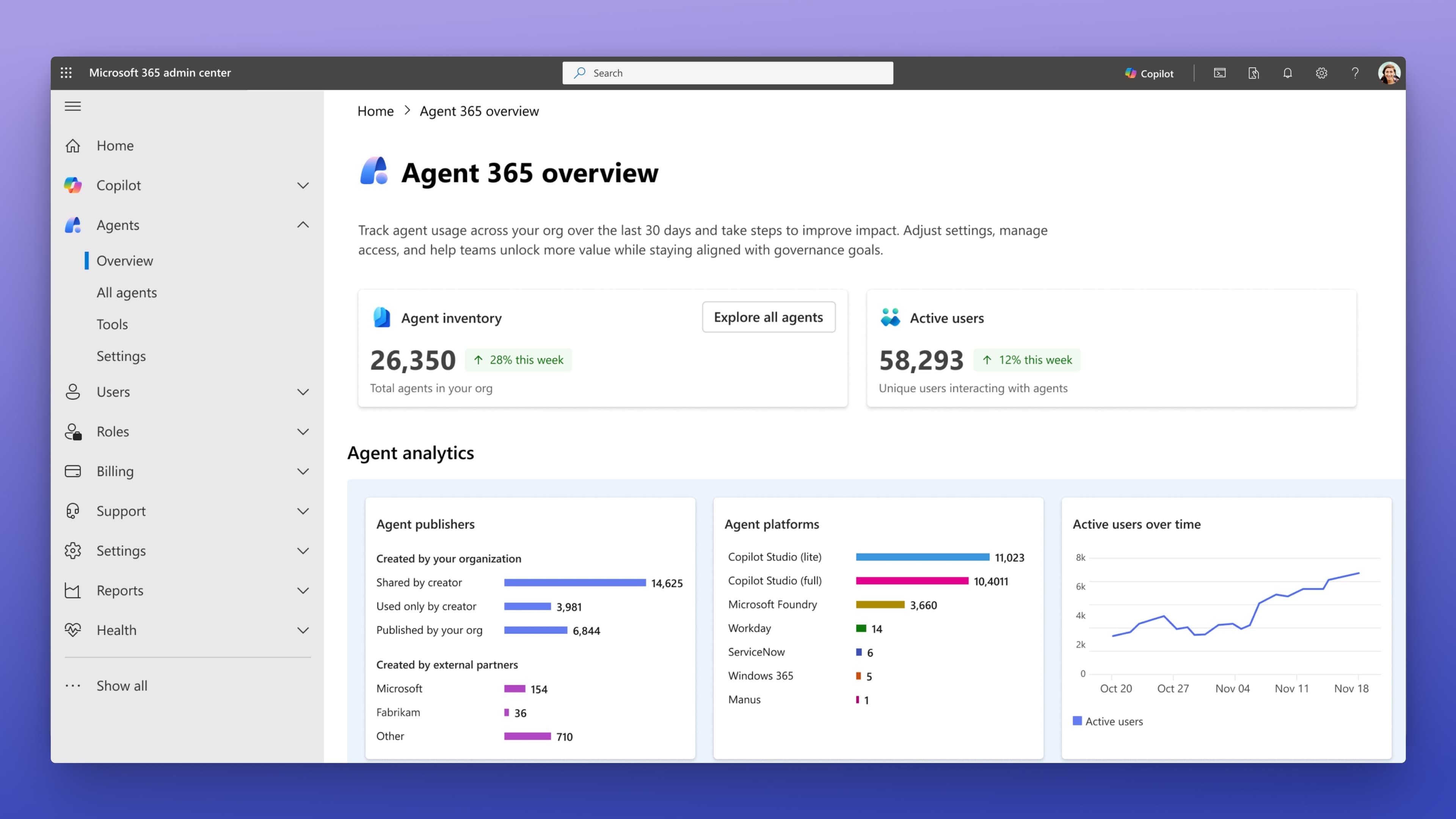
Overview
Microsoft Agent 365 gives IT and security teams a central place to see which AI agents exist, who owns them, what they access and how they behave. It extends familiar identity, data-protection, threat-detection, compliance and lifecycle controls from human users and applications to agents—including agents built outside Microsoft when they are synchronized or integrated correctly.
The product is a governance layer, not an agent builder or model runtime. Its value comes from the Agent Registry, Entra-backed identities, activity maps and telemetry, lifecycle policies, least-privilege access, Defender threat protection and Purview data controls. Organizations already standardized on Microsoft's security stack are the clearest fit; everyone else should model the prerequisite licenses, integration work and per-user coverage before treating the $15 standalone price as the total cost.
Use cases
The strongest fit depends on the job you need the product to complete, not the size of its feature list.
Find Microsoft, partner, custom and synchronized third-party agents and assign accountable owners or sponsors.
Give agents Entra-backed identities and apply scoped permissions, access reviews and Conditional Access based on risk.
Monitor connections between agents, people, tools and data, then route relevant telemetry into security and operations workflows.
Approve, publish, deploy, block, reassign, expire and retire agents with consistent policies and audit trails.
Extend Defender threat detection and Purview data-loss, sensitivity, retention and investigation controls to supported agent activity.
Capabilities
Create a tenant-wide inventory of agents, ownership, origin and status across Microsoft and integrated external platforms.
Surface unsanctioned or previously unmanaged agents and bring eligible activity into an administrative review process.
Assign first-class agent identities with owners, sponsors and permissions instead of relying on shared human credentials.
Use RBAC, ABAC, access packages, identity governance and risk-based Conditional Access to restrict resources and actions.
Visualize relationships among agents, people and data while monitoring activity, adoption, performance and risk signals.
Apply conditions and policies to approval, deployment, ownership, access review, expiration, blocking and retirement.
Assess agent security posture, detect suspicious behavior, investigate threats and block high-risk activity in supported environments.
Apply sensitivity, data-loss prevention, retention, eDiscovery, communication compliance and insider-risk controls to agent data and interactions.
Extend endpoint compliance and network-access guardrails to supported local and cloud agent scenarios.
Synchronize supported platforms such as Amazon Bedrock or Google Vertex AI for centralized visibility without requiring every integration to use the SDK.
Add identity, observability, notification, security and governed Microsoft 365 access to custom agents built with supported frameworks.
Give integrated agents auditable access to approved Microsoft 365 tools such as Mail, Calendar, SharePoint, OneDrive, Teams, Word and Dataverse.
Process
Step 1
Combine the registry, endpoint discovery, platform sync and owner reports to identify agents, users, sponsors and unmanaged gaps.
Step 2
Document each agent's purpose, data, tools, autonomy, blast radius, human approval points and business owner.
Step 3
Map users who interact with, delegate to, own, sponsor or manage premium agents and confirm the required Microsoft base, Defender and Purview entitlements.
Step 4
Use a dedicated agent identity where appropriate, grant the minimum resources and tools, and prohibit shared credentials or broad standing access.
Step 5
Set approval, publication, monitoring, DLP, retention, threat response, access review, expiration and retirement controls.
Step 6
Review logs, behavior, ownership, unused permissions and security signals continuously, then reapprove, restrict or retire agents as conditions change.
Cost
Agent 365 is licensed per user, not per agent. Microsoft says one licensed user can oversee many agents and there is currently no Agent 365 consumption charge, but users who interact with, delegate access to, own, sponsor or manage agents using premium capabilities may require coverage. Base Microsoft, Defender and Purview prerequisites can materially increase the total cost.
Included with eligible Microsoft cloud subscriptions
A starting governance layer without a paid Agent 365 premium license.
$15/user/month, paid yearly
Premium observability, governance, data security and threat protection for eligible licensed users.
$99/user/month, paid yearly
The broader Microsoft secure-AI bundle with Agent 365 included.
Included for eligible preview tenants
Opt-in access to experimental Agent 365 capabilities, not a production pricing tier.
Pricing checked . Check current pricing at the source ↗
Assessment
Compare
The right alternative depends on the specific output, workflow, controls and budget your project requires.
Agents
Choose Google's Gemini Enterprise Agent Platform when building and governing agents across Google Cloud models and services is the primary ecosystem requirement.
Explore Gemini Enterprise Agent Platform →Coding
Choose Splunk Agent Observability when model and agent telemetry, evaluations and production diagnostics matter more than Microsoft identity and lifecycle governance.
Explore Galileo (now Splunk Agent Observability) →Coding
Choose AgentOps for developer-focused testing, debugging and session observability when a full enterprise control plane is excessive.
Explore AgentOps →Agents
Choose GitHub Agent HQ when the primary need is orchestrating software-development agents inside GitHub workflows rather than governing enterprise agents across business systems.
Explore GitHub Agent HQ →Questions
Agent 365 is Microsoft's control plane for observing, governing and securing AI agents. It combines a registry, agent identities, analytics, lifecycle controls and integrations with Entra, Defender, Purview, Intune and Microsoft 365.
No. Copilot Studio, Microsoft Foundry and third-party frameworks build or host agents. Agent 365 inventories and governs them, with integration paths for Microsoft, partner and custom agents.
The standalone list price is $15 per user per month with annual commitment. It is included in Microsoft 365 E7, listed at $99 per user per month annually. Eligible cloud subscriptions also receive foundational capabilities.
No. Microsoft licenses it per user. Agents, blueprints and instances do not need separate licenses, but people who interact with, delegate to, own, sponsor or manage premium agents may need coverage.
No. It is sold as a standalone add-on. However, Microsoft documents base and security prerequisites, and E7 bundles the broadest integrated experience.
Yes, but integration depth varies. Supported agents may use built-in integration, registry sync or the Agent 365 SDK and CLI. Teams should verify identity, telemetry, policy and response coverage for each platform.
No. Agent builders, models, tools and runtime remain separate. Windows 365 for Agents is also a separate pay-as-you-go product rather than part of Agent 365.
Inventory a representative agent set, map owners and licenses, integrate telemetry, test least privilege and policy enforcement, simulate incidents, measure gaps for third-party agents and validate total licensing cost before scaling.
Bottom line
Microsoft Agent 365 is a serious governance option for enterprises that already rely on Entra, Defender, Purview and Microsoft 365. The registry, dedicated identities, lifecycle controls and security integrations address real gaps created by growing agent fleets. The headline $15 price is only meaningful after prerequisites and licensed-user scope are modeled; a successful rollout is as much an operating-model and integration project as a software purchase.
Visit Microsoft Agent 365 website ↗
Holo 2 - Lightweight AI models that power cost-efficient computer-use agents

Lux - OpenAGI's fast, cost-effective computer-use model that tops industry benchmarks

Kimi K2 Thinking - Moonshot AI's open-source thinking agent

Nemotron 3 - Nvidia's new family of open-source AI models in three sizes designed to help developers build multi-agent systems more efficiently

Get access to all our AI courses, hundreds of real-world AI use cases, live expert-led workshops, an exclusive network of AI early adopters, and more.
Get unlimited access to all of our current & upcoming industry-specific AI courses for the duration of your subscription.
To keep up with the rapid pace of AI, our team publishes AI implementation guides daily. Our library contains 300+ practical use cases to automate real-world work.
Join weekly, live, interactive sessions with industry leaders who are at the forefront of AI for hands-on implementation guidance and exclusive insights.
Network with an exclusive community of AI-first professionals who are working smarter with AI. Learn how early adopters are using AI in their work and businesses.