The Rundown AI homepage

Independent tool overview

Ideogram 4.5: features, pricing, and who it is for

Image-editing model focused on preserving details through repeated changes.

Visit the official Ideogram 4.5 site ↗
Ideogram 4.5 product preview
Type
Image-editing model
Specialty
Multi-turn detail preservation
Access
Ideogram platform
Editing cost
Priority credits required

Overview

What Ideogram 4.5 is

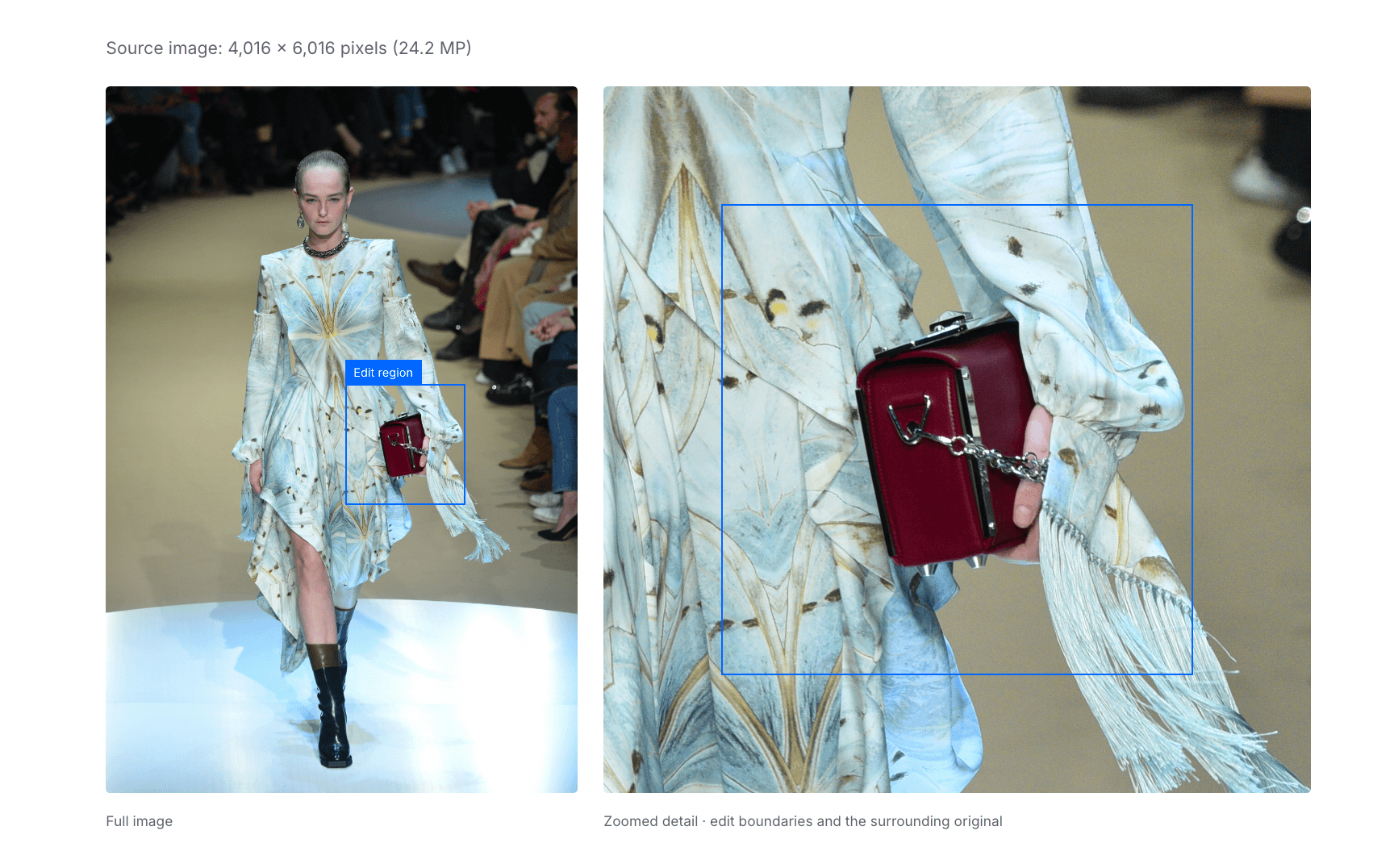
Ideogram 4.5 is an image editing model, introduced around a specific problem: repeated edits often shift pixels, colors, or textures far outside the requested change. Ideogram says this version reduces that drift, supports localized changes, and preserves the edges of a cropped high-resolution edit so it can fit back into an original image. The product page demonstrates uses from colorways and product photography to restoring old photos and altering text.

The model is part of Ideogram's image platform, not a separately priced subscription. App plans allocate priority credits and set privacy, queue, and export rules. The pricing page says AI-powered editing requires priority credits, even when slow generation remains available, so a free account should not be assumed to cover a long iterative editing job. Evaluate accuracy with your own images, especially branded text and fine details.

Use cases

Who Ideogram 4.5 is best for

The strongest fit depends on the job you need the product to complete, not the size of its feature list.

Product marketers

Refine a product scene or colorway while aiming to keep the rest of a campaign image intact.

Design teams

Iterate a visual direction across multiple small edits without constantly rebuilding the starting composition.

Architects and photographers

Explore material, lighting, restoration, or rendering changes on detailed source images.

Capabilities

Core Ideogram 4.5 features

1

Multi-turn editing

The release focuses on less drift across successive edits.

2

Localized high-resolution edits

Zoom into a region, edit it, and place the result back with preserved crop edges.

3

Targeted visual changes

Examples include lighting, text, product photography, interiors, and architecture.

4

Style and structure inputs

The showcase includes style reference, reframing, sketch-to-image, and depth-to-image examples.

5

Ideogram platform access

Use the model within Ideogram's app ecosystem, subject to plan credits and current availability.

Process

How the Ideogram 4.5 workflow works

  1. Step 1

    Start with source quality

    Use a clear original image and identify the area that should change.

  2. Step 2

    Describe the invariant

    State what must stay fixed—subject, typography, background, or composition—alongside the requested edit.

  3. Step 3

    Inspect each turn

    Compare the edited crop and full image after every change for drift or unintended text changes.

  4. Step 4

    Budget priority credits

    Estimate several iterations and reserve credits for final export rather than judging only a first generation.

Cost

Ideogram 4.5 pricing and free plan

Ideogram lists a Free plan and paid Plus, Pro, Team, and Enterprise plans. The page shows Plus at $20/month or $15/month billed annually and Pro at $60/month or $42/month billed annually. AI-powered editing needs priority credits; credit usage varies by model and rendering settings.

Free

$0

Eligible accounts receive limited slow credits.

  • One running or queued generation
  • Editing with AI requires priority credits
  • Images are published by default unless plan supports private generation

Plus / Pro

$20 / $60 monthly

Paid personal plans add monthly priority credits and private generations.

  • Plus: 2,400 priority credits/month
  • Pro: 7,500 priority credits/month
  • Annual billing lowers displayed monthly equivalent

Team / Enterprise

From $30/user monthly; Enterprise custom

Collaboration and negotiated usage.

  • Team minimum two users
  • Team annual equivalent $20/user/month
  • Enterprise custom credit allowance

Pricing checked . Check current pricing at the source ↗

Assessment

Ideogram 4.5 strengths and limitations

Where it stands out

  • Clear specialization in maintaining image detail across repeated edits.
  • High-resolution crop workflow is useful for production assets.
  • Public plan page explains priority-credit and privacy rules.

What to consider

  • Vendor examples do not prove identical results on every source image.
  • AI editing requires priority credits, limiting free experimentation.
  • Private image generation is plan-gated and should be checked before uploading sensitive work.

Compare

Ideogram 4.5 alternatives

The right alternative depends on the specific output, workflow, controls and budget your project requires.

Content Creator

Midjourney

Consider a different platform for image exploration and stylized generation.

Explore Midjourney →

Content Creator

Krea Agents

Consider an agent that plans and iterates creative work across multiple models.

Explore Krea Agents →

Questions

Ideogram 4.5 FAQs

Is Ideogram 4.5 a new image generator?

The model page specifically positions 4.5 around precise editing and preserving details through repeated changes.

Can it edit part of a large image?

Ideogram describes a zoom-edit workflow that preserves the crop edges so the change can be stitched into the original.

Does the free plan cover AI editing?

The pricing page says AI-powered editing requires priority credits, which are obtained through paid plans or top-ups.

Are generated images private?

Ideogram says images are published by default; Plus and Pro include unpublished generations.

Bottom line

Our Ideogram 4.5 verdict

Ideogram 4.5 is worth testing when a visual task needs many controlled revisions instead of one-off novelty. It is strongest as an iterative edit tool, but real quality and credit consumption should be assessed on the team’s own high-resolution assets.

Visit Ideogram 4.5 website ↗
The Rundown University

AI training for the future of work.

Get access to all our AI courses, hundreds of real-world AI use cases, live expert-led workshops, an exclusive network of AI early adopters, and more.

AI Courses

Get unlimited access to all of our current & upcoming industry-specific AI courses for the duration of your subscription.

Daily Guides

To keep up with the rapid pace of AI, our team publishes AI implementation guides daily. Our library contains 300+ practical use cases to automate real-world work.

Workshops

Join weekly, live, interactive sessions with industry leaders who are at the forefront of AI for hands-on implementation guidance and exclusive insights.

Community

Network with an exclusive community of AI-first professionals who are working smarter with AI. Learn how early adopters are using AI in their work and businesses.