Back-to-back meeting schedules
Capture decisions and actions without dividing attention between active listening and verbatim notes.
Independent tool overview
Granola is a bot-free AI meeting notepad that uses device audio, a live transcript, and any notes you type to produce structured summaries, action items, and searchable meeting memory.
Visit the official Granola site ↗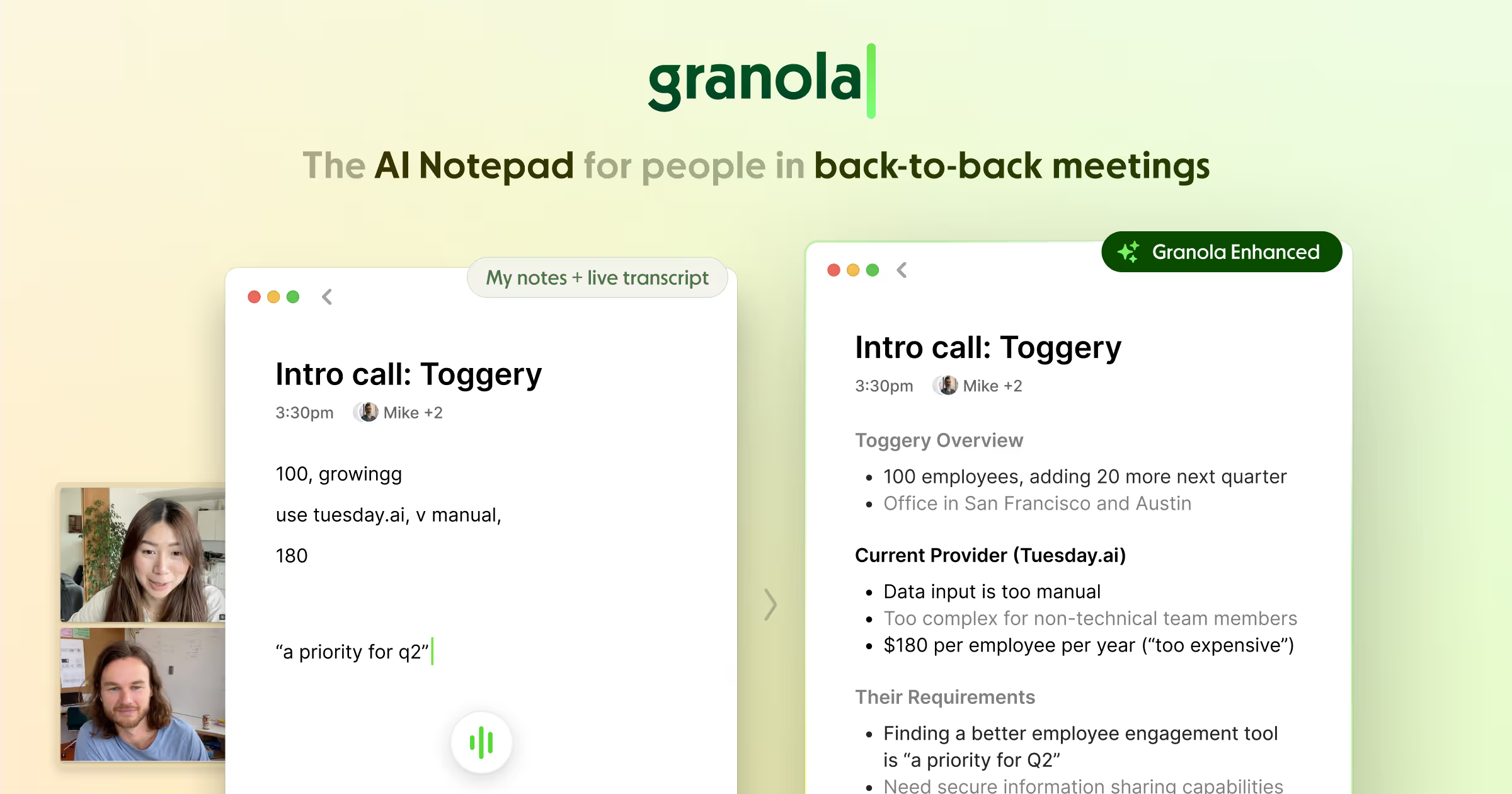
Overview
Granola runs on macOS, Windows, iOS, and Android and captures a meeting through the user's device rather than sending a visible bot into the call. You can jot down only the points that matter—or write nothing—and Granola combines the transcript, raw notes, and calendar context into an editable summary after the meeting.
The product has expanded beyond summaries into pre-meeting briefs, custom templates, cross-meeting chat, people and company views, mobile capture, integrations, an API, and an MCP connector. Its best fit is someone in frequent calls who values private-by-default notes and a human-guided notepad, provided the organization has clear consent, retention, and sharing rules.
Use cases
The strongest fit depends on the job you need the product to complete, not the size of its feature list.
Capture decisions and actions without dividing attention between active listening and verbatim notes.
Turn user interviews, planning calls, and design reviews into specs, themes, and follow-up work.
Keep a searchable history of account conversations and send selected notes into CRM or collaboration tools.
Transcribe through the user's device without adding another participant to a video call.
Use Business-plan API, MCP, and integrations to make approved meeting context available in other tools.
Capabilities
Captures system and microphone audio on the user's device after the user starts a note, with no bot joining the meeting.
Raw notes tell the AI what matters, while the transcript fills in context, structure, and detail.
Inspect the transcript or raw-note basis behind an enhanced note instead of treating every summary point as unsupported.
Use built-in or custom structures for interviews, sales calls, stand-ups, one-on-ones, and other recurring formats.
Ask questions within one meeting or across selected meetings, folders, people, companies, or the full available history.
Prepare for external meetings from prior notes, shared workspace notes, calendar details, the web, and optional Gmail context.
Keep notes private by default, then share a note or organize approved material in team folders.
Organize meeting history around calendar attendees and company information for relationship-level recall.
Share notes to Slack, Notion, HubSpot, Affinity, Attio, and Zapier on eligible plans.
Business includes API access and an MCP connector for making meeting notes available to compatible AI applications.
Process
Step 1
Sign in with Google Workspace or Microsoft and confirm that only the intended calendar context is available.
Step 2
Decide how participants will be informed and obtain any consent required by law, contract, or company policy.
Step 3
Open the scheduled meeting or a quick note and confirm that the transcription indicator is active.
Step 4
Write short notes or headings during the conversation to guide the enhanced summary.
Step 5
Check decisions, owners, dates, quotations, and action items against the transcript before distributing them.
Step 6
Send only the approved summary to the right folder, person, CRM, or integration and apply the team's retention rules.
Cost
Granola offers a free Basic plan, a $14-per-user monthly Business plan, and a $35-per-user monthly Enterprise plan. Business adds full history, advanced AI, integrations, API, MCP, and centralized billing; Enterprise adds organization-level security, administration, retention, and notification controls.
$0 per user/month
For evaluating Granola's core meeting notes and chat.
$14 per user/month
For individuals and small teams that need complete history and connected workflows.
$35 per user/month
For organizations that need centralized security, administration, and data controls.
Pricing checked . Check current pricing at the source ↗
Assessment
Compare
The right alternative depends on the specific output, workflow, controls and budget your project requires.
Project Management
Choose Fathom for a meeting assistant centered on automated summaries and a generous individual workflow.
Explore Fathom →Business Operations
Choose Fireflies for bot-based meeting capture, broad integrations, and conversation analytics.
Explore Fireflies AI →Project Management
Choose Otter.ai for established live transcription, collaborative transcripts, and meeting-agent features.
Explore Otter.ai →Questions
Granola is an AI meeting notepad that transcribes device audio, combines the transcript with any notes you type, and produces editable summaries, action items, and searchable meeting context.
No. Granola runs on the user's computer or phone and captures audio after the user starts a note. It does not add a participant to the call.
Yes. Basic is free with AI meeting notes, limited history, chat, folders, templates, and multi-language support. Business is $14 per user per month and Enterprise is $35.
Granola says it does not store meeting recordings. Desktop audio is transcribed in real time; mobile may temporarily cache audio for processing. It stores the transcript and notes.
Yes. Because it uses device audio, Granola works across Zoom, Google Meet, Microsoft Teams, Slack Huddles, and other meeting apps.
Granola says third-party providers such as OpenAI and Anthropic may not use customer data for training. Granola uses anonymized data to improve its own product unless the user opts out; Enterprise has training disabled by default.
Granola says independent auditors have assessed it against SOC 2 Type 2 standards. Buyers should obtain the current report and evaluate controls relevant to their own use case.
Consent and notice requirements depend on location, contract, workplace policy, and the nature of the conversation. Granola encourages a verbal notice and provides transparency features, but the user and organization remain responsible for compliance.
Bottom line
Granola is a compelling meeting-notes choice for people who want high-quality, editable summaries without a bot in the room. Its human-guided note model, cross-meeting chat, and Business integrations are genuinely useful; the essential implementation work is making the unobtrusive capture transparent through strong consent, sharing, retention, and verification practices.
Visit Granola website ↗
Get access to all our AI courses, hundreds of real-world AI use cases, live expert-led workshops, an exclusive network of AI early adopters, and more.
Get unlimited access to all of our current & upcoming industry-specific AI courses for the duration of your subscription.
To keep up with the rapid pace of AI, our team publishes AI implementation guides daily. Our library contains 300+ practical use cases to automate real-world work.
Join weekly, live, interactive sessions with industry leaders who are at the forefront of AI for hands-on implementation guidance and exclusive insights.
Network with an exclusive community of AI-first professionals who are working smarter with AI. Learn how early adopters are using AI in their work and businesses.


