ComfyUI application backends
Turn a proven node graph into an endpoint that a website, internal tool or product can call.
Independent tool overview
Comfy Deploy is a cloud and open-source platform for sharing ComfyUI environments, testing workflows on GPUs and exposing versioned workflows as application APIs.
Visit the official Comfy Deploy site ↗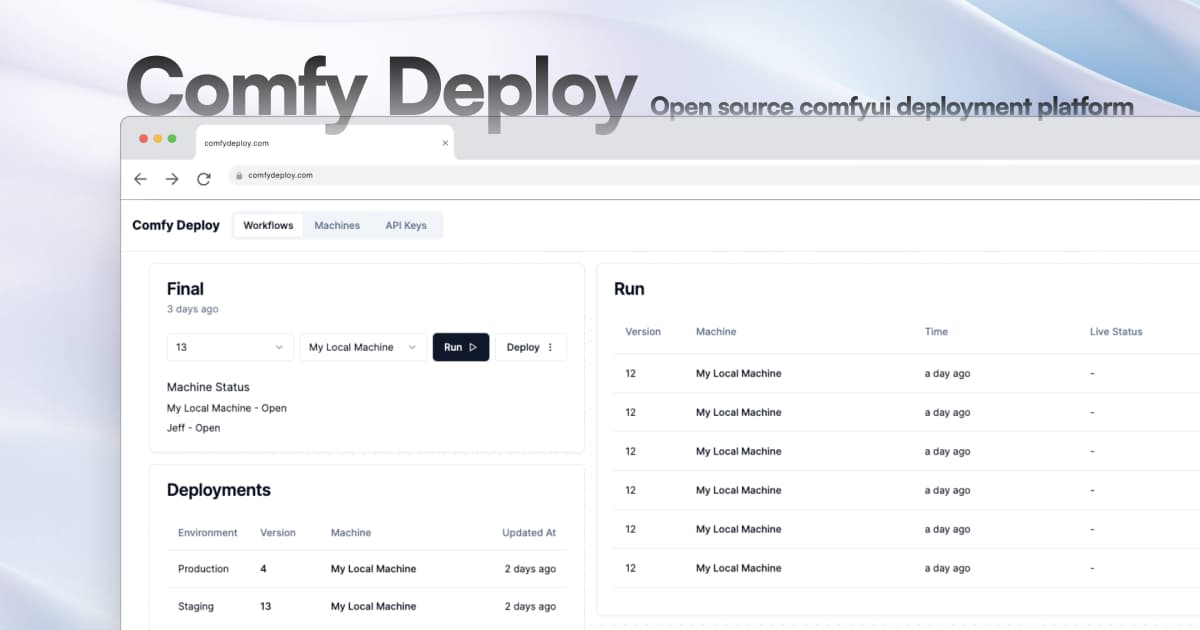
Overview
Comfy Deploy packages ComfyUI workflows for team use and production applications. A developer can import a workflow JSON, reproduce its nodes and models in a cloud machine, expose selected inputs, test it in a managed ComfyUI workspace and deploy a version behind an authenticated API. Non-technical teammates can use simplified playgrounds without editing the underlying node graph.
The project changed direction in 2025: its founders open-sourced the full frontend and backend under GPL-3.0 while continuing to offer the hosted pay-as-you-go service and support existing customers. That makes Comfy Deploy both a usable hosted product and a self-hosting foundation, but teams should evaluate the maintenance model, deployment ownership and migration risk rather than treating it like a conventional fast-growing SaaS platform.
Use cases
The strongest fit depends on the job you need the product to complete, not the size of its feature list.
Turn a proven node graph into an endpoint that a website, internal tool or product can call.
Share models, custom nodes and tested workflows while giving non-builders a simpler playground.
Attach separate workflow versions to staging and production deployments before promoting a change.
Select different cloud GPUs for image, video and other workflows instead of maintaining one fixed machine.
Self-host or inspect the full platform when managed SaaS alone does not meet ownership requirements.
Capabilities
Imports a ComfyUI workflow JSON and detects the custom nodes needed for a compatible environment.
Runs ComfyUI in a browser-backed workspace for editing and testing on cloud machines.
Keeps downloaded models available to the workspace and its shared workflow environments.
Supports team-specific ComfyUI dependencies rather than limiting users to a small fixed catalog.
Marks selected node values as external inputs for API calls and simplified playgrounds.
Connects a workflow version and machine to staging or production deployment slots.
Queues authenticated runs, retrieves status and cancels work through the current V2 endpoints.
Sends run updates to an application instead of requiring constant status polling.
The hosted product advertises autoscaling choices ranging from T4-class hardware through high-memory accelerators.
Publishes the application stack for teams willing to operate the service and its dependencies themselves.
Process
Step 1
Test the ComfyUI graph, pin model files and record exact custom-node versions before moving it to deployment.
Step 2
Upload the workflow JSON, select or create a machine and resolve any ambiguous custom-node detections.
Step 3
Choose a GPU, ComfyUI version, custom nodes and private model files that reproduce local behavior.
Step 4
Make only the intended parameters external and define allowed sizes, types, defaults and validation in the calling application.
Step 5
Exercise expected, malformed and concurrent requests while recording latency, failure rate and cost per successful output.
Step 6
Promote a fixed version to production, consume V2 status or webhooks and retain a rollback path when nodes or models change.
Cost
Comfy Deploy offers a hosted pay-as-you-go path and a GPL-licensed self-hosted codebase. The public site no longer presents a stable numeric GPU rate card, so teams should check current per-machine rates inside the hosted account before estimating production cost. Self-hosting removes the platform license fee but not infrastructure or operations cost.
Usage-based
Managed workspace and API deployment billed for selected cloud resources.
$0 software license
Run the GPL-3.0 platform code in infrastructure controlled by your team.
Contact Comfy Deploy
Support and commercial arrangements for established or higher-touch deployments.
Pricing checked . Check current pricing at the source ↗
Assessment
Compare
The right alternative depends on the specific output, workflow, controls and budget your project requires.
Coding
A more model-centric hosted API platform with broad public model packaging and usage-based inference.
Explore Replicate →Coding
Better suited to deploying and serving mainstream open models without centering the workflow on ComfyUI graphs.
Explore Together AI →Content Creator
A managed creative suite for teams that want visual generation and editing without operating ComfyUI infrastructure.
Explore Krea →Content Creator
A higher-level managed creative platform when polished image and video tools matter more than custom node-graph deployment.
Explore Runway Creative →Questions
Comfy Deploy is a team workspace and deployment layer for ComfyUI. It imports workflows, reproduces their nodes and models on cloud machines and exposes selected versions as authenticated APIs or simplified playgrounds.
Yes. Its site, hosted console and current V2 documentation remain available. The founders also open-sourced the full platform and said the hosted service would remain online and supported while they explored other ideas.
Yes. The full platform repository is published under GPL-3.0. Self-hosters still need to provision and operate databases, storage, authentication, queues and GPU execution.
The hosted service uses pay-as-you-go cloud-resource pricing, but a current numeric GPU rate card was not published on the public marketing pages reviewed. Check the account's rates for your GPU, storage and concurrency. The open-source software has no license fee, but infrastructure and engineering are separate costs.
It is designed for custom nodes and models, but deployability depends on compatible code, available model files, licenses, VRAM and a reproducible environment. Test the exact graph rather than assuming every local workflow will import cleanly.
The V2 documentation lists https://api.comfydeploy.com/api. Older integrations using the www.comfydeploy.com API base and legacy run endpoints should follow the V2 migration guide.
Yes. The deployment documentation describes production and staging slots, each tied to a specific workflow version and machine.
Pin dependencies, test malformed and concurrent requests, measure cold starts and cost, validate webhook retries, scan custom-node code, check model licenses and keep a known-good deployment available for rollback.
Bottom line
Comfy Deploy remains useful when the hard problem is operationalizing a custom ComfyUI graph for a team or application. The hosted path can save substantial setup time, while the open-source release provides control. New deployments should proceed with clear eyes about the project's transition, current API generation and the maintenance burden hidden inside custom-node environments.
Visit Comfy Deploy website ↗
Get access to all our AI courses, hundreds of real-world AI use cases, live expert-led workshops, an exclusive network of AI early adopters, and more.
Get unlimited access to all of our current & upcoming industry-specific AI courses for the duration of your subscription.
To keep up with the rapid pace of AI, our team publishes AI implementation guides daily. Our library contains 300+ practical use cases to automate real-world work.
Join weekly, live, interactive sessions with industry leaders who are at the forefront of AI for hands-on implementation guidance and exclusive insights.
Network with an exclusive community of AI-first professionals who are working smarter with AI. Learn how early adopters are using AI in their work and businesses.


