Operations and program teams
Reconcile spreadsheets, compile updates, build trackers, organize onboarding material, and turn scattered inputs into repeatable operating documents.
Independent tool overview
Claude Cowork is Anthropic's knowledge-work agent for delegating multi-step tasks across files, connected apps, browsers, and desktop tools. It can research, analyze, create polished deliverables, coordinate subagents, and run scheduled work, while keeping the user able to review and redirect the task.
Visit the official Claude Cowork site ↗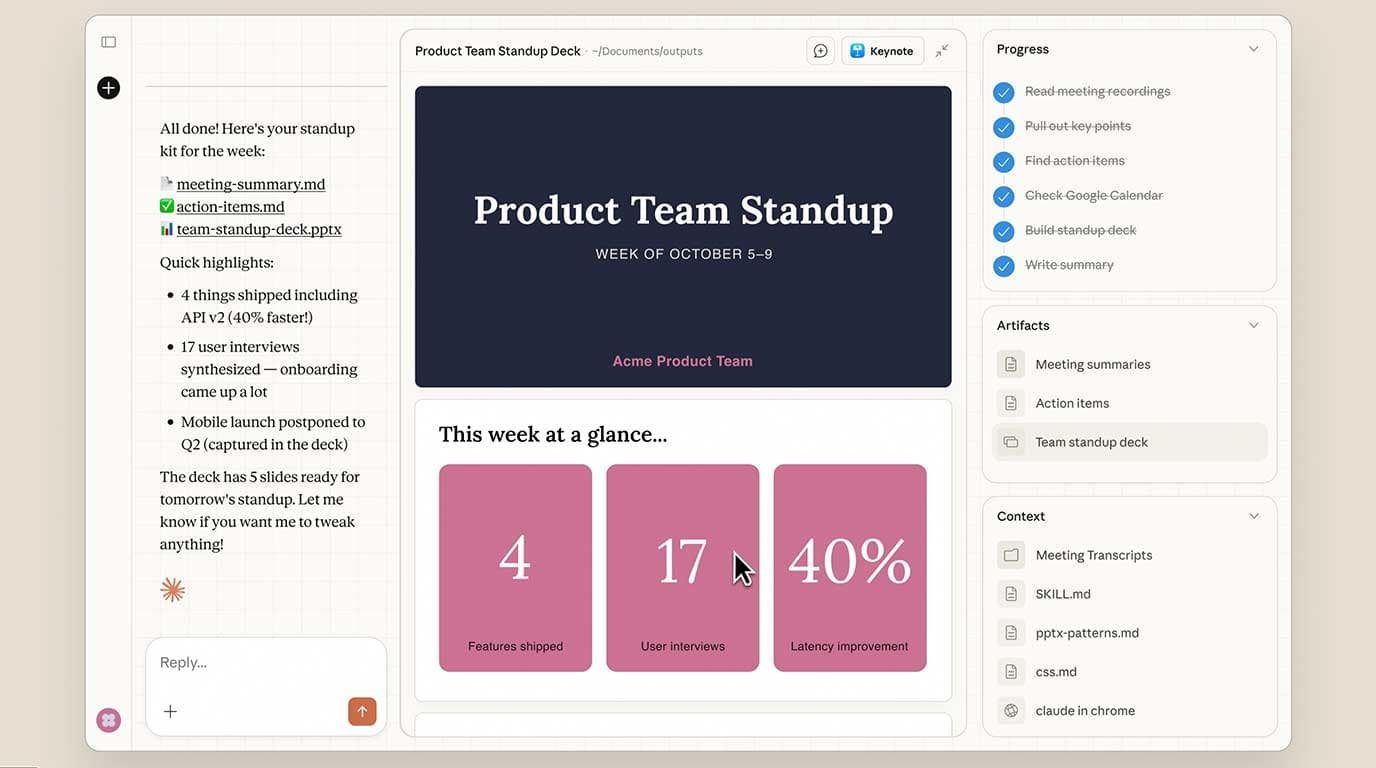
Overview
Claude Cowork brings the agentic architecture behind Claude Code into Claude's regular interface for non-coding work. Instead of only answering a question, it can open source material, plan a task, work across tools, create or revise files, and return a document, deck, spreadsheet, tracker, or other deliverable for review.
Cowork is no longer a macOS-only research preview. It is available on paid Claude plans in the desktop app, with web and mobile access in beta and a Claude in Chrome side-panel experience on supported plans. Local folders, a personal browser, and desktop apps still require a connected desktop app and the permissions you grant there.
The current product combines connectors, plugins, skills, local files, code execution, subagents, scheduled tasks, computer use, and browser automation. Claude chooses the most direct available tool: a connector first, a browser when needed, and screen interaction when no better integration exists.
Cowork sessions can run in Anthropic's cloud in an isolated temporary environment. That isolation protects the local machine from cloud code, but it does not remove the risk of bad instructions in email, documents, webpages, plugins, or MCP servers influencing an agent that has permission to read or write real data.
The right operating model is delegation with review, not unattended authority. Give Claude the narrowest folders, apps, sites, and write permissions needed; keep consequential messages, purchases, deletions, and sensitive-data workflows behind manual approval; and verify every finished deliverable before it leaves the organization.
Use cases
The strongest fit depends on the job you need the product to complete, not the size of its feature list.
Reconcile spreadsheets, compile updates, build trackers, organize onboarding material, and turn scattered inputs into repeatable operating documents.
Combine local documents, web research, messages, and connected-drive material into cited briefs, market maps, and decision-ready reports.
Prepare account briefs, synthesize calls and CRM context, draft follow-ups, and maintain recurring pipeline or customer-health reports.
Move from research and source assets to briefs, campaign plans, copy, presentations, and production files in one delegated workflow.
Organize documents, compare terms, draft summaries, reconcile data, and flag items for expert review without treating Claude as the final professional decision-maker.
Schedule low-risk briefings, reports, research, and summaries that can run from cloud-accessible connectors and saved files.
Capabilities
Describe the outcome and Claude proposes an approach, works through the steps, shows progress, and lets you steer the task before it finishes.
Read and write approved folders or account files, then create documents, spreadsheets, presentations, reports, trackers, and other usable artifacts.
Work with services such as Slack and Google Drive, add trusted MCP connections, install role-specific plugins, and reuse skills or commands for consistent procedures.
Split larger assignments into concurrent research, analysis, drafting, and checking workstreams before assembling the result.
Run hourly, daily, weekly, weekday, manual, or other supported recurring work. Cloud-accessible tasks can run with the computer off; local files or apps require the desktop connection.
Cowork can open its own separate browser to navigate pages, read sites, and fill forms without seeing the user's personal tabs, bookmarks, or passwords unless a login is deliberately imported.
Use the existing browser context when the job depends on the page already open and the accounts already signed in, subject to plan and admin availability.
On supported individual plans, a research-preview mode can click, type, and navigate approved desktop apps when no connector or browser path is suitable.
Start or monitor a Cowork session from desktop, web, or mobile, answer a question, redirect the task, and retrieve outputs from another surface.
Team and Enterprise controls include Cowork enablement, cloud-session controls, permissions, spend limits, usage analytics, OpenTelemetry, role-based access, and Compliance API coverage where available.
Process
Step 1
Start with a useful, reversible deliverable such as a cited brief or draft report. Define what done looks like, which sources are authoritative, and what Claude must not do.
Step 2
Connect only the folder, apps, sites, and tools required for the task. Use a dedicated working folder and keep credentials, health records, banking data, and unrelated confidential material out of scope.
Step 3
Use Manual for new tools or consequential work. Auto adds an action-safety review but consumes more usage. Skip removes that automatic action check and is appropriate only for tightly trusted, low-risk environments.
Step 4
State audience, format, sources, deadline, quality bar, citations, examples, decision rules, and which actions require an explicit stop for approval.
Step 5
Follow the surfaced steps, question unexpected file or site access, and stop the session if the task expands or Claude appears to follow instructions embedded in untrusted content.
Step 6
Check claims against citations, inspect formulas and formatting, compare file changes, and manually approve any communication, publication, purchase, deletion, or other external action.
Step 7
Run the workflow successfully several times, remove consequential write actions, then schedule it and review the past-run log regularly.
Cost
Cowork is included with paid Claude subscriptions and shares the plan's usage pool with other Claude activity. Agentic work typically consumes more capacity than chat, and Auto approval adds extra safety-check usage. Paid users can enable usage credits to continue at standard API rates after included limits are reached.
$20/month or $200/year
Individual plan with Cowork, Claude Code, Research, projects, connectors, and the broader paid Claude feature set.
$100/month
Individual plan for frequent Cowork and Claude use with five times Pro capacity per session and priority access.
$200/month
Highest-volume individual subscription for daily agentic work across Claude products.
$25/seat monthly or $20/seat monthly on annual billing
Managed team workspace for 2–150 users with Cowork, central administration, SSO, connector controls, and no model training on content by default.
$125/seat monthly or $100/seat monthly on annual billing
Higher-capacity Team seat with five times the usage of a Standard seat.
$20/seat plus usage at API rates, or sales-assisted pricing
Consumption-based or negotiated deployment with fine-grained access, spend, retention, audit, compliance, network, and identity controls.
Pricing checked . Check current pricing at the source ↗
Assessment
Compare
The right alternative depends on the specific output, workflow, controls and budget your project requires.
Agents
Choose ChatGPT Agent for an OpenAI-centered general agent that combines browsing, research, code, files, and its own computer environment.
Explore ChatGPT Agent →Business Operations
Choose Microsoft Copilot when the primary requirement is native work inside Microsoft 365 with existing tenant governance and business data.
Explore Microsoft Copilot →Content Creator
Choose Gemini when Google Workspace, Gemini apps, and Google's consumer productivity ecosystem are the center of the workflow.
Explore Gemini →Agents
Choose Manus for a cloud-first autonomous agent experience focused on long-running research, analysis, sites, and task execution.
Explore Manus →Questions
Claude Cowork is Anthropic's agent for multi-step knowledge work. It can work across approved files, connected apps, browsers, and tools to create finished deliverables rather than only returning a chat response.
No. Cowork is available through paid Claude plans on desktop, with web and mobile in beta and a Chrome side-panel option on supported plans. Exact local-file, browser, and computer-use capabilities vary by operating system and plan.
Cowork is included in paid Claude plans. Individual Pro is $20 monthly or $200 annually; Max is $100 or $200 monthly. Team starts at $25 per seat monthly or $20 per seat per month with annual billing.
Cloud Cowork sessions and cloud-compatible scheduled tasks can continue with the computer off. Work that needs a local folder, personal browser, or desktop app requires the Claude Desktop app to remain open and connected.
Yes, but only through folders connected in the desktop app and subject to the permissions granted. Anthropic recommends using a dedicated working folder and keeping sensitive or unrelated files out of scope.
Chat is best for conversation and drafting, Cowork for cross-app knowledge work and finished business deliverables, and Claude Code for software development in terminals, IDEs, and repositories.
Yes. Cowork now has a separate built-in browser on supported plans, and it can also use Claude in Chrome when the task depends on the user's already-open page and signed-in browser context.
A research-preview computer-use mode can click, type, and navigate approved applications on supported individual plans. It is slower and riskier than a direct connector and should not be used for sensitive or high-stakes actions without close supervision.
They are useful for low-risk summaries and reports, but no autonomous task is risk-free. Avoid scheduled purchases, messages, destructive file actions, and sensitive data; review every run and pause tasks that are no longer needed.
Anthropic's current pricing page says Team content is not used for model training by default, and business data is governed by the applicable commercial terms. Organizations should still verify their selected plan, retention controls, connectors, and deployment settings.
Bottom line
Claude Cowork is one of the most complete general knowledge-work agents for people already using Claude. Its advantage is the combination of strong document reasoning, real deliverables, connectors, files, browser automation, schedules, subagents, and enterprise controls. The same breadth creates meaningful security and cost risk, so start with a narrow read-heavy workflow, use Manual approval, measure usage and accuracy, and expand permissions only after the process is dependable.
Visit Claude Cowork website ↗
Grok Voice Agent - Build voice agents that speak dozens of languages, call tools, and search realtime data.
Skills - Vercel's open ecosystem for agent skills

MAI-UI - Alibaba's AI agent that can autonomously control smartphone apps and complete multi-step tasks on mobile devices
OpenClaw - Agentic AI bot that takes actions for you from Telegram, WhatsApp, or other messaging apps

Get access to all our AI courses, hundreds of real-world AI use cases, live expert-led workshops, an exclusive network of AI early adopters, and more.
Get unlimited access to all of our current & upcoming industry-specific AI courses for the duration of your subscription.
To keep up with the rapid pace of AI, our team publishes AI implementation guides daily. Our library contains 300+ practical use cases to automate real-world work.
Join weekly, live, interactive sessions with industry leaders who are at the forefront of AI for hands-on implementation guidance and exclusive insights.
Network with an exclusive community of AI-first professionals who are working smarter with AI. Learn how early adopters are using AI in their work and businesses.