Multi-agent debugging
See which agent, model, tool, or operation caused a wrong answer, exception, loop, delay, or unexpected handoff.
Independent tool overview
AgentOps is an observability platform and open-source SDK for tracing, debugging, and monitoring AI agents and LLM applications. It records agent runs as hierarchical traces, shows LLM and tool activity in a visual waterfall, estimates token costs, supports replay and export, and integrates with major model providers and agent frameworks.
Visit the official AgentOps site ↗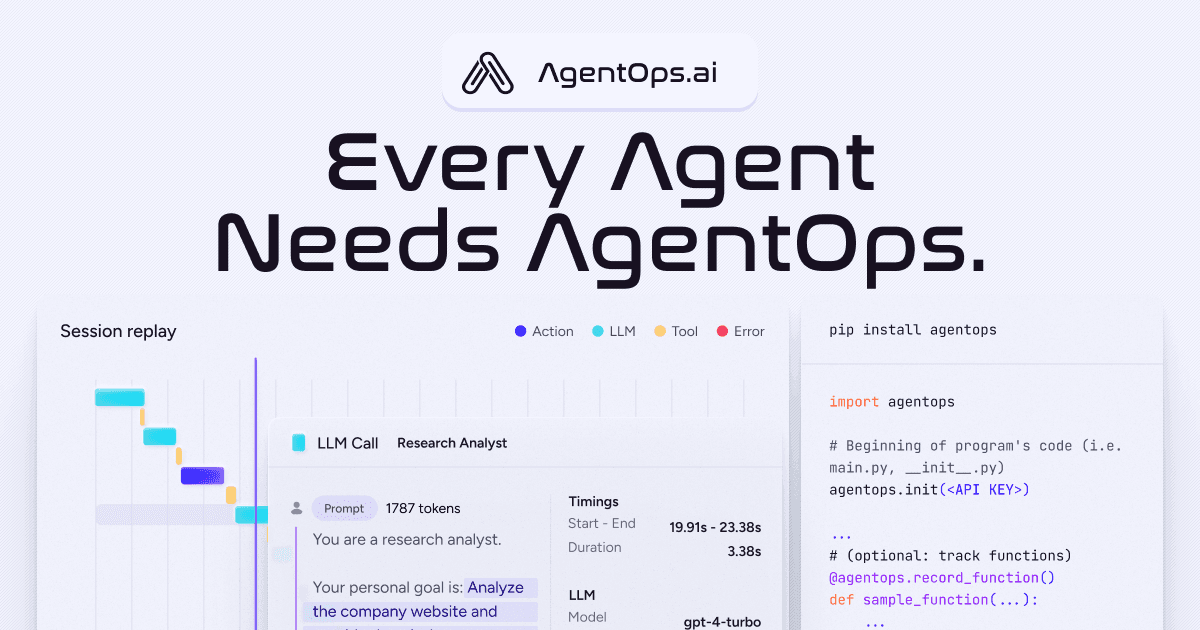
Overview
AgentOps is built for developers who need to understand what an agent did between the initial request and the final response. It captures sessions, agents, workflows, operations, model calls, tool calls, errors, timings, prompts, completions, token counts, and estimated costs.
The Python SDK can auto-instrument supported libraries after initialization, while decorators and manual controls let teams define their own trace, agent, operation, and tool boundaries. A TypeScript/JavaScript SDK is also documented for Node.js applications.
The dashboard provides session lists, aggregate views, chat-style LLM histories, and a timeline waterfall for drilling into an individual span. AgentOps also markets point-in-time replay, audit trails, prompt-injection visibility, cost monitoring across agents, and fine-tuning from saved completions.
AgentOps supports cloud use, a read-only API for exporting trace data, and self-hosting for teams that need greater control over sovereignty, retention, infrastructure, and compliance. Self-hosting is operational work, not a zero-maintenance privacy switch.
Use cases
The strongest fit depends on the job you need the product to complete, not the size of its feature list.
See which agent, model, tool, or operation caused a wrong answer, exception, loop, delay, or unexpected handoff.
Track token counts and estimated model and tool spend across traces, agents, providers, and versions.
Use one tracing layer across OpenAI Agents, CrewAI, AutoGen, LangChain, LangGraph, Google ADK, and other supported integrations.
Choose cloud observability for speed or self-host the open platform when data residency and infrastructure control justify the work.
Capabilities
Initialize the SDK to identify supported providers and frameworks and begin recording their LLM and agent activity.
Organize a run into session, agent, workflow, operation, model, and tool spans so dependencies remain visible.
Inspect a time-ordered view of model calls, actions, tools, errors, latency, and the exact data associated with a selected event.
Review past executions and preserve a trace of prompts, completions, errors, and suspicious behavior for debugging and investigation.
Monitor input and output tokens, model usage, estimated spend, and optional custom costs assigned to tools.
Instrument business-specific functions, agents, workflows, and tools, then filter runs by environment, version, customer segment, or experiment.
Retrieve project, trace, span, success, failure, token, and cost data programmatically for reporting or downstream analysis.
Run AgentOps services and storage in your own environment for data sovereignty, customization, compliance, and infrastructure control.
Process
Step 1
Decide which prompts, outputs, tool arguments, customer identifiers, secrets, and regulated fields may be recorded or must be redacted.
Step 2
Add the SDK and API key, start with automatic instrumentation, and use explicit decorators where business boundaries matter.
Step 3
Use distinct projects or tags for local, test, staging, and production traffic so experiments do not contaminate operational data.
Step 4
Use the waterfall and span details to find bad prompts, wrong tools, loops, latency, token waste, and provider errors.
Step 5
Add tests, alerts, budgets, redaction, approval steps, retention rules, and version comparisons based on recurring failure patterns.
Cost
AgentOps currently offers Basic at $0 for up to 5,000 events. Pro starts at $40 per month and uses pay-as-you-go pricing, with unlimited event limit and log retention, export, support, and role-based permissions. Enterprise pricing is custom and adds SLA, Slack Connect, SSO, custom retention, on-premise or cloud self-hosting, and compliance-oriented options. Because the public page does not publish the full Pro usage curve, estimate monthly events and confirm the calculator before production rollout.
$0/month
For prototypes and small projects starting with agent tracing.
Starts at $40/month
Pay-as-you-go observability for production teams.
Custom
For governed deployments and custom infrastructure requirements.
Pricing checked . Check current pricing at the source ↗
Assessment
Compare
The right alternative depends on the specific output, workflow, controls and budget your project requires.
Coding
A strong alternative for LLM request observability, costs, latency, caching, and gateway-oriented monitoring.
Explore Helicone →Questions
AgentOps records AI-agent and LLM executions so developers can inspect model calls, tool use, errors, latency, prompts, outputs, token counts, and estimated cost.
Basic is free for up to 5,000 events. Pro starts at $40 per month with pay-as-you-go usage, and Enterprise is custom.
Agent runs can contain many recorded items such as model calls, tool calls, operations, actions, and errors. Instrument a representative workflow and check the dashboard before estimating monthly volume.
Current documentation lists integrations including OpenAI Agents, CrewAI, AutoGen, LangChain, LangGraph, Google ADK, LlamaIndex, Haystack, Agno, Smolagents, and several model providers.
Yes, its trace views can include the exact prompt and completion for an LLM call. Establish redaction and access rules before enabling it on sensitive production traffic.
Yes. AgentOps publishes self-hosting documentation, and enterprise plans advertise on-premise and AWS, GCP, or Azure deployment options.
Yes. AgentOps documents an environment-data opt-out setting. The default is to collect limited host information such as OS, Python and SDK versions, process ID, and an anonymized hostname.
It helps investigate and compare runs, but observability is not a complete evaluation suite. Teams still need expected outputs, automated checks, adversarial tests, security controls, and human review.
Bottom line
AgentOps is a practical fit for teams whose AI agents have become too complex for print statements and provider dashboards. Its broad instrumentation, hierarchical traces, waterfall, cost data, and self-hosting path are meaningful strengths. The main implementation risk is over-collection: define telemetry and retention rules, scrub secrets and personal data, estimate event volume from real traces, and pair observability with formal evaluations and production safeguards.
Visit AgentOps website ↗
Get access to all our AI courses, hundreds of real-world AI use cases, live expert-led workshops, an exclusive network of AI early adopters, and more.
Get unlimited access to all of our current & upcoming industry-specific AI courses for the duration of your subscription.
To keep up with the rapid pace of AI, our team publishes AI implementation guides daily. Our library contains 300+ practical use cases to automate real-world work.
Join weekly, live, interactive sessions with industry leaders who are at the forefront of AI for hands-on implementation guidance and exclusive insights.
Network with an exclusive community of AI-first professionals who are working smarter with AI. Learn how early adopters are using AI in their work and businesses.


