GitHub-centered engineering teams
Keep agent assignments, implementation branches, checks, discussion, review, and audit context inside the repository workflow.
Independent tool overview
GitHub Agent HQ is the multi-agent layer across GitHub Copilot, GitHub.com, VS Code, mobile, and the CLI, giving developers a shared place to assign coding work, choose agents, monitor sessions, inspect changes, and govern access.
Visit the official GitHub Agent HQ site ↗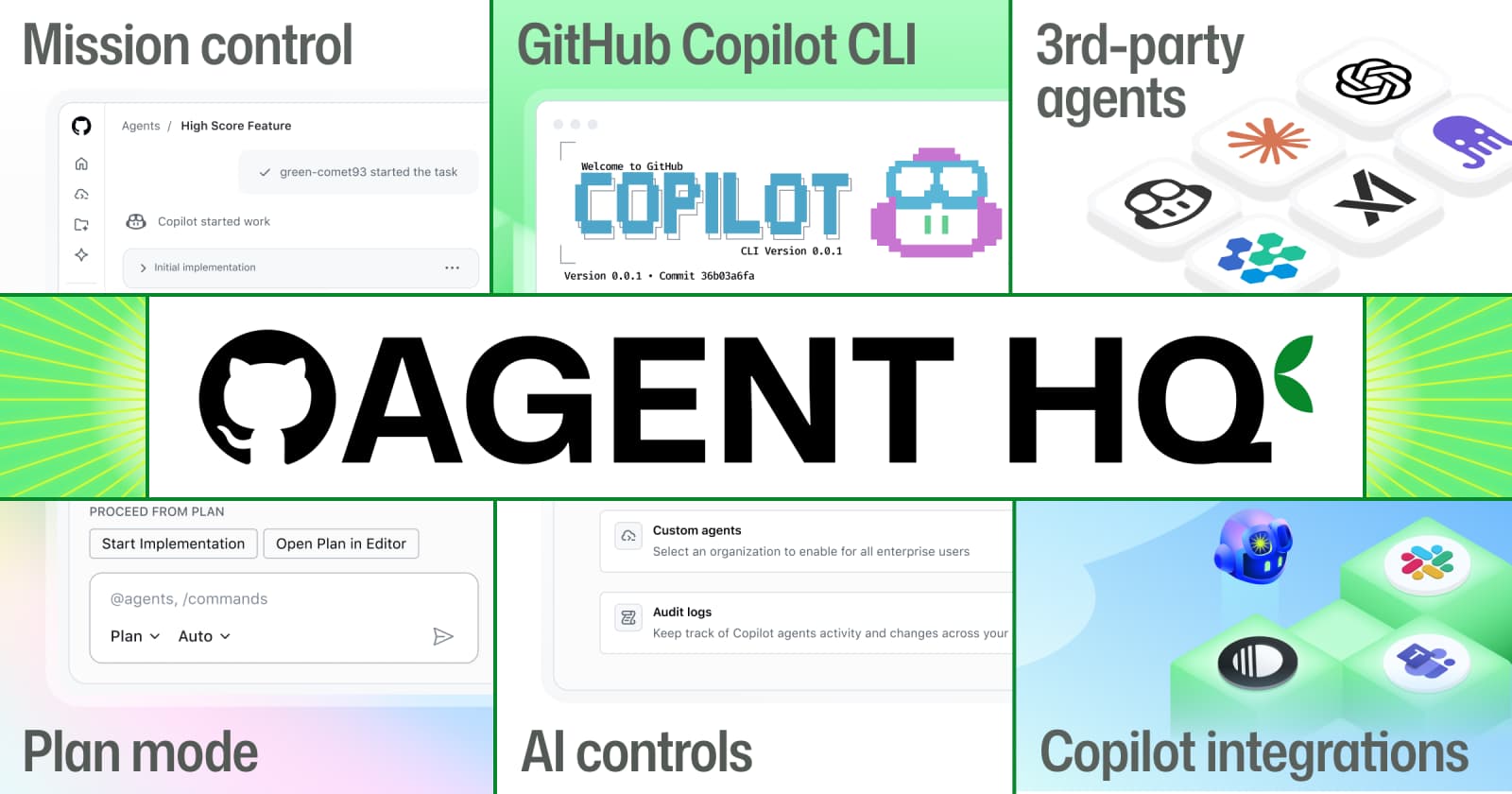
Overview
GitHub Agent HQ is not a separate chatbot or a new code editor. It is GitHub's umbrella for making coding agents native to the pull-request workflow. Its mission-control experience lets developers assign issues and prompts to GitHub Copilot or supported third-party agents, run work asynchronously, follow sessions across GitHub surfaces, inspect logs and commits, and review the resulting branch or pull request.
The advantage is coordination: repository context, issues, branches, checks, review, identity, policies, and agent work live in the same system. The risk is assuming orchestration equals correctness. Every agent still needs bounded permissions, a clear task, reproducible tests, human code review, security checks, and a rollback path. Cost also has two moving parts because agent work consumes GitHub AI Credits and can consume GitHub Actions minutes.
Use cases
The strongest fit depends on the job you need the product to complete, not the size of its feature list.
Keep agent assignments, implementation branches, checks, discussion, review, and audit context inside the repository workflow.
Hand off contained bugs, tests, documentation, dependency work, refactors, and incremental features while developers continue other work.
Compare Copilot, Codex, Claude Code, and custom agent approaches without creating a completely separate task system for each provider.
Start cloud work from an issue or prompt and review a plan, branch, or pull request later rather than keeping an IDE session open.
Control allowed agents and models, access, MCP use, budgets, policies, audit logs, and adoption metrics across an organization.
Monitor or continue relevant sessions from GitHub.com, VS Code, mobile, the CLI, integrations, and the Copilot app.
Capabilities
View and manage agent sessions across repositories from GitHub's agents interface.
Choose GitHub Copilot, supported third-party agents, or custom agents according to task, model access, and organization policy.
Copilot cloud agent works asynchronously in an ephemeral environment where it can inspect code, edit files, and run tests and linters.
Research and refine an implementation plan before asking the cloud agent to create a pull request.
Run multiple bounded tasks concurrently and monitor their progress from the same mission-control view.
Track current progress, duration, token use, tool calls, generated commits, and validation steps.
Redirect a Copilot cloud-agent session with follow-up instructions while it is working.
Copilot-authored commits are signed and link back to the session log, with the task initiator recorded as co-author.
Move agent output through familiar diffs, checks, branch protection, comments, approvals, and merge controls.
GitHub highlights branch controls, merge-conflict resolution, improved navigation, commenting, and agentic code review.
Define specialized behavior, tools, and repository rules for tasks such as frontend work, testing, or documentation.
Start or collaborate on agent tasks from supported products including Slack, Microsoft Teams, Jira, Azure Boards, Linear, and Raycast.
Manage which agents, models, MCP servers, permissions, and policies developers can use.
Measure adoption and pull-request lifecycle outcomes such as agent-created PRs, merges, and median time to merge.
Process
Step 1
Select work with a clear repository, expected behavior, constraints, tests, and definition of done; avoid an unreviewable open-ended rewrite.
Step 2
Document architecture, commands, conventions, restricted areas, security expectations, and validation requirements in version-controlled guidance.
Step 3
Match the task to Copilot, Codex, Claude Code, or an approved custom agent while considering access, capabilities, data terms, and credit cost.
Step 4
Start the session from GitHub or a supported surface, watch the plan and logs, and steer Copilot if the implementation moves outside scope.
Step 5
Review the diff, session trace, commands, tests, lint results, dependencies, generated files, and any unverified assumptions.
Step 6
Execute trusted CI, security scanning, integration tests, and manual product checks in an environment the agent did not control.
Step 7
Require appropriate owners and approvals, resolve conflicts, merge through protected branches, deploy gradually, and retain a rollback path.
Cost
Agent HQ is delivered through GitHub Copilot rather than sold as a standalone subscription. Paid plans include monthly AI Credits; longer or more capable agent runs use more credits, and Copilot cloud-agent tasks can also consume GitHub Actions minutes. Additional usage requires an enabled budget.
$0/user/month
A limited Copilot entry plan for completion, chat, CLI, and some local agent use.
$10/user/month
Paid individual plan for everyday coding-agent workflows.
$39/user/month
Individual plan for premium models and more complex agent work.
$100/user/month
Individual plan for sustained high-volume agent workflows.
$19/user/month
Organization plan with pooled usage and centralized controls.
$39/user/month
Organization-wide plan with greater usage and enterprise platform integration.
$0.01 per AI Credit
Metered usage after the included allowance when an authorized budget is enabled.
Pricing checked . Check current pricing at the source ↗
Assessment
Compare
The right alternative depends on the specific output, workflow, controls and budget your project requires.
Coding
OpenAI's Codex app is a dedicated command center for running and coordinating Codex agents across projects outside a GitHub-first product shell.
Explore Codex App →Coding
Claude Code is a direct terminal and development-environment agent for teams that prefer Anthropic's native workflow over GitHub's orchestration layer.
Explore Claude Code →Coding
Cursor Agents combine editor-native, web, and mobile task execution for teams centered on Cursor rather than GitHub Copilot.
Explore Cursor Agents →Questions
Agent HQ is GitHub's unified workflow for assigning, monitoring, reviewing, and governing Copilot, third-party, and custom coding agents across GitHub.com, VS Code, mobile, the CLI, and connected tools.
No. It is an umbrella experience built into GitHub and Copilot surfaces. The agents panel and mission-control concepts provide a consistent view, while work can begin from multiple tools.
GitHub supports its Copilot agent, custom agents, and selected third-party agents. Current paid individual plan pages explicitly list Claude Code and Codex; availability for other partners depends on rollout and policy.
There is no separate Agent HQ fee. Access comes through GitHub Copilot plans, starting with limited free use and paid individual plans from $10 per month. Agent activity uses AI Credits and may also consume Actions minutes.
Yes. Mission control is designed to assign work to multiple agents and track the sessions together. Use separate issues or branches and avoid overlapping file ownership to limit conflicts.
GitHub supports follow-up steering for Copilot cloud-agent sessions. Its current documentation says steering is not available for third-party coding agents, and every steering message consumes AI Credits.
It works in an ephemeral development environment powered by GitHub Actions, where it can inspect the repository, edit files, and run tests and linters before pushing changes.
Copilot cloud-agent sessions appear in the repository's shared agents view for people with repository access. Local sessions are unshared by default but can be synced or shared. Review organization policy and avoid putting unnecessary secrets in prompts.
Technical capability depends on granted permissions and repository automation, but teams should not give routine autonomous merge or production access. Preserve protected branches, human approvals, trusted CI, deployment gates, and rollback controls.
Run a controlled pilot on representative low-risk tasks and measure accepted-change rate, review time, defect escape, rework, cycle time, credit and Actions cost, security findings, and developer satisfaction—not just the number of pull requests created.
Bottom line
GitHub Agent HQ is compelling for teams that already treat GitHub as their engineering system of record. Its real value is not that one agent writes code; it is that multiple agents can be assigned, observed, governed, and reviewed through familiar repository controls. The strongest adoption pattern is conservative: start with bounded work, limit permissions, keep branches isolated, require independent checks, and measure accepted outcomes and total cost instead of agent activity.
Visit GitHub Agent HQ website ↗
FlowithOS - An agentic workspace that connects your knowledge, creation, and execution in a single flow
Parallel Search - Web search tool built from the ground up for AI agents

Agent Skills - Customize Claude with specialized capabilities

Kimi K2 Thinking - Moonshot AI's open-source thinking agent

Get access to all our AI courses, hundreds of real-world AI use cases, live expert-led workshops, an exclusive network of AI early adopters, and more.
Get unlimited access to all of our current & upcoming industry-specific AI courses for the duration of your subscription.
To keep up with the rapid pace of AI, our team publishes AI implementation guides daily. Our library contains 300+ practical use cases to automate real-world work.
Join weekly, live, interactive sessions with industry leaders who are at the forefront of AI for hands-on implementation guidance and exclusive insights.
Network with an exclusive community of AI-first professionals who are working smarter with AI. Learn how early adopters are using AI in their work and businesses.