Small teams connecting mainstream SaaS apps
Move leads, orders, tickets, messages, files, and records between tools without building and operating every API integration.
Independent tool overview
Zapier is a no-code automation and AI-orchestration platform that connects apps, moves data, runs multi-step workflows, stores lightweight operational data, collects inputs, and exposes actions to AI clients.
Visit the official Zapier site ↗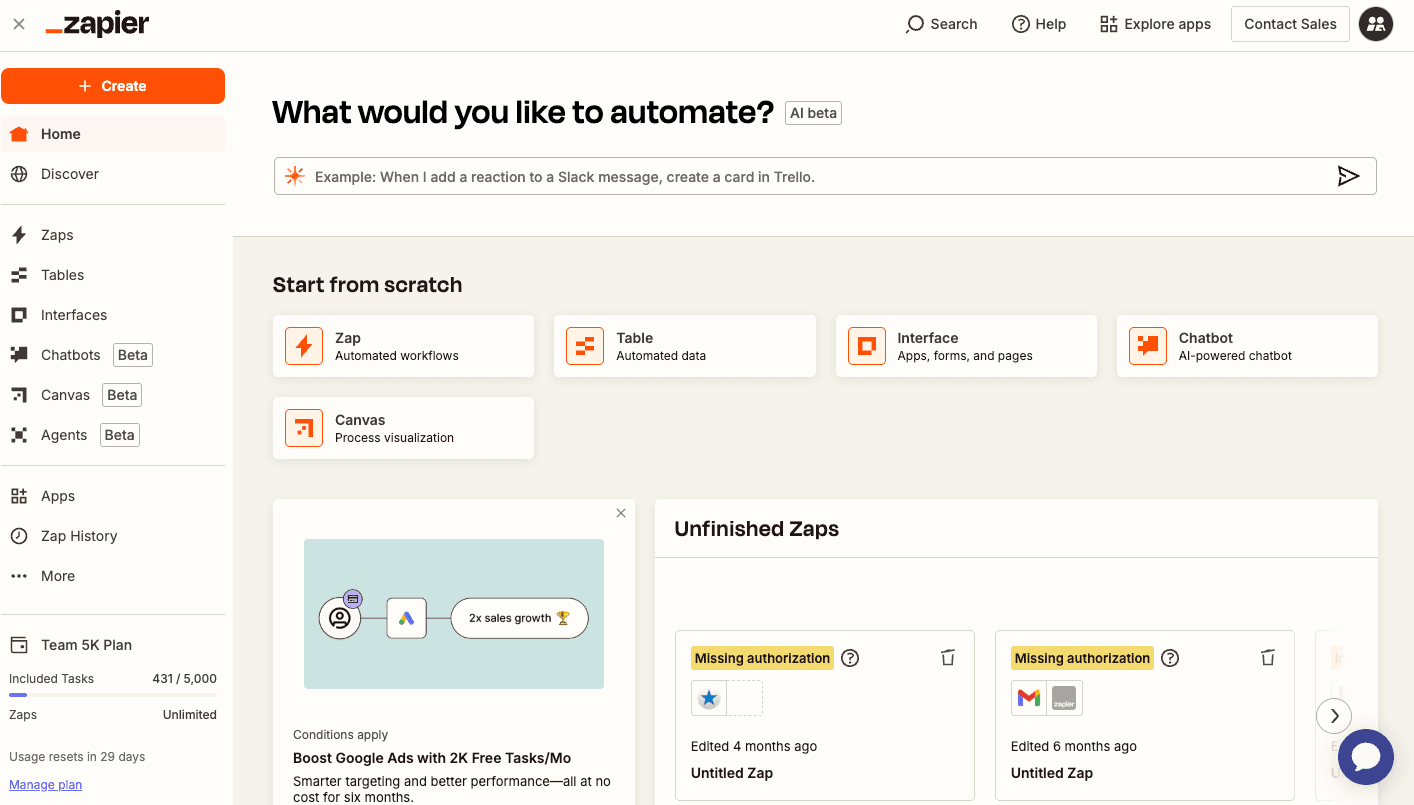
Overview
Zapier has expanded beyond its original trigger-and-action Zaps into a broader automation platform. Current plans combine Zap workflows, Tables, Forms, Copilot, and Zapier MCP, with optional products such as Agents and Chatbots available under separate usage and billing structures.
The core value remains its integration catalog: Zapier advertises more than 9,000 app integrations, while its current MCP documentation describes more than 40,000 actions. This makes Zapier a practical connector when a team wants to automate across common SaaS tools without maintaining each API integration itself.
Pricing is primarily usage-based. Successful workflow actions consume tasks; triggers do not. MCP calls use two tasks each, and AI by Zapier can multiply task usage by model tier and tool calls. Tables and Forms have separate capacity limits, while Agents uses activities as an add-on rather than the core task allowance.
Zapier is easiest to justify when a workflow is stable, measurable, and worth more than its run cost. Critical automations still require scoped credentials, test data, duplicate protection, validation, alerts, replay procedures, change ownership, and human approval before irreversible or high-impact actions.
Use cases
The strongest fit depends on the job you need the product to complete, not the size of its feature list.
Move leads, orders, tickets, messages, files, and records between tools without building and operating every API integration.
Combine filters, paths, formatting, webhooks, lookups, delays, and actions into repeatable business processes.
Collect structured inputs, store workflow state, and trigger automation without standing up a separate application for a simple process.
Expose a bounded set of Zapier tools to compatible AI clients through MCP while reusing Zapier-managed app connections.
Use Team or Enterprise collaboration, shared connections, permissions, SSO, governance, observability, and support instead of unmanaged personal integrations.
Capabilities
Run event-driven automations with triggers, app actions, filters, formatting, paths, webhooks, and multi-step logic on paid plans.
Connect thousands of SaaS products through prebuilt triggers, searches, actions, and authenticated app connections.
Store operational records close to automations, with formulas and paid-plan AI fields or enrichment.
Build multi-page input experiences that can feed workflows, with paid conditional logic, branding, access controls, and other capacity increases.
Open-beta assistant that helps discover, build, change, and troubleshoot assets using natural-language instructions.
Connect compatible AI clients to selected app actions, with Zapier handling authentication, connections, and rate limits.
Add model-backed analysis and generation steps, with Standard, Advanced, Premium, and bring-your-own-provider options on paid plans.
Extend no-code workflows with code steps, SDK access, custom actions, and webhook-based integrations when packaged connectors are insufficient.
Share Zaps, folders, app connections, and workspace assets with plan-dependent permissions and support.
Adds advanced admin permissions, app and action controls, SSO, provisioning, retention options, observability, deployment controls, and enterprise support.
Process
Step 1
Write the exact trigger, expected action, owner, service-level target, and dollar or time value before opening the builder.
Step 2
List source fields, destination fields, required transformations, missing-data behavior, duplicates, retries, and every external side effect.
Step 3
Create service accounts or scoped app connections where possible instead of attaching a broad personal administrator account.
Step 4
Start with one trigger and one safe action, test representative records, then add filters, branches, AI steps, and additional systems.
Step 5
Check required values, use stable external IDs, and prevent the same event from creating duplicate charges, messages, contacts, or tickets.
Step 6
Require a qualified person before payments, deletions, contract changes, external publishing, sensitive messages, access grants, or regulated decisions.
Step 7
Multiply expected successful actions, MCP calls, and AI model/tool rates by event volume, then add testing, retries, peaks, and growth.
Step 8
Set alerts, name an owner, document replay and rollback, review Zap history, and decide what happens when an app schema, credential, or API changes.
Step 9
Run a controlled sample, compare outputs with the old process, monitor cost and error rates, and periodically remove stale connections and unused automations.
Cost
Zapier's public core plans are Free, Professional, Team, and Enterprise. The pricing page displays Professional from $19.99/month and Team from $69/month with annual billing selected; yearly prepayment is advertised as saving 33%. Actual cost varies with task tier, billing cadence, overage settings, add-ons, AI model tier, and usage. Agents and Chatbots can be separately billed add-ons.
$0/month
Single-user entry plan with 100 tasks per month.
From $19.99/month
Single-user paid platform plan; displayed starting price assumes annual billing.
From $69/month
Collaboration plan; displayed starting price assumes annual billing.
Custom
Organization-wide plan with advanced governance and support.
Separate plans
Optional AI products with free entry versions and separately billed paid upgrades.
Pricing checked . Check current pricing at the source ↗
Assessment
Compare
The right alternative depends on the specific output, workflow, controls and budget your project requires.
Business Operations
Consider n8n when self-hosting, code-level control, complex branching, or execution-based economics matter more than Zapier's managed integration breadth.
Explore n8n →Business Operations
Consider Gumloop when the workflow is heavily AI-native and you want a visual builder centered on model, document, and web-processing nodes.
Explore Gumloop →Business Operations
Consider Bardeen when browser-based prospecting, research, enrichment, and user-triggered desktop workflows are the main use case.
Explore Bardeen →Questions
Zapier is a managed automation platform for connecting apps, moving data, running workflows, collecting form input, storing lightweight operational records, and giving AI clients access to app actions.
A Zap is an automated workflow. It begins with a trigger and runs one or more actions, with optional filters, paths, formatting, delays, webhooks, code, or AI steps.
Yes. The current Free plan includes 100 tasks per month, one user, unlimited Zap assets, Tables and Forms, two-step Zaps, 2,500 table records, 10 form pages, and limited Copilot usage.
As reviewed September 1, 2026, Professional starts at $19.99/month and Team at $69/month with annual billing selected. Enterprise is custom. Task volume, monthly billing, overages, add-ons, and AI usage can raise the total.
A task is generally a successfully completed unit of work, such as an action step. Triggers do not consume tasks. Some built-in products or steps have different rates, so use Zapier's current task-rate page for the exact workflow.
Zapier's current plan guide says Zap steps for Tables and Forms do not consume tasks, but each product has separate record, page, upload, and feature limits by plan.
Zapier MCP connects compatible AI clients to tools backed by Zapier app actions. Each successful MCP tool call currently uses two tasks from the account's plan.
Standard, Advanced, and Premium model tiers currently apply 1x, 3x, and 5x task rates. A run uses the tier rate for the model step and again for each successful tool or knowledge call. Bring-your-own-provider can use a 1x Zapier task rate plus the provider's charges.
Agents is an add-on measured in activities, separate from the core task allowance. The free version has its own monthly activity limit, and paid Agent plans are separately billed.
It can remove a large amount of routine integration work, but complex state, custom APIs, high-volume economics, transactional guarantees, testing, and security often still need engineering.
Zapier publishes SOC 2 Type II and SOC 3 evidence and additional security documentation through its Trust Center. Customers must still assess subprocessors, configure least privilege, protect credentials, and govern each workflow's data and actions.
Yes. Retries, replay, source duplication, loops, and non-idempotent destinations can create duplicate side effects. Use stable IDs, lookup-before-create checks, deduplication, and reconciliation.
It can keep critical workflows running after the included allowance is exhausted, but it also permits overage charges. Owners should review whether it is enabled, the account's exact rate, spending controls, and alerts.
Payments, refunds, deletions, legal or employment decisions, access grants, public publishing, sensitive customer communication, and other irreversible or regulated actions should have explicit qualified-human review.
Choose Zapier for managed operations, integration breadth, and faster no-code setup. Evaluate n8n when self-hosting, deep customization, execution control, or a more developer-oriented workflow engine matters.
Bottom line
Zapier remains an excellent default for turning a clear, repeatable process across popular SaaS tools into a managed automation quickly. Its expanded Forms, Tables, Copilot, and MCP layer can now cover more of the surrounding system. The biggest mistakes are economic and operational: undercounting actions and AI multipliers, leaving overages unchecked, granting broad credentials, and publishing workflows without duplicate protection, monitoring, approvals, or recovery.
Visit Zapier website ↗
Fireflies AI: Records, transcribes, and analyzes meetings with automated summaries and searchable notes.

Speechify: Turns text into natural-sounding speech, making it easier to listen to documents, articles, and pdfs.

Guidde: Creates ai-powered step-by-step video documentation from your screen recordings and voice prompts.

Grok: Is an ai chatbot developed by xai that delivers conversational search with wit and sarcasm.

Get access to all our AI courses, hundreds of real-world AI use cases, live expert-led workshops, an exclusive network of AI early adopters, and more.
Get unlimited access to all of our current & upcoming industry-specific AI courses for the duration of your subscription.
To keep up with the rapid pace of AI, our team publishes AI implementation guides daily. Our library contains 300+ practical use cases to automate real-world work.
Join weekly, live, interactive sessions with industry leaders who are at the forefront of AI for hands-on implementation guidance and exclusive insights.
Network with an exclusive community of AI-first professionals who are working smarter with AI. Learn how early adopters are using AI in their work and businesses.