Business video teams
Marketing, training, L&D, and internal-comms teams creating repeatable explainers, promos, onboarding, and social assets.
Independent tool overview
Wonda is the AI creative agent inside Wondercraft's browser-based video and audio studio. It can plan, script, generate, and edit projects through chat while retaining a real timeline editor, but Wonda 2.0 remains opt-in beta, credit use is highly variable, and creators remain responsible for facts, rights, consent, disclosure, and final quality.
Visit the official Wonda site ↗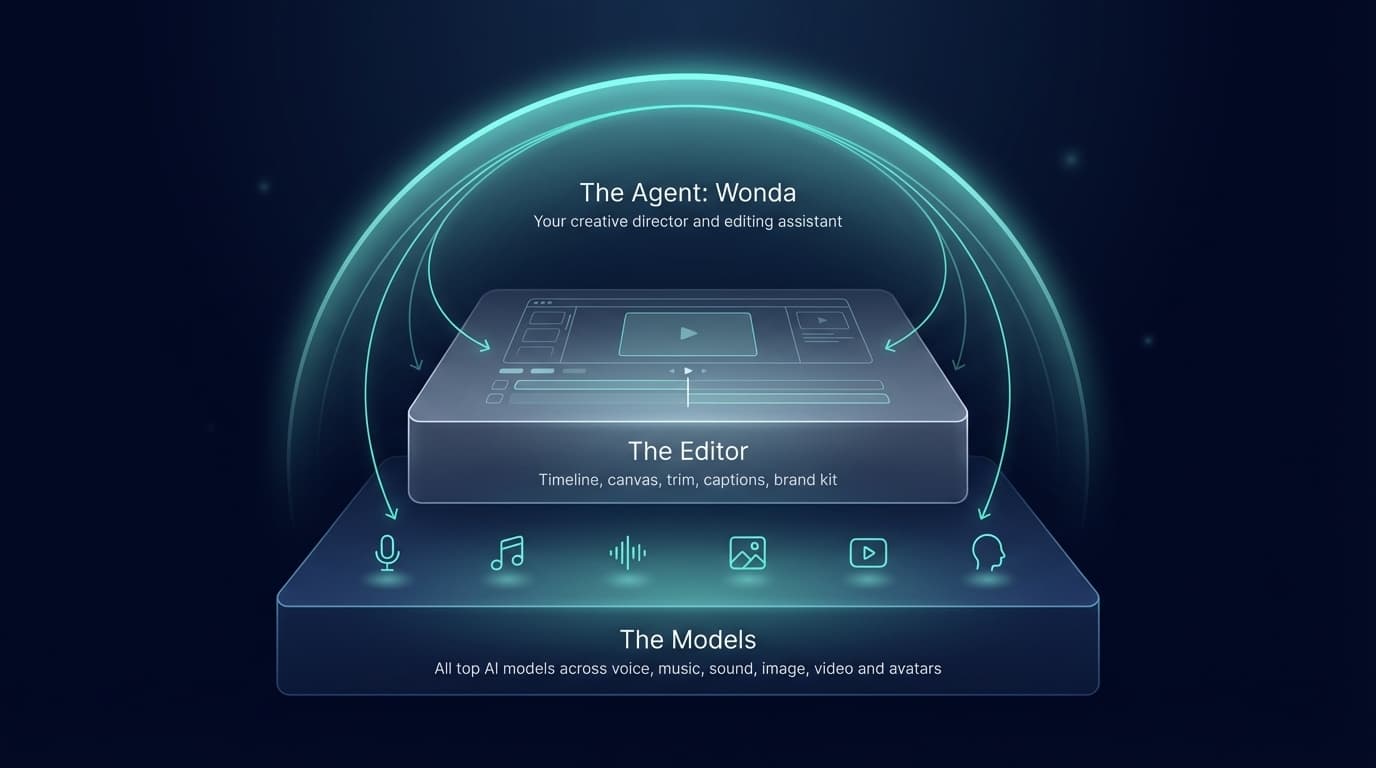
Overview
Wonda coordinates text, video, image, avatar, voice, music, and sound models inside Wondercraft. A creator can begin with an idea, document, script, audio file, video, or media assets; review a proposed storyboard; generate a first production; and continue revising clips or the whole project through conversation.
Its supported actions include writing and restructuring scripts, editing uploaded audio and video, assigning voices, adding music and effects, generating visuals, inserting b-roll, changing avatars, styling and timing captions, adjusting overlays and typography, translating projects, realigning visuals to new narration, and applying a brand direction.
The key product advantage is the combination of an agent and a manual editor. Users can leave Auto-generate off, review Wonda's storyboard and changes, then use the timeline, canvas, captions, layouts, layers, resizing, and export controls when precision matters.
Wonda is part of the broader Wondercraft plan rather than a separate subscription. The standard agent is available, while Wonda 2.0's enhanced project and clip actions require an Early Access beta toggle. Paid plans provide commercial-use rights under Wondercraft's terms, but those rights do not eliminate third-party copyright, trademark, publicity, biometric, defamation, platform, or disclosure obligations.
Use cases
The strongest fit depends on the job you need the product to complete, not the size of its feature list.
Marketing, training, L&D, and internal-comms teams creating repeatable explainers, promos, onboarding, and social assets.
Podcasters and narrators converting existing scripts or recordings into visual productions.
Subject-matter experts who can brief and review a video but do not want to assemble every timeline element manually.
Teams that want one subscription spanning voice, avatars, images, music, sound effects, video generation, and editing.
Capabilities
Turns a brief into scenes, visual directions, script lines, and suggested assets for review.
Builds a draft video with script, visuals, music, voiceover, captions, and timeline structure.
Applies both clip-level and project-level changes to uploaded or generated material.
Routes work across multiple video, image, voice, avatar, music, sound, and language models.
Lets users keep Auto-generate off and approve or revise a storyboard before expensive asset generation.
Can reuse custom instructions and extract colors or logos from an approved brand source.
Provides a real timeline and canvas for detailed editing after agent-driven generation.
Can translate projects, regenerate narration, and realign visuals and captions to the new audio.
Process
Step 1
Define audience, purpose, duration, format, platform, facts, brand rules, accessibility, asset rights, budget, and required human approvers.
Step 2
Use media, voices, faces, logos, fonts, music, documents, and data the organization owns or has permission to process and publish.
Step 3
Ask Wonda for questions and a storyboard before it generates expensive assets or applies large project changes.
Step 4
Fact-check every claim, quote, statistic, price, instruction, citation, pronunciation, disclosure, and regulated statement before voice and video generation.
Step 5
Price a representative clip using the displayed model rates, then account for speech, images, avatars, music, Wonda messages, inspection, retries, and upscaling.
Step 6
Test one scene, voice, character, caption style, and music direction before generating the full batch.
Step 7
Review every cut, frame, caption, transition, lip-sync result, audio level, pronunciation, color, brand element, and mobile-safe area manually.
Step 8
Document consent and licenses, detect impersonation or misleading events, add required AI disclosures, and obtain legal or subject-expert approval for high-stakes content.
Step 9
Check resolution, compression, captions, loudness, aspect ratios, thumbnails, platform policy, accessibility, analytics, and an archive copy before publication.
Cost
Wonda is included in Wondercraft plans. Credits are spent at different rates for Wonda messages, project inspection and actions, speech, images, video, avatars, music, sound effects, and upscaling. Paid credits may roll into the next month but expire after that; top-ups were advertised at $3 per 100 credits.
$0
An evaluation tier for non-commercial projects.
$25/month or $21/month annually
For individual commercial creators.
From $45/month
For professionals and teams choosing a larger credit allocation.
Contact sales
For larger teams needing contractual governance and scale.
Pricing checked . Check current pricing at the source ↗
Assessment
Compare
The right alternative depends on the specific output, workflow, controls and budget your project requires.
Content Creator
Consider VEED when the workflow starts with existing footage and a mature browser editor is more important than multi-model generation from intent.
Explore VEED →Marketing
Consider Synthesia for established enterprise avatar-led training and localization workflows.
Explore Synthesia →Content Creator
Consider Runway Creative when direct access to advanced generative video creation and transformation is more important than an agent assembling complete business videos.
Explore Runway Creative →Questions
Wonda is the AI agent inside Wondercraft that plans, generates, and edits video and audio projects through conversation while working with the Studio timeline.
No. It is included inside Wondercraft and uses the workspace's plan, models, credits, assets, and editor.
The standard Wonda agent is available, while Wonda 2.0's enhanced project and clip capabilities require an opt-in Early Access beta setting.
It can produce scripts, storyboards, video, narration, captions, avatars, images, music, and sound effects and can edit uploaded or generated projects.
Yes. Keep Auto-generate off so Wonda asks questions and presents a storyboard before generating the full set of assets.
Wonda uses Wondercraft plans: Free is $0, Creator is $25 monthly or $21 per month annually, Pro starts at $45 monthly, and Enterprise is custom.
Credits can be spent on chat messages, planning, project inspection, timeline actions, voice, images, video, avatars, music, effects, and upscaling. Rates vary by action and selected model.
No. Wondercraft's current terms restrict free-user output to non-commercial use. Paid-user output is available for commercial use, subject to rights and legal obligations.
Wondercraft's terms say users retain ownership of their inputs and outputs. That does not create rights in third-party people, brands, music, footage, fonts, or other material.
The current terms say uploaded input is not used to train or refine AI or machine-learning models.
Technical features do not replace consent. Obtain documented voice, likeness, publicity, biometric, employment, and distribution permission before creating or publishing a synthetic person.
No. It accelerates planning and execution, but Wondercraft retains a manual timeline because precise cuts, captions, audio, brand, rights, and final judgment still need direct review.
Paid credits can roll into the following month but expire if not used then. Trial and promotional credits may follow different rules.
Review facts, claims, rights, consent, disclosure, captions, translation, pronunciation, visuals, audio, accessibility, platform policy, export quality, and a qualified approver for high-stakes topics.
Bottom line
Wonda is a compelling AI-production layer because it does not stop at prompting a model: it can build and revise a structured project inside a real editor. That makes Wondercraft particularly useful for business teams producing both audio and video. Buyers should budget from a representative project, not headline credits, and keep storyboard approval and manual review in the loop. The current Wonda 2.0 beta, variable credit consumption, and extensive rights and synthetic-media obligations make fully automatic publication inappropriate.
Visit Wonda website ↗
Z-Image - Alibaba Tongyi's full base version of its Z-Image Turbo, which ranked as the top open-source image model in December.

Eleven v3 - ElevenLabs’ most expressive AI voice model, now commercially available
Ray 3.14 - Luma’s upgraded video model for professional creative workflows

Ace-Step-1.5 - Powerful open-source AI music generation model that creates songs in under two seconds.

Get access to all our AI courses, hundreds of real-world AI use cases, live expert-led workshops, an exclusive network of AI early adopters, and more.
Get unlimited access to all of our current & upcoming industry-specific AI courses for the duration of your subscription.
To keep up with the rapid pace of AI, our team publishes AI implementation guides daily. Our library contains 300+ practical use cases to automate real-world work.
Join weekly, live, interactive sessions with industry leaders who are at the forefront of AI for hands-on implementation guidance and exclusive insights.
Network with an exclusive community of AI-first professionals who are working smarter with AI. Learn how early adopters are using AI in their work and businesses.