Redesign and migration teams
Inventory the current site visually, agree on what should move, merge, redirect, or disappear, and hand off a proposed structure.
Independent tool overview
VisualSitemaps crawls public or private websites, captures page screenshots, and organizes them into editable visual maps for audits, redesigns, migrations, content planning, and visual QA.
Visit the official VisualSitemaps site ↗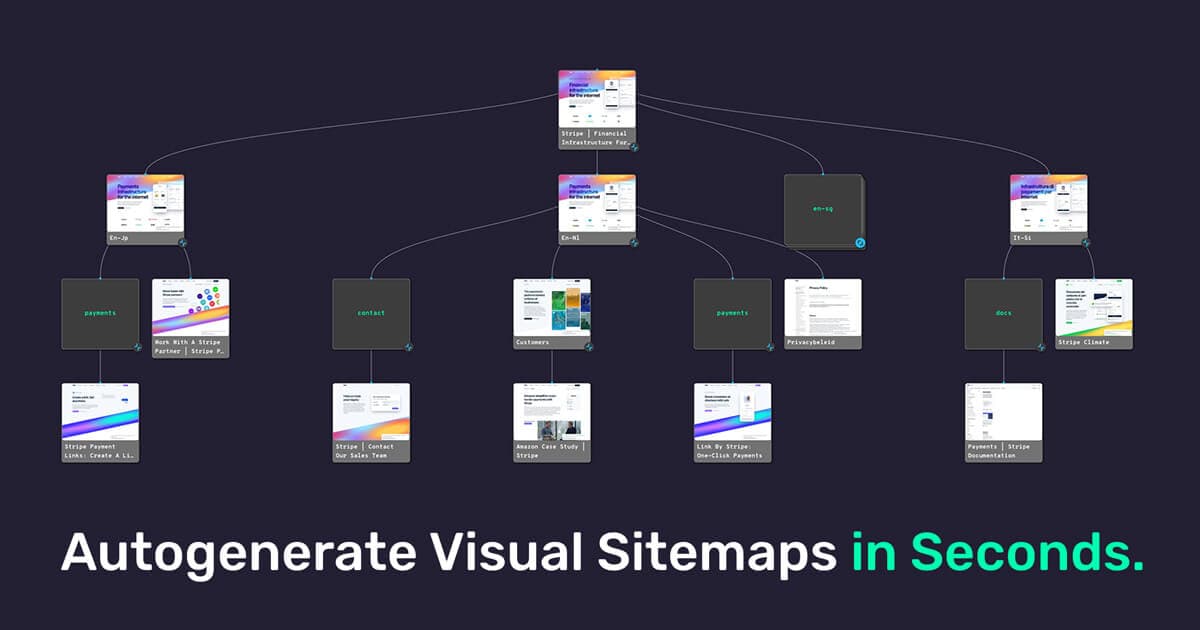
Overview
VisualSitemaps turns a website crawl into a map of page screenshots. It gives design, UX, SEO, product, and agency teams a shared visual inventory of what exists before they start restructuring navigation, rewriting content, migrating platforms, or checking a release.
The core advantage over a conventional URL spreadsheet is context. Teams can see the rendered page next to its place in the site structure, annotate screenshots, tag pages, attach planning notes and Google Drive files, edit a proposed sitemap, and export information for other tools.
Scheduled crawls and visual comparisons extend the product into QA and competitive monitoring. They can help teams notice changed layouts or content after a release, but screenshot differences still require a person to decide whether a change is intentional, harmful, or simply caused by dynamic content.
VisualSitemaps now offers AI-Optimized Maps and reports that propose a future information architecture, topic clusters, redirects, and prioritized structural recommendations. The company explicitly says this is architecture-level analysis—not a full page-content audit, copy rewrite, or comprehensive technical SEO crawl.
The quality of every output depends on crawl completeness. Authentication, JavaScript rendering, popups, blocked resources, flat URL structures, faceted URLs, and personalized content can distort the captured map. Before acting on a recommendation, reconcile it with analytics, Search Console, server logs, the live navigation, and business requirements.
Use cases
The strongest fit depends on the job you need the product to complete, not the size of its feature list.
Inventory the current site visually, agree on what should move, merge, redirect, or disappear, and hand off a proposed structure.
Review hierarchy, page relationships, user journeys, and repeated templates with screenshots attached to the map.
Create shareable visual deliverables, collect annotated feedback, and organize page-level planning assets in one workspace.
Schedule repeat crawls to compare visual changes across a site or selected competitor pages.
Capabilities
Crawl a public site, private environment, XML sitemap, or CSV list and capture desktop or mobile page screenshots.
Rearrange the captured structure, add sections, group pages, apply tags, and create a proposed future-state map.
Analyze an existing crawl for hierarchy, topical grouping, navigation, URL structure, conversion paths, and architecture opportunities.
Export AI recommendations as PDF or Markdown and produce a CSV redirect map for migration planning.
Add public, private, or resolved comments directly to desktop and mobile screenshots and mention collaborators.
Re-crawl sites on a schedule and compare screenshots to support release QA or external-site monitoring.
Store page content, files, notes, scraped and editable metadata, and attached Google Docs, Sheets, or Slides against each map node.
Create user flows, funnels, and journeys, then export maps or data in supported document, image, and structured formats.
Process
Step 1
Choose the canonical host, subdomains, directories, authentication method, device view, crawl depth, and exclusions before spending page credits.
Step 2
Start with a representative sample, suppress predictable popups where necessary, and check screenshots, redirects, and URL discovery before scaling.
Step 3
Compare the crawl with XML sitemaps, navigation, analytics landing pages, Search Console, and known application routes to find missing or duplicate inventory.
Step 4
Tag pages by template, owner, intent, traffic, keep-merge-delete status, and migration risk; attach supporting briefs and data.
Step 5
Use manual editing or AI optimization, then validate every move, consolidation, new page, and redirect with subject-matter and SEO owners.
Step 6
Translate approved decisions into CMS, navigation, content, canonical, internal-link, and redirect work with a rollback plan.
Step 7
Compare the production site with the approved baseline, investigate differences, and confirm important pages remain accessible and correctly linked.
Cost
VisualSitemaps offers Free, Mini, Pro, Team, and custom Agency plans. The live page currently advertises 40% off the first three months of Pro and Team through August 31, 2026; the prices below separate that temporary offer from the normal monthly and annual totals. The pricing page contains several feature matrices and trial-specific limits, so confirm the checkout total and required capabilities before buying.
$0 forever
For testing a small crawl or building lightweight flows.
$29 monthly or $261 yearly
For small sites and individual projects that exceed the free crawl limit.
$99 monthly; currently $59.40 for the first 3 months
For professional audits, deeper sites, AI architecture work, and larger collaboration needs.
$399 monthly; currently $239.40 for the first 3 months
For agencies or in-house teams running high-volume, multi-stakeholder site work.
Custom
A negotiated plan for requirements beyond the self-serve Team tier.
Pricing checked . Check current pricing at the source ↗
Assessment
Compare
The right alternative depends on the specific output, workflow, controls and budget your project requires.
Design
Consider Relume when the main goal is generating a new marketing-site sitemap and wireframes rather than auditing an existing site through screenshots.
Explore Relume →Design
Consider Figma AI when design-system work, interface editing, and collaborative mockups matter more than automated full-site crawling.
Explore Figma AI →Consumer
Consider Framer when the priority is designing and publishing the replacement site itself after the architecture has been decided.
Explore Framer 3.0 →Questions
The permanent Free plan covers 25 pages per month. Mini is $29 monthly, Pro normally $99 monthly, Team normally $399 monthly, and Agency is custom. Annual billing is listed at $261, $891, and $3,591 respectively. A temporary Pro and Team promotion is displayed through August 31, 2026.
It is useful for information architecture, page inventory, metadata planning, topic grouping, redirects, and visual review. Its own documentation says AI optimization is not a full content audit, and it should be paired with a technical crawler, analytics, Search Console, backlink data, and manual review.
Yes. VisualSitemaps documents password-protected crawling and custom headers. Use a least-privilege test account, obtain authorization, revoke access after the crawl, and avoid exposing sensitive production data.
It proposes a reorganized sitemap and can tag pages to keep, move, consolidate, remove, or add. It also produces an architecture report and redirect-oriented CSV output. A person should validate every recommendation before implementation.
Yes. Scheduled crawls and visual comparisons can flag screenshot changes over time. Dynamic or personalized elements can create false positives, so differences still need triage.
The product advertises exports including PDF, CSV, JSON, XML, screenshots, Markdown reports, and Figma-oriented workflows. Exact formats depend on the feature and plan.
Flat URL structures, JavaScript navigation, blocked pages, authentication, crawl-depth limits, exclusions, and orphan pages can all affect discovery. Reconcile the result with navigation, XML sitemaps, analytics, Search Console, and known application routes.
The security documentation says deleted sitemaps can remain recoverable for up to 30 days. Ask the vendor for current contractual deletion and backup terms if the map contains confidential material.
Bottom line
VisualSitemaps is most valuable when a team needs a visual, collaborative understanding of a site before a redesign, migration, or structured QA process. It complements a technical crawler particularly well because screenshots and editable architecture make findings easier for non-SEO stakeholders to act on. The AI report can accelerate first-pass restructuring, but it should remain a proposal: verify crawl completeness, bring real traffic and conversion data into the decision, and approve redirects and removals manually.
Visit VisualSitemaps website ↗
Get access to all our AI courses, hundreds of real-world AI use cases, live expert-led workshops, an exclusive network of AI early adopters, and more.
Get unlimited access to all of our current & upcoming industry-specific AI courses for the duration of your subscription.
To keep up with the rapid pace of AI, our team publishes AI implementation guides daily. Our library contains 300+ practical use cases to automate real-world work.
Join weekly, live, interactive sessions with industry leaders who are at the forefront of AI for hands-on implementation guidance and exclusive insights.
Network with an exclusive community of AI-first professionals who are working smarter with AI. Learn how early adopters are using AI in their work and businesses.


