Short films and trailers
Develop a multi-scene story, characters, pacing, and visual world without manually stitching every generated clip.
Independent tool overview
OpenArt Director is a chat-led AI filmmaking workspace for creating and revising multi-scene videos up to five minutes. It unifies several image and video models behind one workflow, but exact Director credit costs are not clearly published.
Visit the official OpenArt Director site ↗
Overview
OpenArt Director turns a high-level idea into a script, storyboard, characters, scenes, and finished multi-shot video through a conversation with an AI assistant called Ori. It is designed for complete pieces up to five minutes rather than isolated text-to-video clips.
Creators can start with text and optionally add a person, scene image, soundtrack, voice, video, saved character, product, logo, font, or other brand reference. Director proposes settings and builds a scene-by-scene storyboard. You can then ask for changes in plain language or use a more structured editor for precise adjustments.
Director is an orchestration product, not a single proprietary video model. OpenArt says it uses Seedance 2.0, GPT Image 2, and other models to handle the different parts of a production. That can simplify a fragmented workflow, but output quality, credit consumption, and consistency still depend on the selected models and the number of scenes or revisions.
Use cases
The strongest fit depends on the job you need the product to complete, not the size of its feature list.
Develop a multi-scene story, characters, pacing, and visual world without manually stitching every generated clip.
Use product images, logos, fonts, colors, and saved characters to create related campaign variations.
Upload a track and direct visual scenes around its mood, rhythm, and structure.
Build longer visual explanations or repeatable vertical content with recurring characters and a shared style.
Explore scripts and storyboards when hiring a full production crew or learning several generation tools is impractical.
Capabilities
Director can create coherent, multi-scene videos up to five minutes rather than stopping at one short generated shot.
Give story, character, environment, pacing, and edit notes in natural language throughout the workflow.
Review the planned production as individual scenes before evaluating the finished cut.
Request a change to a single frame, scene, character, or the entire film instead of regenerating everything by default.
Save or upload characters, products, logos, fonts, images, voices, and visual references to guide consistency.
OpenArt combines image, video, audio, and language models inside one production environment.
Templates and workflows cover short films, trailers, music videos, micro-dramas, UGC, product ads, social posts, explainers, and video podcasts.
Process
Step 1
Give Ori the audience, story, length, format, aspect ratio, visual style, characters, dialogue, audio, and intended channel.
Step 2
Upload people, products, locations, branding, footage, voice, or music that the production should preserve.
Step 3
Check the generated script, character definitions, storyboard, and settings before expensive scenes are rendered.
Step 4
Let Director build the scenes, then use chat or structured controls to change pacing, shots, style, voices, and continuity.
Step 5
Check character identity, product accuracy, logos, readable text, hands, lip sync, audio, and transitions.
Step 6
Confirm your plan includes commercial rights and verify permission for every uploaded face, voice, song, image, trademark, and reference.
Cost
All current paid individual plans list access to Director and share a monthly credit balance across OpenArt. The plan's approximate generic video count explicitly excludes Director, and OpenArt does not publish a simple fixed credit cost per Director minute or finished film.
$14 monthly or $13/seat/month annually
Entry paid access for experimentation.
$34 monthly or $27/seat/month annually
A larger credit pool with commercial use rights.
$56 monthly or $44/seat/month annually
Higher-volume individual creation with priority support.
$240 monthly or $175/seat/month annually
OpenArt's largest individual credit pool.
$15 per month
Additional monthly credits for eligible paid plans.
Pricing checked . Check current pricing at the source ↗
Assessment
Compare
The right alternative depends on the specific output, workflow, controls and budget your project requires.
Content Creator
Choose LTX Studio for a storyboard-first AI filmmaking workspace with more explicit shot planning.
Explore LTX Studio →Content Creator
Choose Runway for an established hosted video suite with generation and professional editing tools.
Explore Runway Gen-4.5 →Content Creator
Use Replit Animation for code-driven explainers and motion graphics rather than cinematic generated footage.
Explore Replit Animation →Content Creator
Choose Sora for OpenAI's direct generative-video experience instead of a multi-model production orchestrator.
Explore Sora 2 →Questions
OpenArt Director is a chat-led AI production workspace that develops an idea into a script, storyboard, characters, scenes, and a multi-shot video.
OpenArt advertises complete videos up to five minutes long.
OpenArt says Director uses Seedance 2.0, GPT Image 2, and additional models. It is a multi-model orchestration product rather than one video model.
Director is included in OpenArt's paid individual plans, which start at $14 monthly or $13 per month billed annually. Actual Director usage consumes credits, but OpenArt does not publish a flat cost per film or minute.
It is designed to preserve faces, voices, environments, products, and styles across scenes, but AI continuity is not guaranteed and every scene still needs review.
OpenArt says finished films can be used commercially, while its pricing page explicitly lists commercial-use rights on Plus, Pro, and Wonder. Check the current plan terms and clear rights for all reference material.
Bottom line
OpenArt Director is compelling for creators who want to work at the story and scene level instead of prompting and stitching dozens of isolated clips. Its conversational revisions and multi-model workspace can save real production time. The biggest buying uncertainty is cost: access is clear, but Director-specific credit consumption is not. Build a representative pilot, record credits per accepted minute, and compare that effective cost before scaling a content pipeline.
Visit OpenArt Director website ↗
Palmier - Generate, edit, and export production-ready AI videos without leaving your timeline
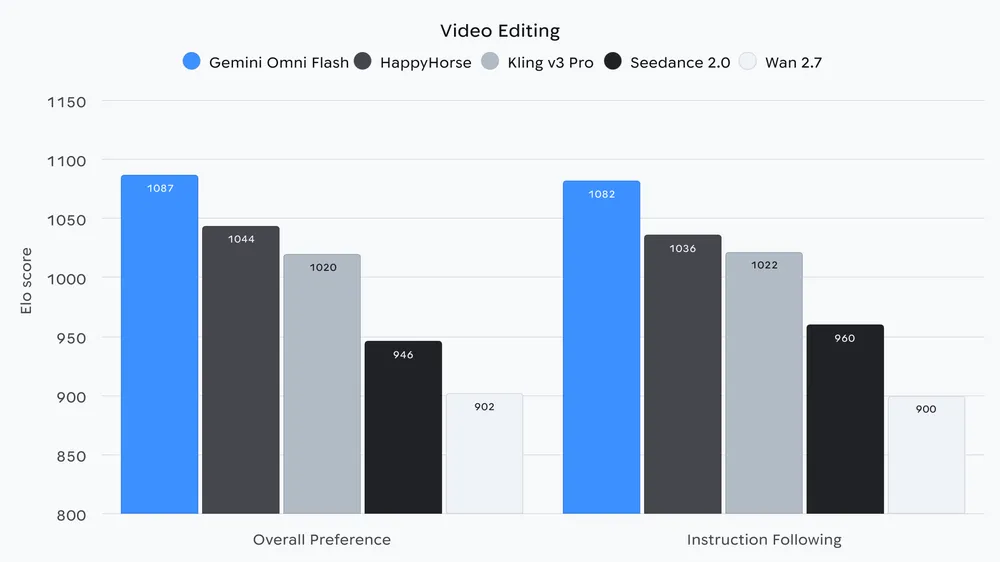
Gemini Omni Flash - Google's API video model fo video generation and editing

🎥 Ray3.2 - Luma's new video model upgrade with richer control, continuity, and cinematic direction.
.gif)
Nano Banana 2 Lite - Google's high-volume, cost-effective image model that generates pictures in just four seconds

Get access to all our AI courses, hundreds of real-world AI use cases, live expert-led workshops, an exclusive network of AI early adopters, and more.
Get unlimited access to all of our current & upcoming industry-specific AI courses for the duration of your subscription.
To keep up with the rapid pace of AI, our team publishes AI implementation guides daily. Our library contains 300+ practical use cases to automate real-world work.
Join weekly, live, interactive sessions with industry leaders who are at the forefront of AI for hands-on implementation guidance and exclusive insights.
Network with an exclusive community of AI-first professionals who are working smarter with AI. Learn how early adopters are using AI in their work and businesses.