Short-term migration testing
Teams comparing an existing preview integration with the stable Omni 1.1 endpoint before switching production traffic.
Independent tool overview
Gemini Omni Flash Preview is Google's original paid Gemini API endpoint for short video generation and conversational editing. It remains callable at this review date but is deprecated and scheduled to shut down on September 30, 2026. New development should use gemini-omni-1.1-flash, and existing integrations should migrate now rather than treating this preview as a current product choice.
Visit the official Gemini Omni Flash Preview site ↗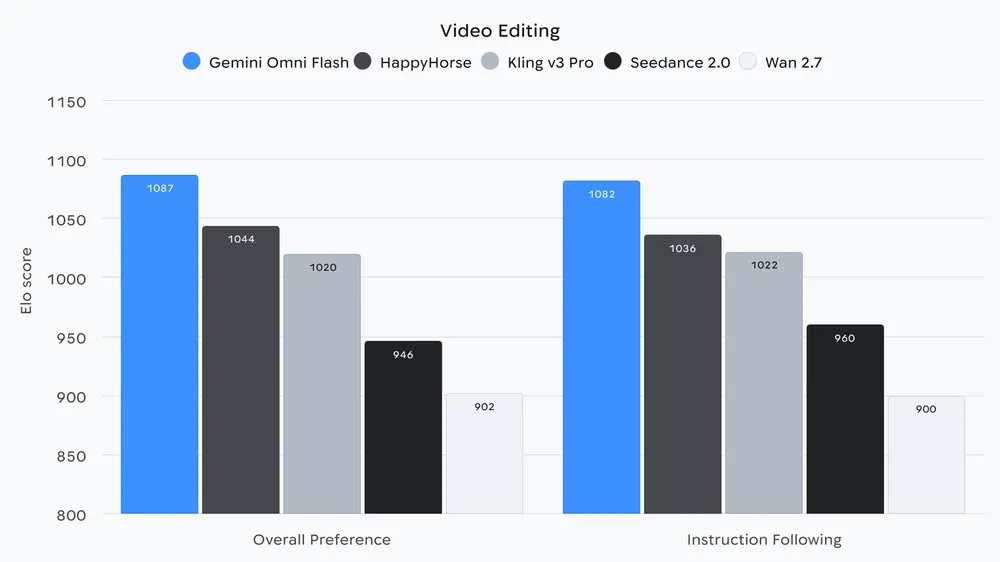
Overview
Google launched gemini-omni-flash-preview on June 30, 2026 as the first developer preview of Gemini Omni's video generation and natural-language editing. It accepts text, images, and short video, then returns a 3- to 10-second 720p clip with audio at 24 FPS through the Interactions API.
The preview demonstrated Omni's core interaction model: create a video, retain its interaction state, and request follow-up changes in plain language. Google allowed up to three sequential edits, but the launch version had important gaps: no scene extension, no uploaded audio references, unreliable processing of video references, and imperfect character consistency through scene changes or camera pans.
On August 27, Google released the generally available gemini-omni-1.1-flash replacement with scene extension, first-and-last-frame interpolation, and resolution controls from 360p to upscaled 4K. The preview endpoint is scheduled to shut down September 30, 2026, so this page is primarily a migration guide and historical record.
A model shutdown is an operational deadline, not merely an SEO label. Once Google turns the endpoint off, requests can fail and applications still pointing at it can lose their video feature. Teams should move traffic only after testing prompts, edits, safety handling, output delivery, cost controls, and generated-media review on the stable replacement.
Use cases
The strongest fit depends on the job you need the product to complete, not the size of its feature list.
Teams comparing an existing preview integration with the stable Omni 1.1 endpoint before switching production traffic.
Developers who temporarily need the original preview model to compare prompt or edit behavior during a controlled migration.
Readers documenting how Google's first developer-facing Omni video endpoint worked and which capabilities arrived in the stable release.
Capabilities
Generates a short 720p video with audio from a prompt describing the subject, action, setting, camera, style, dialogue, and sound.
Uses an image plus text instructions to animate a concept or reference into a short clip.
Allows follow-up natural-language revisions through the Interactions API while retaining the earlier generated clip as context.
Accepts text, image, and video inputs, although the launch version's short video-reference path was documented as unreliable.
Produces synchronized audio as part of the generated video rather than requiring a separate audio-generation request.
Google says generated Omni videos include an imperceptible SynthID watermark for machine-detectable provenance.
Process
Step 1
Search source code, configuration, serverless functions, queues, scheduled jobs, saved workflows, experiments, and fallback paths for gemini-omni-flash-preview. Record owners and traffic before changing anything.
Step 2
Change new and test requests to gemini-omni-1.1-flash. Do not point new product work at an endpoint scheduled for shutdown.
Step 3
Compare the current Omni guide and SDK types with the preview integration, including response format, interaction state, URI delivery, resolution controls, interpolation, extension, regional restrictions, and unsupported parameters.
Step 4
Test real prompts and source assets for visual quality, identity consistency, audio, safety blocks, latency, token usage, file delivery, and sequential edits. Keep the preview only as a temporary comparison baseline.
Step 5
Use server-side keys, budgets, rate limits, bounded retries, input rights and consent checks, least retention, and a human review of factual claims, people, brands, text, audio, and disclosure before publication.
Step 6
Move a small cohort, watch failures and spend, then increase traffic. Roll back only within the remaining preview window and fix the stable path rather than relying on the deprecated endpoint long term.
Step 7
Delete preview configuration and fallbacks, update runbooks and tests, and alert on any remaining preview request before September 30, 2026. Verify that production no longer calls the retiring model.
Cost
The preview has no free Gemini API tier. Its current Standard price matches Gemini Omni 1.1 Flash: $1.50 per million input tokens, $9 per million text output tokens including thinking, and $17.50 per million video output tokens. Google bills 720p output at 5,792 tokens per second, approximately $0.10 per generated second. Equal pricing is not a reason to keep the preview because its endpoint has a scheduled shutdown.
Not available
The preview model requires paid Gemini API access.
$1.50 input / $9 text output / $17.50 video output per 1M tokens
Usage-based preview access until Google shuts down the endpoint.
Same current Standard token rates
Gemini Omni 1.1 Flash is the recommended endpoint and adds production-oriented capabilities.
Pricing checked . Check current pricing at the source ↗
Assessment
Compare
The right alternative depends on the specific output, workflow, controls and budget your project requires.
Miscellaneous
This is Google's direct stable replacement and the correct choice for new development or migration before the preview shutdown.
Explore Gemini Omni 1.1 Flash →Content Creator
Choose Veo 3.1 when Google's dedicated cinematic video model family fits better than Omni's conversational edit loop.
Explore Veo 3.1 →Content Creator
Choose Veo 3.1 Lite when lower-cost Google video generation is the priority.
Explore Veo 3.1 Lite →Content Creator
Choose Runway Gen-4.5 when Runway's models and broader production interface are preferable to a direct Gemini API integration.
Explore Runway Gen-4.5 →Content Creator
Choose Sora 2 when OpenAI's video ecosystem and account or API model better match the project.
Explore Sora 2 →Questions
Yes, as of August 31, 2026, but it is deprecated. Google lists September 30, 2026 as its shutdown date, so remaining use should be limited to migration and comparison work.
Google recommends gemini-omni-1.1-flash, the generally available endpoint released August 27, 2026.
Google's deprecation table lists September 30, 2026. Treat that as the deadline to remove production calls and fallbacks.
There is no free API tier. Standard pricing is $1.50 per million input tokens, $9 per million text output tokens, and $17.50 per million video output tokens, or about $0.10 per second of 720p video output.
It generated 3- to 10-second 720p clips with audio at 24 FPS from text or images and supported conversational edits through the Interactions API.
No. Google's June launch post said scene extension was not yet supported in the Gemini API for the preview. Extension arrived with Gemini Omni 1.1 Flash.
The model code change is necessary but should be followed by representative tests of prompts, sequential edits, parameters, output delivery, safety blocks, costs, resolution, storage, and user-visible quality before production cutover.
Google says Omni output includes invisible SynthID watermarking. Keep provenance attached and add visible disclosure when the audience, platform, law, or context requires it.
Bottom line
Gemini Omni Flash Preview was a useful first look at Google's conversational video API, but it is now a migration dependency rather than a tool to adopt. Its 720p generation, native audio, and follow-up editing remain usable briefly, while the stable 1.1 release adds meaningful capabilities at the same listed Standard rates. Inventory every call, validate representative work on gemini-omni-1.1-flash, move production traffic, and remove the preview path before September 30, 2026.
Visit Gemini Omni Flash Preview website ↗
OpenArt Director - Vibe-directing tool that builds five-minute films from chat
.gif)
Nano Banana 2 Lite - Google's high-volume, cost-effective image model that generates pictures in just four seconds

Palmier - Generate, edit, and export production-ready AI videos without leaving your timeline

Seedance 2.0 - ByteDance's frontier AI video model

Get access to all our AI courses, hundreds of real-world AI use cases, live expert-led workshops, an exclusive network of AI early adopters, and more.
Get unlimited access to all of our current & upcoming industry-specific AI courses for the duration of your subscription.
To keep up with the rapid pace of AI, our team publishes AI implementation guides daily. Our library contains 300+ practical use cases to automate real-world work.
Join weekly, live, interactive sessions with industry leaders who are at the forefront of AI for hands-on implementation guidance and exclusive insights.
Network with an exclusive community of AI-first professionals who are working smarter with AI. Learn how early adopters are using AI in their work and businesses.