Gemini-powered prototypes
Quickly create an interface around Gemini text, image, audio, Live API, or other supported model capabilities.
Independent tool overview
Google AI Studio Build is Google's prompt-driven app builder for creating full-stack web apps and native Android projects around Gemini, with editable code, live previews, integrations, and deployment paths.
Visit the official Google AI Studio Build site ↗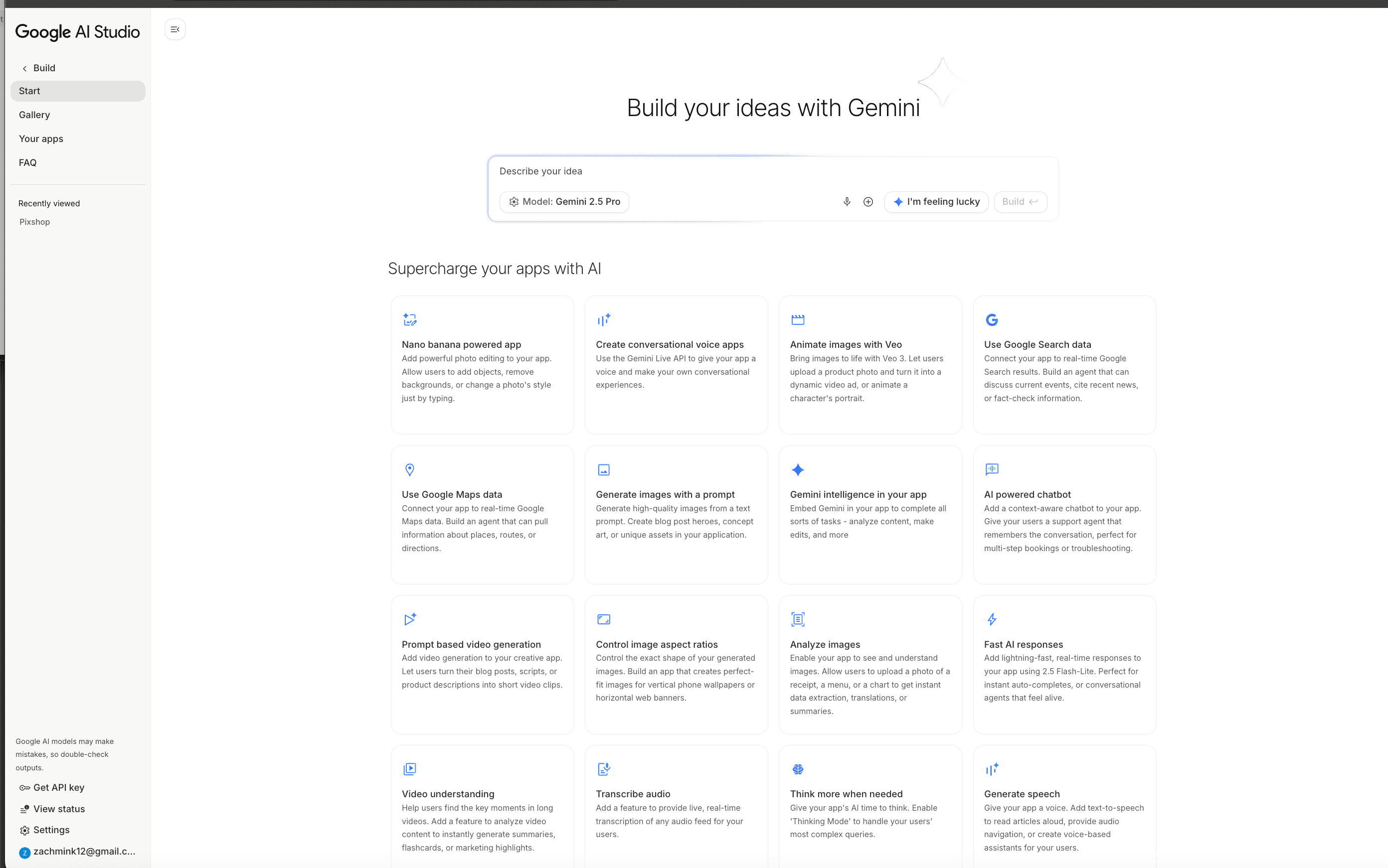
Overview
Google AI Studio Build turns a natural-language description into a working application. For web projects it generates a frontend, React by default, plus a Node.js server runtime. It can also create native Android projects using Kotlin and Jetpack Compose, previewed through a browser-based emulator.
The current experience is powered by components of Google's Antigravity agent harness. It manages multiple project files, keeps context across iterations, installs npm packages, and verifies code updates. Builders can start from a prompt, remix a gallery app, import a GitHub repository, edit code directly, or select part of the preview and describe a visual change.
Build has evolved beyond a front-end demo generator. Web apps can use server-side secrets, external APIs, Firebase Authentication and Firestore, Google Workspace integrations, and real-time multiplayer state. Projects can sync both ways with GitHub, download as a ZIP, or deploy to Cloud Run. That makes it a fast prototyping environment, but generated code, permissions, data handling, and usage-based costs still need conventional engineering review.
Use cases
The strongest fit depends on the job you need the product to complete, not the size of its feature list.
Quickly create an interface around Gemini text, image, audio, Live API, or other supported model capabilities.
Build web tools that use Firestore, Google sign-in, Gmail, Sheets, Docs, Drive, Calendar, and other supported Workspace APIs.
Generate a frontend and server runtime, add secrets and packages, then move the source into GitHub or a local development environment.
Create Kotlin and Jetpack Compose apps without first installing Android Studio, then test in a browser emulator or on a physical device.
Capabilities
Describe a web or Android app and the agent creates the project files plus a live preview.
Web apps can include a React frontend and Node.js server code for API calls, database connections, secrets, and npm packages.
The coding agent maintains project context, coordinates changes across files, and verifies updates.
The agent can provision Firestore and Google-based Firebase Authentication and generate the integration code.
Supported web apps can connect to services including Gmail, Sheets, Docs, Drive, Calendar, Forms, Meet, Slides, Tasks, and Contacts with managed OAuth setup.
Store third-party API credentials in the Secrets panel and access them from server-side code instead of exposing them in the browser.
Prompt changes, edit code directly, or use annotation mode to point at a UI area and request an update.
Web apps support repository import and two-way GitHub sync, while projects can also be downloaded for external development.
Publish a full-stack web app to a managed Cloud Run service and optionally claim an available ai.studio subdomain.
Generate standard Gradle projects using Kotlin, Jetpack Compose, Material 3, and a single-activity architecture.
Browse working examples, copy a project, and adapt it instead of beginning from a blank prompt.
Process
Step 1
Describe the users, core workflow, data source, Gemini capability, and success criteria instead of asking for an entire business in one prompt.
Step 2
Use web for full-stack services and integrations. Choose Android only when a client-side Kotlin and Jetpack Compose app fits the requirements.
Step 3
Run the first prompt, test the live preview, and read the generated code before adding accounts, databases, payments, or sensitive data.
Step 4
For web apps, ask the agent to add Firebase, Workspace APIs, external databases, or server-side packages and place every credential in the Secrets panel.
Step 5
Exercise authentication, authorization, empty states, rate limits, model failures, malformed input, data validation, and mobile layouts.
Step 6
Sync web code to GitHub early so changes are reviewable, recoverable, and easy to continue in a normal development environment.
Step 7
Check dependencies, Firestore rules, OAuth scopes, server endpoints, prompt injection risks, API quotas, and who pays for end-user Gemini calls.
Step 8
Use the limited Starter deployment when eligible or link a billed Google Cloud project, then set budgets, alerts, logs, and access controls.
Step 9
Monitor errors, latency, model spend, abuse, dependency updates, data retention, and user feedback after launch.
Cost
There is no separate subscription price for Build mode. The free Gemini Developer API tier includes Google AI Studio access, while deployed apps can add Gemini API, Cloud Run, Firebase, Google Cloud, and Play Store costs.
Free
Build and test apps within the limits of the free Gemini Developer API tier.
Free when eligible
Publish a small number of full-stack apps without setting up a billing account.
Usage-based
Production model usage is billed by the selected model, input and output type, and optional tools.
Usage-based
Link a billed Google Cloud project for Cloud Run and other production services.
$25 one-time Play registration
A Google Play Developer account is required for the direct internal-testing flow.
Pricing checked . Check current pricing at the source ↗
Assessment
Compare
The right alternative depends on the specific output, workflow, controls and budget your project requires.
Coding
Consider Lovable for a polished prompt-to-web-app experience with a broader focus beyond Google's model and cloud stack.
Explore Lovable →Coding
Consider Bolt for browser-based full-stack generation and a web-container development workflow.
Explore Bolt.new →Coding
Consider Replit Agent for an integrated cloud IDE, agent, deployment, and broader language environment.
Explore Replit Agent →Design
Consider Vercel v0 when React and web UI generation within the Vercel ecosystem is the priority.
Explore Vercel v0 →Questions
It is Google AI Studio's prompt-driven app builder for generating, previewing, editing, and deploying full-stack web apps or native Android projects.
Google AI Studio access is included in the free Gemini Developer API tier. Model quotas are limited, some capabilities are paid-only, and deployed apps can incur Gemini API, Cloud Run, Firebase, or other Google Cloud charges.
The default web setup uses a React frontend and a Node.js server runtime, with npm packages added as the project requires.
Yes for web apps. The server runtime can make secure API calls, use secrets, connect to databases, install npm packages, and manage real-time state.
Yes. It generates native Kotlin and Jetpack Compose projects, previews them in a cloud emulator, and can install on a physical Android device or publish to Play internal testing.
Not through the current Android Build workflow. Google's documentation says Android projects are client-side only; those integrations are available to web apps.
Yes. Web apps can sync with GitHub or download as ZIP files. Android projects currently use ZIP download and do not support GitHub export.
Yes. Eligible users can deploy up to two apps through the Cloud Starter tier, while standard deployment links to a billed Google Cloud project and Cloud Run.
For current web apps, AI Studio stores the key as a server-side secret rather than including it in browser code. The app owner still pays for and controls the resulting API usage.
Google's published pricing and additional terms say unpaid-service content may be used to improve its products, with region-specific exceptions. The paid tier says content is not used for product improvement.
No. The output should be treated as application code that still needs testing, authorization review, secure configuration, dependency maintenance, cost controls, and monitoring.
Bottom line
Google AI Studio Build is one of the quickest ways to turn Gemini capabilities into a working Google-connected application, and its new server runtime closes many gaps that limited earlier prototype builders. It is strongest for rapid web experiments and Android proofs of concept, but teams still need engineers to review the generated system, control data and OAuth permissions, and prevent public usage from turning into unexpected model or cloud spend.
Visit Google AI Studio Build website ↗
SWE-grep - Cognition's fast, agentic model specialized in highly parallel context retrieval
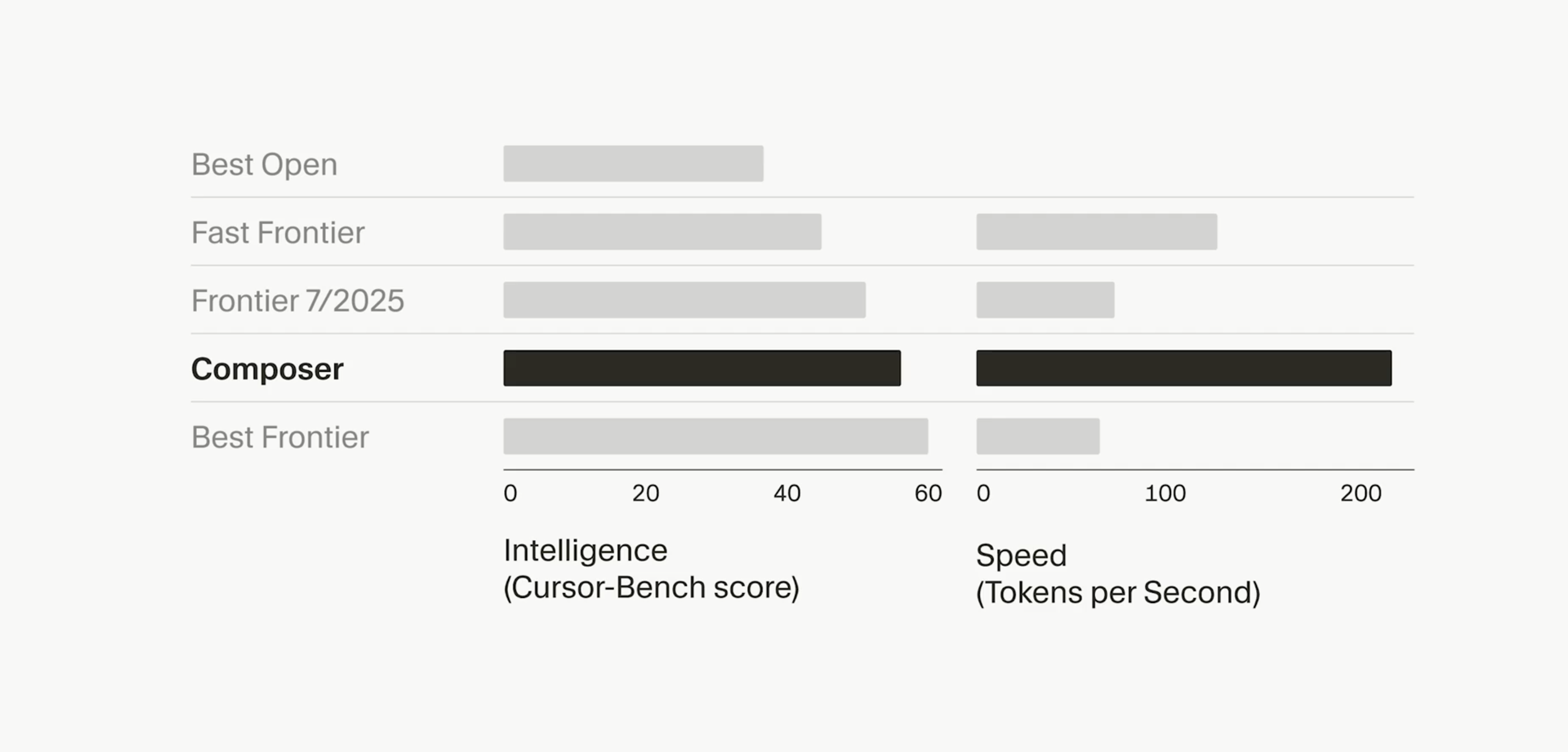
Composer - Cursor's new agent model designed for software engineering intelligence and speed.

Claude Code - Anthropic’s deep-context AI coding assistant
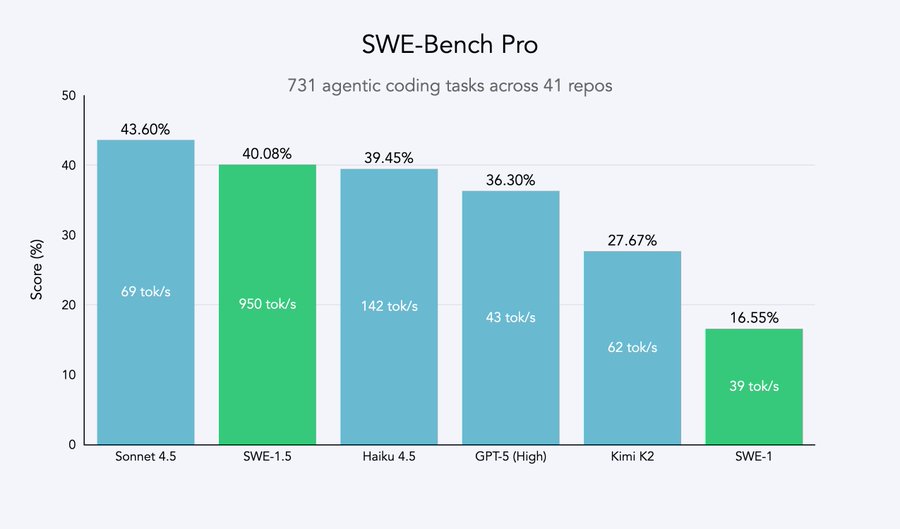
SWE-1.5 - Cognition's fast agentic coding model

Get access to all our AI courses, hundreds of real-world AI use cases, live expert-led workshops, an exclusive network of AI early adopters, and more.
Get unlimited access to all of our current & upcoming industry-specific AI courses for the duration of your subscription.
To keep up with the rapid pace of AI, our team publishes AI implementation guides daily. Our library contains 300+ practical use cases to automate real-world work.
Join weekly, live, interactive sessions with industry leaders who are at the forefront of AI for hands-on implementation guidance and exclusive insights.
Network with an exclusive community of AI-first professionals who are working smarter with AI. Learn how early adopters are using AI in their work and businesses.