Complex document parsing
Teams converting mixed-layout reports, manuals and research PDFs into Markdown for search, retrieval or downstream processing.
Independent tool overview
GLM-OCR is Z.ai's compact, open-weight document-understanding model for extracting text, formulas, tables and structured fields from PDFs and images through a hosted API or self-hosted pipeline.
Visit the official GLM-OCR site ↗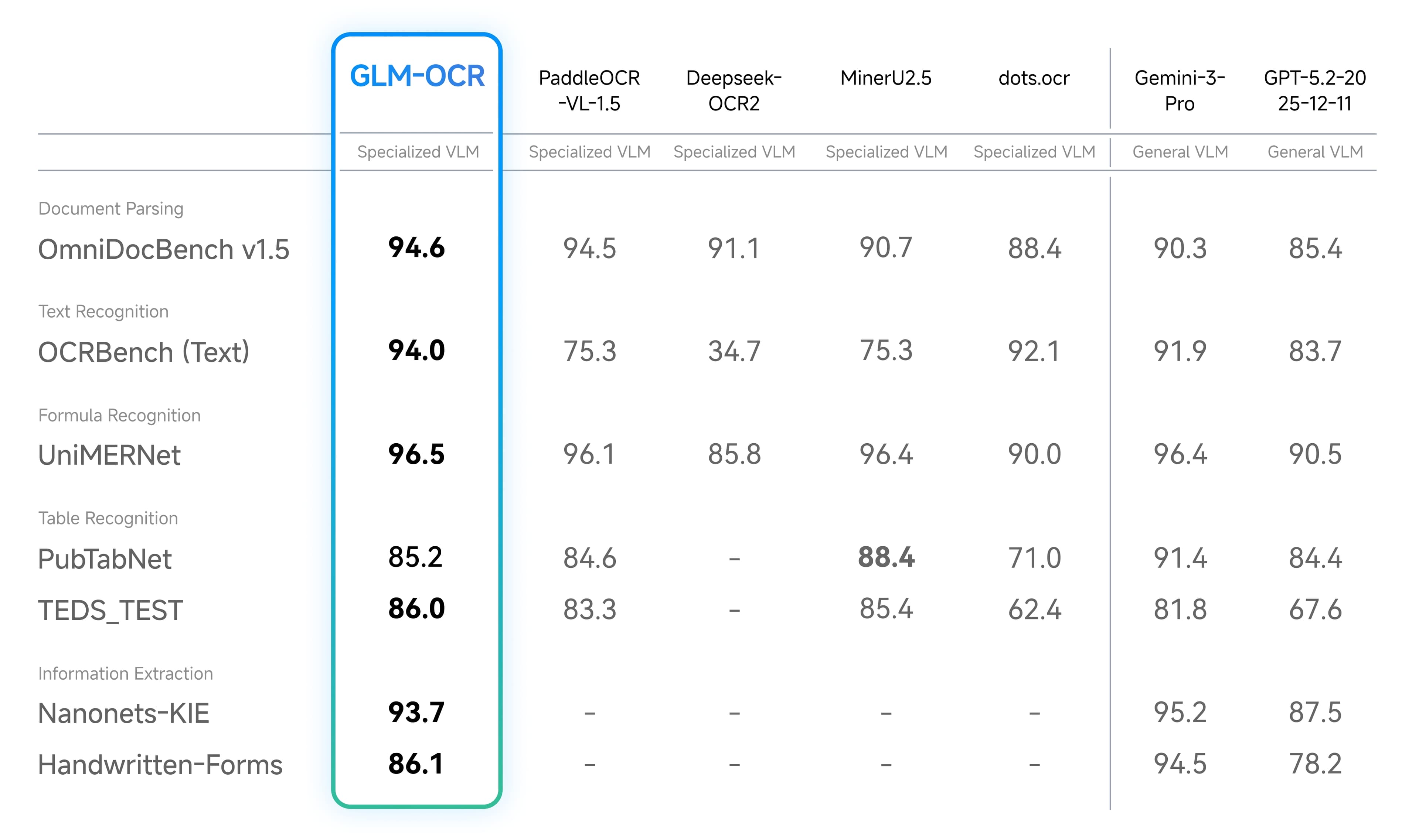
Overview
GLM-OCR combines a roughly 0.9-billion-parameter vision-language model with a two-stage document pipeline: PP-DocLayout-V3 detects regions, then GLM-OCR recognizes them in parallel. It can return text, image links and Markdown documents from PDFs, JPGs and PNGs, with dedicated prompts for text, formula and table recognition plus schema-driven information extraction.
The model is available through Z.ai's hosted layout-parsing API and as MIT-licensed weights on Hugging Face. The complete self-hosted document pipeline also includes PP-DocLayout-V3 under Apache 2.0. That split makes GLM-OCR attractive for both low-cost managed processing and private infrastructure, but production teams still need representative accuracy tests, field validation and a manual review path for consequential documents.
Use cases
The strongest fit depends on the job you need the product to complete, not the size of its feature list.
Teams converting mixed-layout reports, manuals and research PDFs into Markdown for search, retrieval or downstream processing.
Pipelines that need more structure than plain text OCR from tables, mathematical expressions and code-heavy pages.
Developers mapping receipts, certificates, cards and business forms into a predefined JSON schema with validation.
Projects processing Chinese, English, French, Spanish, Russian, German, Japanese, Korean and other documented languages.
Organizations willing to operate GPU inference so documents can remain inside their own controlled environment.
Capabilities
Uses PP-DocLayout-V3 for layout detection and parallel GLM-OCR recognition for detected regions, then formats the combined result.
Extracts printed text and handwriting from photos, screenshots, scans and native-looking document pages.
Provides a dedicated recognition prompt for mathematical expressions rather than flattening every page into plain prose.
Recognizes table structure and content and can return an HTML-formatted representation for later conversion or editing.
Can populate a developer-supplied JSON shape for fields on IDs, invoices, receipts, forms and other standardized documents.
Accepts a file URL or encoded local document through Z.ai's managed glm-ocr endpoint without requiring the customer to run a GPU.
Official guidance covers the GLM-OCR SDK, vLLM, SGLang, Ollama, Transformers and Apple Silicon deployment paths.
The GLM-OCR weights are published under the MIT license, with the layout component carrying its own Apache 2.0 obligations.
Process
Step 1
Sample native PDFs, scans, mobile photos, handwriting, tables, formulas and every important language instead of testing only clean pages.
Step 2
Use the Z.ai API for speed to production or operate the SDK pipeline when data residency, customization or volume economics justify infrastructure.
Step 3
For the hosted API, keep JPG or PNG images at 10MB or less and PDFs at 50MB or less with no more than 100 pages. Split larger files deliberately.
Step 4
Use the documented text, formula or table recognition prompt, or define a strict JSON schema for information extraction.
Step 5
Parse output into the target schema, verify required fields, enforce types and totals, and preserve page coordinates or source references where needed.
Step 6
Send low-quality pages, conflicting totals, missing fields and consequential records to a human rather than silently accepting plausible text.
Step 7
Track character, word, table and field-level accuracy plus latency, failure rate and cost for each document class and language.
Cost
Z.ai prices hosted GLM-OCR input and output uniformly at $0.03 per million tokens. The open weights can be downloaded without a model-license fee, but self-hosting still creates GPU, storage, engineering, observability and support costs.
$0.03 input / $0.03 output per 1M tokens
Managed layout parsing through the glm-ocr API endpoint.
No model-license fee
Download and run the GLM-OCR weights under the MIT license.
Infrastructure cost
Operate layout analysis, parallel recognition and result formatting on controlled hardware.
Pricing checked . Check current pricing at the source ↗
Assessment
Compare
The right alternative depends on the specific output, workflow, controls and budget your project requires.
Business Operations
Choose Mistral OCR 4 to compare a current hosted OCR model focused on layout-aware document understanding.
Explore Mistral OCR 4.1 →Business Operations
Choose Mistral OCR 3 when an existing Mistral integration or prior evaluation makes that version easier to operate.
Explore Mistral OCR 3 →Business Operations
Choose DeepSeek OCR 2 to compare another open document-recognition model and its token-efficiency approach.
Explore DeepSeek OCR 2 →Business Operations
Choose HunyuanOCR for another open visual-document model with a different deployment and language ecosystem.
Explore HunyuanOCR →Questions
GLM-OCR is Z.ai's compact multimodal model and document pipeline for extracting text, handwriting, formulas, tables and structured fields from images and PDFs.
The model weights are released under the MIT license. The complete document pipeline integrates PP-DocLayout-V3 under Apache 2.0, so both licenses matter when distributing the combined system.
Z.ai lists both input and output at $0.03 per million tokens. Self-hosting avoids the hosted token charge but still incurs infrastructure and operating costs.
Yes. The hosted service accepts PDFs up to 50MB and 100 pages. It also accepts JPG and PNG images up to 10MB.
Yes. It documents dedicated prompts for formula and table recognition, and table output can use an HTML-formatted representation. Exact values and structure still need validation.
Handwriting recognition is a documented use case, but accuracy will vary with the writer, language, image quality and layout. Test representative samples before automating a workflow.
Z.ai explicitly lists Chinese, English, French, Spanish, Russian, German, Japanese and Korean, followed by 'etc.' Do not assume equal accuracy across languages without testing.
Yes. Information-extraction prompts can request a strict JSON schema. Applications should validate every field and handle missing or uncertain values rather than trusting shape alone.
Yes. The project documents its own SDK plus vLLM, SGLang, Ollama, Transformers and Apple Silicon routes. Hardware requirements depend on runtime, quantization, page size and concurrency.
It is designed for those tasks, but no OCR model should be trusted without field-level evaluation and review controls. Verify names, dates, identifiers, totals and other consequential fields against the source document.
Bottom line
GLM-OCR is a compelling document-AI building block because it pairs a compact open model with a complete layout-aware pipeline and an exceptionally low-cost hosted API. The right decision is operational: use the API for rapid adoption or self-host for control, then prove accuracy on real documents. Its benchmark position does not remove the need for validation, confidence handling and human review on high-stakes fields.
Visit GLM-OCR website ↗
Microsoft Copilot: Is your ai companion across microsoft 365 for writing, summarizing, and automating work.
Claude Marketplace - Anthropic's enterprise hub for buying Claude-powered partner tools
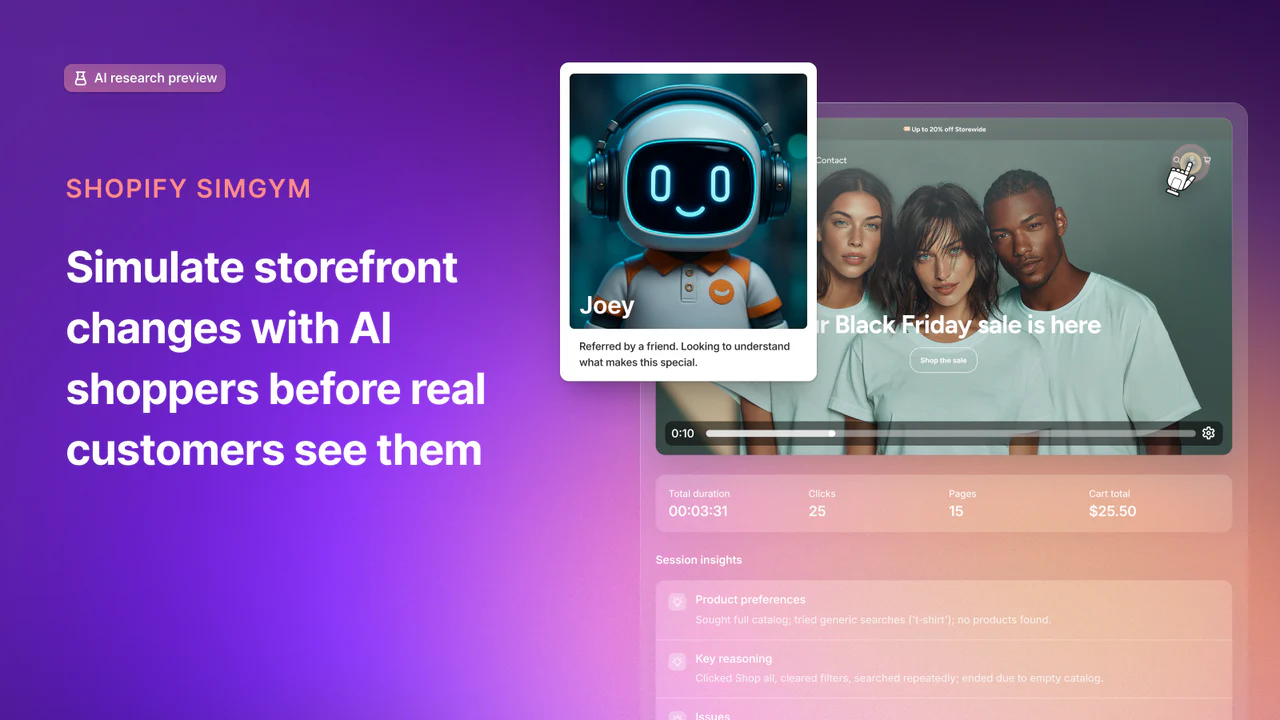
Shopify SimGym - Simulate buyer behavior with AI shoppers and gain the confidence of high traffic brands before launch.

Voxtral TTS - Mistral's voice cloning model for building multilingual AI speech agents

Get access to all our AI courses, hundreds of real-world AI use cases, live expert-led workshops, an exclusive network of AI early adopters, and more.
Get unlimited access to all of our current & upcoming industry-specific AI courses for the duration of your subscription.
To keep up with the rapid pace of AI, our team publishes AI implementation guides daily. Our library contains 300+ practical use cases to automate real-world work.
Join weekly, live, interactive sessions with industry leaders who are at the forefront of AI for hands-on implementation guidance and exclusive insights.
Network with an exclusive community of AI-first professionals who are working smarter with AI. Learn how early adopters are using AI in their work and businesses.