Theme redesign screening
Compare a draft redesign with the current live theme before deciding whether it is ready for real shoppers.
Independent tool overview
Shopify SimGym is an AI Research Preview app that sends simulated shoppers through a Shopify Liquid storefront to compare themes or generate usability feedback before changes go live.
Visit the official Shopify SimGym site ↗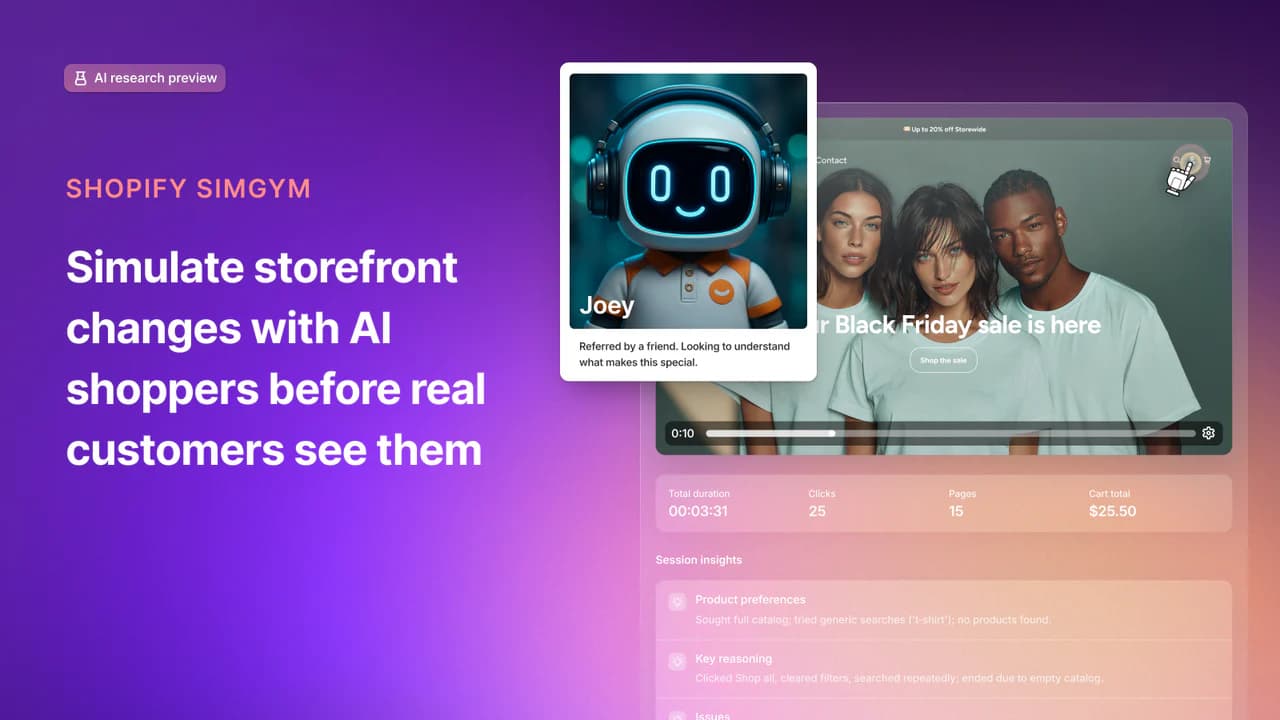
Overview
Shopify SimGym is a prelaunch testing tool for eligible Shopify stores. Its AI shoppers browse products and collections, use navigation and search, add products to the cart, and describe friction they encounter. Merchants can analyze one live or draft theme or compare the active theme with a draft.
The output is directional evidence: a theme-comparison result based on simulated add-to-cart behavior, individual shopper traces, qualitative feedback, and prioritized recommendations. It is especially useful when a store lacks enough traffic to run a fast conventional experiment or wants to catch obvious issues before exposing real customers to a redesign.
SimGym is not a substitute for an A/B test with real shoppers. Shopify explicitly notes that simulated behavior can differ from actual buyer behavior. Merchants should use it to screen ideas, then verify important decisions with accessibility testing, device testing, analytics, real-user research, and controlled production measurement.
The app remains in AI Research Preview. It supports Liquid storefronts, requires Shopify Network Intelligence to be active, and does not support Hydrogen or other headless storefronts. Private stores are also ineligible.
Use cases
The strongest fit depends on the job you need the product to complete, not the size of its feature list.
Compare a draft redesign with the current live theme before deciding whether it is ready for real shoppers.
Test holiday, launch, or promotional layouts before the campaign traffic arrives.
Get directional feedback when a conventional A/B test would take too long to reach a useful sample.
Direct simulated shoppers toward the homepage, products, collections, cart, or search to surface obvious friction.
Capabilities
Runs shoppers with human-like personas through products, collections, navigation, search, and add-to-cart flows.
Reviews a live or draft theme and summarizes strengths, problems, and prioritized conversion recommendations.
Compares the active theme with one draft theme and identifies the higher simulated add-to-cart rate.
Can center a run on the homepage, product pages, collections, cart, or search.
Lets merchants inspect each AI shopper's browsing actions, recordings, and feedback rather than seeing only an aggregate result.
Stores past analyses so teams can compare results across changes and remove runs they no longer need.
Process
Step 1
Confirm the store uses Liquid, is not private, has Shopify Network Intelligence active, and contains real products and content.
Step 2
Duplicate the theme and change one material element at a time so any simulated difference is interpretable.
Step 3
Analyze one theme for feedback or compare the live theme with the draft for a directional add-to-cart result.
Step 4
Review the action logs and qualitative explanations to find repeated navigation, product-discovery, or cart issues.
Step 5
Fix clear defects, then confirm the change through accessibility QA, device testing, analytics, customer research, and live experimentation where feasible.
Cost
SimGym is free to install but uses pay-per-use credits. Each completed simulation costs one credit. Shopify may allocate free credits during the research preview; after they are used, merchants can buy top-ups. Exact top-up prices are displayed inside the app rather than on the public listing.
Free to install
Eligible merchants can install the Shopify-developed app without an upfront subscription.
Free allocation may be available
Shopify may provide a limited number of simulation credits during the preview.
Price shown in the app
Additional simulations require purchased credits after any free allocation is depleted.
Pricing checked . Check current pricing at the source ↗
Assessment
Compare
The right alternative depends on the specific output, workflow, controls and budget your project requires.
Sales
Consider Shopify Magic for broader Shopify-native content and commerce assistance; it complements merchant work but does not replace SimGym's simulated storefront testing.
Explore Shopify Magic →Questions
SimGym is a Shopify AI Research Preview app that uses simulated shoppers to browse a store, add items to the cart, and provide feedback on a live or draft Liquid theme.
Yes. It compares the active theme with one theme from Draft themes and reports which achieved the higher add-to-cart ratio among its AI shoppers. A zero-to-zero tie is inconclusive.
Yes. Single-theme analysis works on a live or draft theme and returns a summary, strengths, improvement areas, and prioritized recommendations.
The store must use a Liquid storefront, have Shopify Network Intelligence activated, and not be in private mode. It should also have at least one product; comparisons require an active and a draft theme.
No. Shopify's current eligibility documentation says Hydrogen and headless storefronts are not supported.
The app is free to install. Each simulation uses one credit, Shopify may grant free preview credits, and additional top-up pricing is shown inside the app.
No. It is an AI simulation that provides directional evidence before launch. Real-user behavior, transactions, and controlled production experiments remain the stronger validation for business decisions.
Look for repeated, explainable issues across shopper traces; fix clear problems; then validate the change through accessibility and device QA, analytics, customer research, and live measurement.
Bottom line
Shopify SimGym is a useful screening layer for eligible Liquid storefronts, especially when merchants want prelaunch feedback or lack enough traffic for quick experiments. Its traces and recommendations can catch obvious friction, but the simulated add-to-cart result should guide what to test—not decide a redesign on its own.
Visit Shopify SimGym website ↗
HunyuanOCR - Tencent's SOTA open-source visual understanding model

Microsoft Copilot: Is your ai companion across microsoft 365 for writing, summarizing, and automating work.

Amazon Quick Suite - Quick connect to your information across apps

Mistral OCR 3 - Mistral's new SOTA AI model for extracting text and images from documents

Get access to all our AI courses, hundreds of real-world AI use cases, live expert-led workshops, an exclusive network of AI early adopters, and more.
Get unlimited access to all of our current & upcoming industry-specific AI courses for the duration of your subscription.
To keep up with the rapid pace of AI, our team publishes AI implementation guides daily. Our library contains 300+ practical use cases to automate real-world work.
Join weekly, live, interactive sessions with industry leaders who are at the forefront of AI for hands-on implementation guidance and exclusive insights.
Network with an exclusive community of AI-first professionals who are working smarter with AI. Learn how early adopters are using AI in their work and businesses.