Gemini API developers
Use a terminal agent with explicit model selection and a direct Gemini API-key billing path.
Independent tool overview
Gemini CLI is Google's Apache-licensed terminal agent for understanding codebases, editing files, running commands, searching the web, and connecting external tools through MCP.
Visit the official Gemini CLI site ↗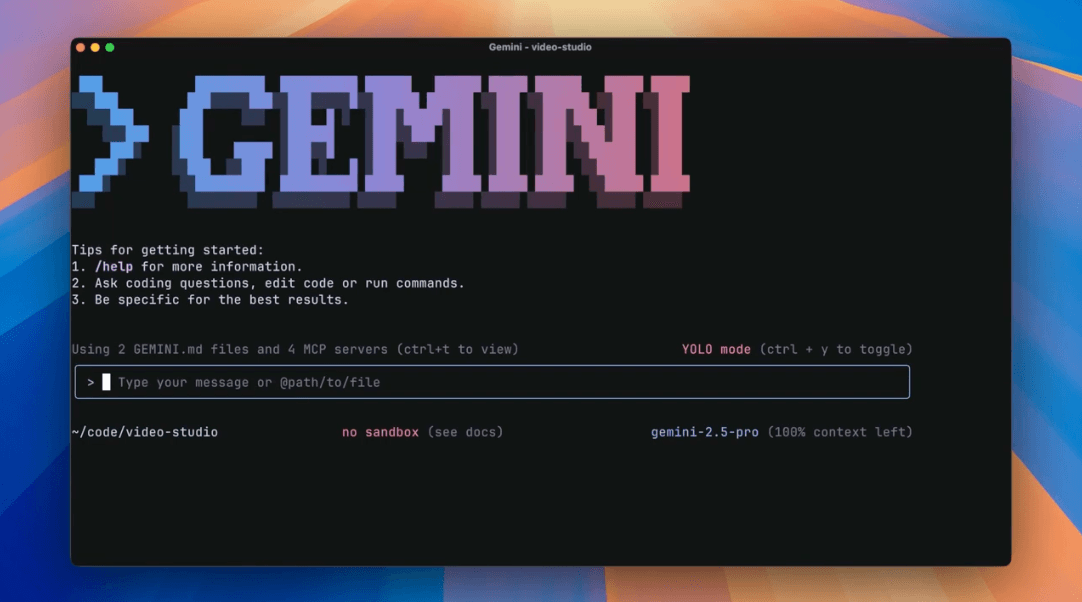
Overview
Gemini CLI is an open-source terminal agent that can inspect repositories, edit multiple files, run shell commands, search or fetch the web, and work interactively or in scripts. The command-line client is licensed under Apache 2.0.
The project supports Gemini models with long context, persistent GEMINI.md project instructions, resumable sessions, plan mode, extensions, MCP servers, custom commands, skills, hooks, GitHub workflows, and IDE integration.
The most important current caveat is authentication. On June 18, 2026, Google stopped serving Gemini CLI requests for Gemini Code Assist for individuals, Google AI Pro, and Google AI Ultra, and removed personal 'Login with Google' access. Google directs those users to Antigravity CLI.
Gemini CLI remains relevant for teams using a Gemini API key, Vertex AI, or Gemini Code Assist Standard or Enterprise. The open-source repository also remains active, but the right setup now depends on whether the user wants the supported Google successor or specifically needs the existing Node-based client.
Like every coding agent with shell and file tools, Gemini CLI can make incorrect edits or execute risky commands. Use a clean branch, review its plan and diff, keep approvals enabled, run it in a sandbox where practical, and never give an MCP server or extension more access than the task requires.
Use cases
The strongest fit depends on the job you need the product to complete, not the size of its feature list.
Use a terminal agent with explicit model selection and a direct Gemini API-key billing path.
Run through Vertex AI or an assigned Gemini Code Assist Standard or Enterprise license.
Inspect, extend, contribute to, or self-package an Apache-licensed coding-agent client.
Use Gemini's long context with repository search, file operations, and persistent project instructions.
Run prompts non-interactively and consume text, JSON, or streaming JSON output in scripts and workflows.
Add MCP servers, extensions, commands, skills, hooks, and IDE or GitHub integrations.
Capabilities
Reads and searches project files to explain architecture, trace behavior, and answer codebase questions.
Creates and modifies code across a workspace, subject to the selected approval and policy settings.
Runs tests, builds, linters, package commands, and other terminal operations.
Grounds research with Google Search and reads web resources when tools and policy allow.
Loads GEMINI.md files for persistent repository instructions, conventions, commands, and background.
Restricts the agent to read-only research and planning tools until the user approves implementation.
Saves, resumes, and revisits conversations for longer coding work.
Connects external tools and data sources through configured Model Context Protocol servers.
Packages reusable MCP integrations, configuration, context, slash commands, and other project capabilities.
Runs non-interactively with text, JSON, or streaming JSON output for automation.
Supports sandboxed execution, trusted-folder behavior, approval modes, and enterprise-admin restrictions.
Supports automated issue or pull-request workflows and a companion IDE experience.
Process
Step 1
Personal Google-account users should start with Antigravity CLI; use Gemini CLI only when its supported API, Vertex, or organization route matches the requirement.
Step 2
Run it through npx or install the latest stable npm, Homebrew, MacPorts, or supported environment package.
Step 3
Use a Gemini API key, Vertex AI credentials, or a Gemini Code Assist Standard or Enterprise license; do not depend on the discontinued personal Google login.
Step 4
Begin on a clean branch with recoverable changes, working tests, and no unrelated secrets or sensitive files in scope.
Step 5
Add a focused GEMINI.md with architecture, conventions, required commands, boundaries, and definition of done.
Step 6
Use plan mode for discovery, retain confirmations, configure policies, and enable sandboxing for command execution where practical.
Step 7
Specify the exact outcome, files or modules in scope, validation commands, and actions that require confirmation.
Step 8
Inspect proposed commands and tool requests, especially network calls, package changes, credentials, and write-enabled MCP actions.
Step 9
Review the diff, run tests and builds, examine security-sensitive changes, and keep normal pull-request protections.
Step 10
Use the model statistics command and provider billing controls to track requests, tokens, and pay-as-you-go usage.
Cost
The Gemini CLI client is free and open source, but model access follows the selected authentication provider. Personal Login with Google no longer works for Gemini CLI. Free and paid API routes have different model access and quotas, while organization licenses use per-user daily request limits.
Free
The command-line client is available under Apache 2.0.
$0 within quota
For light experimentation through the unpaid Gemini API tier.
Free trial path
A temporary Vertex AI entry route without initially enabling billing.
Pay as you go
For model selection, higher usage, production workloads, or uninterrupted access.
Paid organization seat
An organization license that continues to support Gemini CLI.
Paid enterprise seat
Higher-quota organization access with enterprise features.
Pricing checked . Check current pricing at the source ↗
Assessment
Compare
The right alternative depends on the specific output, workflow, controls and budget your project requires.
Coding
Choose Antigravity for Google's supported successor experience, especially if you previously used Gemini CLI with a personal Google account.
Explore Antigravity →Coding
Consider Claude Code for another mature terminal-first coding agent with a strong repository workflow.
Explore Claude Code →Coding
Choose Codex when you prefer OpenAI's coding agents and a dedicated interface for coordinating multiple tasks.
Explore Codex App →Questions
Gemini CLI is Google's open-source terminal agent for reading and editing code, running commands, searching the web, and connecting tools through MCP.
The open-source project remains active, and Gemini CLI continues to support Gemini API, Vertex AI, and Gemini Code Assist Standard or Enterprise routes. Its personal Google-account access was discontinued.
No. Google stopped serving Gemini CLI requests for Gemini Code Assist for individuals, Google AI Pro, and Google AI Ultra on June 18, 2026 and removed the personal Login with Google path.
Google directs affected consumer users to Antigravity CLI, the terminal product in its newer Antigravity agent family.
The client itself is free under Apache 2.0. Model usage may be free within an eligible API quota, included with an organization license, or billed by the Gemini API or Vertex AI.
The official quota page lists 250 requests per user per day for an unpaid Gemini API key, limited to Flash models. Vertex AI Express Mode has account-specific limits and a 90-day no-billing period.
Yes. It can discover and call tools from configured MCP servers, and extensions can bundle MCP configuration. Review every server's code, credentials, permissions, and data handling.
Yes. Headless mode supports plain text, JSON, and newline-delimited streaming JSON output for automated workflows.
Yes. It supports sandboxed tool execution and permission expansion, but teams should verify the active configuration rather than assume every command is isolated.
The project documents anonymized usage statistics covering tool names, request timing, success status, and configuration—not prompt, response, or file contents. Users can disable usage statistics in privacy settings.
Bottom line
Gemini CLI remains a capable, highly extensible open-source agent for API and Google Cloud users, but it is no longer the default choice for individuals who want to sign in with a Google account. Those users should start with Antigravity CLI. Teams that deliberately keep Gemini CLI should use a supported authentication route, stable releases, plan mode, sandboxing, tightly scoped tool permissions, and normal code-review controls.
Visit Gemini CLI website ↗
Warp 2.0: All-in-one agentic development platform

Bolt.new: Lets you spin up AI-powered web apps instantly using natural language.

Google Firebase: Firebase helps developers build and scale apps with backend infrastructure, analytics, and real-time databases.

Cursor Agents - Work with a powerful coding assistant anywhere with the Cursor Agent on web and mobile

Get access to all our AI courses, hundreds of real-world AI use cases, live expert-led workshops, an exclusive network of AI early adopters, and more.
Get unlimited access to all of our current & upcoming industry-specific AI courses for the duration of your subscription.
To keep up with the rapid pace of AI, our team publishes AI implementation guides daily. Our library contains 300+ practical use cases to automate real-world work.
Join weekly, live, interactive sessions with industry leaders who are at the forefront of AI for hands-on implementation guidance and exclusive insights.
Network with an exclusive community of AI-first professionals who are working smarter with AI. Learn how early adopters are using AI in their work and businesses.