Multi-asset campaigns
Keep brand visuals, product imagery, generations, and channel variations organized in one project.
Independent tool overview
Firefly Studio is Adobe's evolving all-in-one creative AI workspace for generating, editing, organizing, and reusing image, video, audio, and design assets across projects.
Visit the official Firefly Studio site ↗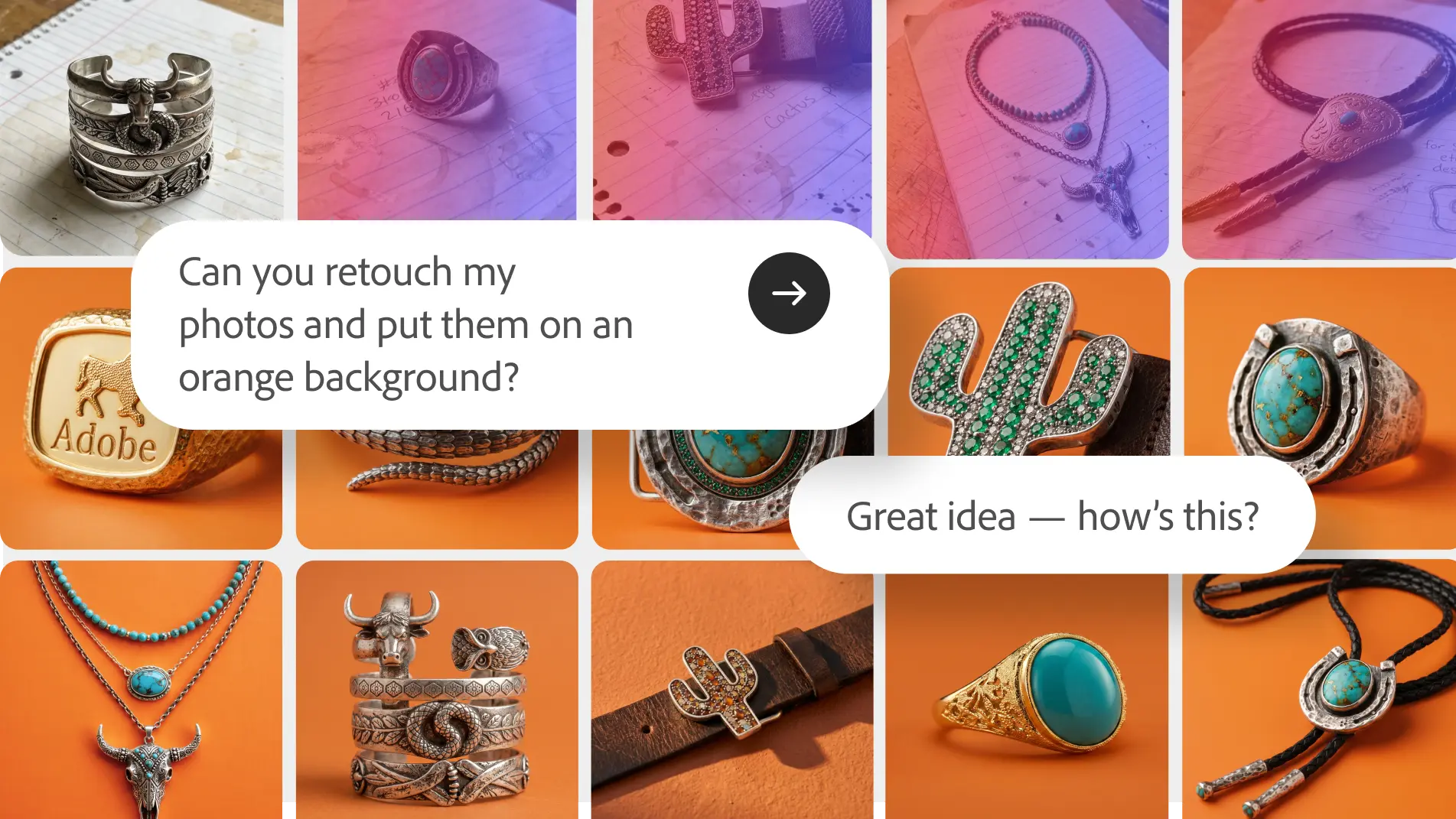
Overview
Adobe Firefly Studio is the upgraded workspace layer of Firefly, designed to connect ideation, generation, editing, and production without moving between separate tools. Adobe previewed the unified Studio experience in June 2026 with persistent project context and reusable creative assets.
Its defining features are Elements, which save characters, locations, and objects for reuse, and Projects, which keep generations, assets, and creative context together. The broader Firefly product also includes AI Assistant, image and video generation, editing, music, speech, sound effects, and partner models from companies such as Google, OpenAI, Runway, Kling, Luma, and ElevenLabs.
Access needs careful reading: Adobe launched the upgraded Studio experience as a private beta and described Elements as an early-release feature in August 2026. Standard Firefly features are broadly available, but Studio, Elements, and project capabilities may still depend on waitlist or account eligibility.
Use cases
The strongest fit depends on the job you need the product to complete, not the size of its feature list.
Keep brand visuals, product imagery, generations, and channel variations organized in one project.
Reuse saved Elements across episodes, storyboards, and creative iterations.
Move from a concept to images, short video, voice, music, sound effects, and format variations.
Combine Firefly generation with familiar Adobe editing tools and Creative Cloud workflows.
Capabilities
Brings creative ideation, AI generation, refinement, and assembly into a connected workspace.
Saves recurring characters, objects, and locations so they can be reused across generations.
Keeps assets, generation history, and creative context together for continuity across sessions.
Uses conversational instructions to orchestrate creative tasks such as storyboards, brand kits, product videos, and batch edits.
Supports workflows across images, video, music, speech, sound effects, and design.
Offers Adobe models alongside selected third-party models inside Firefly.
Extends work into Adobe tools such as Photoshop, Premiere, Illustrator, Express, and other supported apps.
Adobe's Studio direction includes shared creative context and collaborator participation inside ongoing projects.
Process
Step 1
Check whether the upgraded Studio, Elements, and Projects are enabled for the Adobe account or require beta access.
Step 2
Collect the brief, references, brand assets, prior generations, and target deliverables in one workspace.
Step 3
Develop key characters, products, objects, or locations and save the approved versions for reuse.
Step 4
Generate and edit imagery, storyboard video, add audio, and create channel-specific variations.
Step 5
Check brand accuracy, rights, model choice, visual artifacts, accessibility, and final output in the appropriate Adobe editor.
Cost
The upgraded Studio experience has been distributed through gated beta access, while Firefly generation follows Adobe's credit plans. Current individual plans start free, with paid tiers from $9.99 per month; promotional pricing and unlimited-generation offers can change.
$0
Limited daily generations across selected standard and premium features.
$9.99/month
Entry paid plan for regular creative generation.
$19.99/month
Adds more credits plus selected Adobe apps and services.
Regularly $49.99/month
Higher-volume individual plan with more monthly credits.
Regularly $199.99/month
High-volume plan for creators producing substantial image, video, and audio output.
Pricing checked . Check current pricing at the source ↗
Assessment
Compare
The right alternative depends on the specific output, workflow, controls and budget your project requires.
Design
Use the broadly available Adobe Firefly experience when gated Studio project features are not required.
Explore Adobe Firefly →Design
Choose Canva Magic Studio for template-led design, publishing, and team-friendly brand workflows.
Explore Canva AI (Magic Studio) →Content Creator
Choose Runway when advanced AI video generation and editing are the primary need.
Explore Runway Creative →Questions
It is Adobe's upgraded creative AI workspace for moving from ideation through generation, editing, asset reuse, and production across image, video, audio, and design.
Adobe introduced the upgraded Studio experience as a private beta and later described features such as Elements as an early release. Availability may still depend on account eligibility or a waitlist.
Elements let creators save recurring characters, locations, and objects for reuse across generations and projects, helping maintain continuity.
Projects organize assets, generations, and creative context together so work can continue across sessions without rebuilding the brief each time.
Adobe has not listed a separate universal Studio beta price. Firefly usage follows its credit plans, which currently start free and offer paid individual tiers from $9.99 per month.
The broader Firefly studio includes selected partner models from providers such as Google, OpenAI, Runway, Kling, Luma, and ElevenLabs. Availability and credit cost vary.
No blanket assumption is appropriate. Review the exact model, plan terms, source assets, trademarks, likenesses, and intended use. Adobe's commercial-safety and indemnification terms differ by workflow and plan.
Bottom line
Firefly Studio has a strong product direction for creators who want persistent context and reusable assets across a complete campaign. Its immediate value depends on account access, while credit economics, model-specific rights, and final creative quality still need close review.
Visit Firefly Studio website ↗
Frame.md - HeyGen's spec format for AI videos and motion to create branded, consistent content

Muse Image - Meta’s new in-house AI image generator

Reve 2.0 - Reve's new 4K AI image model with new layout-based editing for more granular control

Seedream 5.0 Pro - ByteDance's new image model built for infographics and precise edits

Get access to all our AI courses, hundreds of real-world AI use cases, live expert-led workshops, an exclusive network of AI early adopters, and more.
Get unlimited access to all of our current & upcoming industry-specific AI courses for the duration of your subscription.
To keep up with the rapid pace of AI, our team publishes AI implementation guides daily. Our library contains 300+ practical use cases to automate real-world work.
Join weekly, live, interactive sessions with industry leaders who are at the forefront of AI for hands-on implementation guidance and exclusive insights.
Network with an exclusive community of AI-first professionals who are working smarter with AI. Learn how early adopters are using AI in their work and businesses.