Understanding Cursor's multi-agent transition
See where isolated parallel agents, centralized plans and a review-first interface entered the product.
Independent tool overview
Cursor 2.0 was the October 2025 release that introduced Cursor's first Composer coding model and a redesigned interface for running as many as eight isolated agents on the same task.
Visit the official Cursor 2.0 site ↗.png&w=3840&q=75)
Overview
Cursor 2.0 marked the product's shift from a primarily editor-centered AI assistant toward multi-agent software development. The release paired Composer, Cursor's first in-house agentic coding model, with a new interface for launching and reviewing several agents in parallel.
The release remains historically important, but it is no longer the newest Cursor experience. Cursor 3 replaced its multi-agent interface in April 2026 with a broader Agents Window, multi-repository workspace and smoother local-to-cloud handoffs. Composer also advanced through later generations, so the original Composer performance claims should not be read as descriptions of today's default model lineup.
This page documents what version 2.0 introduced while using Cursor's current plans for the pricing section. New users should install the latest Cursor release rather than trying to locate an old 2.0 build.
Use cases
The strongest fit depends on the job you need the product to complete, not the size of its feature list.
See where isolated parallel agents, centralized plans and a review-first interface entered the product.
Separate features introduced in 2.0 from the expanded agent workspace and cloud workflow delivered in Cursor 3.
Use the release as a practical reference for worktree-based parallel attempts, sandboxed commands and structured review.
Capabilities
Version 2.0 could launch up to eight agents from one prompt, with each attempt operating in an isolated Git worktree or remote machine.
Cursor introduced its first in-house coding model, optimized for low-latency agent work and codebase-wide semantic search. Later Composer versions have superseded it.
A sidebar collected agents and plans while retaining the ability to open files or return to the classic IDE when deeper inspection was needed.
Browser for Agent reached general availability, including an embedded editor view and tools for selecting elements and forwarding DOM context to an agent.
The release made it easier to inspect an agent's changes across several files without navigating each file independently.
Unapproved agent commands ran in a restricted workspace by default, with no internet access unless settings allowed it.
Administrators could centrally distribute team rules and commands, while Enterprise controls expanded for sandbox settings, hooks and audit logs.
Process
Step 1
Give agents a narrow objective, relevant repository context and explicit tests or acceptance criteria.
Step 2
Use separate worktrees or remote environments so parallel agents do not overwrite one another's files.
Step 3
Review plans, diffs, browser evidence and test results instead of choosing an answer from prose alone.
Step 4
Select or combine the best implementation, rerun the full validation suite and merge only the reviewed changes.
Cost
Cursor 2.0 was a software release, not a separate subscription. The prices below are Cursor's current plans as of the review date, not the launch-era 2.0 pricing. Optional on-demand model usage can add to the subscription cost.
Free
Entry plan for limited use.
$20/month
Individual plan with extended agent usage.
$60/month
Higher-volume plan for daily agent users.
$200/month
Top self-serve individual plan.
$40/user/month
Collaborative plan with centralized controls.
Custom
Managed deployment for larger organizations.
Pricing checked . Check current pricing at the source ↗
Assessment
Compare
The right alternative depends on the specific output, workflow, controls and budget your project requires.
Coding
Use Cursor 3 for the current agent-first workspace, multi-repository layout and expanded local-to-cloud workflow.
Explore Cursor 3 →Coding
Choose Claude Code for a terminal-first coding agent centered on Anthropic's model family.
Explore Claude Code →Coding
Choose the Codex app for OpenAI-centered cloud coding tasks and multi-agent supervision.
Explore Codex App →Questions
Cursor 2.0 introduced the original Composer coding model, a redesigned multi-agent interface, up to eight isolated agents per prompt, integrated browser testing, improved code review and generally available sandboxed terminals on macOS.
No. Cursor 3 replaced the version 2.0 multi-agent interface in April 2026 and Cursor has continued adding agent, cloud and repository capabilities since then.
Cursor distributes the current application rather than positioning version 2.0 as a separate product. New users should install the latest Cursor release; this page is a release overview.
Composer was Cursor's first in-house agentic coding model, trained for fast software-engineering work and equipped with codebase search and editing tools. Later Composer generations have superseded it.
Cursor currently has a free Hobby tier. Individual plans are Pro at $20 per month, Pro Plus at $60 and Ultra at $200, while Teams Standard starts at $40 per user per month. Usage-based charges may apply beyond included usage.
Each agent worked in an isolated Git worktree or remote machine. That reduced file collisions, but developers still had to compare, test and integrate the competing changes.
Bottom line
Cursor 2.0 is best understood as a milestone rather than a product to seek out today. It introduced the original Composer model and made parallel, isolated agents a first-class part of Cursor. Those ideas remain relevant, but anyone evaluating Cursor now should use the current release and treat version 2.0 claims as historical context.
Visit Cursor 2.0 website ↗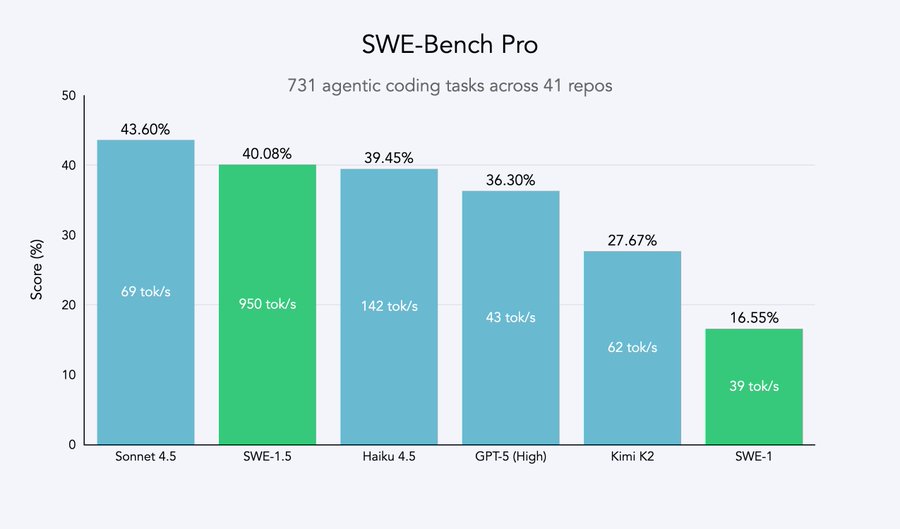
SWE-1.5 - Cognition's fast agentic coding model
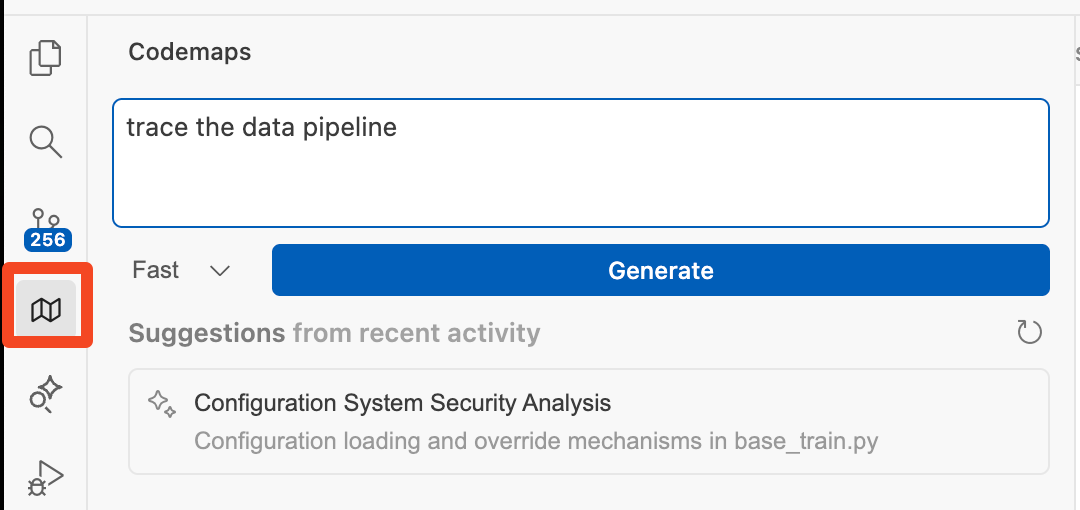
Codemaps - AI code mapping tool to help engineers quickly understand and navigate codebases
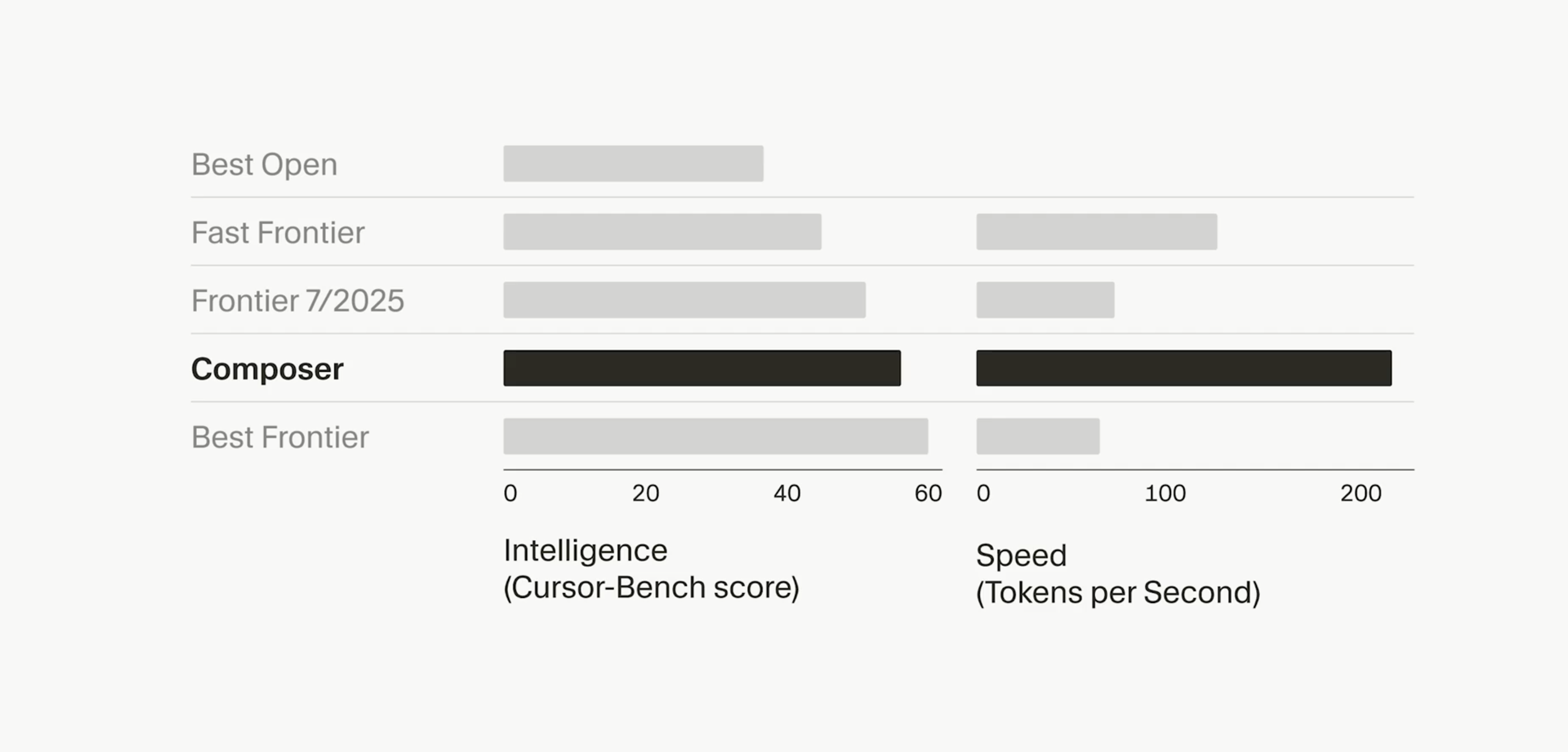
Composer - Cursor's new agent model designed for software engineering intelligence and speed.

Code Arena - LM Arena's evaluation platform for testing models in isolated environments

Get access to all our AI courses, hundreds of real-world AI use cases, live expert-led workshops, an exclusive network of AI early adopters, and more.
Get unlimited access to all of our current & upcoming industry-specific AI courses for the duration of your subscription.
To keep up with the rapid pace of AI, our team publishes AI implementation guides daily. Our library contains 300+ practical use cases to automate real-world work.
Join weekly, live, interactive sessions with industry leaders who are at the forefront of AI for hands-on implementation guidance and exclusive insights.
Network with an exclusive community of AI-first professionals who are working smarter with AI. Learn how early adopters are using AI in their work and businesses.