Onboarding to an unfamiliar repository
Generate a task-specific view of the code paths that matter instead of reading the directory tree from top to bottom.
Independent tool overview
Codemaps is Cognition's AI-assisted code visualization feature for tracing how a system works through interactive, source-linked maps in DeepWiki and Devin Desktop.
Visit the official Codemaps site ↗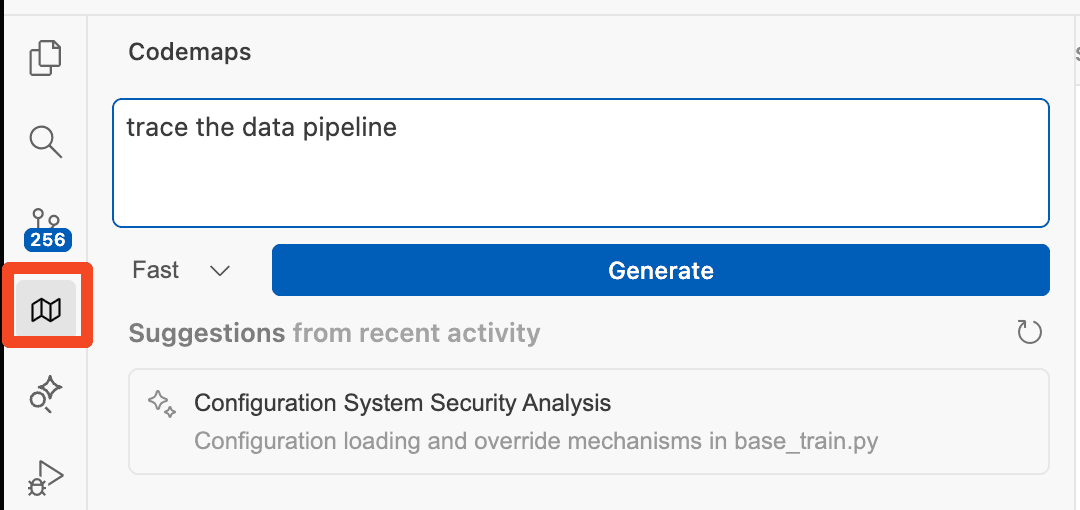
Overview
Codemaps starts with a specific engineering question—such as how authentication flows through a repository—and builds a structured map of the relevant files, functions and relationships. Engineers can use a grouped text view or a visual graph, click through to exact code locations and expand trace guides for more explanation.
The feature launched in Windsurf and DeepWiki in late 2025. Windsurf has since become Devin Desktop, Cognition's agent-management IDE, while DeepWiki remains the documentation and code-understanding surface. Codemaps is useful for onboarding, debugging and planning changes, but its output is a generated snapshot rather than a substitute for reading the code and confirming runtime behavior.
Use cases
The strongest fit depends on the job you need the product to complete, not the size of its feature list.
Generate a task-specific view of the code paths that matter instead of reading the directory tree from top to bottom.
Follow features that span clients, APIs, services and data layers with links back to the relevant source.
Build a shared mental model before changing authentication, data pipelines or other high-impact systems.
Reference a full map or one of its sections in an agent prompt to narrow the context around a task.
Capabilities
Describe the system or code path you need to understand, or begin from one of the suggested topics for the open repository.
Switch between grouped, nested code sections and a visual node map representing the same relevant paths.
Select a section or visual node to jump to the exact area of the codebase it represents.
Open a more detailed explanation of why the mapped lines belong together and how the path works.
Share generated maps with teammates and reference map sections in supported agent workflows.
Use Codemaps alongside repository documentation, architecture diagrams, summaries and source-linked code search.
Process
Step 1
Connect or select the repository in DeepWiki or open it in Devin Desktop.
Step 2
Name the feature, path or problem you need to understand; narrow prompts generally produce a more useful map.
Step 3
Move between the structured and visual views, expand trace guides and inspect the linked source lines.
Step 4
Confirm the map against the current branch, runtime behavior and tests before using it to plan an edit or brief an agent.
Cost
Codemaps is a feature inside Cognition's broader Devin and DeepWiki products rather than a separately priced subscription. Devin's self-serve plans currently start free; paid individual plans are $20 or $200 per month, and Teams has an $80 monthly minimum. Included quotas and on-demand credits affect the total cost.
Free
For an individual trying Devin with limited usage.
$20/month
For one developer using Devin and the desktop IDE regularly.
$200/month
For a single power user who needs a much larger weekly quota.
$80/month minimum
For organizations sharing Devin across regular and occasional users.
Custom
For organizations buying under an enterprise agreement.
Pricing checked . Check current pricing at the source ↗
Assessment
Compare
The right alternative depends on the specific output, workflow, controls and budget your project requires.
Coding
Use the Devin Desktop page for the full current IDE and agent-management product that evolved from Windsurf.
Explore Devin Desktop (formerly Windsurf) →Coding
Consider Cursor when the priority is an AI-native editor with codebase-aware agents and multiple model choices.
Explore Cursor →Coding
Consider Claude Code when you prefer a terminal-centered agent that can inspect and explain a repository through conversation.
Explore Claude Code →Questions
Codemaps are AI-generated, interactive maps of the code paths related to a specific question. They group relevant code, link to source lines and provide expandable explanations.
Windsurf became Devin Desktop in June 2026. Cognition says the new desktop app remains backward-compatible with the Windsurf IDE, and Codemaps is also available through DeepWiki.
Codemaps is not separately priced. Devin's Free plan includes access to DeepWiki with limited overall usage, and Cognition also offers a free DeepWiki experience for public GitHub repositories.
DeepWiki supports connected repositories, but availability and limits depend on the Devin account and plan. Review repository permissions and Cognition's security terms before connecting proprietary code.
Treat each map as a snapshot of the analyzed code. Check the branch and source links, and regenerate or refresh the map after meaningful repository changes.
Bottom line
Codemaps is a practical aid for understanding unfamiliar or cross-cutting code before making changes. Its source-linked views and trace guides are more actionable than a generic architecture diagram, but the map still needs to be checked against the current code and runtime. Start with the free DeepWiki access on a public repository before deciding whether the broader Devin subscription is worthwhile.
Visit Codemaps website ↗.png)
Cursor 2.0

Code Arena - LM Arena's evaluation platform for testing models in isolated environments
SWE-1.5 - Cognition's fast agentic coding model

Antigravity - Google's new agentic development platform to build anything, orchestrate agents, and run parallel tasks across workspaces.

Get access to all our AI courses, hundreds of real-world AI use cases, live expert-led workshops, an exclusive network of AI early adopters, and more.
Get unlimited access to all of our current & upcoming industry-specific AI courses for the duration of your subscription.
To keep up with the rapid pace of AI, our team publishes AI implementation guides daily. Our library contains 300+ practical use cases to automate real-world work.
Join weekly, live, interactive sessions with industry leaders who are at the forefront of AI for hands-on implementation guidance and exclusive insights.
Network with an exclusive community of AI-first professionals who are working smarter with AI. Learn how early adopters are using AI in their work and businesses.