Corporate template workflows
Teams drafting or revising decks inside established masters, layouts, fonts and color systems.
Independent tool overview
Claude for PowerPoint is Anthropic's generally available Microsoft PowerPoint add-in for generating and editing native slides, charts and diagrams inside an existing deck and template.
Visit the official Claude for PowerPoint site ↗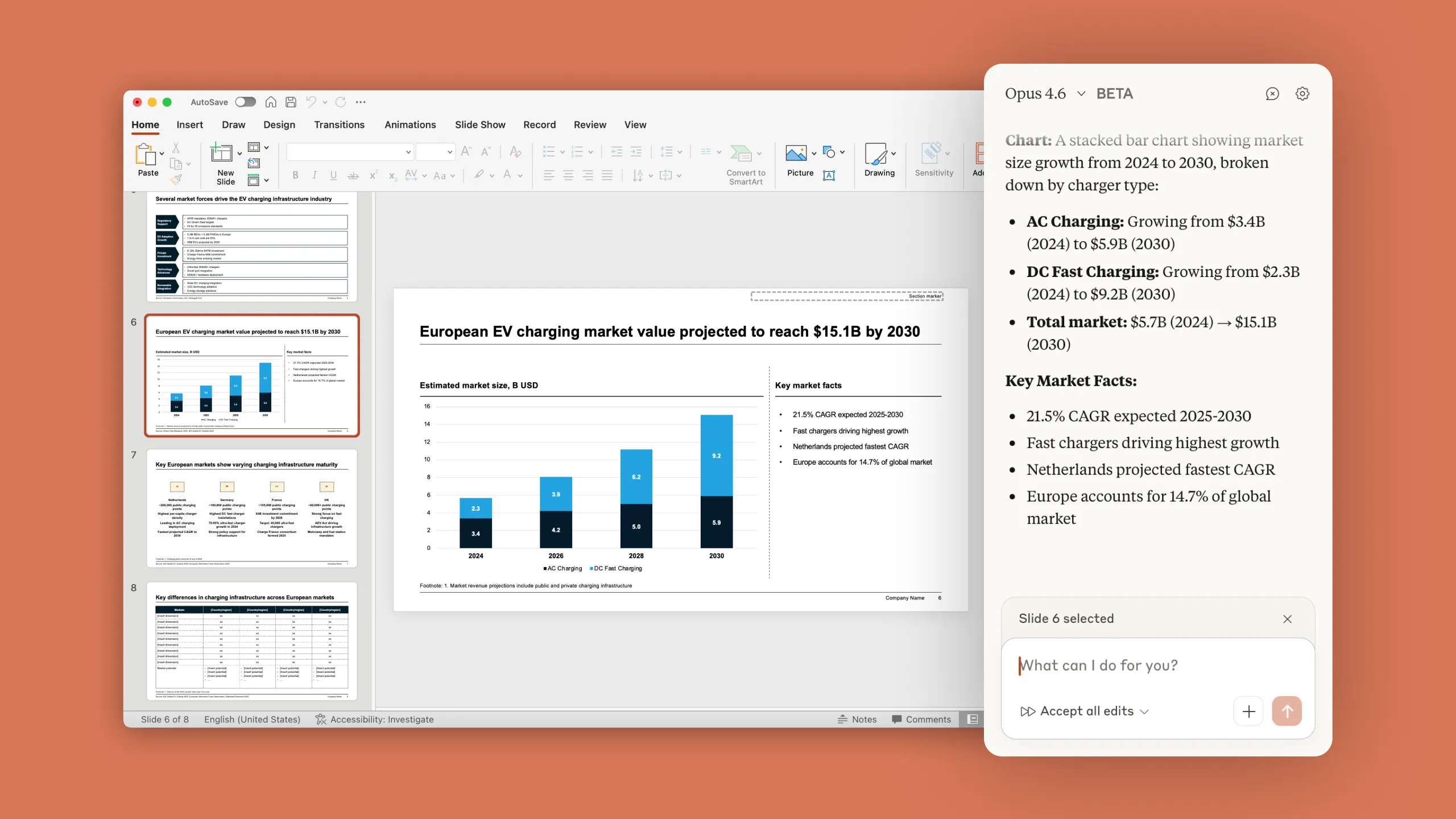
Overview
Claude for PowerPoint—originally introduced as Claude in PowerPoint—places an Anthropic sidebar inside Microsoft PowerPoint. It can create a deck from a brief, edit selected slides, turn bullets into native charts or diagrams and read the current slide master, layouts, fonts and colors instead of exporting a flat image-only presentation.
The add-in is generally available on Claude Pro, Max, Team and Enterprise plans. Its biggest advantage is in-place iteration: users can stay inside an existing corporate template and carry context across Claude for Excel, Word, PowerPoint and Outlook. It is still a drafting tool. Anthropic explicitly recommends human review and warns that untrusted Office files can contain prompt injections capable of influencing connected actions.
Use cases
The strongest fit depends on the job you need the product to complete, not the size of its feature list.
Teams drafting or revising decks inside established masters, layouts, fonts and color systems.
Users carrying analysis from Claude for Excel into PowerPoint without rebuilding the context from the beginning.
Presenters who need to tighten one section, restructure a slide or apply feedback without regenerating the whole deck.
Teams that want AI-created visuals to remain editable as PowerPoint objects instead of receiving a static image.
Organizations using persistent instructions and reusable Skills for recurring deck structures, wording and brand rules.
Capabilities
Builds an initial presentation structure and slides from a natural-language brief, source document or connected context.
Can revise selected slides or elements without requiring the user to replace the full presentation.
Reads slide masters, layouts, fonts and color schemes and attempts to follow them during generation and editing.
Converts bullets or data into editable PowerPoint charts, flows and diagrams rather than only inserting raster images.
Users can set add-in-specific rules for preferred bullet length, slide structure, accent colors and recurring presentation conventions.
Can pull approved external context through connectors and apply reusable task recipes where the account and administrator allow them.
A conversation can span open Excel, Word, PowerPoint and Outlook files so an analysis or brief can flow into the deck.
The add-in currently offers Claude Opus 4.7, Opus 4.6 and Sonnet 4.6 for different quality and usage needs.
Process
Step 1
Use PowerPoint on the web, Windows Microsoft 365 build 16.0.13127.20296 or later, or Mac 16.46 or later with an eligible Claude plan.
Step 2
Individuals can install Claude by Anthropic for PowerPoint from Microsoft AppSource; administrators can deploy it to selected users or groups.
Step 3
Open the approved slide master and layouts first, then provide the audience, decision, narrative, source material and required length.
Step 4
Ask Claude to propose the story and slide sequence, review the logic, then generate or edit the deck within that agreed structure.
Step 5
Request editable charts or diagrams and provide exact source data, units, dates and labels rather than accepting invented placeholder numbers.
Step 6
Refine one slide or element at a time and specify what must remain unchanged to reduce collateral formatting changes.
Step 7
Verify every claim, citation, number, chart scale, speaker note, logo and layout; test slideshow mode and accessibility before delivery.
Cost
Claude for PowerPoint is included with paid Claude plans rather than sold as a separate add-in. A compatible Microsoft PowerPoint or Microsoft 365 license is also required. US individual pricing starts at $20 monthly for Pro, while Max and team plans provide higher usage at higher prices.
$20/month or $200/year
Lowest-priced individual Claude plan documented as eligible for the PowerPoint add-in.
$100/month (5x) or $200/month (20x)
Individual plans for people who need substantially more Claude usage.
$20–$125 per member/month
Managed team plan with Standard and Premium seat choices; at least two members are required.
Seat fee plus usage at API rates
Current enterprise model combines annual per-user access with metered usage and organizational controls.
Pricing checked . Check current pricing at the source ↗
Assessment
Compare
The right alternative depends on the specific output, workflow, controls and budget your project requires.
Business Operations
Choose Microsoft Copilot when native Microsoft 365 administration and the broader Microsoft ecosystem are the priority.
Explore Microsoft Copilot →Content Creator
Choose Plus AI when you want a presentation-focused add-in with PowerPoint generation and editing as its core product.
Explore Plus AI PowerPoint maker →Consulting
Choose Gamma for a browser-first, highly shareable presentation format rather than a PowerPoint-native workflow.
Explore Gamma →Consulting
Choose Replit Slides for a code-adjacent slide creation workflow inside Replit's broader building environment.
Explore Replit Slides →Questions
Yes. Anthropic now documents the product as Claude for PowerPoint, and it is generally available on Pro, Max, Team and Enterprise plans.
No. The add-in is included with paid Claude plans and is not listed for Free users. A compatible Microsoft PowerPoint or Microsoft 365 license is also required.
There is no separate add-in price. US Claude Pro costs $20 monthly or $200 annually, Max costs $100 or $200 monthly, and Team seats range from $20 to $125 per member per month depending on seat and billing interval.
Anthropic lists PowerPoint on the web, Windows Microsoft 365 build 16.0.13127.20296 or later, and PowerPoint for Mac 16.46 or later.
No. Anthropic lists PowerPoint on iPad and Android as unsupported, along with PowerPoint 2016 and 2019 perpetual or volume-license editions.
It reads the deck's slide master, layouts, fonts and colors and attempts to follow them. Human review is still required because template awareness is not a guarantee of perfect compliance.
Yes. Anthropic says it can create native PowerPoint charts and diagrams that remain editable rather than inserting only static images.
Yes. Claude for Microsoft 365 can carry context across open Excel, Word, PowerPoint and Outlook files, subject to the user's access and administrator controls.
Anthropic says inputs and outputs are generally deleted from its backend within 30 days, with documented exceptions and short caching. Chat history is stored locally in browser IndexedDB and does not sync across devices.
Treat external files as untrusted. Anthropic warns that hidden prompt injections in templates, vendor files or imports can attempt to extract data or trigger destructive changes. Review every confirmation and restrict connected access.
Bottom line
Claude for PowerPoint is one of the more practical AI presentation tools for teams that must deliver real PPTX files in an existing template. Native objects, targeted edits and cross-app Microsoft 365 context are meaningful advantages. The tradeoff is operational: it needs a paid Claude plan, supported PowerPoint environment, careful review and explicit controls around sensitive or externally sourced files. Use it to accelerate drafting and revision, not to approve the final deck.
Visit Claude for PowerPoint website ↗
Context - AI office suite for working smarter, faster, and more efficiently

Grok for Excel - Ask questions in plain English, write formulas, and run scenarios with Grok inside Excel

Perplexity - Your Research Assistant, available wherever you are

Kyligence: AI-powered analytics for data insights.

Get access to all our AI courses, hundreds of real-world AI use cases, live expert-led workshops, an exclusive network of AI early adopters, and more.
Get unlimited access to all of our current & upcoming industry-specific AI courses for the duration of your subscription.
To keep up with the rapid pace of AI, our team publishes AI implementation guides daily. Our library contains 300+ practical use cases to automate real-world work.
Join weekly, live, interactive sessions with industry leaders who are at the forefront of AI for hands-on implementation guidance and exclusive insights.
Network with an exclusive community of AI-first professionals who are working smarter with AI. Learn how early adopters are using AI in their work and businesses.