Fast narrative first drafts
Consultants, marketers, educators, founders, and sales teams turning an outline or source material into a coherent, visually presentable deck or document quickly.
Independent tool overview
Gamma is an AI-first visual communication platform for presentations, documents, simple websites, social posts, and graphics. It can turn a prompt, outline, source file, or URL into editable card-based content, then publish it as an interactive link or export it to PowerPoint, PDF, PNG, or Google Slides. Its strongest use is creating and iterating a polished first draft quickly, not replacing fact-checking or precise slide design.
Visit the official Gamma site ↗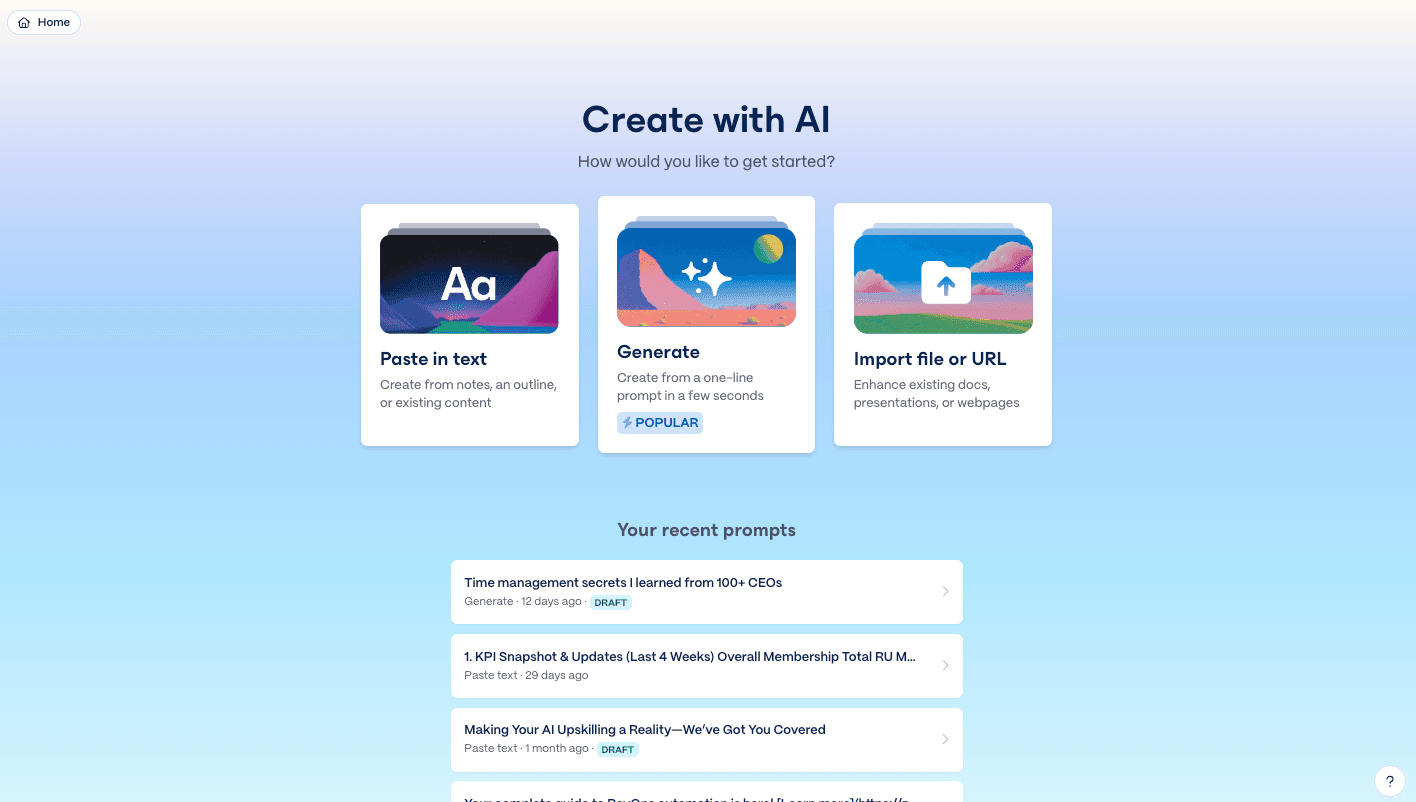
Overview
Gamma starts from a prompt, pasted text, imported file, template, or source URL and generates a structured narrative with copy, layouts, images, charts, and a theme. The editor uses responsive cards rather than a fixed desktop slide canvas, which makes web sharing fast and keeps layouts reasonably consistent as content changes.
The product has expanded beyond decks. The same workspace can create documents, multi-page sites, social graphics, and image-led Studio Mode content; publish private or public links; collaborate in real time; collect engagement analytics; and adapt an existing piece into another format.
Gamma's 2026 Create with Agent workflow can combine PDFs, documents, decks, sites, images, and existing Gamma projects, ask clarifying questions, propose an editable outline, and generate only after approval. It is a Labs feature for Plus, Pro, Ultra, and Team workspaces, so it can change or be discontinued and should not be confused with every older AI-editing action in the product.
The product is easy to try, but plan selection is really a decision about monthly AI credits, model quality, branding, analytics, custom domains, collaboration, and data controls. Individual workspaces permit Gamma to use content for AI training by default unless the user turns that off; Team and Business content is automatically excluded.
Use cases
The strongest fit depends on the job you need the product to complete, not the size of its feature list.
Consultants, marketers, educators, founders, and sales teams turning an outline or source material into a coherent, visually presentable deck or document quickly.
Teams that prefer an interactive, responsive link with embeds, navigation, comments, analytics, and live updates instead of emailing static slide files.
Creators adapting one approved narrative into a presentation, one-pager, microsite, social carousel, or graphic while keeping themes and source material aligned.
Capabilities
Generates from a prompt or source material, helps shape an outline, drafts cards, rewrites content, adds slides, and creates or edits images with plan-dependent models and credit costs.
Combines responsive layouts, text, images, video, embeds, charts, tables, diagrams, buttons, code, and interactive elements without requiring pixel-by-pixel slide construction.
Applies colors, fonts, logos, card styles, headers, footers, and reusable workspace themes; Pro and team plans add stronger custom-branding controls.
Publishes a Gamma as a shareable link or configures navigation, multiple pages, custom domains, password protection, Google Tag Manager, and site analytics on eligible plans.
Exports full projects or individual slides to PDF, PNG, or PPTX. Tables can remain editable in PowerPoint, and uploaded or library fonts are embedded when supported.
Supports real-time editing, comments, shared folders, viewer controls, engagement metrics, and plan-dependent individual viewer analytics and administrative controls.
Process
Step 1
Collect the approved brief, claims, citations, numbers, brand rules, audience, and call to action. Remove confidential material or change the training control before uploading.
Step 2
Use Generate or Create with Agent to build an outline, then edit the order, evidence, slide purpose, and transitions before spending credits on detailed layouts and images.
Step 3
Choose a theme and image model, create the draft, then shorten copy, replace generic visuals, make charts from verified data, and break overcrowded cards into a readable sequence.
Step 4
Review Present Mode, mobile and desktop links, permissions, embeds, custom-domain behavior, and exported PPTX or PDF. Expect some layout differences outside Gamma.
Step 5
Verify every fact, citation, number, logo, image right, link, speaker note, alt text, contrast level, and public-sharing setting before presenting or publishing.
Cost
Gamma bills individual subscriptions per user and assigns AI credits per user. Free credits do not refresh; paid credits refresh monthly and roll over only up to twice the plan allocation. The live checkout can show localized pricing, but the U.S. list prices below were current at review. Extra credits cost $6 per 1,500 for eligible paid users.
Free
A permanent editing and publishing tier with a one-time AI allowance.
$12/month or about $9.40/month billed annually
For regular individual creation without Gamma branding.
$25/month or $20/month billed annually
For professional publishing, customization, analytics, and automation.
$100/month or about $90/month on available annual pricing
Power-user plan for the highest individual AI allowance and model access.
$240/seat/year; 2-seat minimum
Shared brand and administration layer for small teams.
$480/seat/year; 10-seat minimum
Self-service organizational plan with SSO and higher limits.
Pricing checked . Check current pricing at the source ↗
Assessment
Compare
The right alternative depends on the specific output, workflow, controls and budget your project requires.
Design
Choose Canva Magic Studio when the broader requirement includes precise visual design, templates, print, social media production, video, and a large asset library.
Explore Canva AI (Magic Studio) →Business Operations
Choose Microsoft Copilot when native PowerPoint editing, Microsoft 365 permissions, enterprise information protection, and existing Office workflows matter most.
Explore Microsoft Copilot →Consulting
Choose Replit Slides when a code-adjacent team wants to generate and iterate presentation material inside the same environment used for software projects.
Explore Replit Slides →Questions
Gamma creates presentations, documents, simple websites, social posts, and graphics. A project can be shared as a responsive web link, presented directly, or exported for offline use.
Gamma has a free plan with editing, publishing, import, export, basic image models, and a one-time AI-credit allocation. The credits do not refresh, the Gamma badge remains, and free users cannot buy credit top-ups.
Yes. Gamma exports PPTX, PDF, and PNG. A PPTX can be opened in PowerPoint or uploaded to Google Slides. Exported tables can remain editable, but web-native embeds, motion, responsive layouts, fonts, and spacing should be checked after export.
For individual Free, Plus, Pro, and Ultra workspaces, training use is allowed by default but can be turned off in Account Settings under Data Controls. Team and Business workspace content is automatically excluded and the control is locked.
AI actions consume different amounts based on the model, content length, and complexity. Paid balances refresh monthly and can roll over up to twice the plan's monthly allocation. Eligible paid users can buy 1,500 extra credits for $6 or enable auto-recharge.
Yes. Gamma can publish single- or multi-page sites with navigation and hosted links. Pro supports up to 10 custom domains and Ultra or Business up to 100 at review time. Gamma sites suit portfolios, campaign pages, and content hubs more than complex transactional applications.
No. The July 2026 Labs article says Create with Agent is available on Plus, Pro, Ultra, and Team workspaces, but not yet Free or Business. Other AI creation and editing features have different eligibility.
Gamma says it does not claim ownership of user content. Users still need rights to all uploaded material and must verify AI output. The service receives licenses needed to operate and improve the product, and separate AI-training rights apply when the workspace has not opted out.
Bottom line
Gamma is one of the fastest ways to turn approved source material into a polished, web-native presentation or document and is especially strong when the same story needs to become a deck, link, site, or social asset. Treat the generated version as an editable draft, test every export, budget credits and seats rather than just the sticker price, and set the individual-workspace training control before uploading confidential client or company information.
Visit Gamma website ↗
Me.bot: Understand, connect, and coach your life.
Kimi K3 - Moonshot AI's powerful new open-source model that nears the frontier at a fraction of the price

The Reforge Extension helps improve your work.

Discover AI self-improvement to reach your potential.

Get access to all our AI courses, hundreds of real-world AI use cases, live expert-led workshops, an exclusive network of AI early adopters, and more.
Get unlimited access to all of our current & upcoming industry-specific AI courses for the duration of your subscription.
To keep up with the rapid pace of AI, our team publishes AI implementation guides daily. Our library contains 300+ practical use cases to automate real-world work.
Join weekly, live, interactive sessions with industry leaders who are at the forefront of AI for hands-on implementation guidance and exclusive insights.
Network with an exclusive community of AI-first professionals who are working smarter with AI. Learn how early adopters are using AI in their work and businesses.