Frequent PowerPoint users
Draft and revise slides without exporting from a separate AI-native canvas or rebuilding the file manually.
Independent tool overview
Plus AI is an AI presentation add-in that generates and edits native PowerPoint and Google Slides files. It can turn a prompt or source document into a deck, insert individual slides, rewrite copy, remix layouts and add images, icons, charts or tables without moving the project into a proprietary presentation format. Its strongest advantage is compatibility with existing slide workflows; its generated research, claims, numbers, citations and design decisions still require a subject-matter and presentation-quality review.
Visit the official Plus AI PowerPoint maker site ↗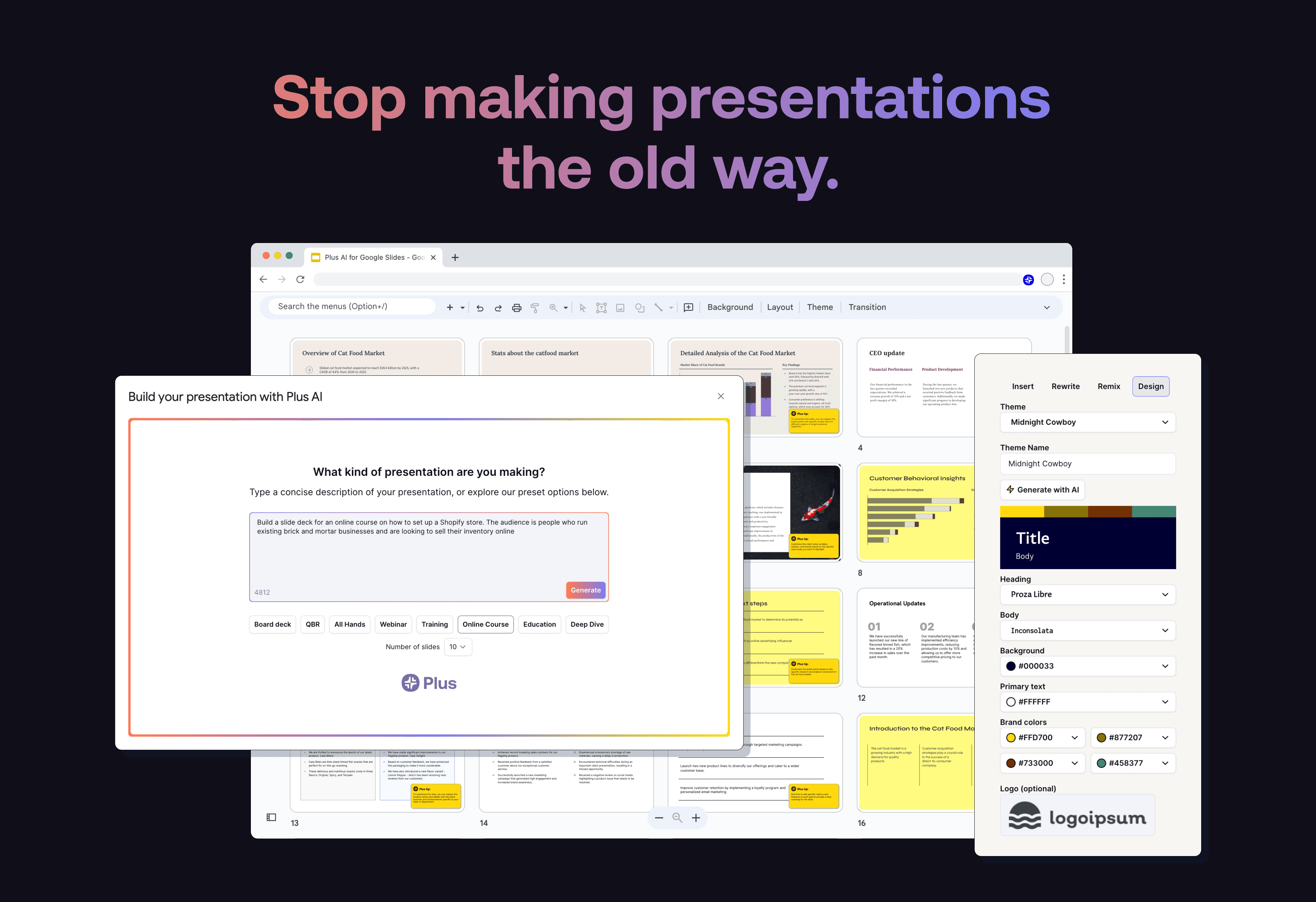
Overview
Plus AI works inside PowerPoint and Google Slides, where its sidebar can generate a new presentation or modify an existing one. The output remains editable with the host application's normal collaboration, formatting and export tools.
The current product supports prompt-to-deck, document upload on Pro and above, single-slide insertion, rewriting, layout remixing, multilingual output and an AI presentation agent. Team adds reusable brand controls and shared presets, while organization-specific custom templates and asset libraries are positioned as Enterprise services.
Plus changed from older unlimited-generation language to a credit model on most current plans. Published tasks usually cost 40–170 credits depending on complexity, so the monthly headline allowance does not translate into a fixed number of decks.
Use cases
The strongest fit depends on the job you need the product to complete, not the size of its feature list.
Draft and revise slides without exporting from a separate AI-native canvas or rebuilding the file manually.
Create recurring proposals, business reviews, training decks and client deliverables from repeatable prompts and templates.
Use shared brand settings, presets, custom instructions or enterprise templates to reduce off-brand first drafts.
Capabilities
Creates a deck outline and native slides from a written brief, selected template and desired length.
Pro and higher plans can turn PDF, DOCX, TXT and supported presentation content into new or remixed slides.
Adds a specific slide, changes the wording or tone, and converts existing content into a chosen layout.
Produces standard PowerPoint and Google Slides elements that can be edited, shared and exported with familiar tools.
Can add generated or selected visual assets and build editable charts and tables inside the presentation.
Team includes logos, colors, fonts, shared presets and instructions; Enterprise supports organization-specific templates and asset libraries.
Plus advertises presentation APIs, a presentation-agent API, Zapier integration and an MCP server for programmatic workflows.
Process
Step 1
Define audience, decision, central message, evidence, required sections and the action the presentation must produce.
Step 2
Upload or paste approved documents and clearly mark facts, quotes, calculations and claims that must not be invented or changed.
Step 3
Create an outline and draft in manageable sections, especially for decks longer than the roughly 30-slide generation limit.
Step 4
Verify every number, citation, quote, chart, image license and recommendation; then fix hierarchy, density, contrast, accessibility and narrative flow.
Step 5
Test fonts, animations, speaker notes, links, charts and export behavior on the delivery computer and with the intended PowerPoint or Slides environment.
Cost
All current paid plans begin with a seven-day trial containing 1,000 AI credits; a credit card is required and billing starts automatically after the trial unless canceled. Annual prices are shown per user per month but billed annually. Plus says typical tasks consume 40–170 credits depending on complexity.
$15 monthly or $10/user/month annually
Core generation and editing for individuals creating basic presentations.
$25 monthly or $20/user/month annually
Adds longer inputs, document conversion and AI image generation.
$40 monthly or $30/user/month annually
Adds shared brand and workflow controls for teams.
$240 monthly or $200/user/month annually
High-cost plan for daily presentation-agent usage.
Custom
Managed deployment for custom templates, asset libraries and administration.
Pricing checked . Check current pricing at the source ↗
Assessment
Compare
The right alternative depends on the specific output, workflow, controls and budget your project requires.
Data Analysis
Consider Claude for PowerPoint when a conversational AI sidebar for researching and editing existing decks is more important than Plus's template-led generation workflow.
Explore Claude for PowerPoint →Consulting
Consider Gamma when fast web-native, interactive presentations matter more than maintaining a PowerPoint-first authoring process.
Explore Gamma →Questions
It is a PowerPoint and Google Slides add-in that generates new presentations and edits existing slides with AI while keeping the output in the native presentation format.
On August 31, 2026, Basic was $15 monthly or $10 per user per month billed annually. Pro was $25/$20, Team $40/$30 and Max $240/$200, with Enterprise priced by quote.
There is no ongoing free plan listed. New customers can start a seven-day trial with 1,000 credits, but a credit card is required and the selected plan begins billing automatically unless canceled.
Yes. Plus's current pricing FAQ says one subscription includes access to its extensions in both applications.
Yes on Pro and higher plans. It can extract and synthesize the text into a new deck, but current guidance says it cannot extract images, diagrams or charts from the source document.
Team supports brand colors, fonts and logos with Plus templates. Using an organization's actual custom templates and slide masters is positioned as an Enterprise service.
Treat them as editable first drafts. Verify facts and visuals, apply the real narrative and brand standards, check accessibility and test the final file in the delivery environment.
Bottom line
Plus AI is a strong choice for people whose final deliverable must remain a normal PowerPoint or Google Slides deck. Its add-in workflow, document conversion and targeted slide edits can save meaningful drafting and formatting time. The economic fit now depends on credit usage, and the quality fit still depends on a human owner who can validate the substance, shape the argument and finish the design—not simply accept the first generated deck.
Visit Plus AI PowerPoint maker website ↗
Get access to all our AI courses, hundreds of real-world AI use cases, live expert-led workshops, an exclusive network of AI early adopters, and more.
Get unlimited access to all of our current & upcoming industry-specific AI courses for the duration of your subscription.
To keep up with the rapid pace of AI, our team publishes AI implementation guides daily. Our library contains 300+ practical use cases to automate real-world work.
Join weekly, live, interactive sessions with industry leaders who are at the forefront of AI for hands-on implementation guidance and exclusive insights.
Network with an exclusive community of AI-first professionals who are working smarter with AI. Learn how early adopters are using AI in their work and businesses.


