Multi-agent users
Bring different compatible agent harnesses and model providers into one persistent desktop workspace.
Independent tool overview
Berd is Block's free, open-source desktop workspace for organizing AI agents, models, projects, skills, tools, automations, and local context in one interface.
Visit the official Berd site ↗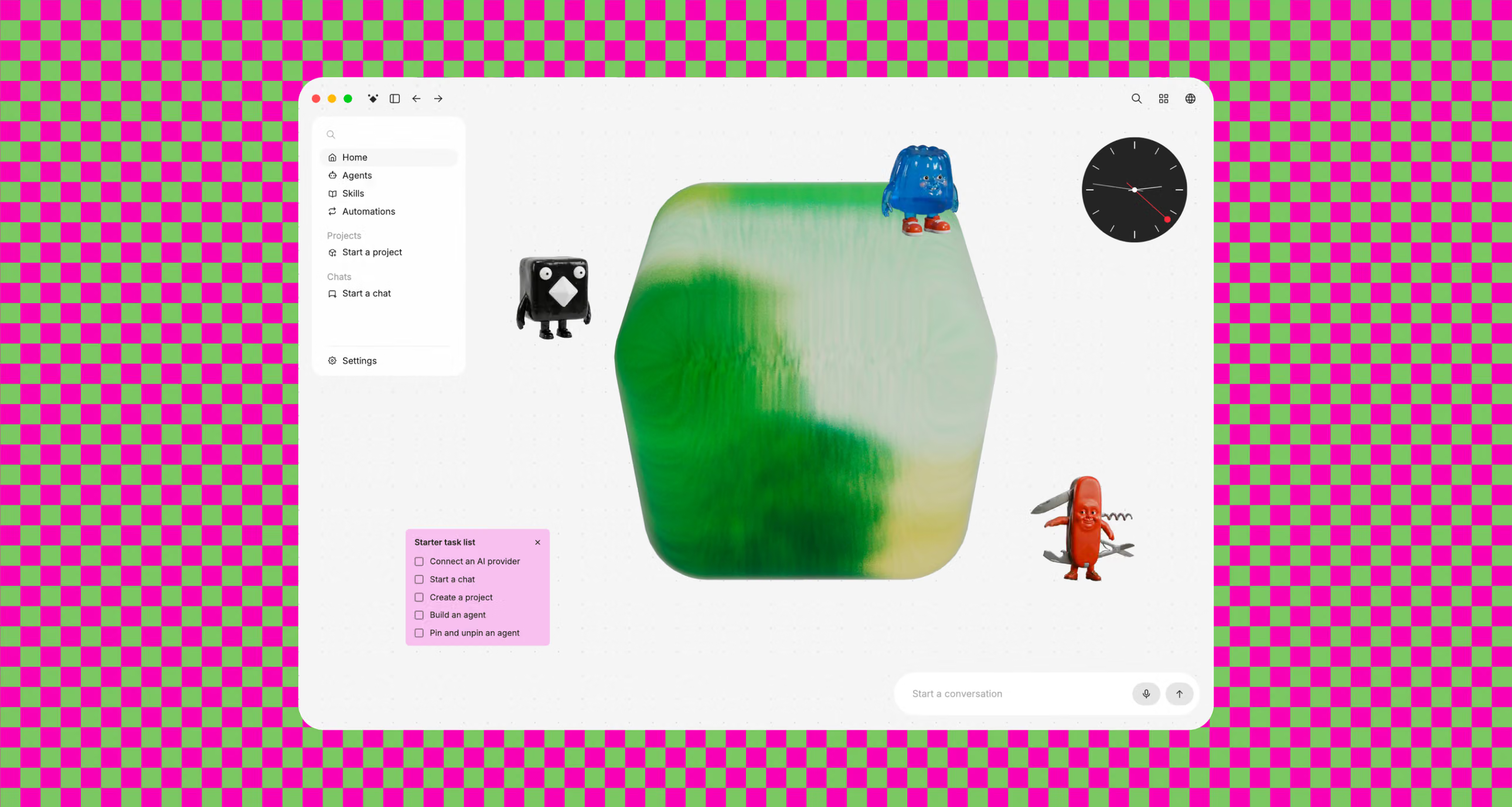
Overview
Berd is not another foundation model. It is a native desktop work surface that gives multiple AI agents a consistent home across projects, files, skills, provider settings, and session history. Block built it for its own teams and released the public app under Apache 2.0 in August 2026.
The app uses a Tauri and React interface over a bundled Goose backend, communicating through the Agent Client Protocol. That separation lets Berd present agents and models through one UI while keeping the underlying harness replaceable.
Berd is most interesting for people who want a visual, persistent agent workspace without being locked to one model vendor. The app itself is free, but users still need compatible providers, API keys, or agent subscriptions—and must be comfortable granting agents access to local files and tools.
Use cases
The strongest fit depends on the job you need the product to complete, not the size of its feature list.
Bring different compatible agent harnesses and model providers into one persistent desktop workspace.
Ground agent sessions in real local projects, files, folders, skills, tools, and repeatable setup.
Manage agent context and activity through a graphical interface instead of assembling every workflow in a terminal.
Fork the public code and supply managed providers, private resources, update channels, and release infrastructure through documented distribution seams.
Capabilities
Attach files or folders, work inside named projects, and keep the active workspace context visible.
Choose the agent, model, and provider shaping each conversation rather than committing the entire app to one vendor.
Review past chats and resume work without rebuilding the project and agent context from scratch.
Create or select reusable agent roles, install skills, and configure extensions as first-class parts of the workspace.
Organizes company-managed services and local MCP connections configured for compatible harnesses such as Goose, Claude Code, or Codex.
Supports repeatable agent workflows, queued follow-ups, and visibility into agent and subagent activity.
The repository exposes extension points for organizations to package private agents, provider settings, companion tools, signing, and publishing infrastructure.
Process
Step 1
Download a versioned build for the supported desktop platform from Block's GitHub releases, or build the app from source.
Step 2
Connect a compatible agent and supply the required local installation, account, subscription, or API credentials.
Step 3
Name the work, choose the relevant folder or folders, and add the context the agent should understand.
Step 4
Select the role, provider, model, skills, and connections appropriate for the task.
Step 5
Follow tool activity, steer the session, review outputs and file changes, and keep important work in the project's history.
Cost
Berd's public desktop app and source code are free under Apache 2.0. Model inference, commercial agent subscriptions, external services, and the engineering needed for a custom organizational distribution are separate costs.
$0
Download an official build or compile the public repository.
Varies
Bring the provider credentials or compatible agent access used by each workflow.
Self-managed
Organizations can build a tailored Berd distribution from the public source.
Pricing checked . Check current pricing at the source ↗
Assessment
Compare
The right alternative depends on the specific output, workflow, controls and budget your project requires.
Coding
Consider Codex App for OpenAI's integrated desktop environment focused on managing Codex coding agents.
Explore Codex App →Agents
Consider Claude Cowork for Anthropic's desktop agent workflow for both coding and broader computer-based tasks.
Explore Claude Cowork →Agents
Consider Hermes Desktop for a native personal agent centered on persistence and memory.
Explore Hermes Desktop →Questions
Berd is Block's open-source desktop workspace for working with AI agents across projects, models, skills, extensions, automations, tools, and local files.
Yes. The official desktop app and source code are free under Apache 2.0. You may still pay separately for model APIs, agent subscriptions, or external services connected to Berd.
No. Berd is a workspace rather than a foundation model. It uses a bundled Goose backend and lets users configure compatible agents, models, and providers.
Block's GitHub releases provide desktop packages for macOS, Windows, and Linux. Check the latest release assets for the architecture and installer format that matches your machine.
Berd runs as a local desktop app, but configured agents and model providers may send task content to their own services. Block says telemetry is off by default in official builds and excludes prompts, messages, files, source code, and credentials when enabled.
Yes. The public repository is designed to support organizational distributions with managed providers, private resources, optional companion tools, and custom release infrastructure.
Bottom line
Berd is a promising open-source answer to agent-workflow fragmentation: keep projects and context in one inspectable desktop while swapping the underlying agent or model. Its early-release status and bring-your-own-provider setup demand patience and security discipline, but the zero-dollar license makes it unusually easy to evaluate.
Visit Berd website ↗
Cartesia's natural text-to-speech model for expressive, multilingual voice generation across 44 languages.
Search API that lets agents query and learn from the live web
Grok Bot - xAI's always-on agent teammates with their own cloud computer

Open-source personal agent, rebuilt with easier setup and multiplayer sessions

Get access to all our AI courses, hundreds of real-world AI use cases, live expert-led workshops, an exclusive network of AI early adopters, and more.
Get unlimited access to all of our current & upcoming industry-specific AI courses for the duration of your subscription.
To keep up with the rapid pace of AI, our team publishes AI implementation guides daily. Our library contains 300+ practical use cases to automate real-world work.
Join weekly, live, interactive sessions with industry leaders who are at the forefront of AI for hands-on implementation guidance and exclusive insights.
Network with an exclusive community of AI-first professionals who are working smarter with AI. Learn how early adopters are using AI in their work and businesses.