Portrait cleanup
Reduce distracting detail behind a person for a profile, bio or social image.
Independent tool overview
Background Blur is a free Magic Studio photo tool that automatically isolates a subject, applies adjustable background blur and lets the user refine the selection.
Visit the official Background Blur site ↗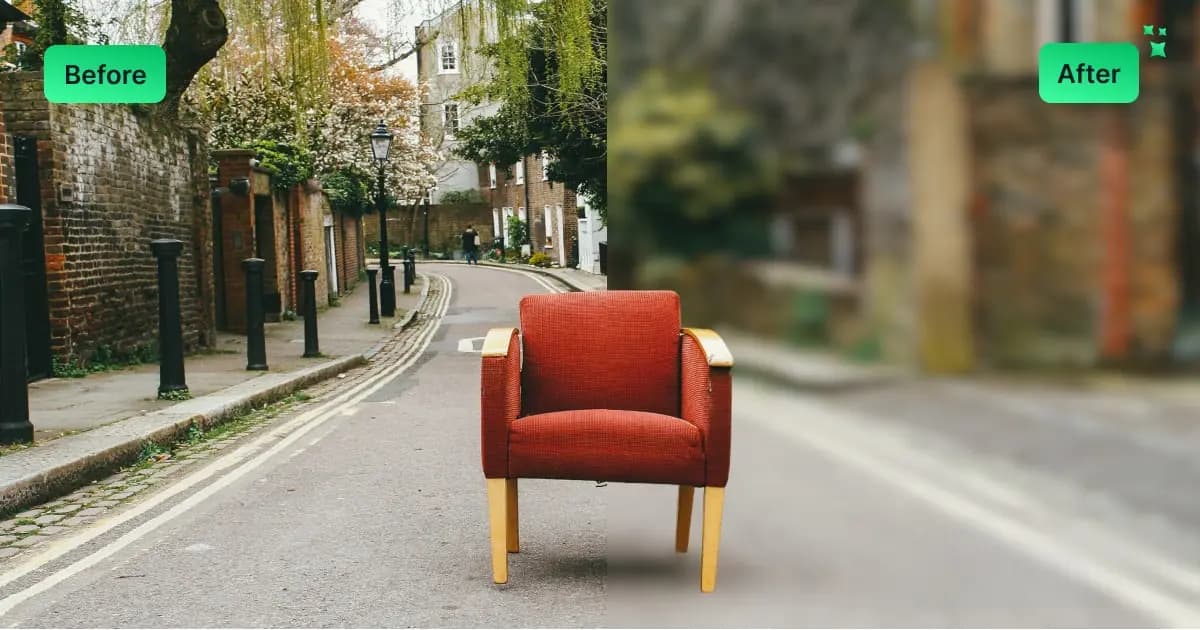
Overview
Magic Studio Background Blur is a focused browser utility for adding a shallow-depth-of-field look to a photo. Upload an image and the tool automatically separates the foreground subject from the background before applying blur.
The result is editable: users can adjust the blur strength and repair the subject mask with AI-assisted points or a fine brush. This matters around hair, transparent objects, furniture and groups, where an automatic selection often needs help.
It is fast enough for portraits, profile photos and simple product images, but it does not reconstruct real lens depth. A uniform blur can look artificial when the background spans several distances, and any important image should be checked closely around edges before download.
Use cases
The strongest fit depends on the job you need the product to complete, not the size of its feature list.
Reduce distracting detail behind a person for a profile, bio or social image.
Direct attention toward one clearly separated object without replacing the full background.
Produce a usable blur effect in a browser without opening a full design application.
Capabilities
Uses AI to identify the main foreground and separate it from the background.
Applies the effect immediately after processing the uploaded image.
Lets users add selection points when the automatic foreground is incomplete.
Provides manual edge repair for areas that need closer correction.
Adjusts the strength of the effect to suit the subject and apparent background distance.
Saves the finished still image back to a computer or phone.
Process
Step 1
Choose a non-sensitive photo that you own or have permission to edit.
Step 2
Zoom in around hair, hands, transparent edges and gaps between multiple subjects.
Step 3
Repair the mask, then choose a lower or higher blur that fits the scene's apparent depth.
Step 4
Check the full-resolution result beside the original before publishing.
Cost
Background Blur is advertised as free with no signup required. Magic Studio also offers a Free account tier with basic access and 40 AI generations, plus a Pro subscription for unlimited generations, high-resolution watermark-free downloads and bulk editing on supported tools; the public pricing page does not expose a stable Pro amount.
Free
Use the single-image blur tool in the browser without creating an account.
$0/month
Adds basic access across the wider Magic Studio website and apps.
See current checkout
Unlocks broader paid benefits across the Magic Studio suite.
Pricing checked . Check current pricing at the source ↗
Assessment
Compare
The right alternative depends on the specific output, workflow, controls and budget your project requires.
Design
A broader design platform when the blurred image also needs text, layout, resizing or social templates.
Explore Canva AI →Design
A larger creative suite for generative edits and workflows that need more control than a single blur slider.
Explore Adobe Firefly →Design
Magic Studio's related tool for removing or replacing the background instead of blurring it.
Explore Magic Studio Background Remover →Questions
Yes. The Background Blur page says it is free to use and does not require signup for the basic one-image workflow.
The tool automatically selects the foreground subject, separates the background and applies adjustable blur to that background region.
Yes. Magic Studio provides AI-assisted selection points and a fine brush for correcting the foreground mask.
JPEG and PNG are highlighted at upload, while the instructions also list common formats including HEIC, WebP and TIFF. Browser support can vary, so JPEG or PNG is the safest input.
It can approximate shallow depth of field, but it does not reproduce the scene's true optical depth. Complex backgrounds may need a more advanced editor.
Avoid it. Magic Studio's privacy policy says content may be used to improve its models and describes a deletion-request process rather than a local-only workflow.
Bottom line
Background Blur is a good free utility when one clear subject needs quick separation from a distracting background. It is less convincing on complex edges or layered depth, and privacy-sensitive photos should stay in a local editing workflow.
Visit Background Blur website ↗
Get access to all our AI courses, hundreds of real-world AI use cases, live expert-led workshops, an exclusive network of AI early adopters, and more.
Get unlimited access to all of our current & upcoming industry-specific AI courses for the duration of your subscription.
To keep up with the rapid pace of AI, our team publishes AI implementation guides daily. Our library contains 300+ practical use cases to automate real-world work.
Join weekly, live, interactive sessions with industry leaders who are at the forefront of AI for hands-on implementation guidance and exclusive insights.
Network with an exclusive community of AI-first professionals who are working smarter with AI. Learn how early adopters are using AI in their work and businesses.


