Small ecommerce catalogs
Create lifestyle and promotional scenes from clean product shots without arranging a new shoot for every campaign.
Independent tool overview
Product Photos by Magic Studio turns an existing product image into staged marketing visuals by removing its background, placing the cutout into a preset or prompted scene and generating four variations at a time.
Visit the official Product Photos site ↗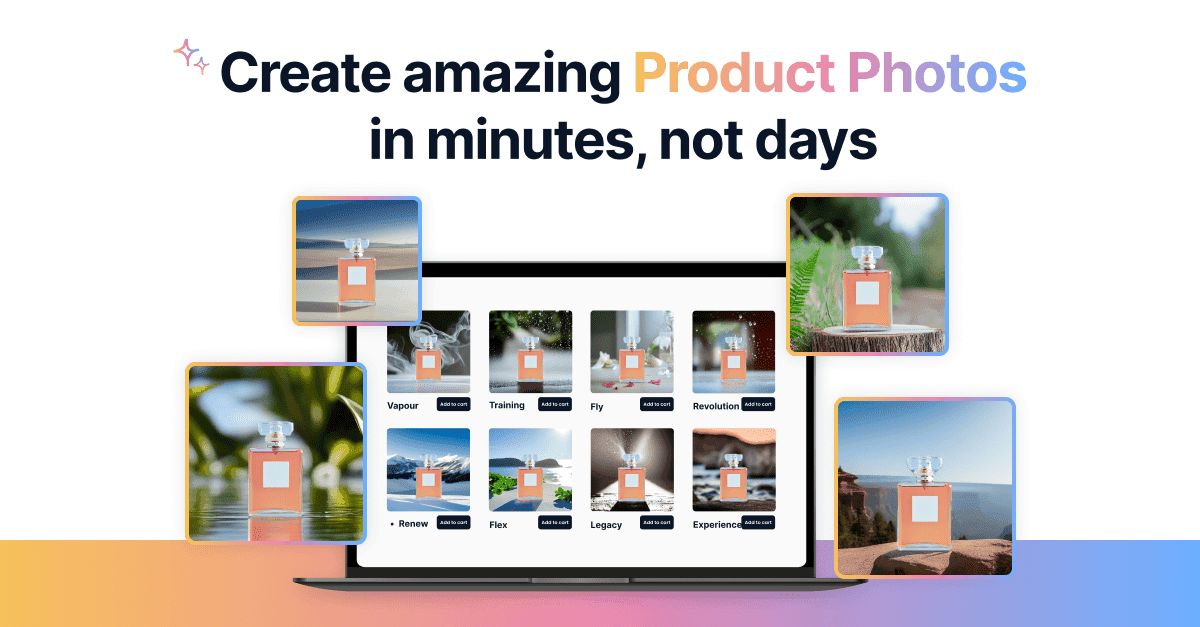
Overview
Product Photos is a focused Magic Studio workflow for ecommerce images, ads, social posts and email creative. It starts from a real product photo rather than asking a model to invent the entire item, which helps preserve the recognizable subject.
After upload, the tool extracts the product, lets the user refine the selection, and places it into a themed or text-described scene. Users set the product's position and scale before generation because the AI does not reliably infer real-world relative size.
The result is best for fast creative testing, not unquestioned catalog accuracy. Packaging text, logos, reflections, transparent materials and exact product geometry should be inspected against the original before the image goes live.
Use cases
The strongest fit depends on the job you need the product to complete, not the size of its feature list.
Create lifestyle and promotional scenes from clean product shots without arranging a new shoot for every campaign.
Generate multiple themes quickly for ad, social and landing-page experiments.
Use preset scenes and a guided four-step workflow instead of a full image editor.
Capabilities
Removes the original background and presents a product cutout for the new scene.
Users can mark points on the item when the automatic cutout includes or removes the wrong areas.
Choose a product-photo theme or describe the desired setting in plain language.
Position and resize the product on the scene placeholder before generation to control composition and apparent scale.
Each run produces four variations that can be regenerated after adjusting the prompt or layout.
The product page documents downloads or conversion across common web and camera image formats.
Process
Step 1
Use a sharp, well-lit product image with clear edges and enough resolution for the intended placement.
Step 2
Zoom into edges, handles, transparent areas and shadows; refine the selection before generating a scene.
Step 3
Select a theme or describe lighting, surface, background and campaign mood without changing the actual product.
Step 4
Manually size the cutout relative to scene objects because the generator does not know the product's physical dimensions.
Step 5
Compare the output with the source and reject changes to labels, colors, shape, included accessories or material finish.
Cost
The dedicated Product Photos page offers 20 generated images free with no credit card. Magic Studio Pro adds unlimited AI generations, high-resolution watermark-free downloads and bulk editing for supported tools; the payable amount is shown for the selected billing period and market.
Free
Try the dedicated workflow before subscribing.
$0/month
Basic access across the broader Magic Studio suite.
Price shown at checkout
Paid access for regular, higher-resolution creative work.
Pricing checked . Check current pricing at the source ↗
Assessment
Compare
The right alternative depends on the specific output, workflow, controls and budget your project requires.
Design
Choose PromeAI for a broader visual-design suite with more rendering and image-transformation workflows.
Explore PromeAI →Content Creator
Choose ChatGPT Images for conversational generation and editing when a dedicated ecommerce workflow is less important.
Explore ChatGPT Images →Design
Choose Finegrain Image Enhancer when the main problem is improving resolution rather than creating a new product scene.
Explore Finegrain Image Enhancer →Questions
It is an AI workflow that extracts a product from an uploaded image, places the cutout into a preset or described scene and generates four product-photo variations.
The dedicated page offers 20 generated product-photo images free without a credit card. Higher-resolution, watermark-free and ongoing use is part of paid Magic Studio access.
The product page lists JPG, JPEG, PNG, HEIC, WEBP and TIFF as supported upload formats.
It begins with a cutout of the real product, but the completed AI scene can still distort labels, edges, colors, reflections and small details. Compare every commercial output with the source photo.
Magic Studio's terms say users own output as between the user and aarzoo to the extent permitted by law. Users remain responsible for having rights to the input and ensuring the output does not infringe other rights.
Position and resize the product manually on the theme placeholder. Magic Studio explicitly notes that the AI does not understand relative sizes in the scene.
Bottom line
Product Photos is a convenient option for producing campaign scenes from straightforward product cutouts. It can save a shoot for low-risk creative tests, but exact catalog, packaging and regulated-product imagery still needs careful retouching or conventional photography.
Visit Product Photos website ↗
Get access to all our AI courses, hundreds of real-world AI use cases, live expert-led workshops, an exclusive network of AI early adopters, and more.
Get unlimited access to all of our current & upcoming industry-specific AI courses for the duration of your subscription.
To keep up with the rapid pace of AI, our team publishes AI implementation guides daily. Our library contains 300+ practical use cases to automate real-world work.
Join weekly, live, interactive sessions with industry leaders who are at the forefront of AI for hands-on implementation guidance and exclusive insights.
Network with an exclusive community of AI-first professionals who are working smarter with AI. Learn how early adopters are using AI in their work and businesses.