Meeting-heavy individuals
Capture calls, generate useful notes, extract action items, and place follow-up work directly on the calendar.
Independent tool overview
Amie is an all-in-one calendar, task manager, and bot-free AI meeting assistant that turns conversations into summaries, action items, scheduled work, emails, and connected follow-up.
Visit the official Amie site ↗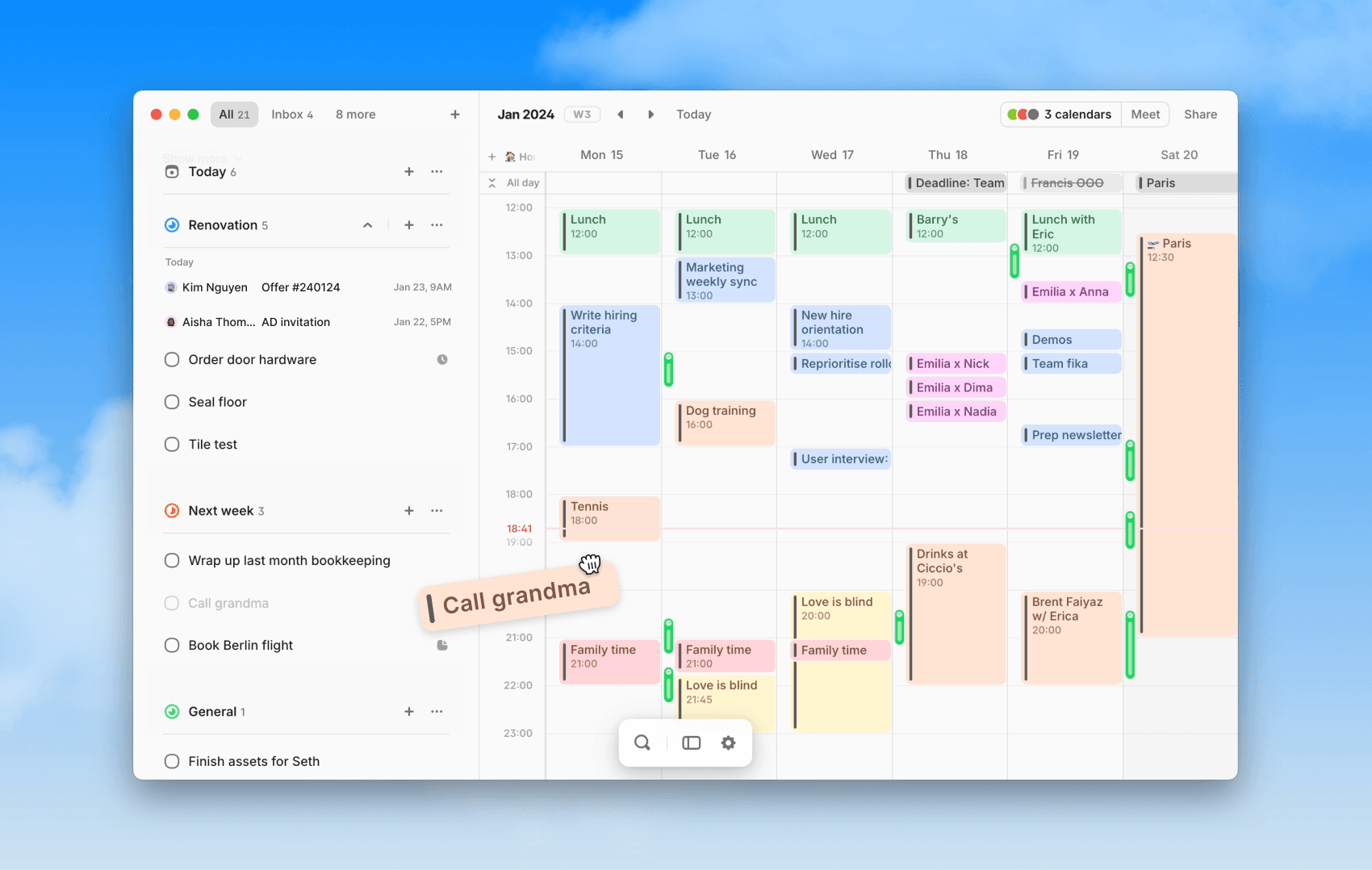
Overview
Amie combines calendar, todos, meeting recording, notes, scheduling links, email context, and AI actions in one workspace. Its bot-free recorder captures calls on the user's computer instead of adding a visible attendee, then produces transcripts, summaries, action items, searchable pages, and follow-up drafts that can feed back into calendars, task lists, CRMs, and collaboration tools.
The product has expanded quickly beyond its original calendar interface. In 2026 Amie added full Outlook sync, Gmail tools, an MCP server for external assistants, more flexible webhooks, Stripe data, meeting-video chapters, and deeper task integrations. That breadth is the appeal and the risk: teams get a connected workday, but they also grant one product access to meetings, calendars, email, tasks, customer systems, and write actions. A careful permission and recording-consent review matters as much as the feature list.
Use cases
The strongest fit depends on the job you need the product to complete, not the size of its feature list.
Capture calls, generate useful notes, extract action items, and place follow-up work directly on the calendar.
Keep project or account context across recurring calls and draft follow-up emails with the conversation already available.
Manage tasks beside the calendar and let AI schedule work around priorities, deadlines, preferred hours, and existing events.
Replace separate calendar, todos, meeting notes, booking links, and lightweight follow-up automation with one interface.
Expose selected Amie context and actions to Claude, ChatGPT, or another compatible assistant through Amie's MCP server.
Capabilities
View and edit multiple Google, Apple, and Outlook calendars, including two-way Outlook sync and native Teams meeting links.
Create todos with dates, deadlines, duration, recurrence, labels, and priority, then drag or schedule them into available time.
Automatically place unscheduled tasks into open calendar slots using priorities, deadlines, working hours, and list-specific preferences.
Record system and microphone audio on the desktop without adding a separate bot participant to the call.
Generate speaker-labeled transcripts, key points, chapters, custom summaries, and extracted action items after meetings.
Add private notes before or during a meeting to guide the structure and emphasis of the generated summary.
Ask questions across recordings and pages, rewrite summaries, create mind maps, prepare agendas, and find prior decisions.
Draft emails, create or update events, make tasks, and prepare connected follow-up from conversational instructions.
Group meeting context by recurring event, customer domain, project, person, or a manually defined topic.
Connect supported tools including Gmail, Slack, Notion, Linear, Todoist, Apple Reminders, ClickUp, HubSpot, Pipedrive, and other services.
Let compatible AI assistants read permitted Amie context and perform supported actions across calendars, todos, notes, pages, contacts, and email drafts.
Use early-access webhooks, custom headers, templated bodies, and recording interfaces for additional workflows.
Share availability on amie.me, including joint availability with co-hosts and multi-calendar free/busy checks.
Download notes as PDF, save Markdown locally, or export transcripts in readable monthly files.
Process
Step 1
Start with the work calendar and one task list; delay email, CRM, Slack, Stripe, and MCP access until a specific workflow needs them.
Step 2
Choose manual, prompted, or automatic recording and establish consent, notification, sensitive-meeting, and retention policies.
Step 3
Define the headings, decisions, risks, action-item fields, owners, dates, and quote rules required for a useful meeting record.
Step 4
Correct speaker names, transcript errors, dates, commitments, and confidential details before distributing the summary.
Step 5
Approve extracted todos, assign realistic durations and deadlines, then let AI scheduling place them around hard commitments.
Step 6
Pilot a bounded write such as an email draft, Linear ticket, CRM note, or Slack summary while keeping the final send or update under human control.
Step 7
Review connected accounts, MCP tools, webhook scopes, recording behavior, task completion, scheduling churn, and the value of generated follow-up each month.
Cost
Amie's current public pricing page offers a seven-day trial and displays Pro and Business plans with a 20% annual-billing discount, but it does not publish their dollar amounts in the page text. The current billing documentation also lists Free, Personal, Pro, Business, and custom Enterprise, so plan availability and exact paid rates should be confirmed in the live plan selector.
Free for 7 days
Test the current paid feature set before subscribing.
$0
Entry plan for calendars, todos, and a limited test of meeting-note features.
Current price shown at selection
Individual power-user plan for unlimited meeting notes and Amie's core AI workflow.
Current price shown at selection
Team plan adding shared workflow and customer-facing controls.
Custom
Contact-sales plan for larger organizations with additional security, oversight, support, and contracting needs.
Pricing checked . Check current pricing at the source ↗
Assessment
Compare
The right alternative depends on the specific output, workflow, controls and budget your project requires.
Project Management
Choose Granola for a meeting-notes-first experience when calendar and task automation are secondary.
Explore Granola →Project Management
Choose Fathom for a focused meeting recorder, transcript, summary, and call-insight workflow.
Explore Fathom →Project Management
Choose Reclaim AI when automatic task, habit, focus-time, and team-calendar scheduling matters more than meeting intelligence.
Explore Reclaim AI →Questions
Amie is a calendar, task manager, and AI meeting assistant that records calls, creates notes and action items, schedules work, and connects follow-up to email, CRM, and collaboration tools.
No for its standard desktop recording workflow. Amie records from the user's computer, so no separate bot attendee joins. Enterprise documentation also references an optional custom bot.
Amie supports Google Calendar, Apple calendars, and Outlook. Its August 2026 update added full two-way Outlook sync, Microsoft SSO, multi-account support, and native Teams links.
Amie has a Free plan, a seven-day trial, Pro and Business subscriptions, and custom Enterprise pricing. The current public page advertises a 20% annual discount but shows exact paid rates only during plan selection.
Yes. AI Scheduling places unscheduled todos into calendar gaps using duration, priority, deadline, working hours, and list preferences. Review the result because the system cannot know every real-world constraint.
Amie can draft emails and supports connected actions and exports for tools such as HubSpot, Pipedrive, Slack, Notion, and Linear. Keep final sends and consequential record changes behind explicit review.
It lets compatible assistants access permitted Amie tools for calendars, contacts, todos, meeting notes, pages, and Gmail-related actions. Enable only the tools and accounts a workflow actually needs.
Amie says desktop recording works across major providers including Zoom, Google Meet, Slack Huddles, Microsoft Teams, Webex, and other calls because capture happens on the computer.
It can be, but suitability depends on consent, plan, security requirements, retention, connected accounts, admin controls, and regional policy. Sensitive organizations should evaluate Enterprise controls and run a legal and security review.
Bottom line
Amie is strongest for people who want meeting context to drive the rest of the workday. The combination of bot-free notes, action extraction, tasks, AI scheduling, email drafts, and calendar control is more cohesive than using a standalone note taker. That same connectedness deserves caution: recording rules, tool permissions, pricing clarity, and human approval for writes should be settled before Amie becomes the system through which every meeting turns into action.
Visit Amie website ↗
Get access to all our AI courses, hundreds of real-world AI use cases, live expert-led workshops, an exclusive network of AI early adopters, and more.
Get unlimited access to all of our current & upcoming industry-specific AI courses for the duration of your subscription.
To keep up with the rapid pace of AI, our team publishes AI implementation guides daily. Our library contains 300+ practical use cases to automate real-world work.
Join weekly, live, interactive sessions with industry leaders who are at the forefront of AI for hands-on implementation guidance and exclusive insights.
Network with an exclusive community of AI-first professionals who are working smarter with AI. Learn how early adopters are using AI in their work and businesses.


