Protecting deep-work time
Set a weekly Focus Time target and let Reclaim find and defend workable blocks around meetings.
Independent tool overview
Reclaim AI is an intelligent scheduling assistant that works on top of Google Calendar and Microsoft Outlook to make room for focus time, habits, tasks, breaks, and flexible meetings.
Visit the official Reclaim AI site ↗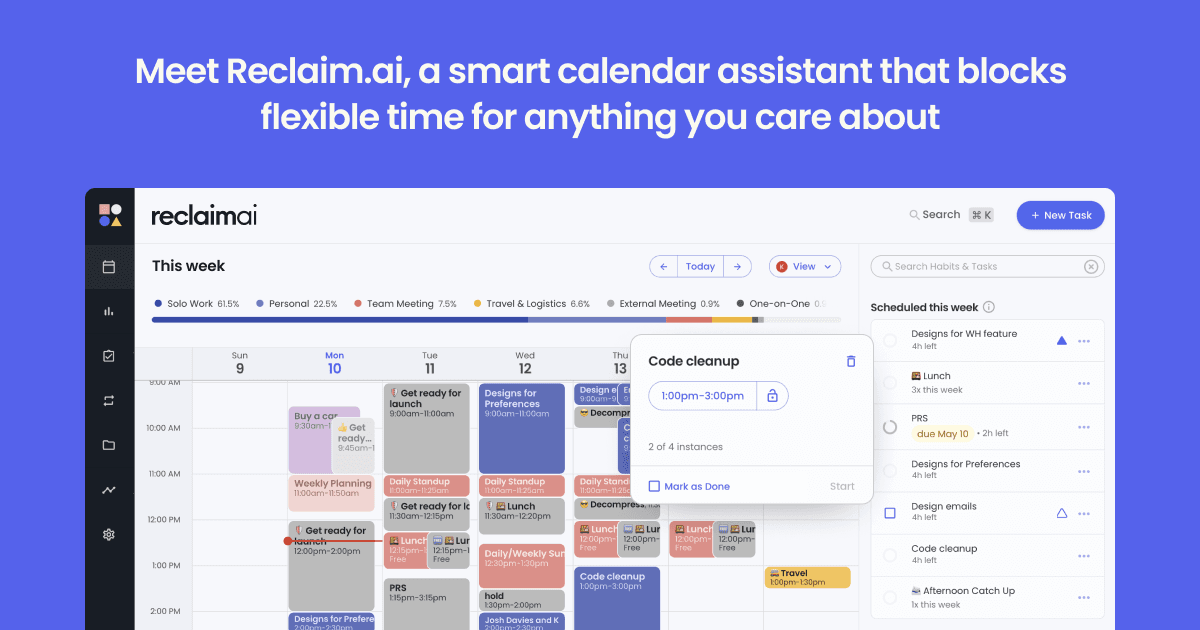
Overview
Reclaim AI is best understood as an automation layer for an existing work calendar, not a replacement calendar. It continuously looks for open time and places flexible blocks around fixed events according to the priorities, hours, and rules you set.
The product can defend weekly Focus Time, schedule recurring Habits, add Buffer Time after calls, place Tasks before their due dates, and automatically move flexible Smart Meetings when conflicts arise. Scheduling Links handle external booking, while Calendar Sync helps prevent double-booking across multiple calendars.
Reclaim supports both Google Calendar and Microsoft Outlook. It was acquired by Dropbox in August 2024 and continues to operate as a standalone scheduling product with active development.
Use cases
The strongest fit depends on the job you need the product to complete, not the size of its feature list.
Set a weekly Focus Time target and let Reclaim find and defend workable blocks around meetings.
Use Habits for exercise, planning, learning, or other recurring activities that can move within defined windows.
Smart Meetings monitor conflicts and can reschedule lower-priority recurring meetings without rebuilding every invite by hand.
Calendar Sync can copy or block availability between connected work and personal calendars to reduce double-booking.
Capabilities
Specialized agents optimize Focus Time, Habits, Buffer Time, Smart Meetings, and meeting quality based on your calendar rules.
Schedule task work before deadlines and turn meeting action items into recommended tasks instead of leaving them outside the calendar.
Flexible recurring meetings can monitor attendance and conflicts, then move to a better time when the schedule changes.
Share bookable availability with priority, duration, timing, and attendee rules instead of exposing every open slot equally.
Keep availability coordinated across connected Google and Outlook calendars while controlling the event details that other calendars can see.
Paid plans expand integrations beyond Google Tasks, Slack, Zoom, and Google Meet to tools including Todoist, Asana, ClickUp, Jira, and Linear.
Process
Step 1
Choose a primary Google or Outlook calendar, then add other calendars whose events should affect your availability.
Step 2
Set work hours, preferred windows, priorities, privacy settings, and how aggressively each type of event may move.
Step 3
Create Focus Time goals, Habits, Tasks, buffers, or Smart Meetings with deadlines and scheduling windows.
Step 4
Use the Planner or your normal calendar to lock, move, edit, or remove blocks that do not match your real priorities.
Step 5
Adjust priorities and hours when Reclaim repeatedly chooses inconvenient times; the automation is only as useful as its constraints.
Cost
Reclaim offers a single-user free plan and per-seat paid plans. The public page lists monthly per-seat prices and offers lower effective pricing for annual commitments; exact checkout totals can vary with billing cadence and team add-ons.
Free
Calendar basics for one user.
$10 per seat/month
For individuals or teams of up to 10 that need more scheduling capacity.
$15 per seat/month
For teams of up to 100 that need broader automation and team controls.
$22 per seat/month
For organizations with more than 100 seats and enterprise administration needs.
Pricing checked . Check current pricing at the source ↗
Assessment
Compare
The right alternative depends on the specific output, workflow, controls and budget your project requires.
Project Management
Choose Amie if you want a more visual all-in-one calendar and task experience instead of an automation layer over your existing calendar.
Explore Amie →Project Management
Choose Asana if project ownership, dependencies, team workflows, and status tracking matter more than automatic calendar optimization.
Explore Asana AI Teammates →Project Management
Choose Notion AI if your priority is combining documents, knowledge, databases, and project planning in one workspace.
Explore Notion AI →Questions
Reclaim automatically schedules flexible priorities such as focus time, habits, tasks, breaks, and movable meetings around fixed events in your Google or Outlook calendar.
No. Google Calendar or Outlook remains the source of truth, while Reclaim adds scheduling rules, automation, planning, and calendar-sync features on top.
Yes. The Lite plan is free for one user, with limits on scheduling range, Calendar Syncs, Scheduling Links, integrations, and AI agents. Paid plans increase those limits and add team features.
Yes. Reclaim officially supports both Microsoft Outlook Calendar and Google Calendar. Some workflows and add-ons differ by calendar provider, so Outlook teams should review the current integration notes before a broad rollout.
Yes. Reclaim supports task integrations including Google Tasks on the free plan and tools such as Todoist, Asana, ClickUp, Jira, and Linear on paid plans.
Dropbox acquired Reclaim AI in August 2024. Reclaim continues to run as an active scheduling product.
Bottom line
Reclaim is a strong choice for people who know what should receive time but struggle to keep that time protected as the week changes. Its real advantage is adaptive time blocking across focus work, routines, tasks, and meetings. Start with a limited calendar and conservative rules, then expand only after its scheduling decisions match how you actually work.
Visit Reclaim AI website ↗
Get access to all our AI courses, hundreds of real-world AI use cases, live expert-led workshops, an exclusive network of AI early adopters, and more.
Get unlimited access to all of our current & upcoming industry-specific AI courses for the duration of your subscription.
To keep up with the rapid pace of AI, our team publishes AI implementation guides daily. Our library contains 300+ practical use cases to automate real-world work.
Join weekly, live, interactive sessions with industry leaders who are at the forefront of AI for hands-on implementation guidance and exclusive insights.
Network with an exclusive community of AI-first professionals who are working smarter with AI. Learn how early adopters are using AI in their work and businesses.


