Keyboard-first AI access
Open a native assistant with a hotkey instead of repeatedly switching to browser tabs and rebuilding context.
Independent tool overview
Alice is a native desktop AI workspace for building reusable assistants, running prompt-based skills, switching among model providers, and connecting chat to local or remote tools.
Visit the official Alice App site ↗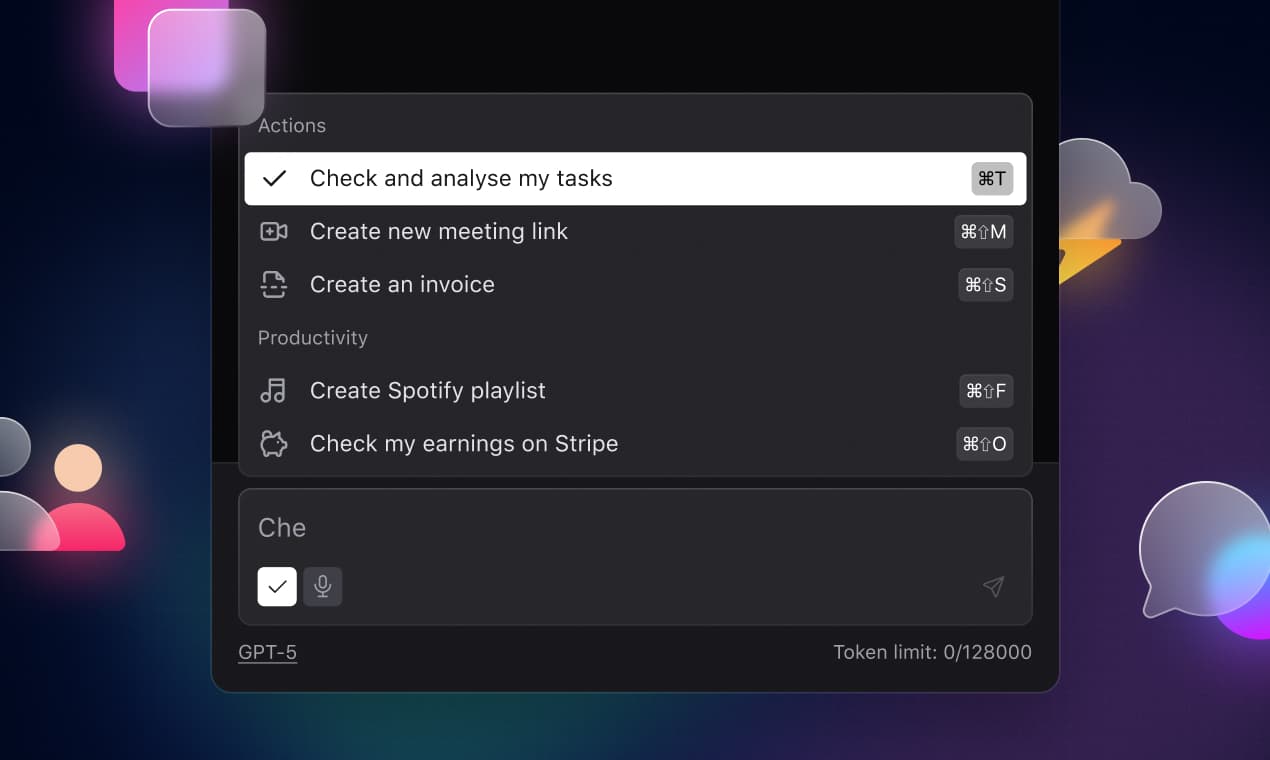
Overview
Alice is designed for people who want AI available from a global desktop shortcut and shaped around repeatable work rather than isolated chats. It supports custom assistant profiles, reusable skills, multiple model providers, files, voice, web and image features, plus tool connections through webhooks, custom backends, and Model Context Protocol servers.
Its strongest fit is a technical individual or small team willing to configure models, permissions, prompts, and automations. Alice stores configuration and chat history locally, but that does not make every conversation private or offline: prompts still go to the selected model provider or connected service unless a local model and local tools are used. The subscription-versus-lifetime decision also matters because the lifetime license requires separate model API access.
Use cases
The strongest fit depends on the job you need the product to complete, not the size of its feature list.
Open a native assistant with a hotkey instead of repeatedly switching to browser tabs and rebuilding context.
Turn a recurring prompt sequence into a named skill or assistant that can be run consistently across daily work.
Work with several commercial or local model providers from one desktop interface and select a model by task.
Connect an assistant to Make, Zapier, n8n, internal endpoints, or MCP servers when a chat needs to trigger real actions.
Keep chat history and configuration on the computer and optionally connect Alice to a local model such as one served through Ollama.
Capabilities
Summon the app with a keyboard shortcut on supported desktop operating systems.
Connect models from providers including OpenAI, Anthropic, Google, xAI, Groq, and compatible custom servers.
Use personal provider API keys, with keys encrypted and stored locally according to Alice's documentation.
Create profiles with their own role, instructions, default model, identity, and assigned skills.
Save reusable prompt-driven tasks such as rewriting text, extracting structured data, preparing content, or calling an automation.
Subscription plans can access a library advertised with more than 50 assistants and 200 skills.
Connect assistants to MCP servers that expose tools, resources, prompts, and supported sampling behavior.
Send structured data to webhook-based workflows in services such as Make, Zapier, or n8n and return the result to chat.
Point Alice at a local or remote server that implements an OpenAI-compatible chat completion interface.
Use an OpenAI-compatible local server such as Ollama so model inference can remain on the device.
Depending on the selected model and plan, Alice can work with files and images, accept voice, search the web, and generate images.
Chats and configuration stay on the device by default rather than syncing automatically across computers.
Process
Step 1
Decide between included subscription credits, personal provider API keys, or a local model based on convenience, cost, and data requirements.
Step 2
Define a narrow role, the inputs it should request, the output format, and clear boundaries for a repeatable task.
Step 3
Save the most reliable prompts as named skills and test them against ordinary, ambiguous, and adversarial inputs.
Step 4
Connect only the documents and files the assistant needs, and remove secrets or sensitive personal data that the model provider should not receive.
Step 5
Add a webhook, custom backend, or MCP server with the smallest useful permission set and a clearly defined action.
Step 6
Keep messages, record changes, purchases, deletions, and other consequential actions behind explicit user review.
Step 7
Track whether the workflow saves time and remains accurate, then update prompts, models, API costs, and tool permissions as dependencies change.
Cost
Alice offers subscriptions with model usage and a one-time desktop license that requires bring-your-own model access. The public pricing page lists a 21-day trial, Individual from $16 per month, Team from $10 per month plus token charges, and Lifetime at $299; exact included usage and team billing should be confirmed at checkout.
21 days
Test the desktop app before choosing a paid option.
From $16/month
Single-user access with included usage for supported models and access to subscription features.
From $10/month plus tokens
Team-oriented option with an administrator account and usage billed through declared token consumption.
$299 one time
Perpetual desktop license for users who will supply their own model API keys or local model.
Pricing checked . Check current pricing at the source ↗
Assessment
Compare
The right alternative depends on the specific output, workflow, controls and budget your project requires.
Business Operations
Choose Raycast for a polished Mac launcher and extension ecosystem where fast command execution matters more than building a provider-neutral AI workspace.
Explore Raycast →Business Operations
Choose ChatGPT for a simpler hosted assistant with cross-device sync and fewer setup decisions.
Explore ChatGPT →Agents
Choose Claude Cowork for an Anthropic-centered agentic desktop workflow with less emphasis on switching among model providers.
Explore Claude Cowork →Questions
Alice is a native desktop AI assistant for macOS, Windows, and Linux. It combines multi-model chat, custom assistants, reusable skills, local storage, and tool connections through webhooks, custom backends, and MCP servers.
No. Alice's official download documentation describes it as desktop-only.
No. A ChatGPT subscription is separate from OpenAI API access. You can use Alice's subscription credits, supply a provider API key with its own billing, or connect a compatible local or custom model.
As of August 30, 2026, Alice lists Individual from $16 per month, Team from $10 per month plus token usage, and a $299 one-time Lifetime license. Confirm exact team billing and included usage at checkout.
No. The official pricing page says Lifetime users must bring their own API keys or use a local/custom model, so provider usage fees are separate.
Chats and configuration are stored locally by default, and a local model can keep inference on the device. If you choose a cloud model, webhook, MCP server, or other remote service, relevant data is still sent to that provider under its policies.
Yes. Alice can trigger webhook workflows in tools such as Make, Zapier, or n8n, connect to custom OpenAI-compatible backends, and use MCP servers. Consequential actions should be narrowly scoped and require confirmation.
Yes. Alice documents connecting to Ollama through an OpenAI-compatible local endpoint. Performance and model quality depend on the computer's hardware and the selected model.
Builds are available, but Alice describes Windows and Linux as beta and says macOS is its primary testing ecosystem.
Bottom line
Alice is a compelling desktop command center for people who want reusable assistants, provider choice, and real automation hooks in one native interface. It becomes substantially more powerful than a basic chatbot once skills, MCP tools, or webhooks are configured—but that power brings setup and security responsibility. The best buyers are technical, keyboard-first users who understand the difference between local storage, local inference, and remote model processing.
Visit Alice App website ↗
Get access to all our AI courses, hundreds of real-world AI use cases, live expert-led workshops, an exclusive network of AI early adopters, and more.
Get unlimited access to all of our current & upcoming industry-specific AI courses for the duration of your subscription.
To keep up with the rapid pace of AI, our team publishes AI implementation guides daily. Our library contains 300+ practical use cases to automate real-world work.
Join weekly, live, interactive sessions with industry leaders who are at the forefront of AI for hands-on implementation guidance and exclusive insights.
Network with an exclusive community of AI-first professionals who are working smarter with AI. Learn how early adopters are using AI in their work and businesses.


