Guided browser automation
Delegate short, well-defined tasks that involve visiting pages, collecting information and filling ordinary browser fields.
Independent tool overview
HyperWrite combines a browser-based writing assistant with an AI Agent that can click, type and navigate websites to complete guided online tasks.
Visit the official HyperWrite AI Agent site ↗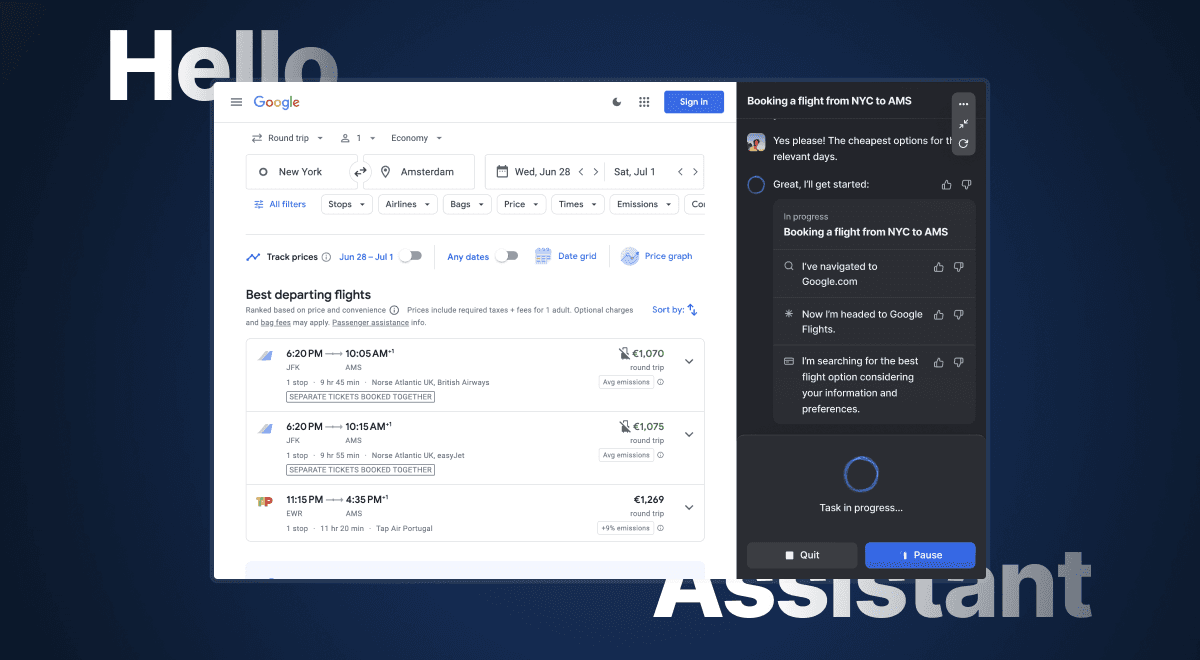
Overview
HyperWrite is primarily a writing and research workspace with a Chrome extension, TypeAhead autocomplete, custom writing personas and hundreds of focused AI tools. Its AI Agent extends that product beyond drafting: it can open a separate browser window, navigate pages, click controls and enter text to carry out a requested task.
The agent is most useful for low-risk, repeatable browser work such as gathering public information, drafting email responses or following a known sequence. It is not a set-and-forget employee. Websites change, agent features are still presented as experimental, and any task involving purchases, messages, account changes or sensitive information should be watched and confirmed by the user.
Use cases
The strongest fit depends on the job you need the product to complete, not the size of its feature list.
Delegate short, well-defined tasks that involve visiting pages, collecting information and filling ordinary browser fields.
Use TypeAhead and the extension's assistant inside email, documents and other browser text fields instead of moving drafts between apps.
Create drafts and summaries with real-time information and citations, then check each source before publishing.
Custom Personas can guide tone and behavior for recurring writing contexts.
Assistant Studio can turn a demonstrated browser sequence into an editable workflow for later reuse.
Capabilities
The Personal Assistant can open a browser window and interact with buttons, links, dropdowns and text fields while the user observes its progress.
Record a browser task, review the generated steps, edit their order and instructions, and test the workflow before relying on it.
Draft, rewrite, brainstorm and research in a focused web workspace.
Open the assistant on supported sites to draft or revise text in the context where you are working.
Receive inline sentence suggestions across browser-based text fields and accept a suggestion with Tab.
Provide style guidance and writing examples so the assistant can better match a preferred voice or use case.
Paid plans advertise current research with citations, which is useful as a starting point but still requires source verification.
HyperWrite provides task-specific tools for writing, editing, research and browser work in addition to the general assistant.
After starting a Personal Assistant task, users can watch its progress in a modal or move to another tab while it works.
Process
Step 1
Sign in to HyperWrite and enable the extension in a browser profile appropriate for the work you plan to automate.
Step 2
Choose a short objective with a clear finish line and avoid purchases, irreversible changes or sensitive accounts while evaluating reliability.
Step 3
Name the website, desired output, constraints and any point where the assistant must stop for confirmation.
Step 4
Watch the agent's clicks and typed content, especially when a website layout is unfamiliar or has changed.
Step 5
Verify facts, recipients, amounts and form values before sending, buying, submitting or changing an account.
Step 6
For repeated work, record and refine the sequence in Assistant Studio, then retest it whenever the target website changes.
Cost
HyperWrite offers a limited free starter account plus Premium and Ultra subscriptions. Agent features are described as experimental, and Ultra includes priority access to writing and Agent features; confirm current availability in your account before subscribing for a specific automation.
$0
A limited starter account for trying basic HyperWrite features.
$19.99/month
The standard paid writing plan.
$192/year
$16 per month equivalent when billed annually.
$44.99/month
Higher-usage plan with priority access to experimental capabilities.
$348/year
$29 per month equivalent when billed annually.
Pricing checked . Check current pricing at the source ↗
Assessment
Compare
The right alternative depends on the specific output, workflow, controls and budget your project requires.
Agents
ChatGPT Agent is a broader agentic option for research and multi-step tasks using OpenAI's integrated toolset.
Explore ChatGPT Agent →Agents
Manus is oriented toward longer research, analysis and deliverable-producing agent tasks rather than primarily in-browser writing.
Explore Manus →Business Operations
Bardeen focuses on structured browser automation and workflow integrations for repeatable business processes.
Explore Bardeen →Data Analysis
Perplexity is a stronger fit when cited web research is the main requirement and browser control is secondary.
Explore Perplexity →Questions
It is the browser-action component of HyperWrite's Personal Assistant. Through the Chrome extension, it can navigate pages, click controls and type into fields to complete a guided online task.
Yes. HyperWrite advertises tasks such as finding information, organizing email and filling browser fields. Reliability depends on the site and instructions, so consequential actions should remain supervised.
HyperWrite offers a limited free starter account. Paid Premium and Ultra plans provide higher usage and additional features.
As of August 30, 2026, Premium costs $19.99 monthly or $192 annually. Ultra costs $44.99 monthly or $348 annually.
HyperWrite's pricing page says Ultra receives priority access to experimental writing and Agent features. Because feature access can change, check the current plan details inside your account before buying specifically for the agent.
TypeAhead is HyperWrite's inline autocomplete for browser text fields. It proposes text as you type and lets you accept a suggestion with Tab.
Its browser agent can interact with sites and forms, but users should require confirmation and verify the recipient, message, item and amount before any consequential action.
Treat browser context, prompts and attached writing samples as data shared with an external service. Review HyperWrite's current privacy terms, available opt-out controls and your organization's policies before using confidential, regulated or client information.
Bottom line
HyperWrite AI Agent is most compelling for people who already want HyperWrite's writing, research and in-browser autocomplete tools and would benefit from occasional browser automation. The extension-centered workflow is convenient, but the agent should be treated as supervised assistance: start with low-risk tasks, verify every consequential step and confirm current plan access before paying specifically for experimental Agent features.
Visit HyperWrite AI Agent website ↗
Get access to all our AI courses, hundreds of real-world AI use cases, live expert-led workshops, an exclusive network of AI early adopters, and more.
Get unlimited access to all of our current & upcoming industry-specific AI courses for the duration of your subscription.
To keep up with the rapid pace of AI, our team publishes AI implementation guides daily. Our library contains 300+ practical use cases to automate real-world work.
Join weekly, live, interactive sessions with industry leaders who are at the forefront of AI for hands-on implementation guidance and exclusive insights.
Network with an exclusive community of AI-first professionals who are working smarter with AI. Learn how early adopters are using AI in their work and businesses.