Everyday translation
Translate messages, short documents and travel text without building a detailed prompt.
Independent tool overview
ChatGPT Translate is OpenAI's focused translation page for converting text across 40+ languages while preserving meaning, tone and intent, with shortcuts for fluent, professional or simplified wording.
Visit the official Translate with ChatGPT site ↗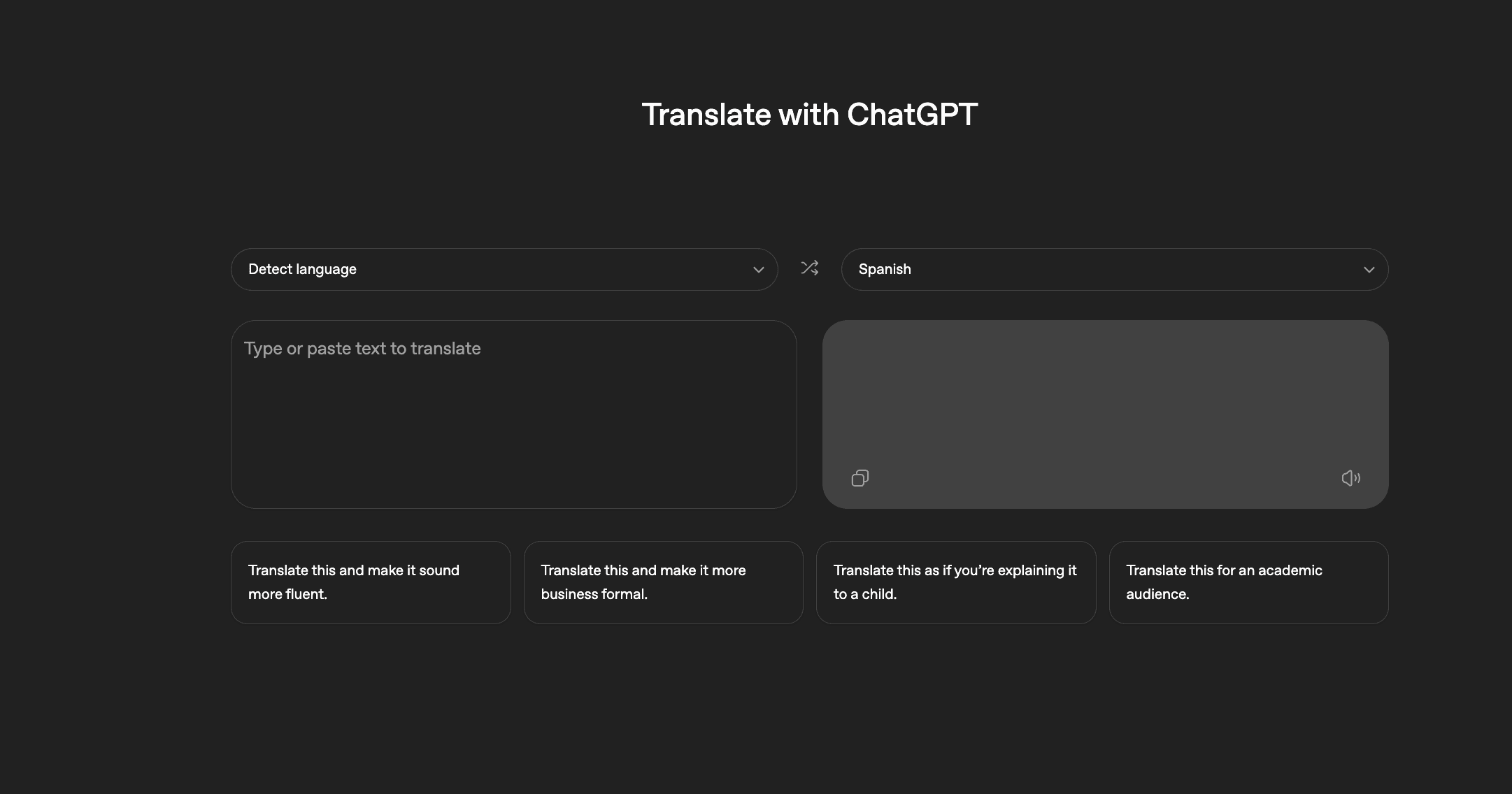
Overview
ChatGPT Translate offers a simpler two-pane experience than starting with a blank prompt. It detects the source language, produces a translation and lets you immediately refine the result for fluency, professional tone or simpler wording.
The dedicated page is best for text, while the wider ChatGPT experience adds conversational follow-ups, image inputs and voice. That makes it useful when a literal translation is not enough and you need to explain an idiom, localize tone or compare alternative phrasings.
It is still a general-purpose AI translator rather than a professional localization system. Important legal, medical, technical or customer-facing copy needs review by a qualified speaker, especially when terminology and regional nuance matter.
Use cases
The strongest fit depends on the job you need the product to complete, not the size of its feature list.
Translate messages, short documents and travel text without building a detailed prompt.
Turn a direct translation into natural, professional or deliberately simple language.
Ask follow-up questions about idioms, word choice, cultural nuance and alternate interpretations.
Capabilities
The dedicated interface can identify the source language before translating it into the selected target.
The product is designed to retain intent instead of substituting words one at a time.
Built-in actions make a result more fluent, more professional or simple enough for a young reader.
A live option supports spoken back-and-forth when voice is available for the account, app and region.
In ChatGPT, supported users can upload a still image and ask the model to translate visible signs, menus or documents.
Users can ask for regional wording, alternative phrases, formality changes or explanations after the first result.
Process
Step 1
Leave source detection on or specify both languages when the text is ambiguous.
Step 2
Translate manageable sections and preserve headings or formatting cues in the input.
Step 3
State the country, reading level, formality and context when those choices affect wording.
Step 4
Use a preset or ask for alternatives that are more natural, professional or concise.
Step 5
Have a fluent speaker check names, numbers, specialized terms and high-stakes claims before publishing.
Cost
The Translate page can be used with free ChatGPT access. Paid ChatGPT plans increase limits and access to broader voice, upload, memory and model features; plan availability and local pricing can vary.
$0/month
Core text translation with limited access to uploads, vision and voice features.
Paid monthly plans
Higher limits and broader ChatGPT capabilities for frequent or more complex translation work.
Per-user or custom pricing
Organizational workspaces with additional administration, privacy and security controls.
Pricing checked . Check current pricing at the source ↗
Assessment
Compare
The right alternative depends on the specific output, workflow, controls and budget your project requires.
Miscellaneous
Choose Gemini Live Translate when real-time spoken translation across a wider advertised language set is the primary need.
Explore Gemini 3.5 Live Translate →Consumer
Choose TranslateGemma when developers want an open model they can adapt or run in their own translation workflow.
Explore TranslateGemma →Content Creator
Choose LanguageTool when the main task is multilingual spelling, grammar and style checking after translation.
Explore LanguageTool →Questions
Yes. Core text translation is available through free ChatGPT access. Paid plans provide higher limits and broader access to uploads, voice, memory and more capable models.
OpenAI currently labels the dedicated Translate page as supporting 40+ languages. Quality can vary by language pair, dialect and subject matter.
The Translate page includes a live translation option, and ChatGPT Voice can listen and respond in another language. Voice options and usage limits depend on the plan, region and app version.
Yes. ChatGPT supports still-image inputs on Free and paid plans, subject to limits. Upload a clear image and specify the target language, but verify small text, names and numbers.
It can produce a strong draft, but it should not be the only reviewer for legal, medical, financial, safety-critical or public-facing material. Use a qualified translator for final approval.
On personal plans, content may be used to improve models unless you turn off Improve the model for everyone. Temporary Chats are not used for training and are removed from OpenAI's systems after up to 30 days, subject to stated safety retention.
Bottom line
ChatGPT Translate is a strong free starting point when tone and explanation matter as much as literal accuracy. Use it for drafts and everyday communication, but choose a professional localization workflow and human review for terminology-heavy or high-stakes work.
Visit Translate with ChatGPT website ↗
Slackbot - Slack's personal AI agent for work
Step3-VL-10B - StepFun's open-source SOTA vision language model

Gmail - Google's email inbox, now infused with Gemini for AI-powered insights, actions, and improvements
ERNIE 5.0 - Baidu's omni-modal, top-ranked Chinese model

Get access to all our AI courses, hundreds of real-world AI use cases, live expert-led workshops, an exclusive network of AI early adopters, and more.
Get unlimited access to all of our current & upcoming industry-specific AI courses for the duration of your subscription.
To keep up with the rapid pace of AI, our team publishes AI implementation guides daily. Our library contains 300+ practical use cases to automate real-world work.
Join weekly, live, interactive sessions with industry leaders who are at the forefront of AI for hands-on implementation guidance and exclusive insights.
Network with an exclusive community of AI-first professionals who are working smarter with AI. Learn how early adopters are using AI in their work and businesses.