SaaS product demos
Highlight clicks and interface details with automatic zooms and smooth cursor movement.
Independent tool overview
Screen Studio is a macOS screen recorder and focused editor that automatically turns clicks and cursor movement into polished, animated product demos and tutorials.
Visit the official Screen Studio site ↗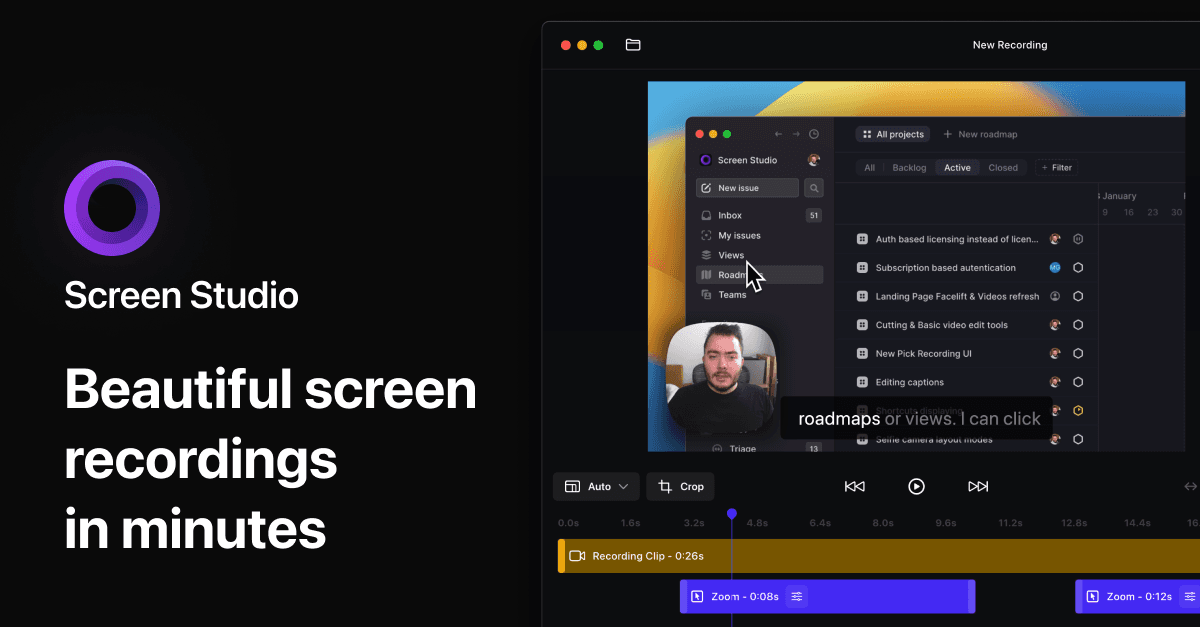
Overview
Screen Studio records a Mac screen, webcam, microphone, system audio or connected iPhone and iPad, then applies automatic zooms around clicks and smooths cursor movement. Its opinionated defaults make software demos and tutorials look finished without building every animation in a general-purpose video editor.
After recording, users can adjust zooms, cuts, speed, camera placement, captions, keyboard overlays, backgrounds and aspect ratio. The app is especially strong for short product videos and social clips. It is macOS-only, and its streamlined timeline is not a replacement for a full editor when a project needs multiple external tracks, complex motion graphics or deep audio post-production.
Use cases
The strongest fit depends on the job you need the product to complete, not the size of its feature list.
Highlight clicks and interface details with automatic zooms and smooth cursor movement.
Record screen, microphone and system audio, then add captions and keyboard-shortcut overlays.
Switch between horizontal and vertical formats while Screen Studio recalculates the zoom framing.
Combine screen capture, webcam, speaker notes, audio enhancement and local captions in one workflow.
Record a connected iPhone or iPad and present it inside customizable device frames.
Capabilities
Screen Studio detects clicks and adds animated zoom ranges that follow the action.
Move, resize, disable or create zooms on the timeline, including fixed areas and instant transitions.
Transform irregular cursor movement into a cleaner glide, resize the cursor and hide it when inactive.
Record an entire display, window or area with webcam, microphone and selected application system audio.
Generate multilingual transcripts on-device with Whisper, or use Apple Speech Recognition on supported macOS versions, then edit caption errors.
Normalize voice volume and remove background noise, with newer on-device cleanup features available in beta.
Set backgrounds, spacing, shadows, insets, camera layouts and reusable visual presets.
Show keyboard shortcuts, click ripples and other cues that make technical steps easier to follow.
Export horizontal or vertical video and let the app adapt zoom framing for the selected destination.
Upload an export to a hosted page for quick sharing, view counts and comments.
Process
Step 1
Write the objective and click path, remove notifications and prepare clean demo data before recording.
Step 2
Select the screen area, camera, microphone and specific apps whose system audio should be recorded.
Step 3
Pause around important clicks and avoid unnecessary cursor movement so automatic zooms have clear targets.
Step 4
Trim mistakes, speed up pauses, move zoom ranges and add manual focus where no click occurred.
Step 5
Correct captions, add shortcut labels, choose a background and check camera or cursor placement.
Step 6
Select horizontal, vertical or GIF output, review legibility at the final size and publish a file or shareable link.
Cost
Screen Studio now uses subscription pricing with the same feature set on monthly and annual billing. It also offers a 40% educational discount to verified students and educators. People who previously purchased a perpetual license should check their account for the exact legacy terms attached to that purchase.
$29/month
Month-to-month subscription that can be switched to annual billing.
$9/month
$108 billed yearly for the same feature set.
40% discount
Available to verified students and educators.
Pricing checked . Check current pricing at the source ↗
Assessment
Compare
The right alternative depends on the specific output, workflow, controls and budget your project requires.
Content Creator
Loom is stronger for fast workplace sharing, transcription and team collaboration across platforms.
Explore Loom AI Workflow →Content Creator
Descript offers deeper transcript-based editing, multi-track production and podcast workflows.
Explore Descript →Content Creator
VEED is a browser-based collaborative editor that works beyond macOS and supports broader social-video production.
Explore VEED →Content Creator
Riverside is a better choice for remote interviews and high-quality separate participant recordings.
Explore Riverside →Questions
Screen Studio is a macOS recorder and editor that automatically adds animated zooms, smooth cursor movement and polished framing to screen recordings.
As of August 30, 2026, Screen Studio costs $29 month-to-month or $9 per month when billed yearly, which is $108 per year.
No. The current product is a macOS screen recorder. Windows users should choose a cross-platform alternative.
The minimum is macOS Ventura 13.1, 8 GB RAM and either an Apple M1-or-newer Mac or a supported recent Intel Mac. Apple silicon is recommended.
Yes. It creates zooms around recorded clicks by default. You can disable automatic zooms or move, resize, remove and replace them after recording.
Yes. It can generate multilingual captions locally with Whisper and lets you edit or export the transcript. Apple Speech Recognition is another local option on supported systems.
Yes. Screen Studio supports connected iPhone and iPad recording and can present the capture inside device frames.
Recording and Whisper caption generation happen locally. A video is uploaded when you choose the hosted shareable-link feature or deliberately send files for support.
Bottom line
Screen Studio is one of the fastest ways for a Mac user to turn a raw screen capture into a polished product demo. Automatic zooms, cursor treatment and responsive layouts save real editing time. The annual plan is compelling for frequent creators; occasional users and Windows teams should compare simpler or cross-platform alternatives first.
Visit Screen Studio website ↗
Get access to all our AI courses, hundreds of real-world AI use cases, live expert-led workshops, an exclusive network of AI early adopters, and more.
Get unlimited access to all of our current & upcoming industry-specific AI courses for the duration of your subscription.
To keep up with the rapid pace of AI, our team publishes AI implementation guides daily. Our library contains 300+ practical use cases to automate real-world work.
Join weekly, live, interactive sessions with industry leaders who are at the forefront of AI for hands-on implementation guidance and exclusive insights.
Network with an exclusive community of AI-first professionals who are working smarter with AI. Learn how early adopters are using AI in their work and businesses.