Turning a script into a first-cut video
Generate or paste narration, select a voice and let the platform match it with relevant media before manual editing.
Independent tool overview
JW Studio, formerly Augie Studio, is an AI-assisted video creation and editing platform for turning scripts, recordings and existing media into social videos, ads and highlight reels.
Visit the official JW Studio (formerly Augie Studio) site ↗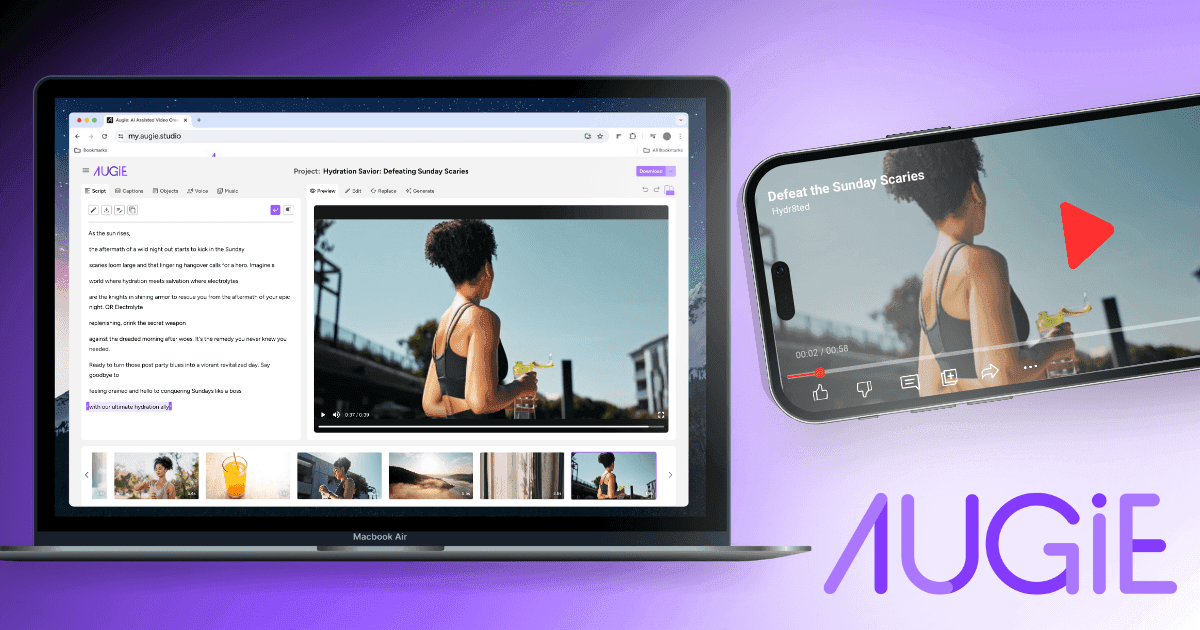
Overview
JW Studio guides a creator from a script or recording to an editable first-cut video. Users can write a script, transcribe uploaded audio or video, or generate a draft with AI; the platform then matches the narration to uploaded or licensed media, adds captions and provides a browser editor for finishing the result.
The product was originally called Augie Studio and the live application now identifies itself as JW Studio, although its domain and much of the documentation still use the Augie name. It is best suited to marketers and publishers making short, narrated content from existing material. Its plan limits, licensing rules and lack of advertised collaboration on self-serve tiers deserve attention before adopting it for a production team.
Use cases
The strongest fit depends on the job you need the product to complete, not the size of its feature list.
Generate or paste narration, select a voice and let the platform match it with relevant media before manual editing.
Transcribe uploaded audio or video, highlight the useful passages and build a shorter social video or highlight reel.
Create ads, explainers and social clips using stock assets, uploaded media, captions and brand controls.
Paid plans provide AI voices and personal voice cloning for turning a written script into narration.
Capabilities
Write or paste the script, transcribe an uploaded recording, or ask AI to generate a draft from a goal and selected tones.
Build a first cut by matching script segments to a user's library and available stock images or video clips.
Paid users can select generated narrators or record and clone their own voice for future scripts.
Start with a workflow tailored to an advertisement, social post, shorter cut from an existing video or a custom project.
Add closed captions and adjust shots, text, transitions, filters, zoom and positioning in the studio editor.
Upload images, GIFs and video from a device, URL or Dropbox, then use paid search tools to locate useful material.
Paid plans include image and clip generation for experimenting with new visuals inside a project.
Process
Step 1
Start an ad, social video, highlight reel or custom project from the dashboard.
Step 2
Write the copy, upload a recording for transcription or generate a draft with AI.
Step 3
Record a voice, choose an AI voice and add owned or licensed assets from the media library.
Step 4
Let JW Studio align the script with visual assets and assemble an initial sequence.
Step 5
Correct captions, refine timing and visuals, confirm commercial-use rights for every asset and download the finished version.
Cost
The live JW Studio app lists Lite at $0, Premium at $40 monthly or $34 per month with annual billing, and Professional at $99 monthly or $80 per month with annual billing. Enterprise directs buyers to contact sales. Current in-app details should be checked at checkout because the Augie help center does not match the live Lite allowance.
Free
For testing the core workflow with short, watermarked videos.
$40 monthly or $34/month annually
For individual creators making short professional videos.
$99 monthly or $80/month annually
For higher-volume individual and professional use.
Contact sales
For businesses that need onboarding, support and custom requirements.
Pricing checked . Check current pricing at the source ↗
Assessment
Compare
The right alternative depends on the specific output, workflow, controls and budget your project requires.
Content Creator
Consider OpusClip when the main job is finding and formatting short clips from a longer video.
Explore OpusClip →Content Creator
Consider Descript for transcript-based video and podcast editing with stronger audio-production workflows.
Explore Descript →Content Creator
Consider VEED for a broader browser video editor with recording, captions, templates and team-oriented production tools.
Explore VEED →Questions
Yes. The live application now identifies itself as JW Studio, while the my.augie.studio domain and existing help documentation still use the Augie name.
JW Studio has a free Lite plan. The live plan card lists videos up to two minutes and 15 total video minutes per month, using a watermark. The older help page still says five monthly minutes, so verify the current account allowance.
The live app lists Premium at $40 monthly or $34 per month with annual billing, and Professional at $99 monthly or $80 per month with annual billing. Enterprise requires a sales conversation.
Yes. A user can write or generate a script, choose narration and let the platform match the words with uploaded or stock media to create an editable first cut.
The documentation permits commercial use for specified stock, premium and user-owned assets when the creator has the necessary rights. It separately warns that clips created with the Generate feature are not suitable for commercial use.
Bottom line
JW Studio is a useful script-to-video workflow for marketers and publishers who want AI assistance without giving up a conventional editing pass. Premium is the practical entry point for watermark-free work, but buyers should confirm current allowances and asset rights because the rebrand has left some documentation inconsistent and generated clips carry a commercial-use restriction.
Visit JW Studio (formerly Augie Studio) website ↗
Get access to all our AI courses, hundreds of real-world AI use cases, live expert-led workshops, an exclusive network of AI early adopters, and more.
Get unlimited access to all of our current & upcoming industry-specific AI courses for the duration of your subscription.
To keep up with the rapid pace of AI, our team publishes AI implementation guides daily. Our library contains 300+ practical use cases to automate real-world work.
Join weekly, live, interactive sessions with industry leaders who are at the forefront of AI for hands-on implementation guidance and exclusive insights.
Network with an exclusive community of AI-first professionals who are working smarter with AI. Learn how early adopters are using AI in their work and businesses.


