Multi-stage research
Collect and compare many sources, analyze the findings, and deliver a structured report or presentation.
Independent tool overview
Perplexity Computer is a general-purpose agent that researches, browses, creates files and apps, connects to work tools, and runs multi-step tasks in the background. It is built for delegated workflows rather than single search answers, and its practical cost depends on both a qualifying subscription and task-based credits.
Visit the official Perplexity Computer site ↗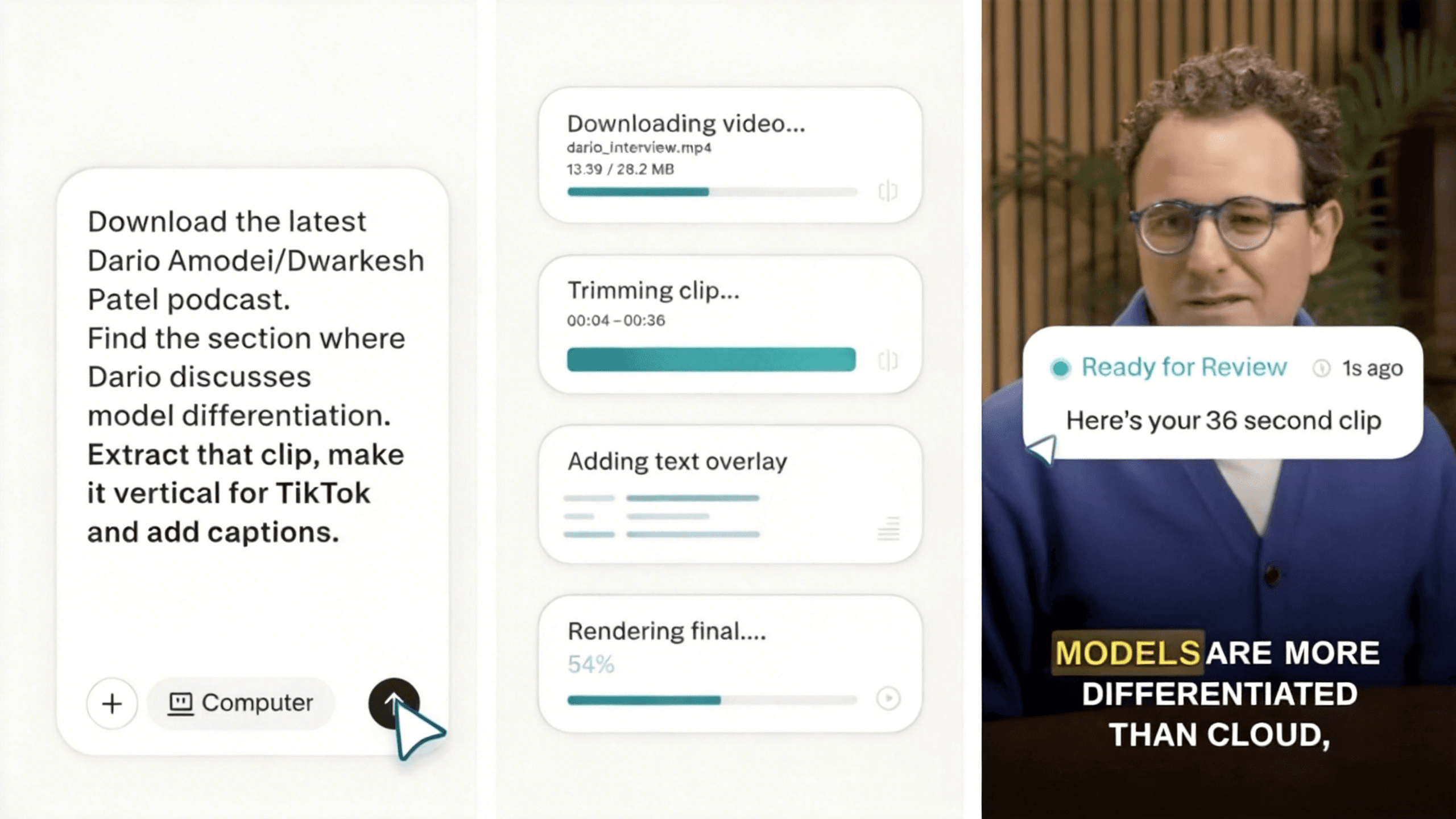
Overview
Perplexity Computer turns a natural-language request into a workflow carried out by tools and subagents. It can search in parallel, browse sites, analyze information, generate documents or apps, use connected services, and continue work asynchronously while the user does something else.
The product is available to Pro and Max subscribers across web, mobile, Slack, and Microsoft 365. Connectors include services such as Gmail, Outlook, GitHub, Linear, Slack, Notion, Snowflake, Databricks, and Salesforce; users can also add reusable Skills and schedule recurring work.
Computer can take consequential actions, so good use requires clear scope, least-privilege connectors, review checkpoints, and spend controls. A finished-looking report, message, spreadsheet, or app can still contain incorrect facts, formulas, recipients, permissions, or code.
Use cases
The strongest fit depends on the job you need the product to complete, not the size of its feature list.
Collect and compare many sources, analyze the findings, and deliver a structured report or presentation.
Use context from approved email, productivity, developer, data, or business connectors inside one workflow.
Build reports, spreadsheets, slides, dashboards, websites, and lightweight applications from a defined brief.
Schedule checks and follow-up tasks that continue without keeping an interactive session open.
Hand off a bounded project that benefits from background execution, intermediate artifacts, and iterative refinement.
Capabilities
Runs complex work asynchronously and preserves a task session for later review or continuation.
Dispatches subagents to search, extract, compare, and synthesize information across multiple sources.
Uses authenticated integrations to retrieve context and, where permitted, take actions in connected services.
Produces documents, presentations, spreadsheets, images, websites, and applications as task deliverables.
Runs recurring or condition-based workflows, with each execution consuming Computer credits.
Applies built-in or user-created methods that can deploy specialized subagents for repeatable work.
Retains preferences and task context across sessions, with Max also receiving preview access to the Brain memory system.
Eligible users can send a task from their account email and receive the result and attachments back in the thread.
Process
Step 1
Specify the deliverable, audience, deadline, accepted sources, constraints, and what Computer must not do.
Step 2
Enable the minimum apps, files, and credentials required for the task, and check whether each connection can read, write, or send.
Step 3
Require a draft or confirmation before external messages, purchases, publication, data changes, or other consequential actions.
Step 4
Watch the initial plan and early steps, correct mistaken assumptions, and clarify criteria before the task consumes substantial credits.
Step 5
Open cited sources, test formulas and code, inspect recipients and permissions, and compare the output with the original brief.
Step 6
Use the lowest useful schedule frequency, review per-thread usage, set purchase limits, and stop automations that no longer add value.
Cost
Computer requires a qualifying Perplexity subscription and consumes separate task credits. Perplexity currently values 100 credits at $1. Pro has no recurring monthly Computer allocation, while Max includes 10,000 credits per month; advertised one-time bonuses are promotional and may change. Enterprise plans have per-seat pricing and their own monthly credit allocations.
$20/month or $200/year
The lowest-cost consumer subscription with Computer access.
$200/month or $2,000/year
Higher-access consumer plan with a monthly Computer allowance.
$40/month or $400/year per seat
Team plan with administrative, privacy, and collaboration controls.
$325/month or $3,250/year per seat
Highest enterprise access and larger Computer allowance.
Pricing checked . Check current pricing at the source ↗
Assessment
Compare
The right alternative depends on the specific output, workflow, controls and budget your project requires.
Agents
A strong alternative for users who want OpenAI's integrated research, browser, terminal, and action-taking agent inside ChatGPT.
Explore ChatGPT Agent →Agents
Another general-purpose autonomous agent focused on completing research, analysis, creation, and productivity workflows.
Explore Manus →Agents
An alternative cloud agent with built-in tools, persistent memory, and scheduled automation, particularly relevant to creative workflows.
Explore Higgsfield Supercomputer →Questions
Search primarily finds and synthesizes information in response to a question. Computer can chain research with tools and actions, create deliverables, use connected apps, and continue work in the background.
Pro grants access, but consumer Pro currently has no recurring monthly Computer-credit allowance. New users may receive a one-time promotional bonus; ongoing tasks require purchased credits after that balance is used.
Perplexity currently sets 100 credits equal to $1. Its published examples place lighter tasks around 100–350 credits and progressively larger projects much higher, but actual usage varies and the account shows the charge for each thread.
Yes, when the relevant connectors and permissions are enabled. Limit access to what the workflow needs and require review before external communication or changes with material consequences.
Yes. Scheduled tasks can perform recurring work, and each run consumes credits. If credits or access are unavailable, a run can be skipped after retries and resume on the normal schedule later.
It can generate functioning websites and applications and publish sites to a Perplexity URL or, through an integration, a custom domain. Production use still requires testing security, accessibility, data handling, dependencies, and deployment settings.
Enterprise offerings add administrative and data protections, and Perplexity says enterprise data is not used for model training. A company should still review contracts, retention, connector permissions, audit controls, and the sensitivity of each workflow before deployment.
Bottom line
Perplexity Computer is one of the more complete agent workspaces for people who want research to flow into real files, apps, communications, and recurring tasks. Its weakest point is pricing clarity at the moment of purchase: Pro unlocks the feature but does not include a recurring monthly credit pool. Start with a narrow, reviewable workflow, measure the credit cost and correction burden, and expand only after it reliably saves more work than it creates.
Visit Perplexity Computer website ↗.jpeg)
Notion Custom Agents - Always-on AI agents for automating team workflows across tools

Hermes Agent - Nous Research's open-source autonomous agent with persistent memory and cross-platform messaging
Kimi Claw- Moonshot's browser-based AI assistant that deploys integrated OpenClaw agents in the cloud with 5,000+ community skills

Luma Agents

Get access to all our AI courses, hundreds of real-world AI use cases, live expert-led workshops, an exclusive network of AI early adopters, and more.
Get unlimited access to all of our current & upcoming industry-specific AI courses for the duration of your subscription.
To keep up with the rapid pace of AI, our team publishes AI implementation guides daily. Our library contains 300+ practical use cases to automate real-world work.
Join weekly, live, interactive sessions with industry leaders who are at the forefront of AI for hands-on implementation guidance and exclusive insights.
Network with an exclusive community of AI-first professionals who are working smarter with AI. Learn how early adopters are using AI in their work and businesses.