Family and archival-photo projects
People creating visually engaging color interpretations of old photographs while keeping the original scan intact.
Independent tool overview
Palette.fm is an AI photo colorizer for turning black-and-white images into customizable color versions through filters, text guidance and reference images.
Visit the official Palette site ↗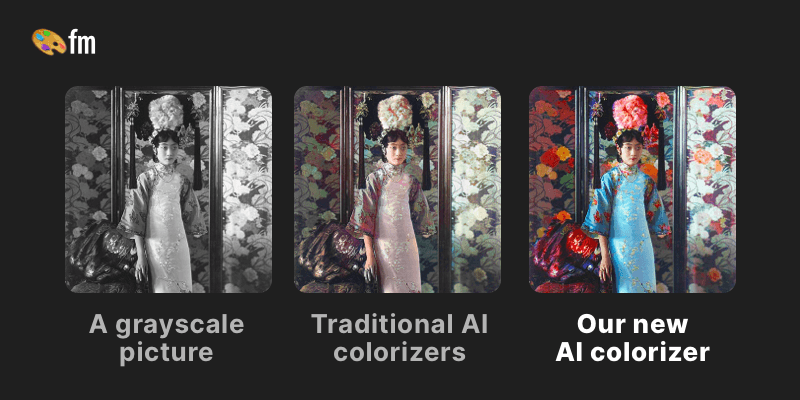
Overview
Palette.fm is a focused browser tool for adding plausible color to monochrome photos. Users upload an image, compare more than 20 color filters and refine the result with descriptive guidance rather than manually painting every region. Paid credits remove the Palette logo and allow full-resolution downloads up to 5000 by 5000 pixels.
Palette also exposes image and video colorization APIs for developers and bulk workflows. The service is useful for family photos, creative projects and production experiments, but generated color is an interpretation—not reliable evidence of the original clothing, objects, skin tones or environment.
Use cases
The strongest fit depends on the job you need the product to complete, not the size of its feature list.
People creating visually engaging color interpretations of old photographs while keeping the original scan intact.
Designers and creators comparing different palettes before choosing a look for a project.
Developers or production teams integrating image colorization through the API or processing larger collections.
Capabilities
Generates a color interpretation from a black-and-white image without requiring manual masks or brush work.
Provides more than 20 standard filters, ranging from conservative color choices to more vibrant looks.
Lets users describe desired colors and scene details to steer a new colorization.
The API can use another image as a color reference to approximate a chosen palette.
Paid web credits unlock logo-free results at full resolution up to the site's stated 5000 by 5000 pixel limit.
Separate developer plans support automated prompts, multiple resolutions, bulk image processing and video-frame colorization.
Process
Step 1
Keep an untouched high-quality scan before uploading or applying any generative restoration workflow.
Step 2
Try conservative and vivid filters, then use short factual descriptions to guide important colors.
Step 3
Check faces, hands, hair, uniforms, foliage, signs and small objects for color bleeding or implausible choices.
Step 4
Export the chosen resolution and identify the result as AI-colorized when historical or documentary context matters.
Cost
Palette's consumer web app offers free watermarked previews plus one full-resolution trial credit. Current paid options include a $72 annual subscription for 480 credits and a $49 one-time pack for 75 credits. API plans use a separate credit system and pricing.
$0
Unlimited lower-resolution previews with a logo plus one trial download credit.
$72 per year
Recurring web plan for regular high-resolution colorization.
$49
Non-recurring web credit pack for occasional projects.
Free to $169 monthly
Separate developer pricing for automated image colorization.
Pricing checked . Check current pricing at the source ↗
Assessment
Compare
The right alternative depends on the specific output, workflow, controls and budget your project requires.
Design
Choose Finegrain for open-source, diffusion-based enhancement and upscaling rather than dedicated historical colorization.
Explore Finegrain Image Enhancer →Content Creator
Choose Krea for enhancement, generation and editing inside a broader managed creative suite.
Explore Krea →Design
Choose Magnific when high-detail upscaling and creative enhancement matter more than a focused colorization workflow.
Explore Magnific AI →Questions
Palette.fm uses AI to create customizable color interpretations of black-and-white photos through filters, text guidance and, in supported API workflows, reference images.
Yes. The free web plan provides unlimited watermarked previews capped at 500 by 500 pixels and one trial credit for a logo-free full-resolution result.
As of August 29, 2026, the web app lists 480 annual credits for $72 per year and a 75-credit one-time pack for $49. API pricing is separate.
Not necessarily. The system generates plausible colors from visual context and user guidance, so the result should be treated as an interpretation unless colors are verified from independent records.
Palette's privacy overview says uploaded files are used to provide the service and deleted shortly after results are delivered, unless the user explicitly provides them as feedback.
Bottom line
Palette.fm is one of the more approachable dedicated colorizers because it combines immediate previews with useful control over the palette. It is a strong fit for creative and family-history projects, provided users preserve the original and clearly distinguish an attractive AI interpretation from documentary fact.
Visit Palette website ↗
With Magic Eraser, effortlessly remove unwanted elements from your images.

DALL·E 3 helps unleash your creativity with AI-generated visual concepts.

Upload, style, and download stunning profile pictures.

Freeflo: Unleash your creativity with hundreds of AI art styles.

Get access to all our AI courses, hundreds of real-world AI use cases, live expert-led workshops, an exclusive network of AI early adopters, and more.
Get unlimited access to all of our current & upcoming industry-specific AI courses for the duration of your subscription.
To keep up with the rapid pace of AI, our team publishes AI implementation guides daily. Our library contains 300+ practical use cases to automate real-world work.
Join weekly, live, interactive sessions with industry leaders who are at the forefront of AI for hands-on implementation guidance and exclusive insights.
Network with an exclusive community of AI-first professionals who are working smarter with AI. Learn how early adopters are using AI in their work and businesses.