Concept artists and illustrators
Keep ownership of composition through hand-drawn shapes while using AI to explore detail, lighting, texture, and style directions.
Independent tool overview
Muse Pro is an active Apple-first drawing app that lets hand-drawn strokes guide real-time AI imagery. Its strongest fit is exploratory illustration on iPad with Apple Pencil, but its subscription is expensive relative to traditional drawing apps and AI processing sends canvas data to external services.
Visit the official Muse Pro site ↗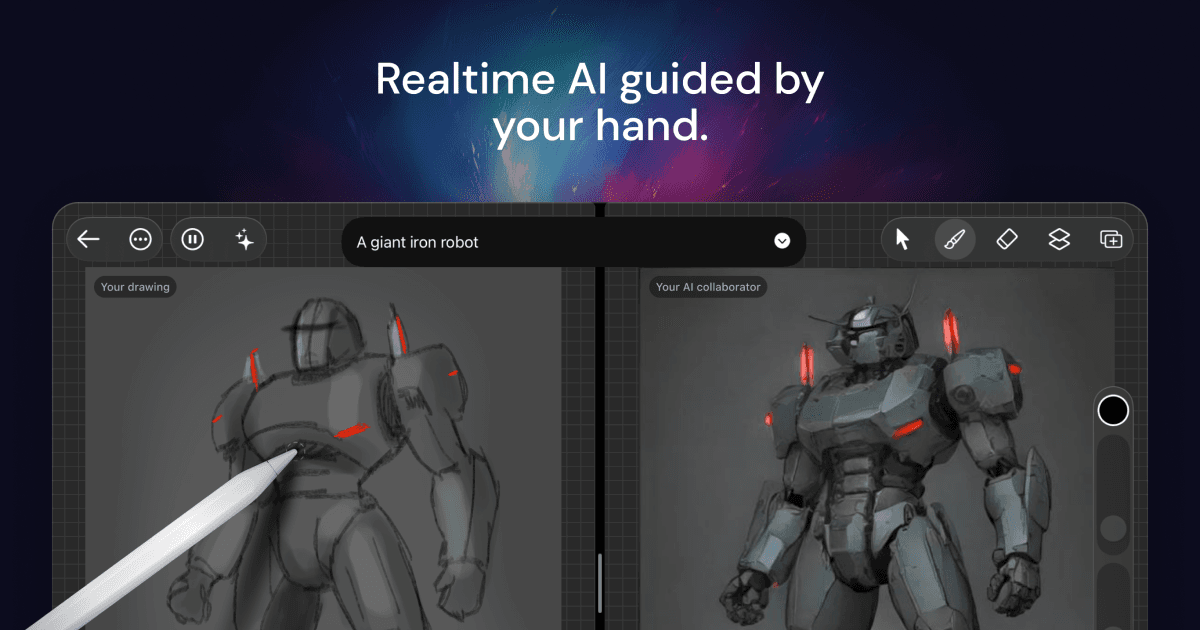
Overview
Muse Pro combines a conventional layer-and-brush drawing app with real-time generative AI. As an artist draws, the app can stream the evolving canvas to an image model and return updated AI interpretations, while prompts, seed controls, influence sliders, and a pause control help steer the result.
It is primarily designed around iPad and Apple Pencil, with pressure-sensitive brushes, a Metal rendering engine, layers, blend modes, shapes, text, imported images, selection tools, and enhancement. The current App Store listing also supports iPhone, Apple-silicon Mac, and Apple Vision, although the iPad remains the clearest intended experience.
Muse Pro remains active: its website still links to the live App Store listing, and the listing shows version 1.1.5 released in November 2025. The app is free to download with in-app subscriptions, but neither the website nor listing publishes a fixed free-trial duration or AI-generation allowance.
Use cases
The strongest fit depends on the job you need the product to complete, not the size of its feature list.
Keep ownership of composition through hand-drawn shapes while using AI to explore detail, lighting, texture, and style directions.
Generate variations from rough marks, adjust prompt and influence, and pause the AI when a direction needs manual refinement.
Use pressure and tilt, brush stabilization, layers, selection tools, gestures, and responsive rendering in an iPad-centered interface.
Capabilities
Canvas updates stream to an image model so the generated interpretation changes while the user draws rather than only after a finished prompt.
Text prompts, seed shuffling, influence strength, speed-versus-quality controls, and pause give the artist several ways to guide generation.
Pressure and tilt support, stabilization, smudging, custom brush sets, and a Metal-based renderer support conventional digital drawing.
Layers can be reordered, locked, transformed, blended, and assigned separate opacity for non-destructive composition.
The app can enhance detail, change style, remove backgrounds, and upscale artwork for larger output.
Muse Pro imports common image formats and can export high-quality PNG files or layered Muse Pro documents.
Process
Step 1
Start with a rough drawing, imported reference, shapes, or text so the layout comes from the artist rather than the model.
Step 2
Add a concise prompt, adjust AI influence and seed, and draw with Apple Pencil while watching the generated direction evolve.
Step 3
Stop live generation when the result is promising, then use layers, brushes, selections, and opacity to make deliberate edits.
Step 4
Check anatomy, edges, text, rights, and artifacts before upscaling or exporting the layered source and final image.
Cost
Muse Pro is free to download with in-app purchases. The US App Store currently lists weekly and monthly subscriptions, but the public pages do not state a fixed trial duration, generation quota, annual plan, or one-time purchase.
Free to install
The website invites users to try Muse Pro for free, but public details do not define the exact trial or usage allowance.
$8.99 per week
Short-term subscription access through the US App Store.
$29.99 per month
The lower effective price for users keeping the app beyond a few weeks.
MIT licensed
The developer publishes the Muse Pro source code, but self-building requires technical setup and separate service credentials.
Pricing checked . Check current pricing at the source ↗
Assessment
Compare
The right alternative depends on the specific output, workflow, controls and budget your project requires.
Content Creator
Choose Krea for broader browser-based real-time image generation, enhancement, and model access across devices.
Explore Krea →Design
Consider Adobe Firefly when integration with established Adobe design workflows and commercial asset tooling matters more than live Apple Pencil generation.
Explore Adobe Firefly →Design
Choose OpenArt for a broader web-based image-generation and editing suite with many models and workflows.
Explore OpenArt →Content Creator
Choose Midjourney when prompt-led image quality and style exploration matter more than direct drawing control.
Explore Midjourney →Questions
Yes. The official website still links to a live App Store listing, and Apple lists version 1.1.5 released on November 21, 2025.
The US App Store currently lists $8.99 per week or $29.99 per month. The app is free to download, but the public listing does not define a fixed free-trial duration or annual plan.
It combines digital drawing tools with real-time AI image generation. Apple Pencil strokes, prompts, seeds, and influence settings guide an evolving AI interpretation.
The app is designed primarily for iPad, but Apple's current listing also supports iPhone, Apple-silicon Mac, and Apple Vision. It does not list Windows, Android, or web support.
Yes. StyleOf publishes a Muse Pro repository under the MIT License. Building it yourself still requires Xcode, an Apple developer setup, and credentials for its external services.
No. The developer's public source documentation describes sending canvas snapshots over a WebSocket to fal for inference and using OpenAI for prompt enhancement.
Bottom line
Muse Pro has a genuinely distinctive interaction: the artist's hand controls composition while AI responds continuously. That makes it more interesting than a basic prompt box for iPad illustrators who want fast visual exploration. The subscription is difficult to justify without a hands-on trial, so test stroke alignment, latency, output control, privacy fit, and the number of accepted images you create in a week before subscribing.
Visit Muse Pro website ↗
Transform your style with personalized fashion tips from a renowned stylist.

A powerful image generator for creating AI characters.

AI art generation for effortless creative expression.

Weavely: Design and publish interactive web-based forms.

Get access to all our AI courses, hundreds of real-world AI use cases, live expert-led workshops, an exclusive network of AI early adopters, and more.
Get unlimited access to all of our current & upcoming industry-specific AI courses for the duration of your subscription.
To keep up with the rapid pace of AI, our team publishes AI implementation guides daily. Our library contains 300+ practical use cases to automate real-world work.
Join weekly, live, interactive sessions with industry leaders who are at the forefront of AI for hands-on implementation guidance and exclusive insights.
Network with an exclusive community of AI-first professionals who are working smarter with AI. Learn how early adopters are using AI in their work and businesses.