Fast visual concepts
Turn a short brief into multiple polished aesthetic directions for moodboards, pitches, and pre-production exploration.
Independent tool overview
Higgsfield Soul is the original preset-driven image model in the Soul family, built for fast fashion-aware, culture-native, and camera-like visuals. It is strongest when a creator wants an art-directed look without extensive prompt engineering, but its realistic people and scenes remain synthetic and require careful consent, rights, accuracy, and disclosure checks.
Visit the official Higgsfield Soul site ↗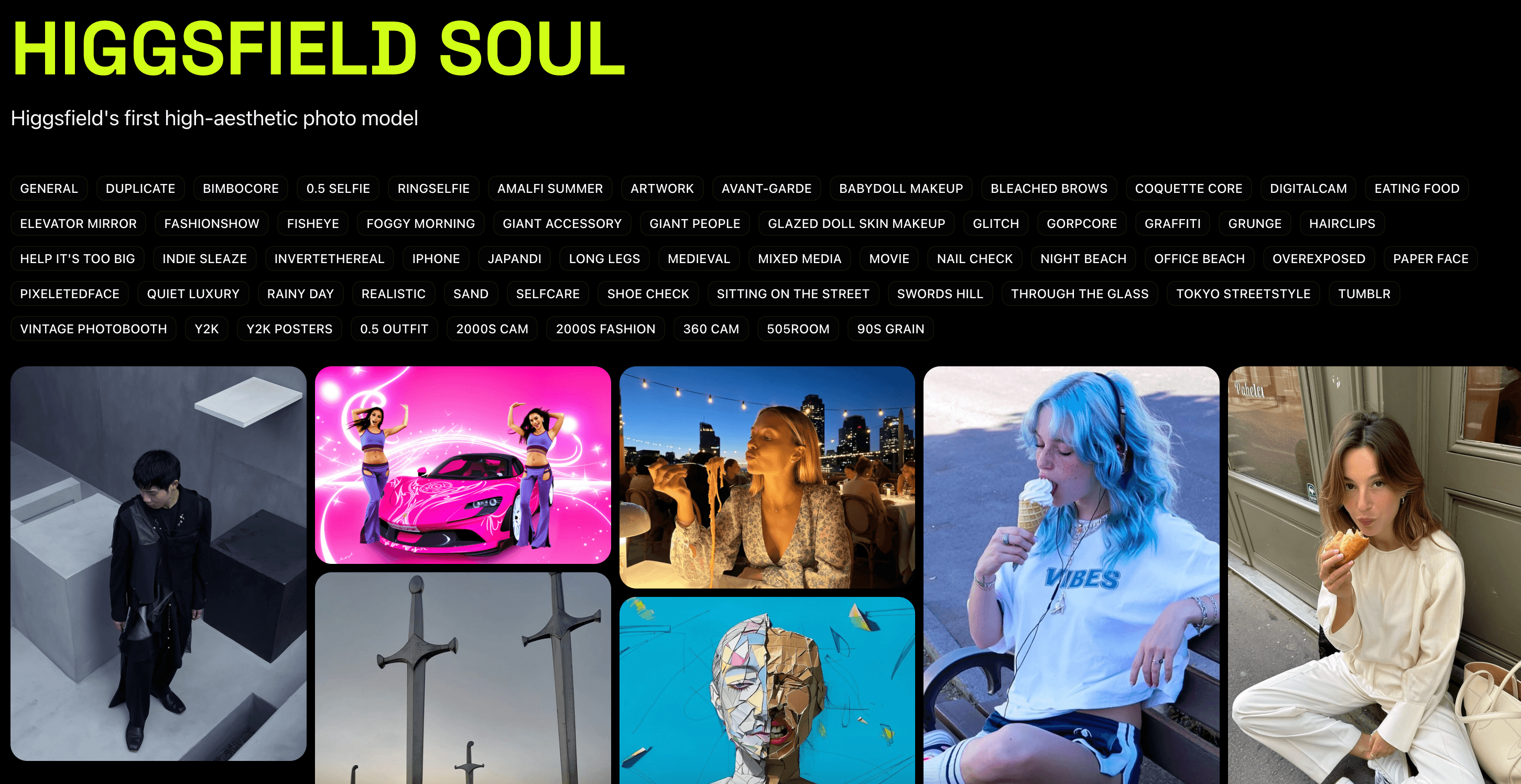
Overview
Higgsfield Soul remains available as the quick, preset-driven model in Higgsfield's image workspace. It is distinct from Soul 2.0, which adds Moodboards, Soul HEX, reference-image control, and its own separate Soul ID workflow.
The live Soul experience centers on a broad preset library spanning social aesthetics, beauty, mood, camera-photo looks, and graphic art. Higgsfield's current help center describes categories rather than a fixed total, so older claims that the product has exactly 50 or more presets should not be treated as a permanent count.
Soul is designed to make outputs feel intentionally photographed and styled: natural skin texture, flash, early-digital, editorial, street-style, and candid-phone aesthetics are common use cases. That visual realism is a creative effect, not evidence that a depicted person, product, event, or location exists.
Creators can combine a preset with a prompt or generate from an avatar. When a reference image is attached in the current Soul workflow, Higgsfield says the prompt field becomes unavailable, so teams should test identity and composition carefully rather than assuming prompt instructions will override the reference.
Soul is sold through Higgsfield's wider subscription and credit system rather than as a standalone purchase. Plan access, credit cost, free generations, promotions, and model availability can change, and the amount shown before generation is the authoritative cost for that run.
Use cases
The strongest fit depends on the job you need the product to complete, not the size of its feature list.
Turn a short brief into multiple polished aesthetic directions for moodboards, pitches, and pre-production exploration.
Explore wardrobe, styling, lighting, camera feel, and editorial composition before committing to a real shoot.
Build candid-phone, flash, lo-fi, or trend-aware images for clearly disclosed synthetic campaigns and content tests.
Generate a recurring synthetic subject through Soul's avatar option when the team has documented permission and accepts identity drift between outputs.
Capabilities
Choose a tuned visual style and generate without writing a complex photography prompt.
Current presets cover general, social-platform, beauty, mood, camera-photo, and graphic-art directions, with the library changing over time.
A creator can add a subject and scene brief or let the selected preset carry more of the visual direction.
Soul can generate with a selected avatar; characters are model-specific and do not automatically transfer to Soul 2.0 or Soul Cinema.
A reference can direct the generation, although Higgsfield's current guide says attaching one disables the prompt field in original Soul.
The generation panel includes batch-size and aspect-ratio choices for testing several crops and variations.
Outputs sit inside the broader Higgsfield platform, where creators can manage assets and move into other image or video workflows available to their plan.
Process
Step 1
Decide whether the output is a private concept, an advertisement, a profile image, editorial illustration, or public entertainment; the approval standard should rise with the risk.
Step 2
Obtain explicit permission for every identifiable person's likeness and for any uploaded reference, with extra safeguards for minors, clients, employees, and sensitive contexts.
Step 3
Specify subject, setting, composition, wardrobe, lighting, camera feel, texture, intended audience, and exclusions before choosing a style.
Step 4
Select the closest aesthetic category, then record the preset used so approved work can be recreated and audited later.
Step 5
Start with low-stakes variations and confirm the displayed credit cost before scaling a campaign.
Step 6
Check faces, hands, teeth, anatomy, skin, clothing, logos, text, reflections, backgrounds, cultural symbols, and unintended changes to age or identity.
Step 7
Reject unauthorized endorsements, copied brand assets, misleading before-and-after claims, documentary framing, or visuals that could be mistaken for evidence.
Step 8
Keep the prompt, preset, source permissions, selected output, edits, and approver; add an AI disclosure or content credential wherever the audience or applicable rules require it.
Cost
Soul has no standalone price. It uses Higgsfield's individual or business plans and the platform's credit system. Official plan comparisons around this review date show individual access starting near $9 per month, but Higgsfield changes promotions, allowances, and model access frequently; confirm the live checkout price and the cost displayed before each generation.
$0 with limits
Higgsfield lets users explore a small model set without a subscription, but availability and output restrictions vary.
From about $9 per month in current official comparisons
Paid plans add credits, broader models, watermark-free downloads, and more parallel generation according to tier.
Team, Scale, or custom Enterprise
Team plans add shared workspaces and pooled credits; higher tiers add administration and compliance options.
Pricing checked . Check current pricing at the source ↗
Assessment
Compare
The right alternative depends on the specific output, workflow, controls and budget your project requires.
Content Creator
The newer Soul model for Moodboards, Soul HEX, reference images, Soul ID consistency, and greater creative control.
Explore Higgsfield Soul 2.0 →Content Creator
The broader Higgsfield platform when image generation is only one part of a larger video, character, or campaign workflow.
Explore Higgsfield AI →Design
A general image generator with especially useful typography and graphic-design capabilities.
Explore Ideogram →Design
A broader creative suite with close Creative Cloud integration and a different approach to commercially oriented generation.
Explore Adobe Firefly →Recruiting / HR
A specialized option when the goal is a conventional professional headshot rather than aesthetic editorial imagery.
Explore HeadshotPro →Questions
Soul is Higgsfield's original quick, preset-driven AI image model for fashion-aware, culture-native, and camera-like visuals. It is one member of a wider family that also includes Soul 2.0 and Soul Cinema.
No. Original Soul focuses on quick preset-led generation and avatar support. Soul 2.0 is a separate model with Moodboards, Soul HEX, reference-image control, and its own Soul ID characters.
The live library is extensive and changes as Higgsfield adds or reorganizes styles. Current official documentation names categories rather than guaranteeing one permanent total, so older fixed counts should be treated as launch-era descriptions.
Yes, according to Higgsfield's current help guide. In original Soul, attaching a reference disables the prompt field, so the reference becomes the primary direction and should be tested closely for identity drift.
Higgsfield's current terms do not restrict commercial use of outputs and do not claim ownership of them. You remain responsible for permissions, likeness, copyright, trademark, privacy, advertising, disclosure, and other third-party or legal requirements.
There is no separate Soul fee. Access depends on the Higgsfield plan, and generations can use credits based on the model and settings. Official comparisons around August 2026 show individual plans starting near $9 per month, but live pricing and the pre-generation cost display are authoritative.
Under the standard terms reviewed, Higgsfield may use inputs and outputs to improve its models, and deleting content or the account stops future use subject to stated exceptions. Higgsfield says Enterprise agreements receive different confidential and no-training treatment.
No. They are synthetic images and can contain convincing but invented people and details. Do not present them as IDs, documentary evidence, journalism, medical results, political endorsements, or authentic records of an event without unmistakable context and appropriate safeguards.
Bottom line
Higgsfield Soul is a useful speed tool for creators who want strong fashion, social, and editorial aesthetics without learning complex prompts. Use it for concepts and clearly synthetic creative—not as a substitute for factual photography—and move to Soul 2.0 when identity, reference, palette, or moodboard control matters more than one-click presets.
Visit Higgsfield Soul website ↗
Runway: Offers ai video, image, and text generation tools for creatives to produce high-quality content at scale.

HeyGen Video Agent - Create video content with scripts, actors, edits, and more

Voice Design V3 - Create any voice you can imagine with a prompt

Co-STORM - Write Wikipedia-like articles from scratch based on AI search

Get access to all our AI courses, hundreds of real-world AI use cases, live expert-led workshops, an exclusive network of AI early adopters, and more.
Get unlimited access to all of our current & upcoming industry-specific AI courses for the duration of your subscription.
To keep up with the rapid pace of AI, our team publishes AI implementation guides daily. Our library contains 300+ practical use cases to automate real-world work.
Join weekly, live, interactive sessions with industry leaders who are at the forefront of AI for hands-on implementation guidance and exclusive insights.
Network with an exclusive community of AI-first professionals who are working smarter with AI. Learn how early adopters are using AI in their work and businesses.