Short marketing clips
Developers creating 3–10 second product, social or campaign video variants with generated sound.
Independent tool overview
Gemini Omni Flash 1.1 is Google's generally available developer model for generating and conversationally editing short videos with native audio through the Gemini API.
Visit the official Gemini Omni Flash site ↗
Overview
The product introduced as Gemini Omni is now available as Gemini Omni Flash 1.1, with the stable API model ID gemini-omni-1.1-flash. It accepts text, images and short videos, generates video with audio, and supports iterative natural-language edits through Google's Interactions API.
Its clearest fit is short, API-driven creative work rather than long-form production. Outputs run from 3 to 10 seconds at 24 FPS in landscape or portrait formats. The model can return 360p or 720p video and upscale to 1080p or 4K, but those higher resolutions are explicitly upscaled rather than native.
Use cases
The strongest fit depends on the job you need the product to complete, not the size of its feature list.
Developers creating 3–10 second product, social or campaign video variants with generated sound.
Teams that want to generate a clip, then refine specific elements through follow-up natural-language instructions.
Creators bringing product shots, illustrations or photographs to life from an image plus a motion prompt.
Workflows that need first-to-last-frame interpolation or a short continuation appended to an existing clip.
Product teams embedding video generation and editing through Google's SDKs or REST API.
Capabilities
Processes text, image, audio and video context while producing video with an automatically generated audio track.
The Interactions API can carry a generated video's context into later turns so the user can request focused changes while preserving the rest of the scene.
Animates a supplied reference image using a text description of motion, camera behavior, mood and sound.
Accepts two images as boundary frames and generates the transition between them.
Appends a 3–10 second continuation to a model-generated or uploaded video, with additional image references supported.
Supports 360p and 720p output, upscaled 1080p or 4K, and either 16:9 landscape or 9:16 portrait framing.
Generates sound with the video and accepts prompting for dialogue, ambience, music and timed audio events.
Every generated video includes Google's invisible SynthID watermark for programmatic provenance verification.
Process
Step 1
Start from text, an image, an uploaded video or a previous Omni interaction depending on whether the goal is creation, editing, interpolation or extension.
Step 2
Describe scene, subject, camera movement, lighting, mood, timing and audio. Explicitly request a continuous shot when unwanted cuts would be a problem.
Step 3
Choose 16:9 or 9:16, a 3–10 second duration and the required resolution. Use URI delivery for larger outputs instead of moving large base64 payloads.
Step 4
Call gemini-omni-1.1-flash and retain the interaction ID when later conversational edits or model-generated extensions are planned.
Step 5
Ask for one clear change at a time and add 'Keep everything else the same' when visual continuity matters.
Step 6
Inspect every frame, audio cue, spoken line, logo and text element; disclose synthetic media where required and keep human approval in the release path.
Cost
Gemini Omni Flash is available to developers on the paid Gemini API tier. At Standard rates, Google bills input at $1.50 per million tokens, text and thinking output at $9 per million, and video output at $17.50 per million. A 720p output uses 5,792 tokens per second, or approximately $0.10 per second.
$0 to try where available
Google links to AI Studio for testing, but Gemini Omni Flash does not have a free production API tier.
$1.50 input / $9 text output / $17.50 video output per 1M tokens
Usage-based paid access to the stable Gemini Omni Flash 1.1 model.
About $0.30 for 3s or $1.01 for 10s
Approximate output-only math based on Google's published $0.10-per-second effective 720p rate; input and text or thinking tokens add cost.
Pricing checked . Check current pricing at the source ↗
Assessment
Compare
The right alternative depends on the specific output, workflow, controls and budget your project requires.
Content Creator
Choose Grok Imagine for image and short-video generation within xAI's consumer and API ecosystem.
Explore Grok Imagine →Content Creator
Choose Runway Gen-4.5 for a creator-facing video workflow with editing tools and a broader production interface.
Explore Runway Gen-4.5 →Content Creator
Choose Kling 3.0 to compare another short-form video model with image, motion and audio capabilities.
Explore Kling 3.0 →Content Creator
Choose Hailuo AI for a web-based generative-video workflow aimed at creators rather than API-first implementation.
Explore Hailuo AI →Questions
Google's original Gemini Omni announcement evolved into Gemini Omni Flash. The current stable developer model is Gemini Omni Flash 1.1 with the API ID gemini-omni-1.1-flash.
Yes. Google lists Gemini Omni Flash 1.1 as generally available to developers on the paid tier of the Gemini API.
A generated output can be 3 to 10 seconds long at 24 FPS. Uploaded source videos for editing and extension are generally limited to 10 seconds.
Yes. It generates video with an audio track and accepts prompts for sound, music and dialogue. It does not currently support voice editing or uploading a separate audio reference.
Yes, as an upscaled output option. Google's documentation labels both 1080p and 4K as upscaled, while 720p is the default output resolution.
Standard pricing is $1.50 per million input tokens, $9 per million text and thinking output tokens, and $17.50 per million video output tokens. Google estimates 720p video at about $0.10 per output second.
No. Google's pricing table lists the free API tier as unavailable. AI Studio may provide a way to test the model where supported, but that is not free production API capacity.
Yes. It supports uploaded-video editing and conversational edits to prior generations, subject to source-length, content and regional restrictions.
Yes. It can append a 3–10 second continuation. Extension works only at the end of a clip, and uploaded-video extension is unavailable in some regions.
Yes. Google says every generated video contains an invisible SynthID watermark that can be detected programmatically for provenance verification.
Bottom line
Gemini Omni Flash 1.1 is a strong fit for developers who need short video generation, native audio and iterative edits inside one Google API workflow. Its main constraints are equally clear: 3–10 second outputs, paid-only API use, narrow aspect-ratio choices, upscaled high-resolution modes and several editing and regional limitations. It is most useful as a controllable clip engine with human review, not an unattended replacement for long-form video production.
Visit Gemini Omni Flash website ↗
KREA 2 - Krea's first in-house image model with style transfer and moodboard-based generation

Stable Audio 3.0 - Stability's open-weight, fully-licensed audio model family
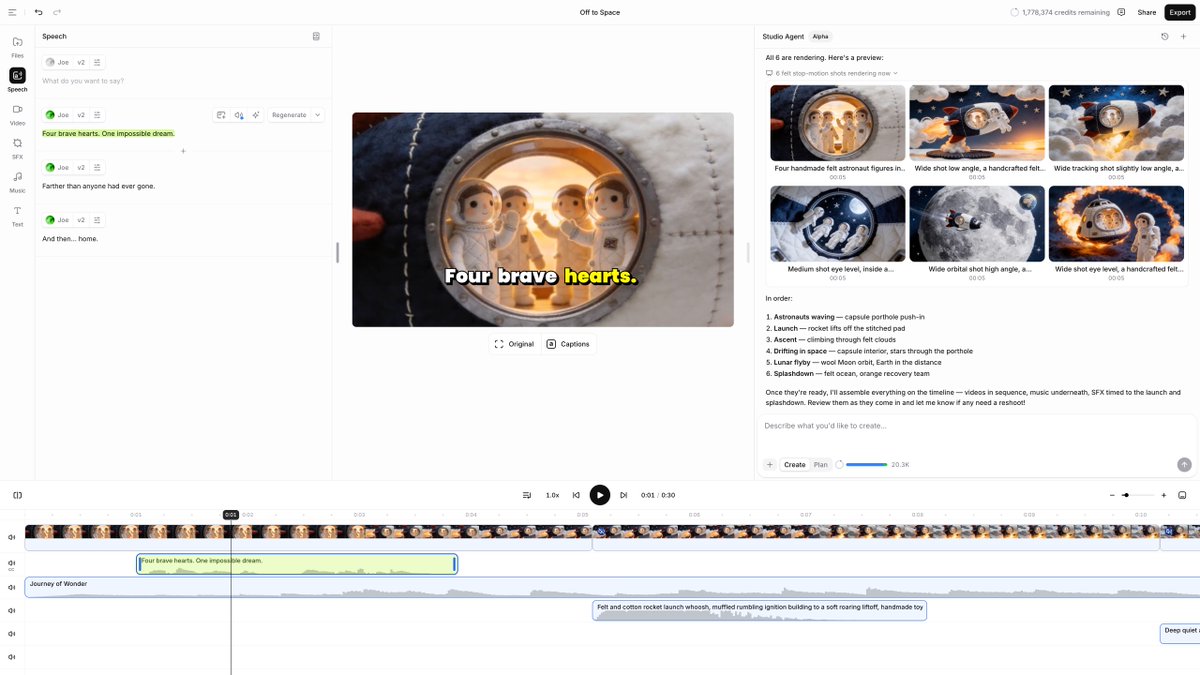
ElevenLabs Studio Agents - AI co-editor that drafts videos and places sound effects frame by frame

🎥 Ray3.2 - Luma's new video model upgrade with richer control, continuity, and cinematic direction.

Get access to all our AI courses, hundreds of real-world AI use cases, live expert-led workshops, an exclusive network of AI early adopters, and more.
Get unlimited access to all of our current & upcoming industry-specific AI courses for the duration of your subscription.
To keep up with the rapid pace of AI, our team publishes AI implementation guides daily. Our library contains 300+ practical use cases to automate real-world work.
Join weekly, live, interactive sessions with industry leaders who are at the forefront of AI for hands-on implementation guidance and exclusive insights.
Network with an exclusive community of AI-first professionals who are working smarter with AI. Learn how early adopters are using AI in their work and businesses.