Social and campaign concepts
Create images that reveal a logo, word, or shape when viewed at a different size or distance.
Independent tool overview
Fusion Art AI is a specialized illusion-art generator inside the Quick QR Art platform. It blends prompts with patterns, logos, text, images, or QR-like structures to create visuals that reveal a hidden shape or message from a distance.
Visit the official Fusion Art AI site ↗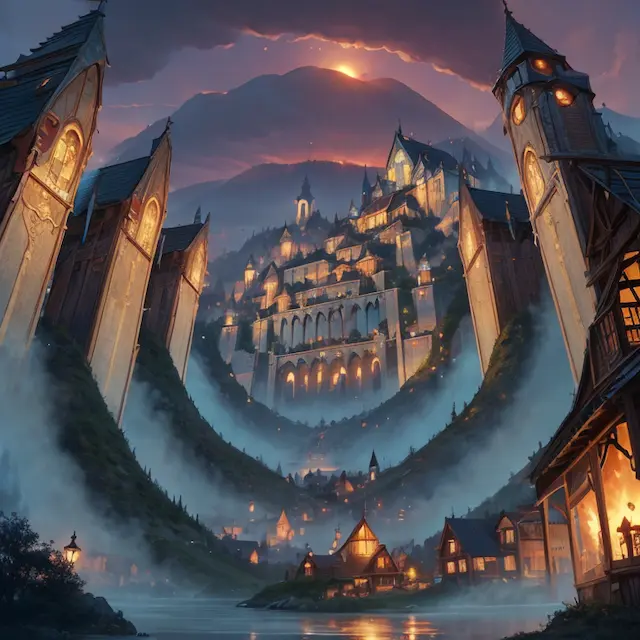
Overview
Fusion Art AI became known for spiral images, optical illusions, and generated scenes containing hidden logos, symbols, words, or QR structures. Instead of creating a conventional image from text alone, it uses a reference pattern as a structural guide for the final composition.
The tool remains available as a Fusion Art section in Quick QR Art's web app, and Pixel ML still lists the separate Fusion Art AI iPhone app. The iPhone release history is concentrated in 2023, while the broader Quick QR Art service and subscription continue to be maintained.
Fusion Art works best for experimental social graphics, posters, puzzles, and attention-grabbing campaign concepts. It is not a reliable way to encode critical information: hidden text can be misread, and any QR output must be tested across devices, sizes, lighting, print materials, and viewing distances.
Use cases
The strongest fit depends on the job you need the product to complete, not the size of its feature list.
Create images that reveal a logo, word, or shape when viewed at a different size or distance.
Use spiral, line, texture, and silhouette patterns as structural guidance for an AI-generated scene.
Hide a clue, symbol, or message inside a larger composition for audiences to discover.
Move between illusion imagery, text art, image blending, and artistic QR tools inside the same Pixel ML account.
Capabilities
Use a spiral, line drawing, texture, silhouette, or other structural reference to shape the generated composition.
Blend a recognizable mark or shape into the lighting, objects, and layout of an AI image.
Guide a scene around letterforms or a short phrase so the message becomes clearer from a distance or at thumbnail size.
Combine artistic imagery with QR structures through the surrounding Quick QR Art toolset, with adjustable emphasis and scannability checks.
Upload an image as visual structure or background guidance instead of starting only from a text prompt.
Describe the subject and style, choose presets, and adjust how strongly the reference pattern influences the result.
Explore public outputs and prompts for ideas; paid stealth generation can reduce public sharing of eligible work.
Use the separate Fusion Art AI app on iPhone or the broader Quick QR Art mobile products from Pixel ML.
Process
Step 1
Start with a bold symbol, short word, high-contrast logo, or uncomplicated pattern; intricate source shapes usually become harder to recognize.
Step 2
Prompt for objects, lighting, perspective, and materials that can naturally follow the reference lines instead of fighting them.
Step 3
Vary the reference influence and seed to balance a coherent scene with a hidden element that remains discoverable.
Step 4
Check the full image, thumbnail, blurred view, and intended print or screen size to make sure the effect works without becoming obvious or illegible.
Step 5
If the design contains a QR code, test it on several phones and apps, from multiple distances and angles, and after the exact export or print process.
Cost
Fusion Art is part of the wider Quick QR Art service. Free use is limited and defaults to public, noncommercial asset terms. The current paid web offer is Pixel ML Essentials at an advertised $11 per month billed annually, with monthly credits, watermark removal, stealth generation, and general commercial terms. Verify licensing because the current plan name and older Terms terminology differ.
$0 with limited credits
For experimenting with public, noncommercial illusion art.
$11/month billed annually
For regular generation and eligible commercial work across Pixel ML tools.
$45 for 5,000 credits to $6,500 for 1,000,000 credits
For programmatic QR art, text art, text-to-image, upscaling, and face enhancement.
Pricing checked . Check current pricing at the source ↗
Assessment
Compare
The right alternative depends on the specific output, workflow, controls and budget your project requires.
Design
Choose Quick QR Art when scannable artistic QR codes are the main requirement rather than hidden-logo and optical-illusion images.
Explore Quick QR Art →Content Creator
Choose Midjourney when broad image quality, style exploration, editing, and general visual creation matter more than a specialized hidden-pattern effect.
Explore Midjourney →Design
Choose Canva AI when the generated concept must be finished inside a broader brand, layout, social, or campaign-design workflow.
Explore Canva AI →Questions
Fusion Art AI is an illusion-image generator inside Quick QR Art that uses prompts and reference patterns to hide logos, words, symbols, shapes, or QR-like structures inside a larger AI-generated scene.
Yes. Quick QR Art currently exposes a Fusion Art section in its web app, and Pixel ML's separate Fusion Art AI iPhone listing remains available. The iPhone release history has not been updated since 2023.
Limited free generation is available through Quick QR Art. Its current paid web offer advertises Pixel ML Essentials for $11 per month billed annually, including 1,000 monthly fast credits, no watermark, stealth, and general commercial terms.
Yes. Short text, bold logos, simple symbols, spirals, and high-contrast patterns work best. Exact brand geometry and readable copy should still be added or corrected in a design editor.
The surrounding Quick QR Art platform specializes in artistic QR codes. Every result must still be tested after resizing, compression, and printing because visual quality does not guarantee reliable scanning.
The current paid plan advertises general commercial terms, while free assets are described as noncommercial. Because the plan names and older Terms language differ, confirm the current license for your account and organization before publishing paid work.
Free images and prompts are public and remixable by default. Paid stealth reduces public sharing on a best-efforts basis, but content generated in shared Discord spaces remains visible to participants.
Bottom line
Fusion Art AI remains a useful niche tool for hiding a simple visual structure inside a generated scene. It is best approached as an experimental effect rather than a general image generator or dependable QR encoder. Use it when the illusion itself is the point, review public-sharing defaults, confirm commercial rights under the current plan, and test any functional QR output in the exact environment where people will scan it.
Visit Fusion Art AI website ↗
Get access to all our AI courses, hundreds of real-world AI use cases, live expert-led workshops, an exclusive network of AI early adopters, and more.
Get unlimited access to all of our current & upcoming industry-specific AI courses for the duration of your subscription.
To keep up with the rapid pace of AI, our team publishes AI implementation guides daily. Our library contains 300+ practical use cases to automate real-world work.
Join weekly, live, interactive sessions with industry leaders who are at the forefront of AI for hands-on implementation guidance and exclusive insights.
Network with an exclusive community of AI-first professionals who are working smarter with AI. Learn how early adopters are using AI in their work and businesses.