Cross-app Microsoft 365 work
Turn information from authorized mail, calendar, Teams, OneDrive, and SharePoint into a coordinated set of Office outputs.
Independent tool overview
Microsoft Copilot Cowork is an action-taking agent inside Microsoft Copilot that can research, create and edit Office files, work across OneDrive and SharePoint, send Outlook email, schedule meetings, post in Teams, operate websites, and run recurring tasks with approval controls.
Visit the official Copilot Cowork site ↗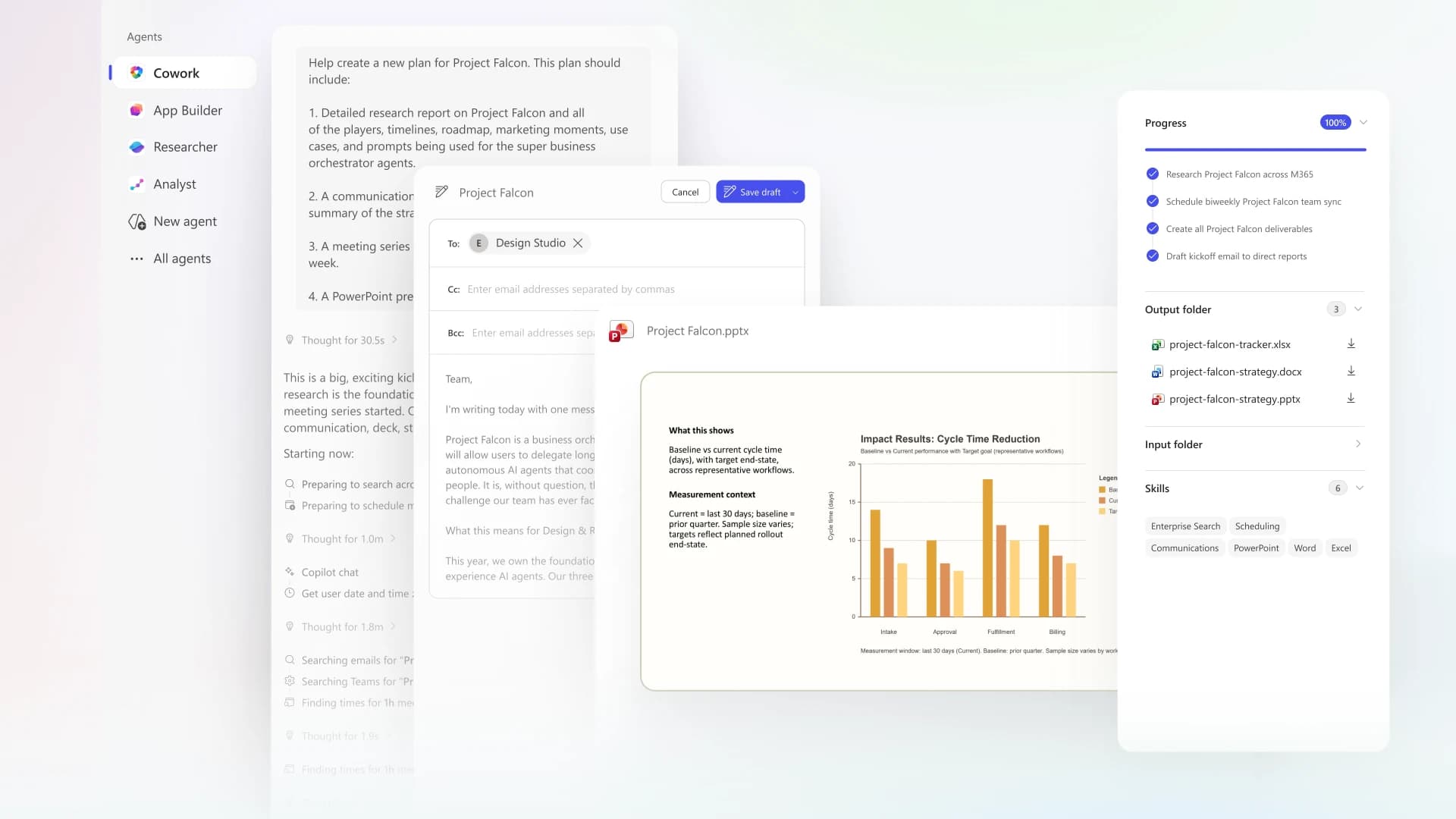
Overview
Copilot Cowork moves Microsoft Copilot from answering questions to carrying out multi-step work. A user can ask for a briefing, spreadsheet, presentation, email campaign draft, meeting schedule, Teams update, research package, or recurring automation, and Cowork can gather authorized Microsoft 365 context, create outputs, and invoke tools in one tracked task. Work and school access is generally available; personal-account access remains a preview.
Cowork is powerful because it can act through the user's existing permissions, which is also its central risk. Overshared SharePoint content, an incorrect recipient, a hidden website instruction, a misunderstood prompt, or a broad recurring approval can turn a plausible answer into a real data or communications incident. Organizations should remediate access before deployment, constrain users and credits, preserve approvals, audit activity, and begin with reversible internal workflows.
Use cases
The strongest fit depends on the job you need the product to complete, not the size of its feature list.
Turn information from authorized mail, calendar, Teams, OneDrive, and SharePoint into a coordinated set of Office outputs.
Collect relevant files, people, messages, and schedule context into a reviewable briefing and follow-up package.
Create a first-pass Word document, Excel workbook, PowerPoint deck, or PDF from bounded sources and explicit requirements.
Draft and, after approval, send Outlook or Teams updates with the right source context and recipient review.
Research across internal and web sources, preserve citations, and assemble several related files in one task.
Schedule a tested briefing or reporting prompt after permissions, sources, approvals, costs, and failure handling are understood.
Capabilities
Plans and carries out a task across models, organizational context, tools, and runtime instead of returning one answer.
Drafts, replies, forwards, and sends email, works with attachments, and manages calendar events.
Posts messages and uses work-context information in Teams for eligible work or school accounts.
Creates and edits Word documents, Excel workbooks, PowerPoint presentations, and PDFs.
Finds and works with cloud files the signed-in user is already authorized to access.
Searches for files, people, and information across authorized work data through Microsoft 365 context.
Can browse websites through clicking, scrolling, and typing, subject to site support, safety controls, and user takeover.
Shows a preview and asks the user to approve actions such as Send, Post, Create, payment, personal-data submission, and account changes.
Lets the user interrupt a task, inspect progress, continue later, or take control when manual interaction is required.
Organizes files provided to a task and outputs produced by it, with preview and download controls.
Runs recurring prompts and exposes an Automations view to edit, reschedule, or remove them.
Saves conversations and task results so users can search, review, and resume prior work.
Charges each task according to model use, context retrieval, tool calls, runtime, and related safety processing.
Shows an approximate current-task credit total and remaining monthly limit without consuming additional credits.
Uses Entra identity, Microsoft 365 permissions, Purview labels, DLP, audit, retention, eDiscovery, budgets, limits, alerts, and hard caps where configured.
Process
Step 1
Inventory SharePoint, OneDrive, Teams, mail, groups, guest access, links, and sensitivity labels before giving an agent the same reach as employees.
Step 2
Assign Cowork only to selected users and groups, connect a billing policy, set hard limits, and define prohibited data, systems, and actions.
Step 3
Begin with an internal briefing or draft file, not payroll, legal acceptance, account administration, external bulk messages, or purchases.
Step 4
Name the sources, date range, recipients, output files, accuracy checks, excluded actions, approval points, and stop conditions.
Step 5
Use the minimum authorized OneDrive, SharePoint, Teams, Outlook, or web context and avoid broad exploratory access.
Step 6
Watch intermediate progress and pause immediately if Cowork opens an unexpected site, source, recipient, account, or approval.
Step 7
Verify recipient, attachment, permissions, destination, content, price, quantity, date, account, and external data before approving.
Step 8
Open files in their native apps, check formulas and citations, test links, confirm accessibility, and reconcile numbers against source systems.
Step 9
Use /cost for an estimate, the admin Cost Management dashboard for budget control, and Purview or audit tools for authoritative activity records.
Step 10
Convert a task to an automation only after it succeeds consistently and the unattended approvals, data changes, and exception path are understood.
Cost
Business use has two layers. First, each user needs a qualifying Microsoft 365 plan and a Microsoft 365 Copilot license. Microsoft currently lists Copilot Business at a promotional $18 per user per month paid yearly through December 31, 2026, renewing at the then-current rate; monthly billing is $25.20 per user. Cowork itself includes no task entitlement in that subscription. Every task consumes Copilot Credits based on model, context, tools, runtime, and safety processing. Pay-as-you-go credits cost $0.01 each; prepaid annual commitments can lower the per-credit rate. Personal Cowork is a preview for eligible Microsoft 365 Personal or Family subscribers with unpublished, changeable limits.
Included with eligible Microsoft 365 Personal or Family subscription
Preview access for personal Microsoft accounts, with features and usage limits subject to change.
$18/user/month annually promo or $25.20 monthly
Required Copilot user license for eligible small-business Microsoft 365 customers before Cowork usage charges.
$0.01 per Copilot Credit
Variable task charge funded through a connected billing setup and governed in Microsoft 365 admin center.
Annual commitment; discounted tiers
Committed credit capacity for organizations that can forecast stable usage.
Pricing checked . Check current pricing at the source ↗
Assessment
Compare
The right alternative depends on the specific output, workflow, controls and budget your project requires.
Agents
Choose Claude Cowork for a more local desktop-oriented agent workflow outside the Microsoft 365 governance and credit model.
Explore Claude Cowork →Agents
Choose Perplexity Computer for a multi-model, research-heavy cloud agent that is not centered on Outlook, Teams, and Office execution.
Explore Perplexity Computer →Business Operations
Choose standard Microsoft Copilot when assistance inside Microsoft 365 is enough and action-taking, long-running tasks, and separate Cowork credits are unnecessary.
Explore Microsoft Copilot →Questions
Copilot Cowork is an action-taking Microsoft agent that can complete multi-step work across Outlook, Teams, Office files, OneDrive, SharePoint, research, websites, and recurring tasks.
It is generally available for work and school accounts. Personal-account Cowork remains a preview for eligible Microsoft 365 subscribers.
Work users need a qualifying Microsoft 365 plan and Microsoft 365 Copilot license, then pay for Cowork tasks in Copilot Credits. Pay-as-you-go is $0.01 per credit, and each task's credit use varies.
No. Microsoft's current licensing guidance says no Cowork task entitlement is included with the prerequisite Microsoft 365 Copilot subscription.
Type /cost inside a Cowork task to see approximate credits used and the current remaining limit. It is free to run but is not the authoritative billing record, and it cannot quote the final cost before the task starts.
At general availability Microsoft listed Anthropic Opus 4.8 and Sonnet 4.6. Other model options, including Microsoft-hosted models, can be added or changed, so the tenant experience is the current source of truth.
Microsoft says it presents approvals for actions such as sending or posting, creating or modifying files, payment, personal-data submission, account changes, and sensitive steps. Users remain responsible for reviewing each approval.
It can accept uploaded local files as task inputs, but it does not directly browse or edit files on local device storage. Ongoing file work uses OneDrive and SharePoint.
Microsoft states that Copilot operates within the Microsoft 365 service boundary and honors enterprise data protection. Procurement teams should still review current service terms, subprocessors, retention, residency, and tenant settings.
Remediate overshared content, configure identity and Purview controls, choose a narrow pilot, set billing limits and hard caps, preserve approvals, define prohibited actions, train users, and monitor both audit and cost data.
Bottom line
Copilot Cowork is most compelling for organizations already committed to Microsoft 365 because it can turn authorized work context into files, meetings, messages, and recurring operations without leaving the platform. It is not simply included Copilot capacity: every real task is separately metered. A careful deployment should prove both safety and return on credit spend before expanding access or scheduling unattended actions.
Visit Copilot Cowork website ↗
GPT 5.4 - OpenAI's new flagship reasoning model with native computer use and 1M context

Nemotron 3 Super - NVIDIA's open 120B reasoning model with 1M token context for agentic workflows

Gemini 3.1 Flash-Lite - Google's fastest, cheapest Gemini 3 model for high-volume dev workloads

Mistral 4 Small - Mistral's open-source 119B MoE model combining reasoning, coding, and vision in one package

Get access to all our AI courses, hundreds of real-world AI use cases, live expert-led workshops, an exclusive network of AI early adopters, and more.
Get unlimited access to all of our current & upcoming industry-specific AI courses for the duration of your subscription.
To keep up with the rapid pace of AI, our team publishes AI implementation guides daily. Our library contains 300+ practical use cases to automate real-world work.
Join weekly, live, interactive sessions with industry leaders who are at the forefront of AI for hands-on implementation guidance and exclusive insights.
Network with an exclusive community of AI-first professionals who are working smarter with AI. Learn how early adopters are using AI in their work and businesses.